Skip to content



From casual Instagram users to ecommerce sellers creating product visuals, Picsart claims to be a tool for everyone. That wide appeal is exactly what makes it popular and exactly what makes its pricing tricky. Because when a platform tries to serve everyone, it rarely fits anyone perfectly. For growing brands, the stakes are much higher. The wrong plan is not just an extra expense. It can limit outputs and quietly eat into their margins. Add to that the hidden costs, and locked features, and the actual price can look very different from what you signed up for. So before you commit, it is worth taking a closer look. In this guide, we break down Picsart pricing in 2026, what each plan really offers, and who it truly works best for.

What is Picsart, and who is it for?
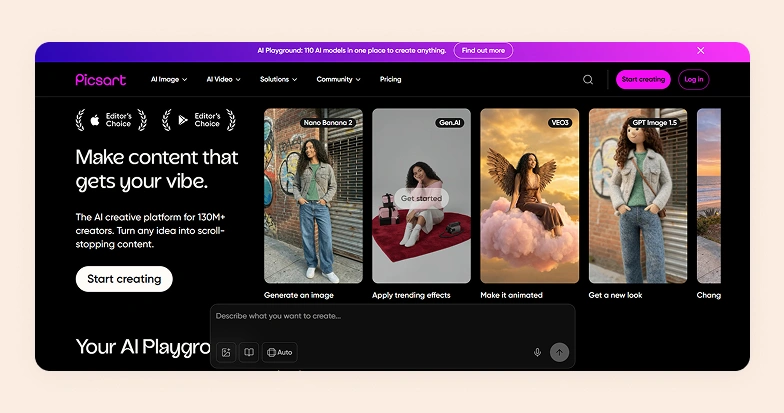
Picsart started as a mobile-first app known for stickers, filters, and meme-style edits. It slowly evolved into a broader tool that supports everything from background removal to image enhancements. Today, users can not only edit images but also create entirely new visuals using text prompts.
Picsart is commonly used for social media content, product photography, quick design tasks, personal projects, and basic marketing visuals. This makes it appealing to a wide spectrum of users, from casual creators experimenting with visuals to small businesses and ecommerce sellers looking to produce content without relying on professional designers.
How does Picsart pricing work?
Like any other AI image generator, Picsart uses a credit-based subscription model. Instead of unlimited access, many of its generative tools operate on credits. Each AI action, whether it is generating an image, replacing a background, or creating a product visual using text prompts, costs a certain number of credits.
All plans come with a set number of credits, but there is an important distinction. Paid plans include renewing monthly credits, while also giving you the option to purchase additional credits if needed. These add-on credits do not expire and can be used anytime. However, the credits included in your subscription do not roll over. So any unused credits at the end of the billing cycle are lost.
For free plan users, access is even more limited. You cannot purchase additional credits unless you upgrade to a paid plan. This means your ability to use AI features is restricted right from the start.
This model works well for occasional use. But for users relying heavily on AI generation, especially for ecommerce product photography, managing credits becomes a key part of understanding the true cost.
Picsart pricing plans detailed breakdown
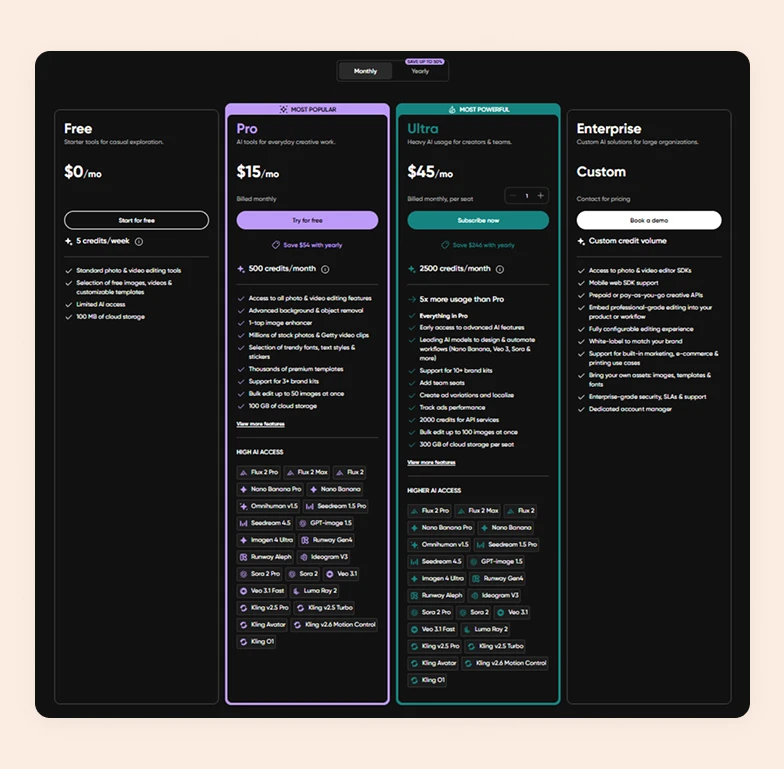
Picsart’s plans are structured based on how intensively you use its AI tools. Higher tiers unlock more credits and advanced features. Here are the 4 main pricing tiers offered by Picsart:
1. Free plan
The Free plan is designed for casual users who want to explore Picsart without any cost. It includes 5 credits per week. This limits how much you can use AI tools, along with standard photo and video editing features, and a small 100 MB cloud storage. You also get access to a limited library of templates and assets. The limited credits and restricted AI access make it unsuitable for regular or professional use.
2. Pro plan
This plan is aimed at everyday creators. It costs $15 per month when billed monthly. You get 500 credits per month, which significantly expands your ability to use AI tools. It unlocks all editing features, advanced tools like background and object removal, bulk editing (up to 50 images), and access to millions of stock assets and premium templates. Storage also jumps to 100 GB, and you can manage multiple brand kits.
3. Ultra plan
This plan is built for heavy users and teams who rely heavily on AI. It costs $45 per month per seat. You get 2,500 credits per month. In addition to everything in Pro, Ultra includes early access to advanced AI models, bulk editing up to 100 images, support for 10+ brand kits, and 300 GB cloud storage per seat. It also supports team collaboration, ad creation, localization, and performance tracking, plus API credits (2,000).
4. Enterprise plan
The Enterprise plan is tailored for large organizations with advanced needs. Pricing is custom, depending on usage and requirements, and includes flexible credit allocation. It offers SDK access, white-label capabilities, custom workflows, and integration into existing products. You also get enterprise-grade security, SLAs, and a dedicated account manager. It supports use cases like embedding editing tools into apps, scaling creative production, and managing large teams.
Hidden costs to consider while using Picsart
While Picsart’s subscription price may seem straightforward at first, there are a few underlying costs that can impact your overall spend. Here they are:
1. Add-on credits and non-rollover limits
Monthly credits included in your plan typically do not roll over. This means unused credits expire at the end of the billing cycle. This could potentially lead to wasted value. On the flip side, if you exceed your limit, you will need to buy add-on credits. This increases your effective monthly cost.
2. Team scaling increases per-seat costs
For teams, especially on higher tiers, pricing is often calculated per user or seat. As your team grows, your subscription cost scales accordingly. Features like collaboration and brand kits are useful, but they also mean a higher total investment as more users are added.
3. Advanced AI features may require higher plans
Some of the most powerful AI models and capabilities are locked behind higher-tier plans or limited usage thresholds. If your workflow depends on these advanced tools, you may need to upgrade to a more expensive plan like Ultra or Enterprise, even if you do not need all the other features included.
4. Storage and asset usage considerations
While Picsart provides cloud storage, limits vary by plan. Heavy users working with high-resolution images or large asset libraries may hit storage caps and need to upgrade. Additionally, access to premium stock assets and templates is tied to paid plans. This can indirectly increase costs for content-heavy workflows.
In short, while the base subscription gives a good starting point, your actual Picsart app cost will largely depend on how intensively you use their tools and manage credits over time.
Are Picsart plans worth the price in 2026?
Picsart may seem very affordable at first, but costs can increase quickly as your usage grows. This is mainly due to the additional credits required for higher-resolution outputs and access to advanced features. As your brand scales, these needs become unavoidable. Adding more team members also drives costs up further.
For example, you might start with a single Pro subscription at $15 per month. However, as you expand to a team of five and require consistent and high-quality visuals, you may need to upgrade to the Ultra plan and purchase extra credits. This can push your monthly cost to around $225(for 5 users), excluding additional credit purchases.
Another limitation is the lack of flexibility in credit usage. If your workload fluctuates, unused credits may not carry forward in a way that benefits your business. This makes it harder to manage costs efficiently during slower months.
These factors make Picsart less cost-efficient for brands that rely on high-volume product image creation, especially when compared to tools built specifically for large-scale visual production.

WizStudio: A cost-effective alternative to Picsart in 2026
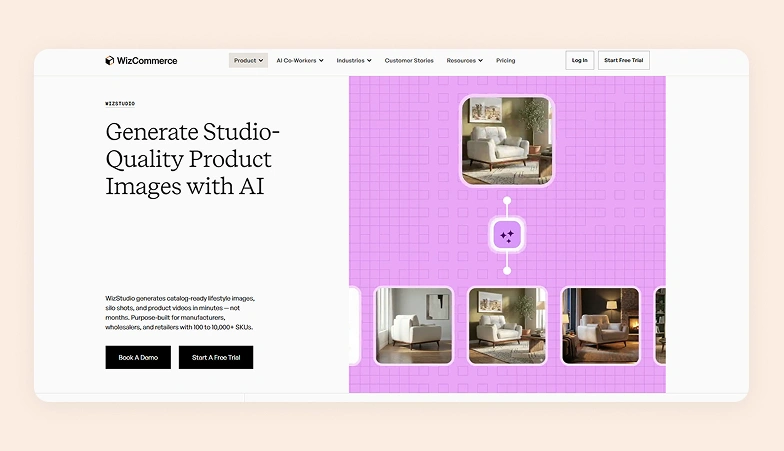
If you are looking for a more predictable Picsart alternative that can handle large-scale visual production, WizStudio is a clear choice for many. Unlike Picsart’s usage-heavy credit model, WizStudio focuses on delivering high-quality outputs with clearer pricing tiers and features tailored for ecommerce and marketing teams. WizStudio also lets you generate unlimited images without spending credit.
A key advantage is how WizStudio handles credits. Credits come with longer validity, so there is no pressure to use them within a short window. This makes it ideal for brands with flexible or seasonal demand, where one month may require minimal output, and another may need high-volume production.
As far as pricing is concerned, WizStudio offers the following tiers:
- Free trial with 5 credits valid for 15 days, allowing you to explore the platform before making any commitment.
- Starter plan ($250) includes 16 credits for 2 months
- Pro plan ($500) offers 40 credits for 4 months, adding features like multi-product staging.
- Studio plan ($1,125) further expands capabilities with 120 credits for 6 months, including advanced outputs like lifestyle product videos and 360-degree visuals.
- Enterprise plan provides custom credit allocation, bulk image generation, and even done-for-you services. It is best suited for large teams.
Across all plans, you get access to core tools such as background remover, AI image editor, relighting, upscaling, product swap, and lifestyle image creation, along with unlimited usage of essential editing tools.
But what makes WizStudio particularly compelling is its strong feature set focused on streamlining image generation workflows. Here are some core features you get access to:
- Background remover: Automatically removes backgrounds from product images, helping you create studio-quality visuals without manual editing.
- AI image shadows: Adds realistic shadows to products so they look grounded and natural.
- Dimension lines: Let you showcase product measurements directly on images.
- Magic eraser: Removes unwanted objects or distractions from images with a single click.
- Lifestyle product images: Places your products into AI-generated environments, making them look like professional lifestyle photoshoots.
- AI image expander: Extends the background or canvas of an image.
- Relight images: Adjusts lighting conditions in your photos to create consistent brightness and highlights across your product catalog.
- AI image upscaler: Enhances image resolution and sharpness, allowing you to convert low-quality images into high-resolution visuals.
- Product swap: Lets you replace one product with another in the same scene
- Multi-product staging: Allows you to place and arrange multiple products in a single scene.
- Lifestyle product videos: Generates short videos of your products in realistic settings.
- Product variant builder (Enterprise): Automatically creates different versions of a product, such as color or style variations, without needing separate photoshoots.
- “We create for you” service (Enterprise): A managed service where the WizStudio team handles image creation and editing for you, reducing internal workload.
If your goal is to scale product content without unpredictable costs or limitations like Picsart, WizStudio offers a more streamlined approach. It is worth trying the free plan to see how it fits into your creative workflow before upgrading. Sign up now.
Frequently Asked Questions
How much does Picsart cost?
Picsart costs start at $15 per month(Picsart Pro price) when billed monthly and go up to $45 per month per seat(Picsart Ultra price), depending on the plan chosen. However, the actual cost often increases due to add-on credits and scaling team usage. For brands looking for more predictable pricing with access to advanced features, WizStudio is a better choice with longer-validity credits and unlimited image generation.
What are the cons of using Picsart?
The cons of using Picsart include non-rollover credits and increasing costs as usage grows. You might face rising per-seat expenses and restricted access to advanced AI features unless you upgrade to higher tiers. In contrast, WizStudio removes much of this friction with flexible credit usage and no pressure to consume credits monthly, making it better suited for fluctuating workloads.
Is Pixelcut cheaper than Picsart?
Whether Pixelcut is cheaper than Picsart depends on your usage volume and output needs. Both AI photo editors rely on usage-based pricing that can increase over time with higher output needs. The real comparison comes down to scalability. Tools like WizStudio tend to offer better long-term value for ecommerce brands because they are built for a high-volume creative process without constant credit limitations.
Is there a free version available in Picsart?
Yes, Picsart offers a Free plan with 5 credits per week and access to basic editing tools. However, AI features are heavily restricted, and you cannot purchase additional credits unless you upgrade. WizStudio also offers a free trial with 5 credits, but with unrestricted access to many powerful editing tools and generation features, so that you can test the platform without any hurdles.
What feature is included in the paid plan of Picsart?
The features included in the paid plans of Picsart include background removal, object removal, bulk editing, premium templates, stock assets, and higher monthly credit limits for AI generation. While these are useful, access is still tied to credits.
What is the cost of using AI for large catalogs?
The cost of using AI for large catalogs can rise significantly on tools like Picsart due to repeated credit consumption, especially for high-resolution outputs and bulk edits. This often leads to ongoing purchases of add-on credits and higher-tier plans