Skip to content



High-quality furniture product photography can be the difference between a buyer scrolling past your product and adding it to their cart. For wholesalers and distributors, images aren’t just decorative. They’re your most powerful sales tool when buyers can’t see or touch the furniture in person.
This furniture photography guide walks you through everything you need to know about furniture photoshoots, from planning your shoot to optimizing images for different sales channels. Let’s get started!

Why is furniture photography important for wholesalers and distributors?
In wholesale, your buyers are making purchasing decisions for their own businesses. They need to evaluate quality, finish, dimensions, and style, all from photographs.
Poor images create doubt. Professional furniture product photography builds confidence and speeds up the buying process. In fact, according to Retail Technology Review, 75% of online shoppers rely on product photos to make purchasing decisions.
How does furniture photography drive sales and conversions in B2B markets?
Quality images directly influence how quickly buyers move from browsing to ordering. When retailers can clearly see fabric texture, wood grain, and construction details, they spend less time asking questions and more time placing orders.
Key benefits of furniture product photography:
- Faster purchasing decisions – Buyers have the visual information they need upfront
- Fewer returns – Accurate representation means buyers know exactly what they’re getting
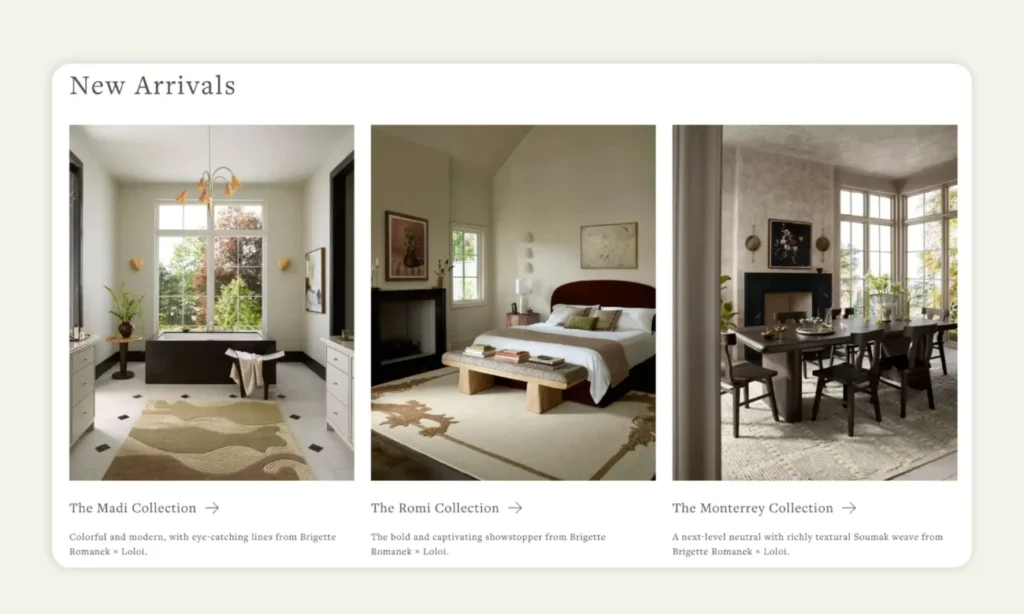
- Higher engagement – Sales reps report that lifestyle shots alongside technical images keep customers interested
- Better conversions – Multiple high-quality angles and details significantly boost B2B conversion rates.
Professional home furniture photography also helps you compete with manufacturers who invest heavily in their visual content. When your catalog looks as polished as theirs, you’re positioning yourself as an equally credible source.
Why do buyers prefer professional home furniture photography today?
Today’s furniture buyers expect the same quality of your images they see on consumer websites. They’re comparing your catalog against competitors who may be using professional setups to create lifestyle images.
Professional furniture product photography communicates that you take your furniture business seriously. It shows attention to detail, which translates to trust in product quality.
Buyer perception matters. If you’ve invested in good images, buyers may assume you’ve also invested in quality control, accurate inventory data, and reliable fulfillment.
Mobile shopping has raised the bar even higher. Buyers browsing on phones or tablets need images that are sharp, well-lit, and easy to understand at a glance. Blurry or poorly composed photos simply don’t work on small screens.
Consumers are three times more likely to buy when sellers provide rich imagery that includes zoomable closeups, color options, and in-room context or lifestyle scenes.
Understanding why quality matters is the first step. Now let’s look at how to actually create those compelling images, starting with proper planning.
Furniture photography guide: How to plan a furniture photoshoot that highlights your products
Planning prevents wasted time and inconsistent results. A well-organized furniture photoshoot ensures you capture everything you need in one session and maintain a cohesive look across your entire catalog.
Essential furniture photography tips for shoot preparation
Start by creating a detailed shot list for each furniture piece. Think about what your buyers need to see:
Essential shots checklist:
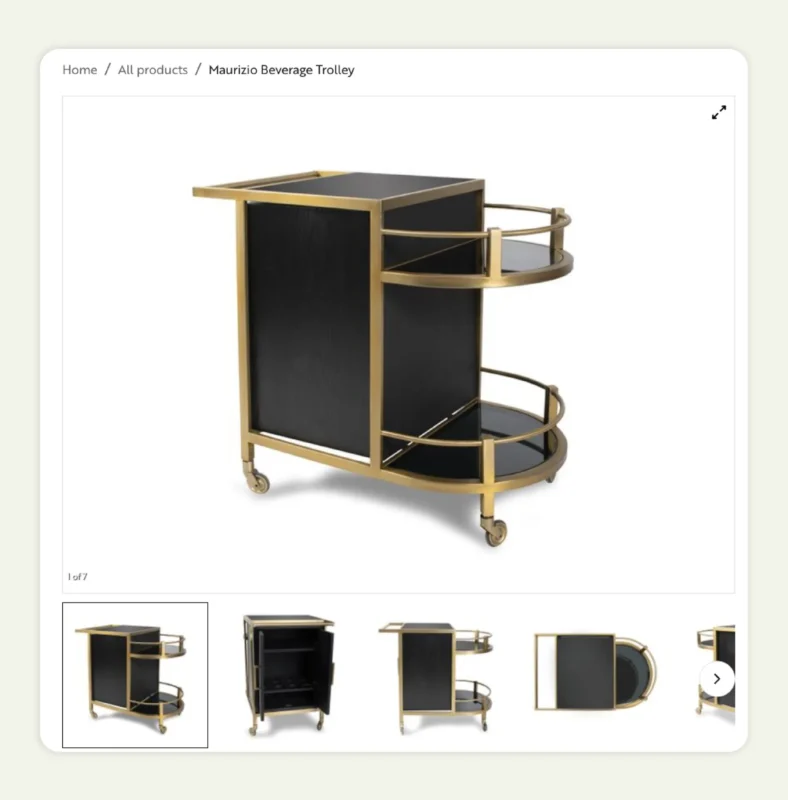
- Front, back, and side views
- Close-ups of fabric, wood grain, or hardware
- Dimension reference shots showing scale
- Lifestyle images showing the piece in a styled setting
- Unique features or customization options
Before shoot day:
Clean and prep: Dust, scratches, and fabric pills are magnified in professional photography. Have cleaning supplies, fabric steamers, and touch-up materials on hand.
Gather styling elements: For home furniture photography, collect pillows, throws, plants, rugs, or home decor that complement your pieces without overwhelming them.
Create a realistic timeline: Large furniture pieces take longer to position and light properly. Build in buffer time because rushing leads to mistakes.
Once you know what you need to capture, the next big decision is where to shoot. Your location choice significantly impacts both your results and your budget.
How to choose between a home furniture setup and a furniture photography studio
Your decision depends on the type of furniture you’re shooting, your volume, and your budget. Each approach has distinct advantages.
| Setup type | Best for | Key advantages | Considerations |
| Furniture photography studio | Catalog images, white-background shots, high-volume shooting | Controlled lighting, professional backdrops, consistent results | Higher cost per session, may lack lifestyle context |
| Home/showroom setup | Lifestyle images, styled room settings, smaller operations | Authentic context, cost-effective, flexible scheduling | Variable lighting, space constraints, weather dependent |
| Hybrid approach | Complete catalogs needing both technical and lifestyle shots | Best of both worlds, comprehensive visual coverage | Requires coordination between locations |
Many wholesalers use a hybrid approach- studio shots for clean product images and on-location shoots for lifestyle content. This gives buyers both the technical details and the inspirational context they need.
If you’re working with limited space or budget, tools like WizStudio can transform basic product shots taken anywhere into professional lifestyle images without needing a full studio space setup.
Why consistency matters in furniture studio photography for wholesale catalogs
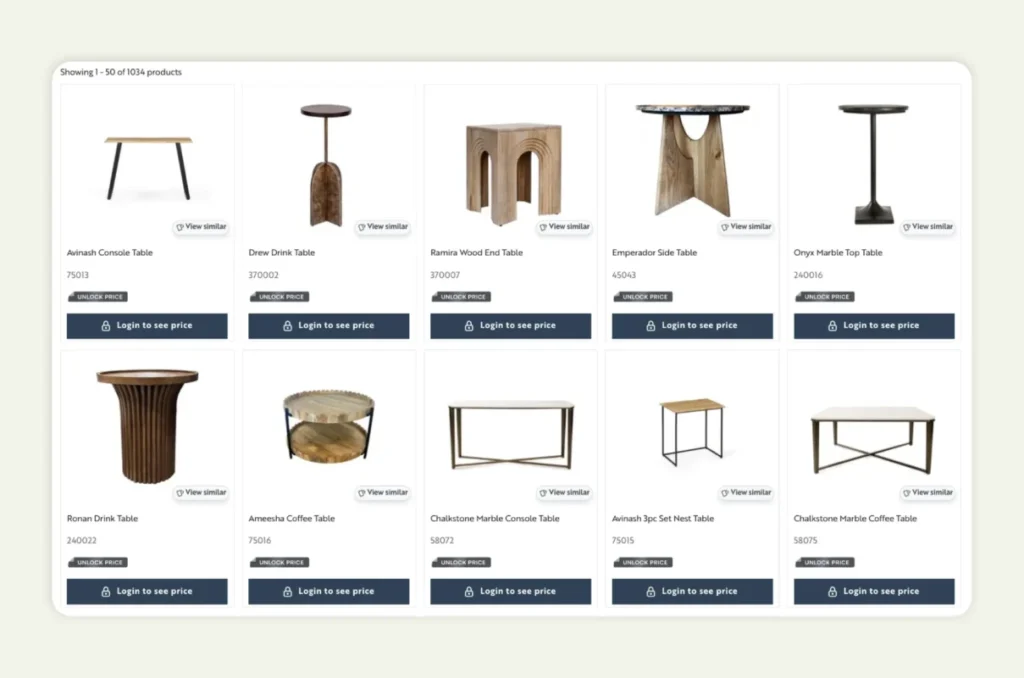
Buyers browsing your catalog should see a unified visual experience. Inconsistent lighting, backgrounds, or angles make your collection look disorganized and can create doubt about quality control.
Establish photography standards:
- Standardize angles for each furniture category
- Maintain consistent lighting across all shots
- Use the same background style within product categories
- Document your process in a style guide for long-term consistency
Document your photography standards in a style guide. Include lighting setups, camera settings, styling rules, and post-processing workflows. This ensures consistency even when different people handle the photography over time.
Once you’ve planned your approach and decided on your setup, the next step is gathering the right equipment to execute your vision.
What equipment do you need for professional furniture product photography?
You don’t need to break the bank, but investing in the right equipment makes a significant difference in your furniture product photography results. Quality gear also speeds up your workflow and reduces frustration.
Recommended cameras, lenses, and lighting setups
Camera requirements:
A DSLR or mirrorless camera with manual controls gives you the flexibility to adjust settings for different pieces of furniture and lighting conditions. Full-frame sensors perform better in varied lighting, but crop-sensor cameras work well for most furniture photography needs.
Lens selection:
| Lens type | Focal length | Best use |
| Zoom lens | 24-70mm | General furniture photoshoot situations, versatile |
| Macro lens | 50mm or 100mm | Fabric texture, hardware details, close-ups |
| Wide-angle | 16-35mm | Large pieces, room settings (watch for distortion) |
Lighting essentials:
Consistent lighting is critical for professional results. Consider:
- Softbox lights or LED panels for controlled indoor shooting
- Light stands and adjustable arms for positioning flexibility
- Reflectors to fill shadows and balance light
- Diffusers to soften harsh light sources
Light through large windows can work beautifully for home furniture photography, but it changes throughout the day. If you’re shooting multiple pieces, artificial lighting gives you consistency.
How to capture material textures and finishes accurately
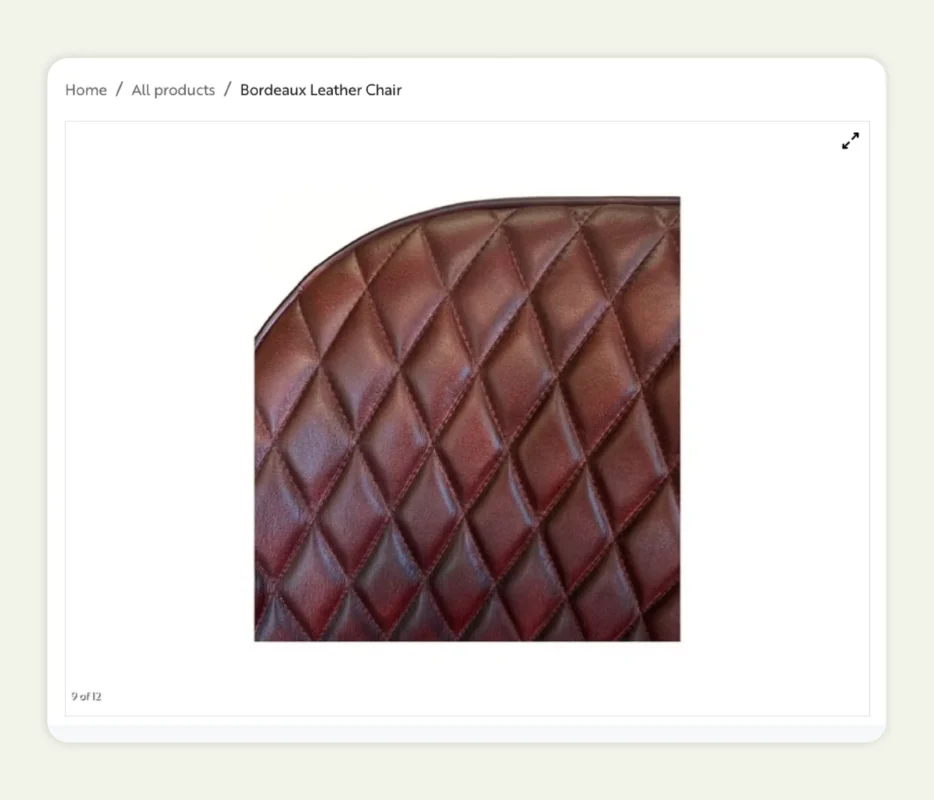
Texture sells furniture. Buyers want to see the weave of fabric, the grain of wood, and the sheen of metal finishes. Getting these details right requires both good lighting and proper camera settings.
Lighting for texture:
- Position your artificial light source at a 45-degree angle to emphasize texture
- Side lighting creates shadows that reveal fabric weave and wood grain patterns
- For reflective surfaces like glass or polished metal, use diffused lighting to prevent harsh glare
Camera settings for detail:
- Use a tripod and slower shutter speed to capture maximum detail without camera shake
- A smaller aperture (higher f-stop number) keeps more of the piece in focus (if you want to showcase the entire piece)
- Take multiple shots at different exposures to capture both highlight and shadow details
Accessories that make the photoshoot furniture stand out
The right accessories create context without distracting from the furniture itself. Think of them as supporting players that help tell the story of how the piece fits into real life.
Styling by furniture type:
For upholstered furniture:
- Coordinating throw pillows in complementary colors
- Draped blankets that add texture
- Side tables with simple styling
For dining furniture:
- Place settings that show scale
- Simple centerpieces
- Lighting fixtures that frame the piece
For bedroom furniture:
- Layered bedding that looks inviting
- Minimal nightstand styling
- Soft lighting that creates ambiance
Styling rule of thumb: Keep accessories neutral and timeless. Trendy items date your photos quickly, while classic styling remains relevant longer.
With your equipment ready and styling accessories prepared, it’s time to put everything together and create compelling compositions.
Furniture product photography tip to styling and positioning furniture for better visuals
Styling transforms a product shot into an image that buyers can imagine in their own spaces. Good styling feels natural, not forced, and always keeps the furniture as the hero.
Professional styling techniques:
| Technique | How to do It | Why it works |
| Create depth | Pull pieces 6-12 inches from walls, angle furniture slightly | Creates shadows and dimension, makes furniture look three-dimensional |
| Show scale | Add familiar objects like books, mugs, or pillows | Helps potential buyers understand true size and proportions |
| Apply rule of thirds | Position furniture slightly off-center in frame | Creates dynamic, visually interesting compositions |
| Shoot at eye level | Position camera 3-4 feet off the ground | Matches how buyers naturally view furniture |
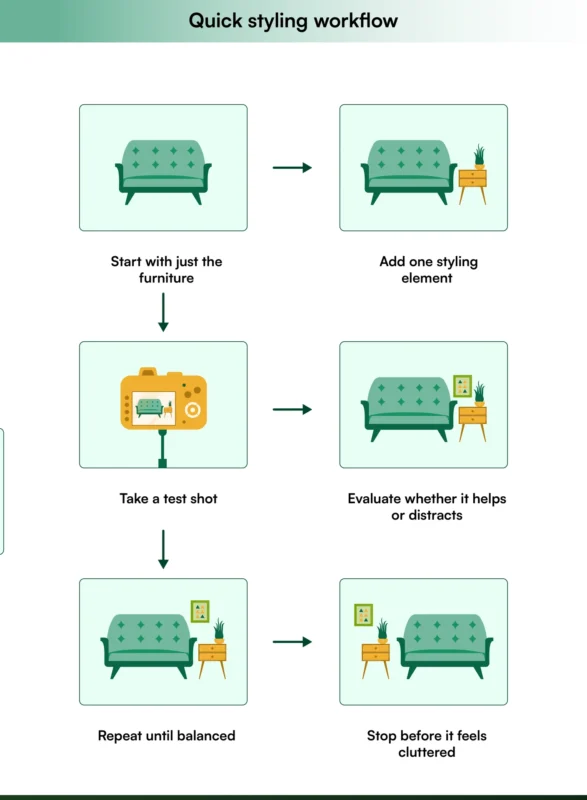
| Layer thoughtfully | Add one element at a time, evaluate before adding more | Prevents over-styling and keeps focus on the furniture |
| Choose neutral backgrounds | Use complementary colors that don’t compete | Keeps attention on the product, not the setting |
After capturing your images, the work isn’t quite done. Post-processing is where good photos become great ones.
How to edit and refine your furniture photos
Photo editing transforms good photos into great ones. Follow these essential steps to present your furniture product photography accurately and attractively.
Basic corrections first: Adjust exposure, contrast, and white balance so furniture colors match real-life intricate details. This is critical for upholstery and wood tones.
Clean up distractions: Remove dust spots and sensor marks, but don’t over-edit. Natural texture and wood variation build trust.
Enhance details subtly: Sharpen fabric weave and wood grain. Add slight contrast for crisp edges. Avoid aggressive sharpening that creates unnatural halos.
Perfect backgrounds: Make white backgrounds pure white. For lifestyle shots, adjust backgrounds to make furniture pop while staying natural. If you have used a green screen, make sure you add the right background.
Build consistency: Create editing presets for each furniture category. All dining tables should share a similar color balance. All sofas should have consistent brightness.
Quick consistency check: Place two product images side by side. Do they look like they belong in the same catalog? If not, adjust your presets to ensure a consistent look throughout.
Export smart: Use JPEG at 80-90% quality for most images. Use PNG for transparent backgrounds. Balance file size with image quality for fast loading.
Beautiful images are only half the battle. Now you need to ensure they perform well across all your sales channels.
How to optimize furniture images for ecommerce and digital catalogs
Great photography only works if it loads quickly, displays properly, and helps buyers find your products. Furniture photography optimization makes sure the photos of your furniture perform as well as they look.
Best image formats and compression tips for listing pages
Choosing the right format:
| Format | Best Use Case | Pros | Cons |
| JPEG | Most furniture photography | Good quality, smaller files, universal support | No transparency support |
| PNG | Transparent backgrounds, cutouts | Lossless compression, transparency | Larger file sizes |
| WebP | Modern platforms that support it | 25-35% smaller than JPEG, excellent quality | Limited older browser support |
Image sizing guidelines:
- Main product images: 2000-2500 pixels on the longest side
- Thumbnail images: 400-600 pixels
- Detail/zoom images: 3000-4000 pixels
Pro tip: Most platforms automatically generate thumbnails, but uploading properly sized images improves initial load time and reduces server processing.
Why naming conventions and alt text help SEO performance
Search engines can’t “see” images, so they rely on filenames and alt text to understand what they show. Descriptive names help your home furniture product photography appear in image search results.
Filename best practices:
✅ Good: grey-sectional-sofa-fabric-front-view.jpg
❌ Bad: IMG_8472.jpg
Include in your filename:
- Product type
- Color
- Material
- View or angle
Alt text guidelines:
Write helpful alt text that describes what’s in the image. Focus on useful information for someone who can’t see the image:
✅ Good: “Grey L-shaped sectional sofa with fabric upholstery and dark wood legs, front view”
❌ Bad: “sofa” or “furniture”
Alt text serves both accessibility and SEO purposes. It helps visually impaired users understand your product and gives search engines context about the image content.
At this point, you might be wondering whether to tackle furniture photography yourself or bring in professional help. Let’s explore both options.
Should you hire a furniture photographer or manage photography in-house?
This decision comes down to volume, budget, quality requirements, and speed. Both approaches can work, depending on your situation.
When to hire a professional furniture photographer
Consider professional photographer when:
- You need consistently high-quality results across large catalogs
- Your team lacks photography experience or equipment
- You’re launching major collections that need polished marketing materials
- Time is limited and you need fast turnaround
- Your furniture includes complex materials or finishes that require expertise
Cost expectations:
Professional furniture photography studios typically charge $50-200 per shot, depending on complexity and your location. A complete furniture photoshoot for a new collection might cost $5,000-15,000.
That sounds expensive, but it includes expertise, equipment, styling, and editing, all factors that contribute to a consistent, professional look.
When to manage photography in-house
In-house furniture studio photography makes sense when:
- You have ongoing product additions that need quick turnaround
- Your budget is limited but you have time to learn
- You need flexibility to reshoot or update images frequently
- Your furniture is straightforward to photograph
- You’re willing to invest in equipment and training
Investment requirements:
In-house setup requires initial equipment investment ($2,000-5,000 for decent gear) and time to develop skills. But the per-image cost drops significantly once you’re set up, and you control the entire process.
Whichever path you choose, being aware of common pitfalls will save you time and money. Here’s what to watch out for.
Why AI is rapidly taking over furniture photography
For decades, furniture photography has been a logistical nightmare. Unlike photographing small items like jewelry or apparel, shooting a sectional sofa or a solid wood dining set requires renting massive studio spaces, hiring movers, physically staging heavy items, and building elaborate room sets. This makes traditional photoshoots incredibly expensive and painfully slow.
Today, AI is transforming this process from a physical challenge into a highly scalable digital workflow. AI product photography tools eliminate the need for physical staging by seamlessly placing basic product cutouts into hyper-realistic, digitally generated environments. Here is why wholesale brands and distributors are rapidly making the switch:
- Drastically reduced costs: By bypassing studio rentals, set construction, and professional staging, brands can save thousands of dollars per collection.
- Unmatched speed to market: What used to take weeks of planning, shooting, and post-production can now be achieved in minutes, allowing businesses to launch products and catalogs much faster.
- Infinite creative flexibility: AI allows marketing teams to instantly swap a modern living room background for a rustic cabin, or change the lighting from dawn to dusk, without ever moving the actual furniture.
- Effortless scalability: For wholesalers managing thousands of SKUs, AI ensures strict visual consistency across the entire catalog, automatically standardizing lighting and scale.
AI furniture photography tips for realistic results
Even when you generate furniture photos with AI platforms, small details make all the difference between average and truly realistic results. Use the following AI furniture product photography tips to ensure your final visuals look natural and ready for your catalog:
Tip #1: Maintain accurate product scale and proportions
One of the most common mistakes in AI furniture photography is distorted scale. A chair that looks oversized next to a side table or a sofa that appears compressed in a room instantly breaks realism. Always ensure your original product image maintains correct proportions. Check that the AI environment does not unintentionally resize or stretch the product.
Compare your furniture against common reference points like door height, table size, window placement, or standard ceiling height. If something feels visually off, adjust alignment or regenerate the scene. An accurate scale builds credibility, especially for buyers who rely heavily on visuals to judge fit and size.
Tip #2: Write clear, minimal AI Prompts
When generating AI scenes, less is often more. Overloading prompts with too many styling instructions can create cluttered or inconsistent environments. Instead of writing long and complex descriptions, focus on clear and specific directions such as “an elegant living room corner” or “soft diffused interior light.” Here is the prompt used for generating the lifestyle visual for the sample sofa covered in the previous section:
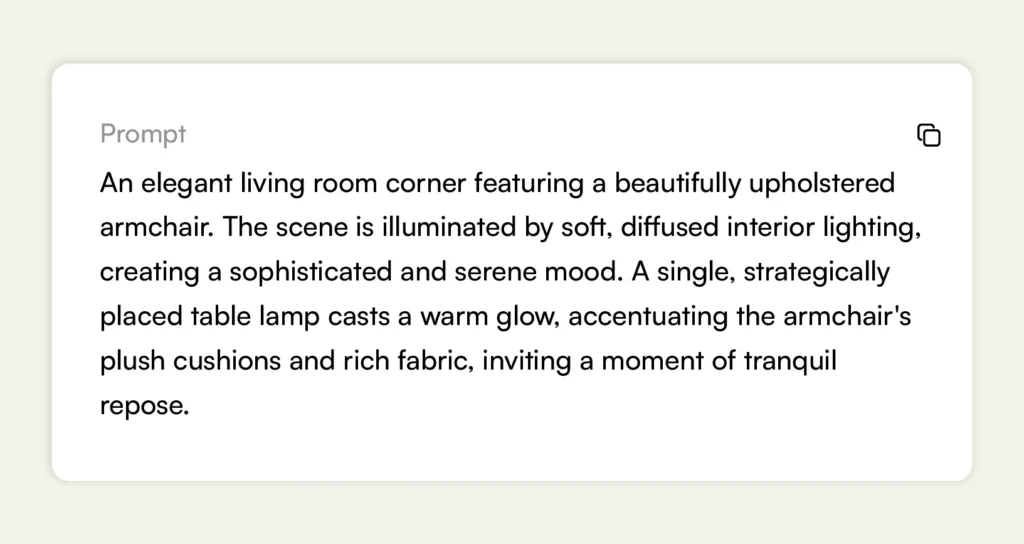
Simple prompts produce cleaner compositions and allow the furniture to remain the focal point. Remember – the goal is to enhance the product, not distract from it.
Tip #3: Select room styles that align with your brand identity
Your AI-generated environment should reinforce your brand positioning. A luxury velvet sofa should not be placed in a basic, undecorated room, and a minimalist wooden chair will not fit in an overly ornate interior. Match your furniture with room styles that reflect your target audience, whether modern, rustic, contemporary, luxury, industrial, coastal, or minimal. For instance, here is the same sofa placed in three different types of settings:
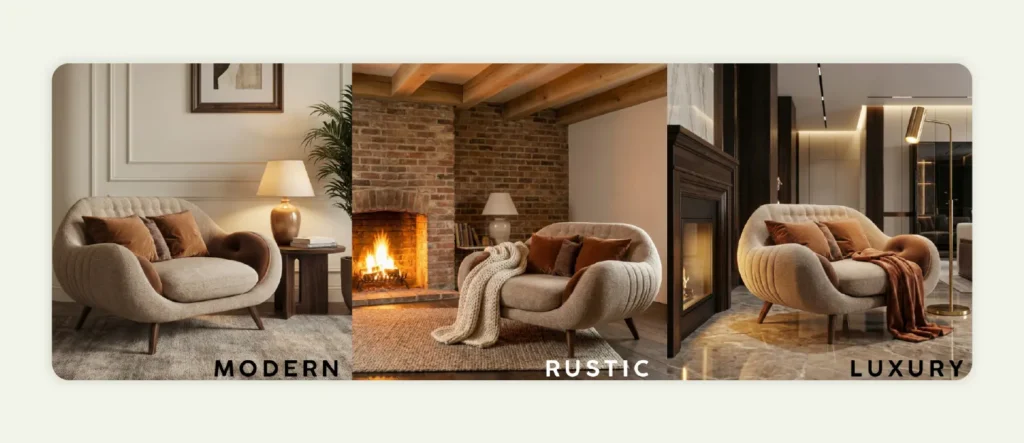
Consistency across your B2B ecommerce catalog also matters. When all product visuals follow a cohesive style direction, your brand looks more professional and premium.
Tip #4: Choose complementary decor and props
AI tools allow you to include decor elements like rugs, lamps, plants, artwork, and cushions. Use these thoughtfully. Props should support the furniture, not compete with it. Neutral decor often works best because it frames the product without overpowering it. For example, in the image below, you can find different props like a lamp, pillows, a book, a side table, a vase, etc., complementing the sofa, rather than taking away the focus.
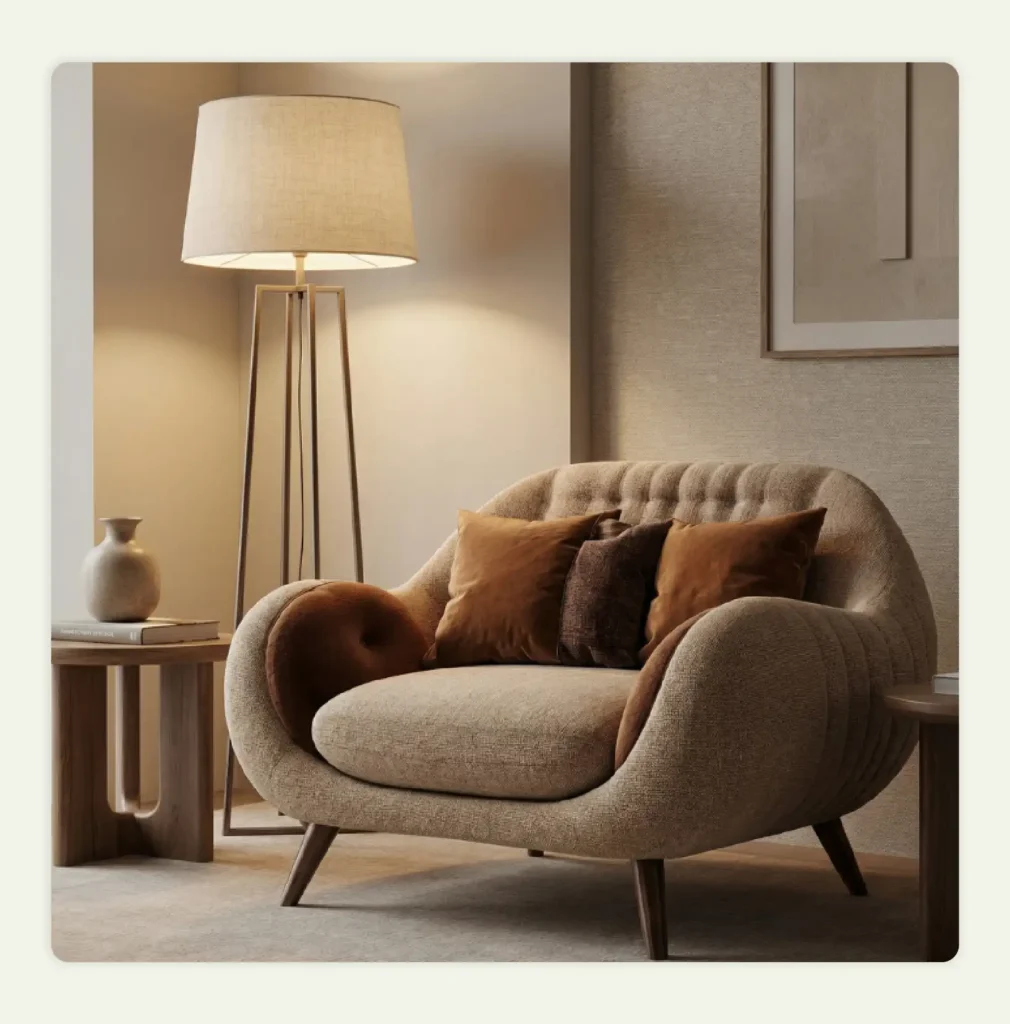
Also, make sure props feel proportionate and realistic. For example, a coffee table should not be unusually small compared to a sofa, and decorative items should follow natural placement rules. Subtlety creates sophistication.
Tip #5: Test multiple lifestyle variations
One major advantage of AI furniture photography is flexibility. Instead of settling for the first generated image, experiment with multiple variations. Try different lighting moods, room layouts, wall textures, or seasonal styling. Sometimes, a small shift in environment dramatically improves the visual appeal of the product. For instance, here are three variants created in WizStudio based on the lighting conditions:
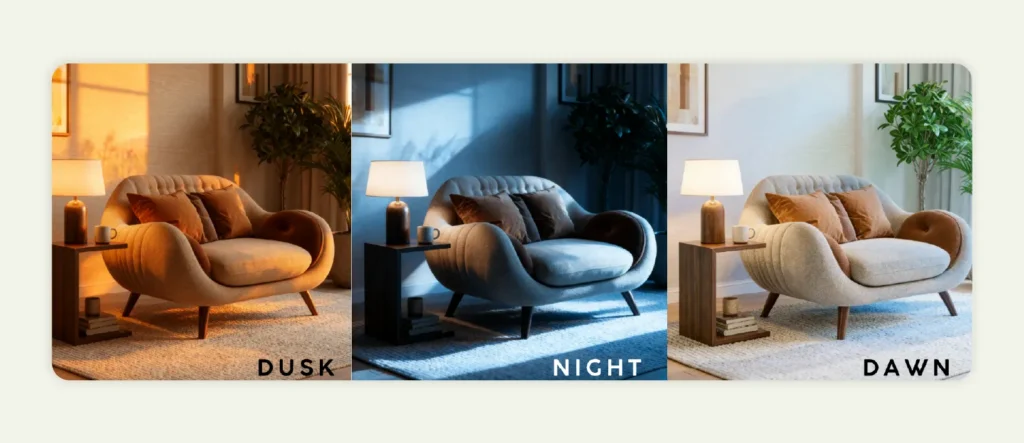
Testing variations also allows you to tailor images for different platforms, such as websites, social ads, or print catalogs, without additional physical shoots.
Tip #6: Review outputs critically before publishing
Finally, never treat AI output as final without review. Zoom in and inspect details. Check for unnatural shadows, warped lines, inconsistent reflections, or floating effects. Look at the image from a buyer’s perspective and ask whether it feels believable.
A catalog-ready image should look intentional and realistic. When done correctly, AI furniture photography should feel indistinguishable from a professionally staged shoot while remaining scalable and cost-efficient.
Common furniture photography mistakes to avoid
Even the best furniture photography tips won’t help if you’re making these common mistakes. Knowing what to watch for before the shoot, not after, helps you avoid them or recognize when images need reshooting.
Lighting missteps that ruin texture details
Common lighting errors:
❌ Flat, direct lighting – Washes out texture and makes the entire piece of furniture look one-dimensional
✅ Solution: Use 45-degree angled lighting to reveal dimension and texture
❌ Harsh overhead lighting – Creates harsh shadows under furniture, makes legs disappear
✅ Solution: Position lights at various angles, not directly overhead
❌ Single light source only – Creates dramatic, unwanted shadows that hide details
✅ Solution: Add fill lights or reflectors to balance lighting and get the best possible light
This is especially problematic for home furniture photography, where buyers want to see material quality and texture details clearly.
Poor styling decisions that confuse scale or purpose
Styling mistakes to avoid:
| Mistake | Problem | Better approach |
| Over-styling | Too cluttered, distracts from product | Style minimally, let furniture be the hero |
| Under-styling | No context for size or use | Add just enough elements for scale reference |
| Mismatched styling | Confuses target market | Keep styling aligned with furniture’s design language |
Example: Don’t style a contemporary sectional with traditional accessories or vice versa. Buyers need clear signals about the furniture’s intended aesthetic.
If traditional photography feels overwhelming or budget-prohibitive, there’s a modern solution that bridges the gap between DIY and professional services.
How WizStudio helps you generate realistic, studio-quality lifestyle images
If traditional furniture photography studios are out of budget or you need faster turnaround, WizStudio by WizCommerce offers a practical alternative. It is an AI-powered product photo generator that turns basic product photos into professional lifestyle images without complex equipment or setup.
Upload a simple product shot and describe the setting you want. WizStudio generates realistic room scenes with proper lighting, shadows, and context. Your sofa appears in a styled living room. Your dining table sits in a warm, inviting space. No physical staging required.
What WizStudio offers:
- Lifestyle image generator – Create clean product cutouts and detailed line drawings instantly, perfect for catalogs and technical sheets
- Multi-product staging – Show how pieces from your collection work together without moving heavy furniture or building physical room sets
- 360-degree views and videos – Give buyers interactive visuals and a comprehensive view of the furniture that builds confidence, especially important for high-value furniture
- Scene relighting and background removal – Change image lighting or mood instantly, remove distractions with magic eraser
- AI shadows and extensions – Add natural shadows for flawless product shots, extend images beyond the frame
The tool works as a DIY solution for teams who want control, or WizCommerce’s expert team can handle the entire process end-to-end for larger creative needs.
Ready to get started? Book a quick demo with our experts today!
Frequently asked questions on furniture photography
What is the best lighting for furniture photography?
One of the most practical lighting furniture product photography tips is to use soft, diffused lighting from a variety of angles for most furniture. Position your main light at a 45-degree angle to the piece of furniture, then use fill lights or reflectors to balance shadows.
Direct sunlight and natural light from large windows creates excellent results but changes throughout the day, so artificial lighting gives you more consistency. Avoid direct, harsh light that creates extreme shadows or washes out texture details.
What is the best lens for photographing furniture?
A 24-70mm zoom lens handles most furniture photography situations effectively. It lets you shoot wide for large pieces or room settings and zoom in for detail shots without changing lenses.
For very tight detail work on fabrics or hardware, a 50mm or 100mm macro lens captures texture beautifully. Avoid extreme wide-angle lenses that distort proportions and make furniture look unnatural.
What is the best backdrop for furniture photography?
For catalog and ecommerce images, seamless white or light gray backgrounds keep focus on the furniture and create consistency across your catalog. For lifestyle images in home furniture photography, neutral walls in soft whites, grays, or beiges provide context without competing for attention. The backdrop should complement the furniture’s style. Contemporary pieces often look best against crisp, clean backgrounds, while traditional furniture can handle more textured or warmer backgrounds.
How to photograph large furniture?
Larger pieces of furniture require adequate space to step back and capture the full piece without distortion. Use a normal focal length lens (around 35-50mm) rather than a wide-angle lens, which can make proportions look unnatural. Position your camera at eye level, typically 3-4 feet off the ground. Break large sectionals or modular pieces into individual shots showing each configuration, then provide overview shots that show how pieces connect.
For very large items, consider shooting in sections with consistent lighting, then stitching images together in post-processing if needed for catalog detail views.