Skip to content



In B2B ecommerce, scale is both an advantage and a challenge. Unlike D2C, where brands manage a few hundred SKUs, B2B businesses deal with thousands of products and variants. Every new product needs multiple images. And each of those images must be enhanced, resized, optimized, renamed, and exported. What seems like a small task at first quickly becomes a time-consuming operational burden.
This is where image batch processing in B2B commerce changes the rules. Instead of handling product images one by one, you can automate all these repetitive tasks. In this blog, we will explore what batch image processing is and how it helps modern businesses streamline image management.
What is image batch processing in B2B ecommerce?
Image batch processing is the automated transformation of large groups of images using a predefined set of rules. Instead of creating or editing product images one at a time, it operates on hundreds or thousands of images simultaneously. The system applies the same set of actions across all files, ensuring consistency while dramatically reducing manual effort.
Here are some examples of what a standard visual tool can accomplish through image batch processing in B2B ecommerce:
- Bulk image resizing for ecommerce portals, wholesale catalogs, and marketplaces.
- Compress multiple PDP images for faster loading, popularly known as batch image compression.
- Convert formats such as PNG to WebP or JPEG.
- Apply standardized naming conventions.
Why B2B ecommerce needs more than traditional batch image processing tools?
For many years, traditional batch image tools were built to handle simple repetitive tasks at scale for B2B brands. These tools were effective when visual requirements were minimal. However, B2B ecommerce has evolved significantly. Today, brands are expected to present products with richer visuals that include contextual environments, consistent lighting, realistic shadows, and campaign-ready imagery. Legacy batch processing tools were never designed for this level of visual complexity. As a result, teams had to rely on costly photoshoots or time-consuming manual editing, irrespective of how large their catalog was.
Modern AI-powered batch image generation approaches the problem differently. These AI systems can generate and enhance product visuals in bulk. Backgrounds can be replaced automatically, lighting can be standardized across thousands of images, and contextual product scenes can be created from a single base image. This allows brands with massive catalogs to produce high-quality visuals much faster while maintaining consistency.
The difference between legacy batch tools and modern AI batch image generation becomes clearer when viewed side by side.
| Capability | Legacy batch image processing | AI batch image generation |
| Core function | Basic image transformation | Image enhancement and generation |
| Typical tasks | Resize, compress, rename, and format conversion | Background replacement, lighting correction, contextual rendering |
| Visual consistency | Requires manual adjustments | AI ensures uniform backgrounds, lighting, and composition |
| Catalog scalability | Unsuitable for building large catalogs | Designed for large B2B product catalogs |
| Content creation | Cannot generate new imagery | Can create new scenes and product visuals automatically |
Business impact of automating visual management with AI batch image generation
When you replace bulk image processing with batch AI image generation for your catalogs, you experience an array of benefits such as:
- Faster catalog launch cycles: Since image batch processing allows hundreds of product images to be generated or optimized simultaneously, you will experience faster product launches.
- Reduced operational cost: Automation minimizes the need for repeated photoshoots and manual retouching. You also need fewer design resources. All these significantly lower catalog production costs.
- Improved visual consistency: AI workflows ensure consistent lighting and styling across all product images. This creates a cleaner and more professional catalog presentation.
- Higher conversion rates: Consistent product imagery improves customer trust and product clarity. This can lead to better engagement and increased conversions.
- Global catalog localization at scale: You can generate localized product visuals for different regions and campaigns, without recreating images manually.
How batch AI image generation transforms product photography at scale?
When product catalog management spans thousands of SKUs, producing multiple environments and product variants quickly becomes expensive and slow. Batch AI image generation eliminates this by creating large volumes of contextual product visuals from a single base image. Here are the different ways in which it achieves this:
1. Environment variation at scale

Whenever you want to showcase a product in multiple real-world contexts, the real challenge is never creativity. It is the time and cost required to recreate every environment. It’s a challenge easily solved by batch AI image generation.
For instance, if you wanted to showcase a vase in a kitchen, in a living room, and in an office setting, it would require a separate photoshoot. Each environment meant new props and additional production time. But with batch AI generation, a single product image can be placed into dozens of environments automatically.
In the example below, we have generated multiple environments for the same vase using WizStudio. All it takes is a simple AI prompt to achieve this at scale.
2. Lighting, shadows, and reflections consistency

Maintaining consistent lighting across thousands of product images has always been difficult. Even in controlled studio environments, small variations in lighting and reflections can occur between shoots. These inconsistencies become more noticeable when products appear side by side in ecommerce listings or large product catalogs.
Batch AI image generation solves this by applying consistent lighting models while automatically rendering realistic shadows and reflections. AI systems can adjust highlights, exposure, shadow direction, and surface reflections based on the product’s shape and orientation. The result is a visually consistent catalog where products look natural, well-lit, and professionally presented without manual editing.
For instance, here are three furniture lifestyle visuals generated using WizStudio in the same setting with consistent lighting and shadows. This helps create a more uniform and visually cohesive catalog.
3. Brand-compliant backgrounds

Your brand guidelines might often dictate specific background color or visual styles for product images. Maintaining these standards across thousands of images can be difficult when multiple designers or studios are involved. Manual editing also increases the chances of small inconsistencies that slowly dilute brand presentation.
AI product photo generators allow you to automatically generate product images using predefined background styles that align with their visual identity. Whether it is a clean white ecommerce background or a textured lifestyle scene for print catalogs, the system can apply these templates consistently across entire product sets.
For instance, Howard Elliott, the popular home furnishing brand, uses WizStudio to generate its catalog lifestyle images. As you can see, WizStudio helps maintain a consistent visual style across all its product images.
4. Seasonal catalog updates

Many wholesalers frequently update product imagery for seasonal campaigns such as summer collections or festive sales. Traditionally, this meant organizing new photo shoots or manually redesigning visuals to match seasonal themes. For brands with large catalogs, these updates required significant time and coordination.
Batch AI image generation allows seasonal variations to be created quickly across thousands of product images. Backgrounds and contextual elements can be updated automatically to match seasonal campaigns.
For example, the image below shows how you can use WizStudio to place a product realistically across multiple seasonal backgrounds, such as Christmas, Halloween, and Autumn. This lets you quickly generate visuals for seasonal campaigns.
5. Variant building
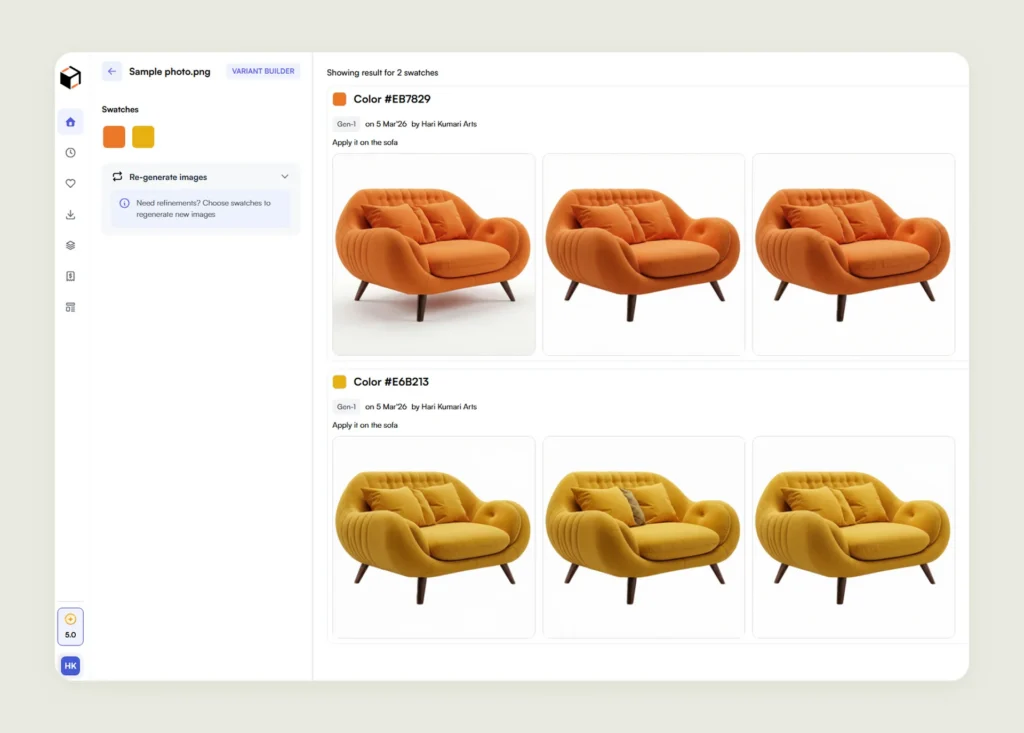
Many products are available in multiple variants, such as different colors or packaging designs. Creating separate product images for each variant often multiplies photography requirements and increases production costs.
Batch AI generation simplifies variant building by automatically generating visual variations from a base product image. For instance, a sofa available in ten colors can have all variants generated instantly without requiring separate photoshoots. Similarly, sneakers with different designs can be visualized quickly.
Here you can see us using WizStudio to generate multiple variants for the same product using its Variant Building feature.

How does WizStudio support bulk AI product photography and catalog automation?
WizStudio is an ecommerce product photography platform that offers advanced batch AI image generation features to help you automate product catalog workflows. Instead of handling images product by product, WizStudio allows you to process thousands of product images simultaneously.
From generating product variants to creating dimension line drawings, WizStudio is designed to maintain visual consistency while dramatically reducing the time required for catalog production.
Here are three main bulk generation features of WizStudio:
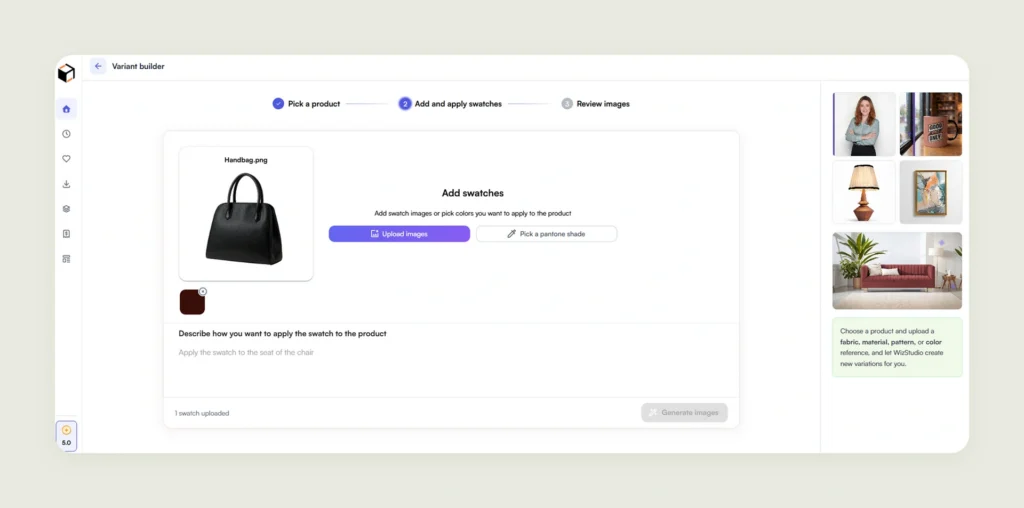
- Variant builder: Generate multiple product variations, such as colors, materials, or styles, from a single base image. This helps you create complete variant catalogs without repeating expensive product photoshoots.
- Bulk dimensions lines generator: Upload a simple CSV file with product measurements and automatically generate dimension line drawings for multiple products at once. This eliminates manual design work while ensuring measurement visuals stay consistent across the catalog.
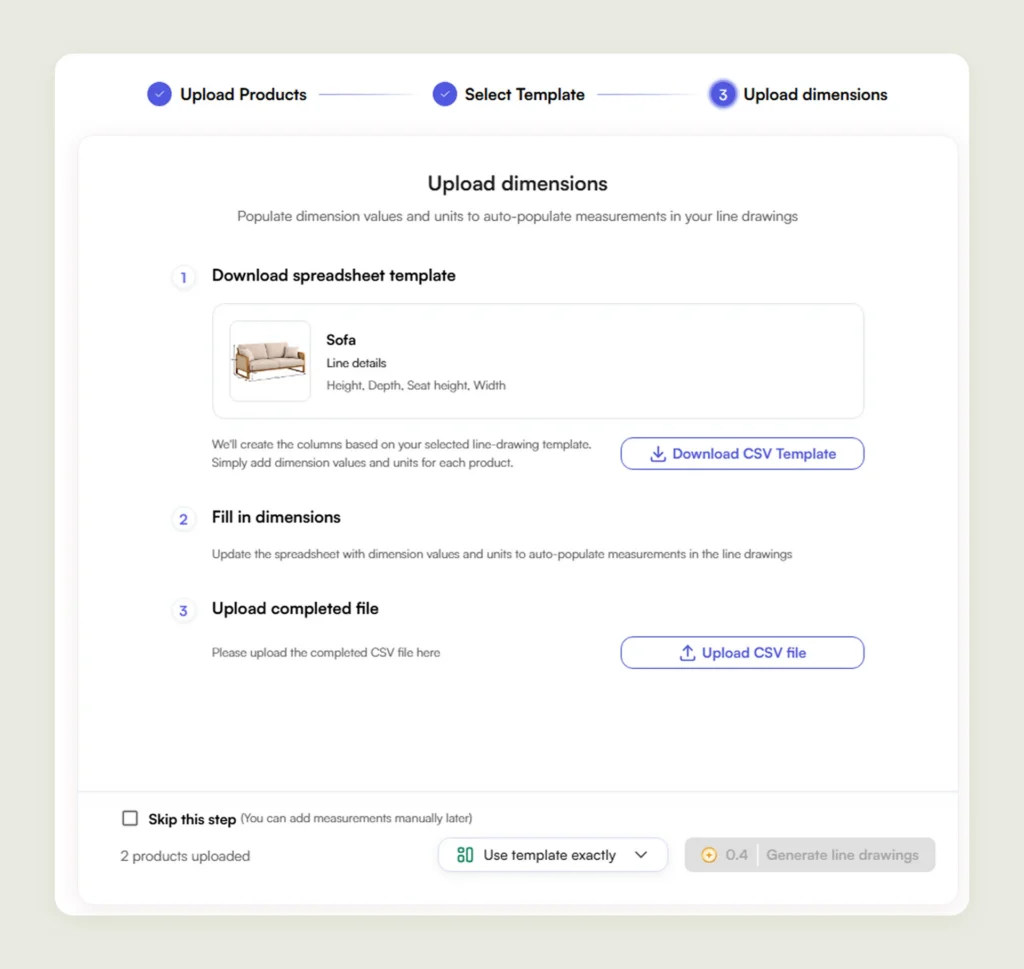
- Templates: Create reusable templates for dimension placements to maintain consistent product visuals. These templates can be applied across large batches of products to standardize your catalog quickly.
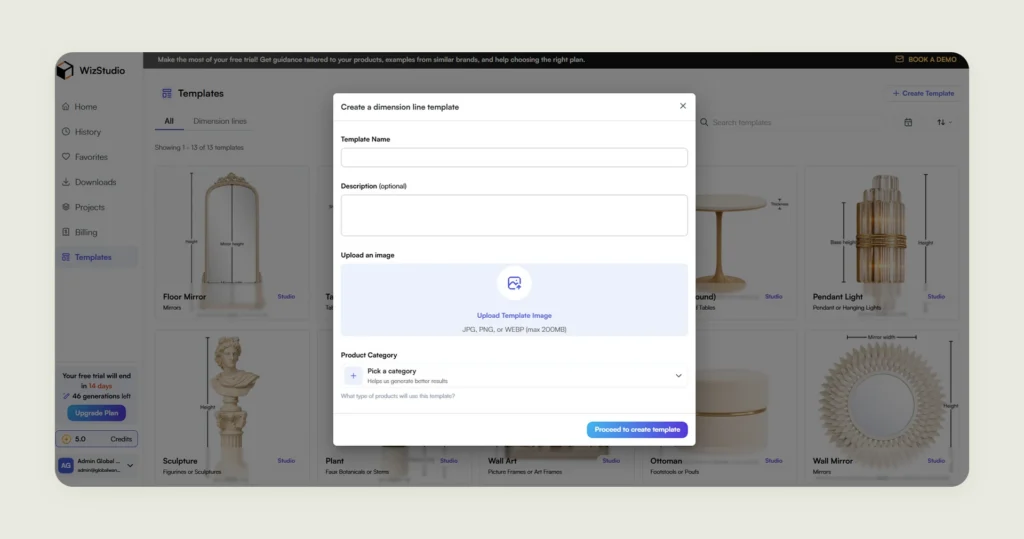
If you want to see how bulk AI product photography and automated catalog workflows can transform your product pipeline, you can explore WizStudio with a free trial and test these features on your own catalog.
Frequently Asked Questions
Why is image batch processing important for large product catalogs?
Image batch processing is important for large product catalogs because it allows you to manage large volumes of product images simultaneously instead of handling them individually. This is especially important for B2B ecommerce brands with extensive catalogs where thousands of images in different sizes need resizing, or in different formats need reformatting.
How does batch processing in B2B ecommerce improve operational efficiency?
Batch processing in B2B ecommerce improves operational efficiency by reducing the manual effort required by team members to prepare product images for catalogs. Instead of editing images one by one, you can apply the same transformations across hundreds or thousands of image files at once. This streamlines workflows and allows product catalogs to be updated more quickly.
What is the difference between batch image processing and batch AI image generation?
The difference between batch image processing and batch AI image generation is that traditional batch image processors focus on modifying parameters like file size, dimensions, name, and format, while batch AI image generation functionality of a platform like WizStudio goes further by creating new visual variations at scale. AI can generate backgrounds, adjust lighting, build contextual scenes, and produce product variants automatically from a single base image.
How can batch AI image generation help with product photography at scale?
Batch AI image generation helps with product photography at scale by letting you create large volumes of product visuals without repeating photoshoots. A single product image can be transformed into multiple lifestyle scenes or product variants automatically. This allows you to manage large catalogs while significantly reducing the time and effort required for photography.
How can businesses automate their product catalog workflow?
Businesses can automate their product catalog workflow by using powerful tools like WizStudio that support batch image generation, background generation, lighting adjustments, and variant creation. These tools allow your product images to be enhanced and prepared for multiple channels automatically. Integrating them with ecommerce platforms further streamlines catalog management.
How can bulk AI product photography reduce photoshoot costs?
Bulk AI product photography reduces photoshoot costs by eliminating the need for repeated studio shoots and location setups. Instead of photographing products in multiple environments, you can generate lifestyle scenes and seasonal visuals digitally. This significantly lowers production costs while still letting you generate product photography at scale.
What are the key features to look for in a batch image processing solution?
The key features to look for in a batch image processing solution include batch image generation capabilities beyond just bulk editing. It should support background replacement, lighting consistency, and scalable image generation for easy handling of large product catalogs, including automated variant creation. These capabilities help you manage product imagery efficiently while maintaining consistent visual quality.