Skip to content



Not long ago, AI-generated visuals were easy to spot. They felt abstract and inconsistent. They were often impractical for real-world use. Today, that is no longer true. AI image generation has crossed a critical threshold where quality meets usability. Brands are no longer just experimenting with it. They are building workflows around it. This shift is most visible in product photography. Instead of organizing shoots, brands are producing high-quality product visuals in controlled, customizable environments. Backgrounds are swapped instantly. Lighting is adjusted with precision. Variations are created in minutes instead of days.
To help you become a part of this tectonic shift in scalable image generation, we break down AI product photography in a practical way. From its definition to implementation steps, we will cover everything you need to know before adopting it for your wholesale business.

What is AI product photography?
AI product photography is the use of generative AI to create high-quality product images, without relying on traditional photoshoots. Instead of setting up a studio and capturing multiple shots, you provide the AI product photo generator with a product image or prompt. It then generates realistic visuals complete with backgrounds, lighting, shadows, and even contextual scenes. Think of it as a shift from “capturing” product images to “creating” them.
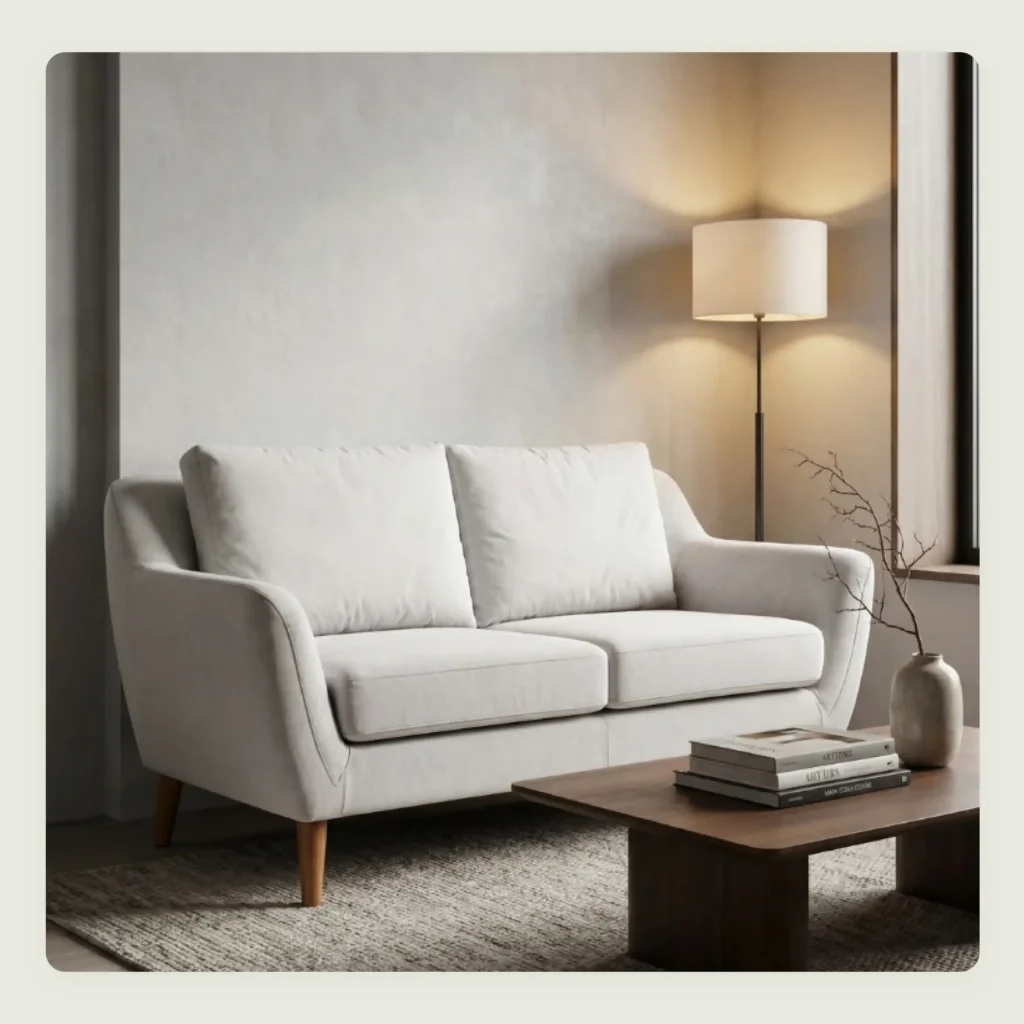
As you can see from the above image, which was generated using WizStudio, a powerful AI image generator, the output is not just a cutout placed on a random background. Modern AI systems like WizStudio understand depth, texture, reflections, and perspective. This allows them to produce images that appear to have been shot in a real environment.
How does AI product photography work?
AI-based product photography is powered by a combination of advanced technologies working together in tandem. Here are the key components involved in its working:
- Training on real-world product data: AI models are trained on thousands of professionally shot product images across categories and styles. This helps them learn what high-quality output should look like, rather than just manipulating pixels.
- Computer vision builds product understanding: The AI system can “see” and interpret the product by identifying boundaries, shapes, angles, and proportions. It also understands material types like glass, metal, wood, or fabric, and predicts how each interacts with light.
- Lighting and quality awareness: AI recognizes highlights and reflections, allowing it to recreate realistic photography lighting conditions. It can also detect and correct inconsistencies such as uneven tones or minor imperfections.
- Neural networks process images in layers: These models analyze visuals step by step. Early layers detect edges and textures, while deeper layers understand full objects and spatial relationships. This layered approach ensures the output feels natural and cohesive.
- Background and scene synthesis tie it all together: Instead of simply placing a product on a backdrop, AI creates a complete scene where lighting and perspective align naturally, making the final image look professionally shot.
How does AI product photography differ from traditional product photography?
Traditional product photography relies on physical setups, real locations, lighting equipment, and multiple rounds of shooting and editing. It is time-consuming and often difficult to scale consistently across large catalogs. Even small changes like background swaps or lighting adjustments may require reshoots. However, it remains a reliable option for brands that require highly tactile or premium visuals where complete creative control and real-world accuracy are essential.
In contrast, when you use AI for product photography, you eliminate these dependencies. Backgrounds, lighting, shadows, and compositions can be adjusted instantly, allowing for rapid experimentation and faster go-to-market cycles.
The easiest way to understand the differences between the two is by comparing them side by side. Here’s how they stack up across key factors:
| Factor | Traditional product photography | AI product photography |
| Cost | High. Requires studio setup, equipment, photographers, models, etc. | Significantly lower. No physical setup required. |
| Speed | Slow. Shooting and editing can take days or weeks. | Fast. Images can be generated and iterated within minutes. |
| Scalability | Limited. Scaling means more shoots and higher costs. | Highly scalable. Generate hundreds of variations across products and formats instantly. |
| Creative flexibility | Constrained by physical limitations like location and time. | Extremely flexible. Instantly test different backgrounds and concepts without reshooting. |
| Operational effort | High. Requires coordination between multiple teams, including photographers and editors. | Low. Can be managed by a small team or even a single operator with the right tools. |
| Consistency | Can vary across shoots due to lighting or human factors. | Highly consistent. AI can standardize lighting and style across an entire catalog. |
| Turnaround for changes | Difficult. Even small changes may require reshooting. | Easy. Modify prompts or inputs to regenerate updated visuals instantly. |
| Dependence on physical assets | Requires physical samples and logistics. | Minimal. Can work with existing images or even concept-stage products. |
| Experimentation | Expensive and time-consuming, often limited to a few concepts. | Encourages experimentation. Multiple creative directions can be tested quickly and affordably. |
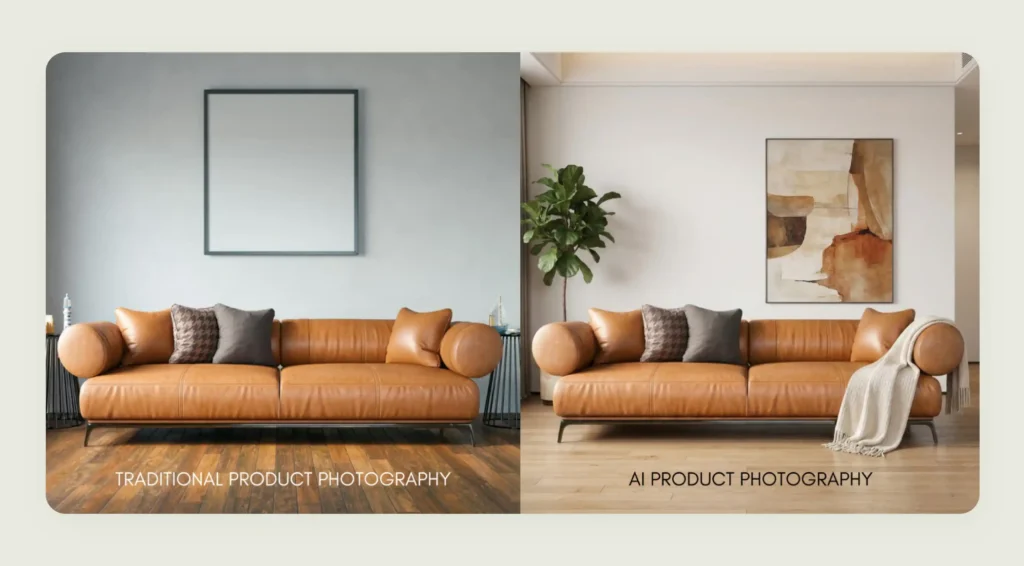
On top of all these differences, the final output quality is nearly indistinguishable. As seen in the image below, the left image is captured using traditional methods, while the right image features a fully AI-generated background using WizStudio. Both deliver comparable visual appeal and realism.
Key benefits of AI product photography for wholesalers and ecommerce teams
For wholesalers and ecommerce teams, using AI for product photography is all about building a more efficient way to produce product visuals that support fast-growing catalogs. Here are some of the key benefits offered by AI product photography for wholesalers and ecommerce teams:
1. Cost reduction
AI product photography removes the need for repeated studio shoots across large catalogs. For wholesalers dealing with hundreds or thousands of SKUs, this turns a recurring cost into a far more predictable and efficient workflow. Howard Elliott, a popular home accents wholesaler, experienced $10k per year cost savings by eliminating repeated photoshoots and editing cycles after using WizStudio.
2. Scale
AI product photography can support bulk catalogs effortlessly. Whether you are introducing new product lines or refreshing existing listings across multiple channels, a bulk product image generator produces consistent output at scale without operational bottlenecks. Ganz, a top gifting wholesaler, created 500+ feature images in weeks across multiple catalogs using WizStudio.
3. Speed
You can launch complete product image sets in minutes instead of weeks. This is especially useful when onboarding new inventory or quickly responding to retailer requests. WizStudio helped Howard Elliott reduce their imagery turnaround time for photography and editing from 6 weeks to 2 weeks.
4. Brand consistency
AI product photography ensures uniform product presentation across all your retailer touchpoints. Every SKU’s image maintains the same lighting and visual identity, regardless of where it is listed or who is selling it.
5. Unlimited A/B testing
You can create multiple variations of the same product for different marketplaces or buyer preferences. It is also possible to test backgrounds and compositions without the need for reshoots or added costs.
6. Market localization
It lets you adapt visuals for different geographies or retail partners without redoing the shoot. You can change backgrounds and styling to suit regional preferences while working from the same base product image.
Different types of AI product photography
AI product photography is not limited to one format. It can replicate and enhance multiple styles that wholesalers typically need across catalogs and marketing channels. Here is a simple breakdown of the most common types and where they work best:
| Type | What it does | Best used for |
| AI packshot / White background | Generates clean and distraction-free product images with pure white or neutral backgrounds | Marketplace listings, ecommerce portals, and print catalogs |
| AI lifestyle photography | Places products in realistic and contextual environments such as homes, offices, or outdoor settings | Ecommerce websites, lookbooks, and print catalogs |
| AI fashion photography | Showcases apparel on AI-generated models with different poses | Apparel wholesale catalogs and seasonal collections |
| AI jewelry photography | Enhances fine details and reflections, with premium backgrounds and lighting | High-end jewelry catalogs, product pages, and promotional campaigns |
| AI food & beverage photography | Creates appetizing and styled food visuals with props and serving contexts | Menus, packaging, ads, and ecommerce listings for F&B wholesalers |
| AI 3D / virtual photography | Produces depth-rich or fully virtual product renders | Product demos, interactive catalogs, and complex products needing multiple views |
| AI ad creative photography | Generates high-impact and campaign-ready visuals with creative compositions and branding | Paid ads, social media campaigns, banners, and promotional creatives |
For wholesalers, the real advantage lies in being able to generate all these formats from a single base product image. This means you can maintain consistency while still tailoring visuals for different buyers and markets without starting from scratch each time. Some categories still carry rules of their own — garments have to show fit, drape, and fabric texture accurately, which is what makes ecommerce apparel photography a discipline in its own right.
How to choose the right AI product photography tool
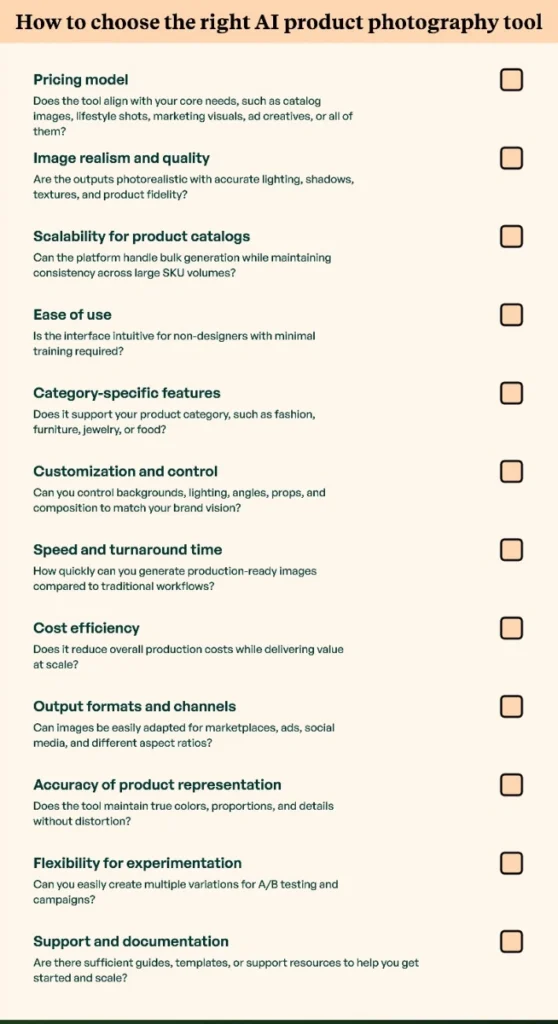
The right AI product photography tool is the one that aligns with your business goals and scale of operations. With multiple platforms available today offering overlapping capabilities, it is important to evaluate them against clear decision criteria to ensure you select a solution that delivers both quality and efficiency. The checklist in the image below provides a practical framework to help you assess and compare tools effectively:
Pro Tip: One of the most important decisions you’ll make is whether to go with a broad, all-purpose tool or one built specifically for your industry. For a deeper look at why this choice impacts your final image quality, check out our breakdown of generic vs. specialized AI image generation to see which approach fits your business better.”
Step-by-step AI product photography workflow
Rather than relying on one-off image generation, you should follow a repeatable process when it comes to AI product photography. This will help ensure accuracy and measurable business impact. The steps below outline a practical end-to-end workflow for those adopting the AI product photography workflow:
Step 1: Capture your base image
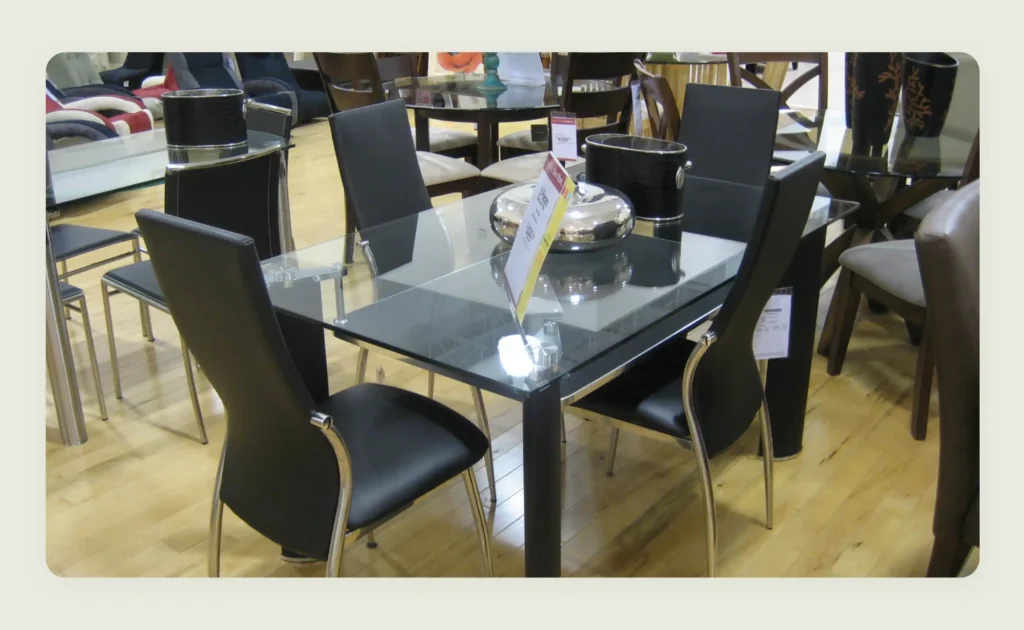
Start with a clean and well-lit packshot on a neutral background. Ensure the product is centered and colors are accurate. More importantly, make sure that all key details, such as labels and textures, are clearly visible. This base image acts as the foundation for all AI-generated outputs, so quality at this stage directly impacts final results. In the example below, we are using a simple dining table image captured in a brick-and-mortar store and will enhance it using AI furniture photography.
Step 2: Define AI’s role in your funnel
Next, decide where AI-generated visuals will be used across your funnel. This could include baseline product detail page (PDP) images, lifestyle or contextual scenes for better storytelling, high-conversion ad creatives, print catalogs, etc. Brands creating campaign assets can also use AI tools to create Pixar-style avatars for social media visuals, promotional storytelling, or playful product-led content. Having clarity at the early stages helps you choose the right styles and level of creative variation.
In our example, we will be using the lifestyle visual for PDP in an ecommerce catalog.
Step 3: Remove and replace backgrounds
Use an AI background remover to strip the original background and replace it with style-consistent environments. This could range from clean white backgrounds for marketplaces to branded or lifestyle settings for marketing. Maintain consistency in tones and colors across your catalog.
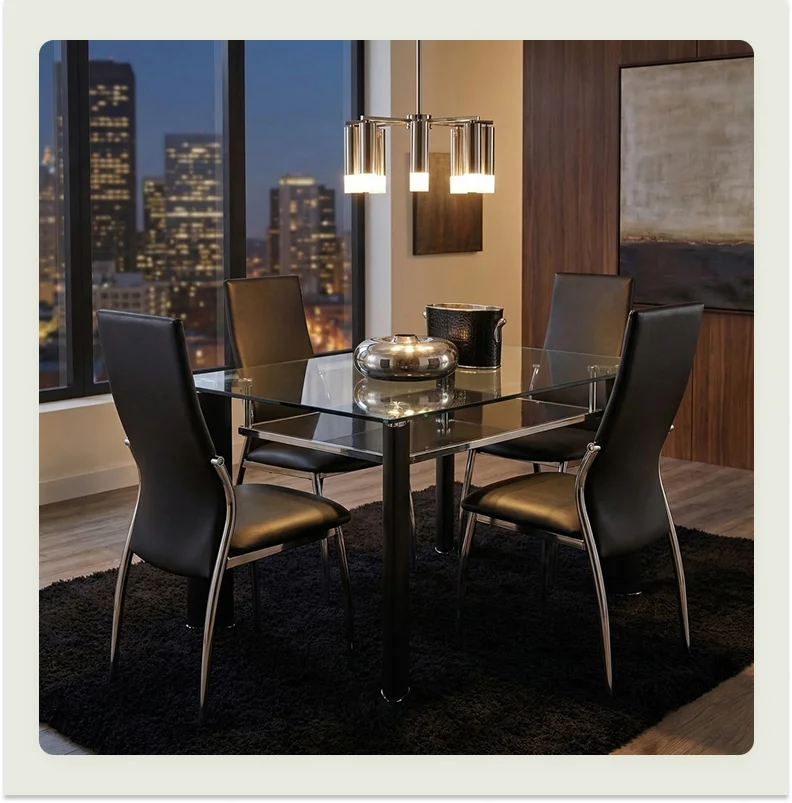
In our example, we used WizStudio to seamlessly remove and replace the background, transforming the original image into a brand-aligned, lifestyle-driven visual that is polished and ready for catalog upload.
Using AI to swap backgrounds is a game-changer. For a closer look at the variety of environments you can create—from minimalist studios to luxury living rooms—check out our AI product photo gallery.
Step 4: Apply lighting and shadow adaptation
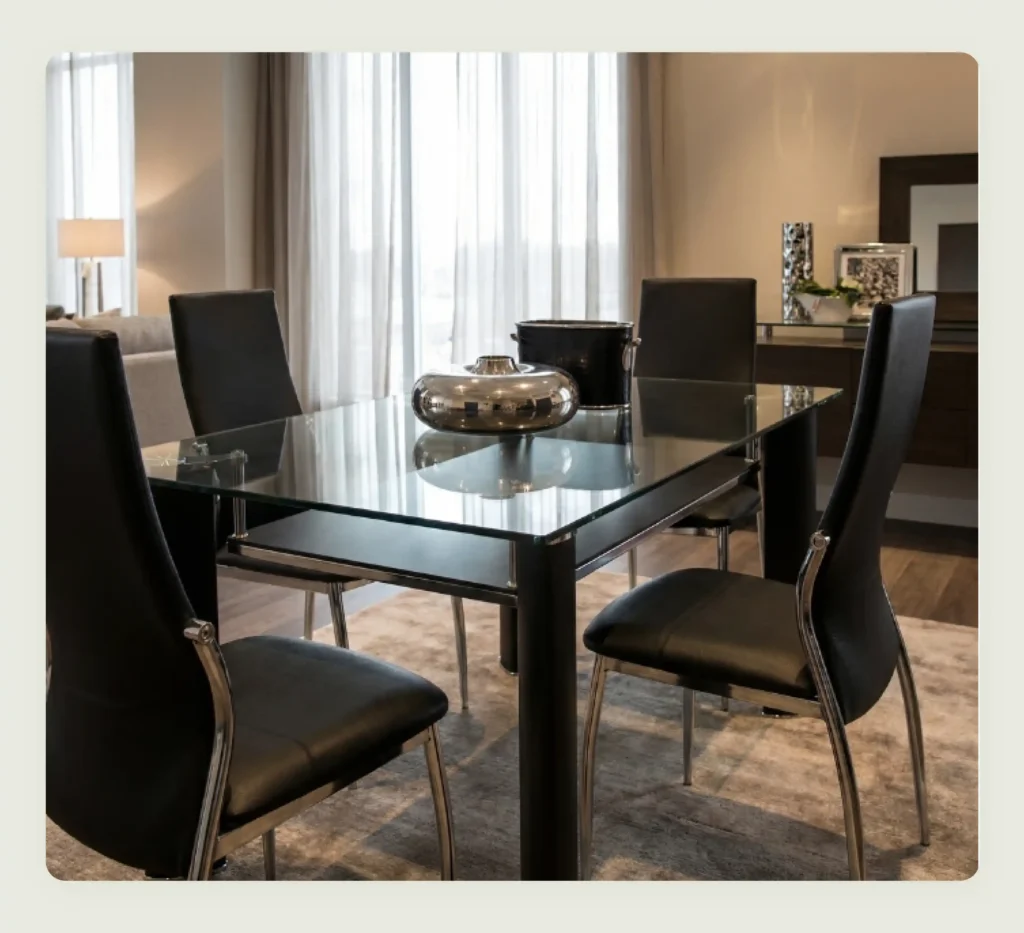
Ensure the generated images have realistic lighting and shadows that match the product’s placement in the scene. Proper shadow direction, intensity, and reflections are critical for achieving a natural, photorealistic look.
WizStudio intelligently applies varied lighting conditions to replicate real-world environments, helping buyers visualize the product more clearly and confidently. In our example, WizStudio has re-lit the image to realistically mimic natural daylight.
Step 5: Run quality control
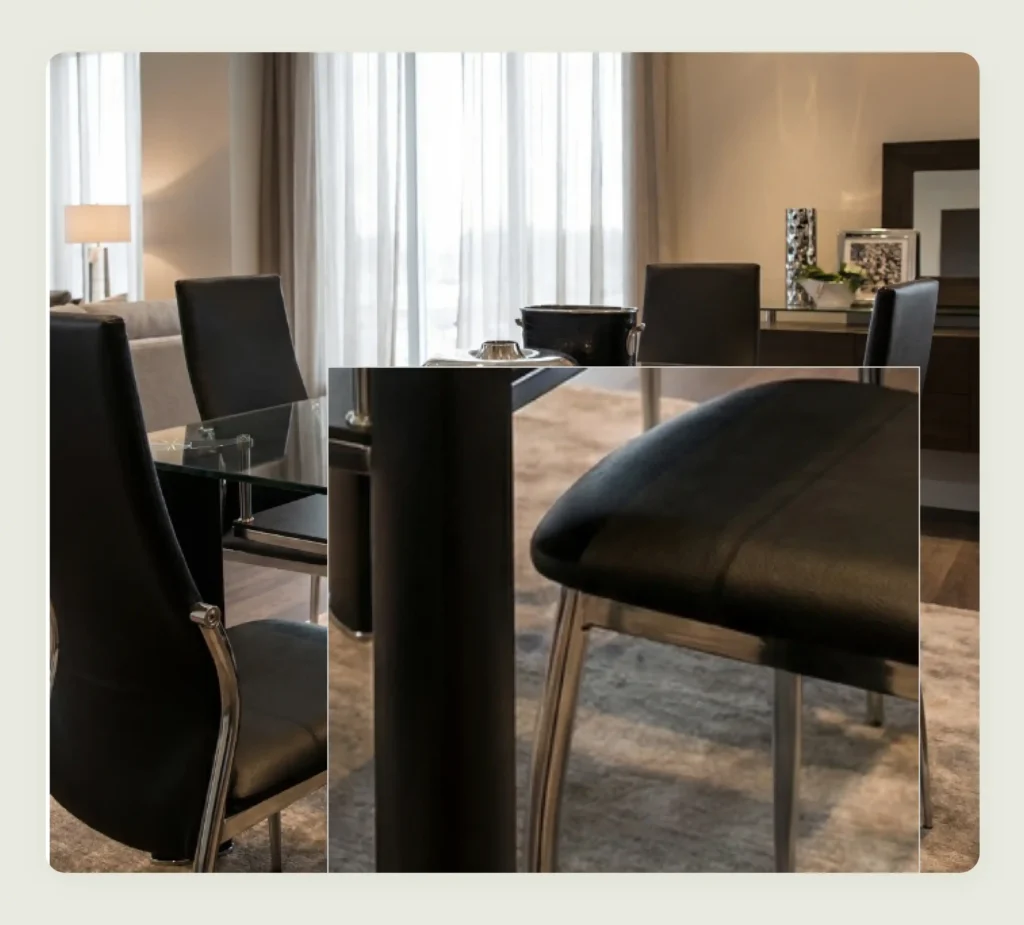
Carefully review outputs by zooming into important areas such as labels, stitching, edges, and logos. Look for distortions, artifacts, or color inconsistencies. It’s also a good practice to run an image search on your generated visuals to ensure they don’t closely resemble existing stock photos or competitor imagery. Reject any images that compromise product accuracy or brand standards. WizStudio lets you zoom into the visual with great ease.
Step 6: Measure conversion impact
Test the effectiveness of AI-generated images by running A/B tests. Change one variable at a time, such as background style or composition. Then track metrics like click-through rates and return rates to understand what drives performance.

Best practices to follow while using AI product photography
AI-powered ecommerce product photography can significantly improve the speed at which you build catalogs. But getting high-quality and conversion-ready visuals depends on how you use the tools. Following a few key best practices ensures your outputs look realistic and effective. Here are some handy tips for you:
Use high-quality base images
Always start with sharp and high-resolution product images. It should be ideally captured on a clean or neutral background. Poor-quality inputs limit what AI can achieve and often lead to unrealistic or blurry outputs. A strong base image helps preserve details and textures, resulting in more polished visuals. For instance, in the screengrab below, the product shot on the right would generally lead to better results on AI platforms than the image on the left.

Write clear and descriptive prompts
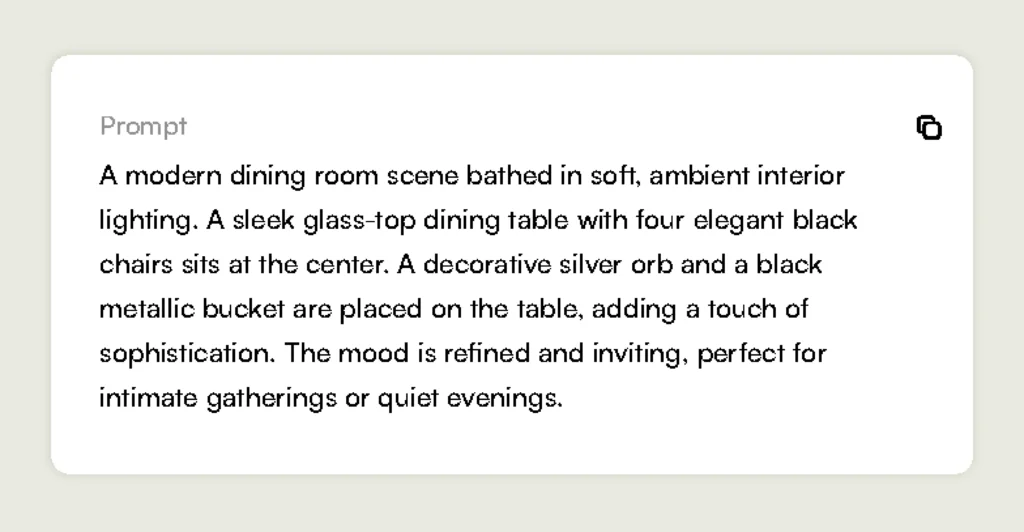
Be specific about the setting, lighting, mood, and composition. Instead of vague instructions, describe exactly what you want the scene to look like. Clear prompts reduce guesswork for the AI and help you get outputs that align closely with your brand and use case. Here is a clean and neat prompt:
Review realism in lighting and perspective
Always check if the lighting direction, shadows, and angles are consistent. Even small mismatches can make an image feel artificial. The product should look naturally placed within the scene, with lighting and perspective that match the background. For instance, in the image below, WizStudio has accurately aligned lighting direction, shadows, and angles, resulting in a seamless and natural-looking visual.
Avoid over-editing
It is easy to overdo effects when using AI tools. Excessive stylization or dramatic lighting can reduce trust and distract from the product. Focus on clean, natural visuals that enhance the product without overwhelming it.
Use context that reflects the target audience
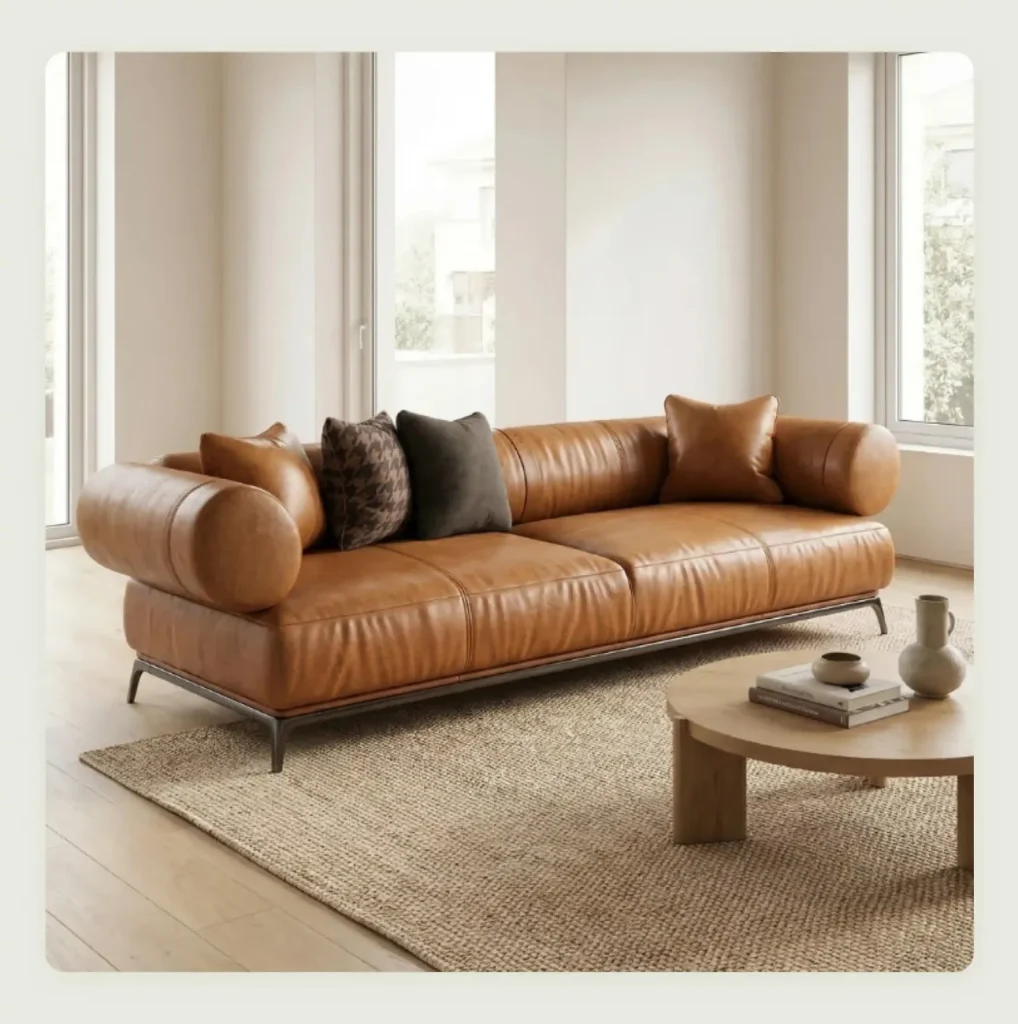
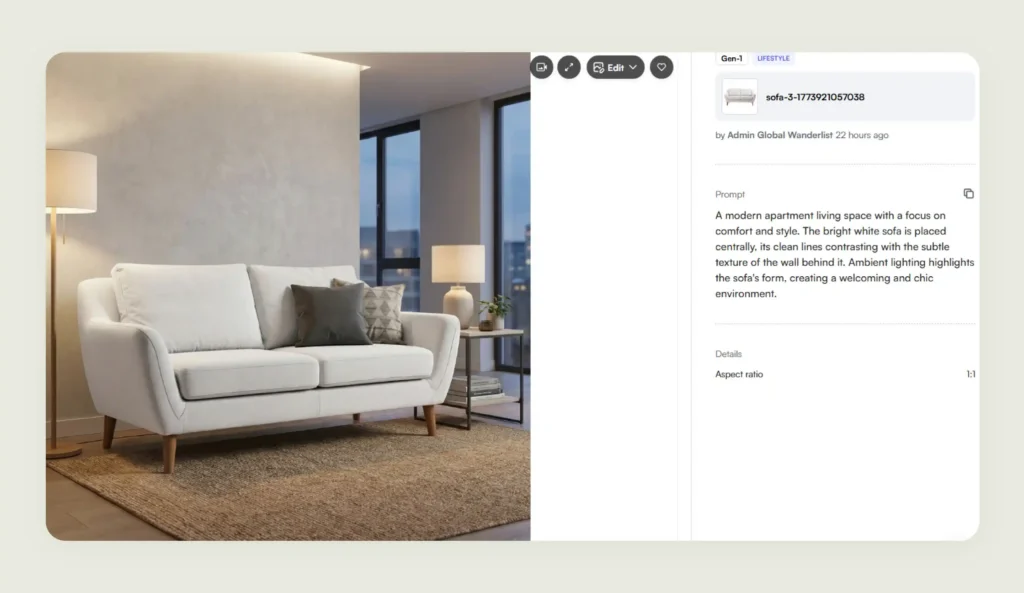
Ensure the environment and styling match how your customers would realistically use the product. Relevant context included via prompts improves relatability and helps buyers visualize the product in their own lives, which can directly impact conversions. For instance, the following image conveys comfort and style, clearly brought to life through a well-crafted prompt.
Optimize for different channels
Different platforms have different requirements and user expectations. Marketplaces typically prefer simple, white-background images, while social media favors lifestyle visuals. Create variations of the same product image tailored to each channel to maximize performance.
How WizStudio streamlines AI product photography
WizStudio checks all the boxes in the earlier checklist, bringing together realism and scalability into a single streamlined workflow. With WizStudio, you need not be content with generic AI outputs, as it generates industry-relevant scenes with natural lighting and accurate shadows. Every image generated using WizStudio feels authentic and aligned with how the product is actually used. At the same time, the platform doesn’t compromise on brand consistency. This means every visual maintains a cohesive look and feel without requiring manual intervention.
You do not need advanced design skills or complex setups to get started, which makes it ideal for businesses handling large volumes of SKUs but have a lean design and marketing team. So, if you are looking to scale your product photography without compromising on quality, sign up for a free trial with WizStudio to experience it firsthand.
FAQs on AI Product Photogrpahy
1. How does AI product photography work?
AI product photography works by using trained models to analyze a base product image and generate realistic visuals by adding backgrounds, lighting, shadows, and context. It understands textures, depth, and materials to create natural-looking outputs. Tools like WizStudio simplify this process by combining automation with built-in scene intelligence for faster and higher-quality results.
2. Is AI product photography better than traditional photography?
Whether AI product imagery is better than traditional photography depends on your specific needs. AI product photography offers clear advantages in speed, scalability, and cost. It is ideal for large catalogs and frequent updates, while traditional photography still works best for highly tactile or premium shoots. Platforms like WizStudio help bridge this gap by delivering near-realistic outputs without the operational complexity and supporting it with a done-for-you service for that human touch.
3. Can AI product photography create realistic lifestyle images?
Yes, modern AI product image generator tools can generate highly realistic lifestyle images by combining product understanding with contextual scene creation. They align lighting, perspective, angles, and shadows to ensure the product blends naturally into the environment.
4. How much does AI product photography cost compared to traditional shoots?
The cost of AI product photography compared to traditional shoots is significantly lower, as it removes the need for studios, equipment, and repeated shoots. This makes it especially valuable for businesses managing large SKU volumes. Solutions like WizStudio help turn photography into a predictable workflow instead of a recurring expense.
5. Do I need professional photos before using AI product photography tools?
You do not necessarily need professional photos before using AI product photography tools, but high-quality base images improve results. A clear, well-lit product shot helps the artificial intelligence algorithms generate more accurate and realistic outputs. WizStudio is designed to work effectively even with simple inputs, while still enhancing them into polished and catalog-ready visuals.
6. Can AI product photography generate multiple variations of the same product?
Yes, one of the biggest advantages of AI product photography is the ability to create multiple variations from a single base image. You can experiment with different backgrounds, lighting, angles, and styles for various channels or audiences. WizStudio makes this especially efficient with its dedicated image variation generator.
7. Does AI product photography replace professional photographers?
AI product photography does not fully replace professional photographers but reduces dependency on large-scale shoots. It complements traditional workflows by handling repetitive and scalable tasks efficiently. For instance, tools like WizStudio allow your team to focus on creative direction while automating execution for faster and more consistent results.