Skip to content




In e-commerce, your product photography functions as a silent but highly persuasive salesperson for your brand. It tells your story, builds credibility, and drives buying intent, often well before a single word of copy is read. However, all these benefits are realized only if you get your visuals right.
This complete guide will help beginners understand the art and strategy behind e-commerce product photography. From basic definition to expert-backed strategies, you will learn everything required to start your photography for e-commerce journey in 2026.

What is e-commerce product photography?
E-commerce product photography involves capturing high-quality images of products for your online store and digital campaigns. Interestingly, the goal of e-commerce photography goes beyond aesthetics. It is about translating your product’s physical essence: texture, design, craftsmanship, and functionality into a visual experience that compels a viewer to order the product.
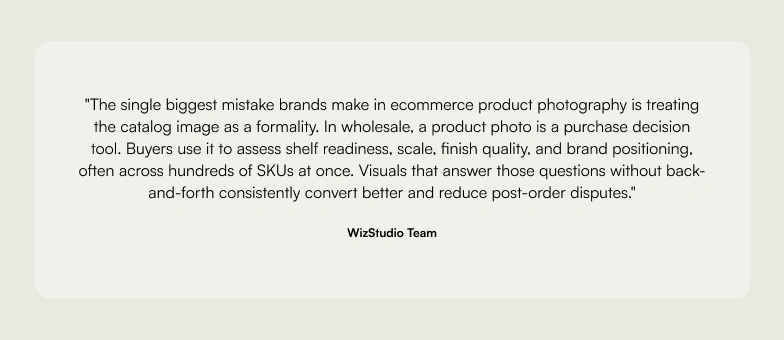
In the wholesale space, where large orders are common and retailers lack the tactile experience of in-store purchasing, e-commerce product photography serves as the bridge that fills this sensory gap.
For wholesalers selling through a wholesale e-commerce platform, high-quality product imagery becomes even more important because retailers need to evaluate products, compare options, and place bulk orders without seeing them in person.
Also read: How to Evaluate Product Photography Services for Your E-commerce Site?
Why is product photography so important for e-commerce sales?
Quality product photos do far more than attract attention. They build confidence and drive measurable results for your e-commerce business. For wholesale online marketplaces where buyers place bulk orders without physical inspection, this reliance on visual accuracy is even greater.
Here is why effective product photography is a must in modern-day e-commerce:
- Create a solid first impression: High quality images communicate professionalism instantly. They encourage buyers to explore your catalog rather than scroll past.
- Builds customer trust: Clear visuals signal reliability to your buyers. This is critical for B2B buyers making large-volume decisions where customer trust is non-negotiable.
- Drives conversions: Compelling visuals make decision-making faster. They help potential buyers visualize quality and suitability, turning interest into orders and improving conversion rates.
- Highlights product details: Sharp, detailed images communicate material quality and finishes, reducing ambiguity and the need for back-and-forth clarification about details of your products.
- Improves SEO and engagement: Optimized product photos with descriptive alt text improve search visibility. Engaging visuals also keep potential customers on the page longer, which signals relevance to search engines.
- Reduces returns: Accurate, detail-rich e-commerce product photos help buyers know exactly what they are purchasing, leading to fewer misunderstandings and lower return rates over time.
Also read: Do You Still Need an E-commerce Product Photography Service in the Age of AI?
Types of e-commerce photography
Several types of e-commerce photography serve different storytelling and conversion goals. Here are the key types of photography every business owner should know:
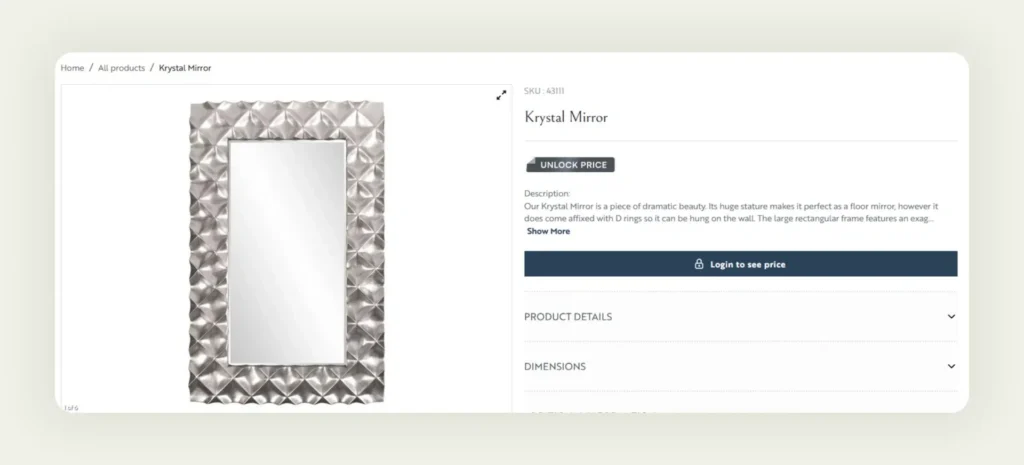
1. White background
This is the most common and essential form of product photography e-commerce imagery. These are clean, distraction-free product shots with a plain white background. They highlight the product’s true color, shape, and features while maintaining consistency across your catalog. White background shots are ideal for listings where clarity and uniformity drive clicks.
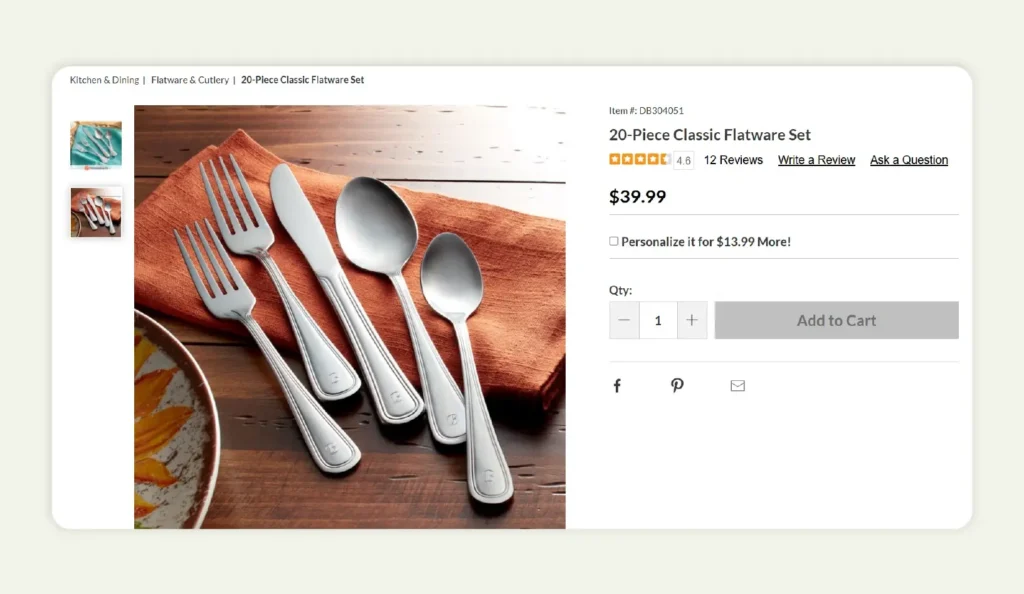
2. Lifestyle photography
This type is all about demonstrating how the product is applied. Lifestyle shots show products in relevant operational settings, for example, kitchenware in a commercial kitchen. This helps buyers quickly assess whether a product is suitable for their market or end-user needs. Lifestyle photography is one of the highest-converting formats in product photography e-commerce because it answers “how does this fit into my world?” before the buyer even asks.
3. Product packaging
Packaging photography plays a key role in communicating how the product will be shipped or how it will be displayed on retail shelves. Clear images of cartons, labels, and branding elements help buyers understand logistics and retail readiness. These are, after all, key factors in bulk procurement and shelf planning. Here is an example:

4. Zoom or close-up
Close-up shots reveal the intricate details that buyers rely on to evaluate build quality and compliance. Texture, finish, stitching, labeling, and components. These visuals serve as an excellent substitute for physical inspection, making them vital for accuracy and customer trust. They carry the most weight where the material is the product, which is why clothing photography for ecommerce leans so heavily on close-ups of weave, seams, and hardware. Getting the depth of field right in close-ups is what separates a credible listing from one that raises doubts.

5. Group shots
Group photography displays product variants, sizes, or bundles within the same frame. It is particularly used in wholesale catalogs where buyers want to see the full product line at a glance. Group shots usually help communicate the depth of inventory, available SKUs, and compatibility across products. This aids in larger order decisions. Here is a group shot used in the wholesale setting:

Also read: The Ultimate Guide to Tabletop Photography and How AI Tools Can Help
What are the key elements of a good product photograph?
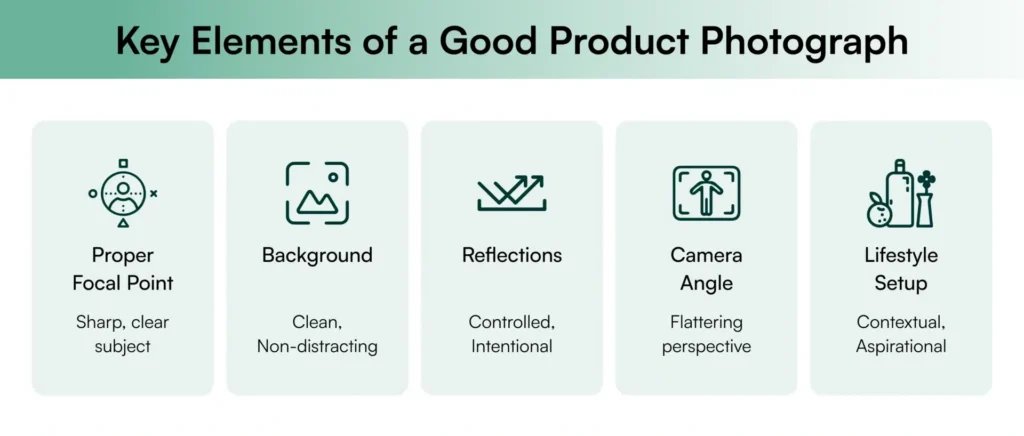
Let us now understand the key elements that make each product photo stand out and drive sales using a sample rug lifestyle image as reference throughout this section:
1. Focal point
A strong focal point directs the viewer’s attention to the most important aspect of your product photo. It eliminates distractions and instantly communicates the product’s value. In the sample image, the rug is the clear focal point. Its pattern and texture are sharply captured, immediately drawing the viewer’s eye to the product features that matter most to the buyer.
2. Background
A clean background enhances the product by removing visual noise and creating a consistent, professional look. Neutral or white background settings work best for e-commerce as they highlight product details and color accuracy. In the sample image, the minimal neutral-toned setting with pastel walls and soft curtains complements the rug without competing for attention, a balanced frame that keeps the product central.
3. Reflections
Reflections can elevate or ruin a product photo. When controlled, they add depth and polish ; when unmanaged, they undermine the professional quality of the final image. In the sample image, natural light gently fills the room without causing harsh shadows or glare on the rug or floor. This gives a clean, matte look that enhances the texture without distracting from the product details.
4. Camera angle
A well-chosen camera angle creates a sense of depth of field and proportion, helping viewers understand the product’s size and placement within a space. The right lighting paired with the right camera angle makes the product feel tangible and realistic. Expert e-commerce photography tips consistently highlight angle selection as one of the most impactful technical decisions in a photo shoot.
5. Lifestyle setup
Lifestyle setups show your product in real-world use, helping buyers imagine how it fits into their lives or their customers’. It adds emotional appeal and builds a stronger product connection. The styled living room setting shows how the rug enhances a modern interior, helping potential buyers visualize it in a typical cosy home while keeping the product central to the composition.
Also read: A Complete Guide to Furniture Photography for Wholesalers
How to do e-commerce product photography?
Let us now address the elephant in the room: How do you actually capture those perfect e-commerce product photos? This depends on your budget, resources, and the scale of your catalog. Below are four key approaches, each with its own process, requirements, and trade-offs. And as you read through them, one thing will become clear: AI-powered options are increasingly the most practical path for modern e-commerce business teams.
Also read: 15 Best E-commerce Photography Tips You Should Know
Option 1: Do it yourself (DIY product photography)
This route involves setting up your own e-commerce photography setup using basic equipment: a camera or good smartphone, a tripod, a lighting setup, and a backdrop. You or someone from your team handles shooting and editing. You will also need a working knowledge of Adobe Lightroom or Adobe Photoshop for editing.
How it works:
- Set up your backdrop (white or neutral) in a well-lit space.
- Position your light sources: use natural lighting from a north-facing window or a softbox for artificial lighting.
- Mount your camera on a tripod and set your camera settings: adjust shutter speed, depth of field, and white balance.
- Shoot the product from different angles, including front, back, close-up, and 45-degree perspectives.
- Import images into Adobe Lightroom for basic corrections, then use Adobe Photoshop for background cleanup and retouching.
- Export at the required resolution for your e-commerce site or marketplace.
This method works best for businesses with a smaller product range and those comfortable with simpler, non-professional visuals.
| Pros | Cons |
| Cost-effective if you own a camera and lighting setup | Steep learning curve for lighting, composition, and the editing process |
| Full creative control over how your product is presented | Inconsistent results without professional execution |
| Flexible: shoot anytime without external scheduling | Time-consuming, especially for large catalogs |
| Lacks the polish needed for competitive online marketplaces |
Option 2: Bring in a professional photographer
This approach involves hiring a professional e-commerce product photographer who handles everything: lighting, composition, retouching, and post-production. Most professionals either bring their own studio space or work in a dedicated photography for e-commerce studio.
How it works:
- Brief the photographer on your brand identity, visual style, and product features to capture.
- Ship or deliver products to the studio space.
- The photographer handles lighting setup, camera lens selection, composition, and camera settings for each shot.
- Approve previews or contact sheets before final retouching begins.
- Receive final files in your required formats: optimised for your e-commerce website and online store.
Professional photography is suitable for large brands that prioritise premium image quality above all. It ensures quality but may not be scalable for growing e-commerce businesses that need fast, frequent content updates.
| Pros | Cons |
| Consistent, high-quality visuals tailored to your brand identity | High cost: requires a large budget |
| Professional lighting setup, composition, and editing process | Limited flexibility: frequent scheduling and coordination required |
| Saves your team time in production and post-production | Revisions or reshoots add to costs and delays |
| Difficult to scale for large or frequently updating catalogs |
Option 3: Use AI tools
AI-driven e-commerce product photography is quickly becoming the standard. An AI product photography tool like WizStudio uses advanced algorithms to transform raw product photos into polished, hyper-realistic visuals with minimal effort. WizStudio is built specifically for this: transforming raw product photos into polished, hyper-realistic visuals with minimal effort.
How it works:
- Photograph your product on a plain or white background, even a smartphone shot works.
- Upload the image to WizStudio.
- Choose your output type: white background silo, lifestyle scene, shadow generation, or line drawing with dimension lines.
- Describe the scene or setting using a simple text prompt (for example: “a vase on a marble kitchen counter”).
- WizStudio generates studio-quality visuals in seconds using AI-driven lighting setup optimization and scene placement.
- Download your final image in the format and size your e-commerce site or marketplace requires.
From product background removal to scene generation, WizStudio streamlines the entire workflow, while maintaining professional image quality and it is the most accessible option for e-commerce business teams working with growing catalogs.
| Pros | Cons |
| Cost-effective with fast turnaround: no studio space needed | Requires a basic product image as input |
| Ideal for bulk image editing and lifestyle scene generation. | Some initial learning to guide AI prompts for best results |
| No specialised right equipment or editing expertise required | |
| Scales to any catalogue size without multiplying effort or cost |
Apart from product photography, want to know some other areas in e-commerce transformed by AI? Find out in this essential guide. If you’re specifically comparing tools like Claid AI, our breakdown of Claid alternatives ecommerce teams are considering walks through how several platforms stack up

Option 4: Use AI + human creativity
This hybrid model combines the speed and precision of AI with artistic direction from human creatives. AI handles the repetitive technical work while designers bring emotional appeal and storytelling depth, which gives you the best results from both approaches.
WizStudio supports a full-service plan that combines both. Once AI places your products in photorealistic lifestyle scenes, in-house design experts fine-tune the final image to make it look real and on-brand.
How it works:
- Submit your raw product images and a brief describing your visual goals and brand identity.
- WizStudio’s AI generates lifestyle scenes and catalogue-ready e-commerce product photos.
- Human creatives from the WizStudio team review and refine the best results for realism and brand alignment.
- Receive final images optimised for your online store, social media, and online marketplaces within 24 to 48 hours.
| Pros | Cons |
| Fast turnaround without compromising image quality | Slightly more expensive than self-service AI tools alone |
| Consistent, brand-aligned visuals across hundreds of SKUs | Requires a brief and some lead time for human review |
| Combines AI precision with human creative and emotional depth | |
| Scalable and far more cost-effective than full professional shoots |
For more on how leading AI tools are shaping the future of product photography e-commerce, the guide to the 10 best AI product photo generators covers platforms redefining how brands create visuals at scale.
Turn every click into a conversion
The future of commerce product photography lies in the synergy between human creativity and AI processing power. With platforms like WizStudio, you can automate repetitive tasks while ensuring each product photo reflects your brand identity. The result is visually compelling, conversion-optimized e-commerce product photos that capture attention and build customer trust faster than any traditional photo shoot could match.
And with WizStudio’s full service plan, you can hit the sweet spot, blending automation with human artistry. Ready to turn your product photos into stunning lifestyle visuals? Sign up for a free trial now.
FAQs on Beginner’s Guide to E-Commerce Product Photography
1. Why are high-quality images important for an online store?
High quality images are important for an online store because they are the primary decision-making tool for online shoppers. 75% rely on product images to decide what to buy. Sharp, accurate visuals build customer trust, reduce return rates, and directly improve conversion rates on any e-commerce site or marketplace.
2. What lighting is best for e-commerce product photography?
The lighting best for e-commerce product photography that works well for most products is natural lighting from a large north-facing window. For consistent results across your catalog, artificial lighting using softboxes or LED panels gives you more control. Avoid harsh shadows by diffusing your light sources and positioning them at a 45-degree angle to the product.
3. What equipment is needed for e-commerce product photography?
A basic e-commerce photography setup requires a camera or high-resolution smartphone, a tripod for stability, a white-background sweep, and photography lighting equipment such as softboxes or LED panels, or access to good natural light. For the editing process, Adobe Lightroom for color and exposure corrections and Adobe Photoshop for background cleanup are the industry-standard tools.
4. How to set up e-commerce product photography?
To set up for e-commerce product photography, position your backdrop in a clean, well-lit area, set up your lighting setup to eliminate harsh shadows and mount your camera on a tripod and adjust your camera settings, including shutter speed and depth of field for the product. Shoot from different angles, then refine each final image in post. Alternatively, AI tools like WizStudio eliminate most of this setup entirely.
5. What makes a good e-commerce product photo?
A good e-commerce product photo combines sharp focus on product features, accurate color accuracy, a clean background, and controlled lighting with no harsh shadows. Applying the rule of thirds in composition and shooting from different angles gives buyers the visual confidence they need to commit to a purchase.
6. What are the best e-commerce product photography styles?
Some of the best e-commerce product photography styles include: white background catalog shots, and lifestyle photography. Close-up detail images and group variant shots are the best practices for e-commerce product photography. The best way to approach this is to pair clean catalog images with at least one lifestyle photography scene per SKU. This combination consistently improves performance on online store listings and social media.
7. How do brands take e-commerce product photos?
Brands use these three main approaches to take e-commerce product photos: DIY setups with a camera and lighting setup, Professional photographers with studio access, or AI platforms like WizStudio. The most scalable option for modern brands managing growing catalogs is AI-assisted product photography e-commerce. It delivers the best results at a fraction of the cost and time of traditional shoots, without requiring a dedicated studio space or specialist equipment.