Skip to content



Buyers at trade shows make decisions quickly. If your sales rep can’t pull up the right product, confirm stock, or write an order on the spot, that buyer moves to the next booth. Managing orders efficiently during high-traffic events is one of the biggest operational challenges exhibitors face, and most businesses only realize how much it costs them after the show is over.
This blog covers how a trade show order-taking app solves that problem, what to look for in one, and how to build an order-taking process that actually holds up on a busy show floor.
Understanding trade show event apps
Trade show apps are mobile applications designed specifically to manage various aspects of trade shows. They provide a centralized platform for exhibitors to streamline the trade show order-taking process, lead capture, and other crucial operations. By leveraging technology, these apps simplify and enhance the overall experience for both businesses and buyers replacing paper forms and manual systems with fast, accurate digital workflows.
Trade show app features
When it comes to streamlining your trade show order-taking process, there are trade show applications available that can assist you. Some applications allow you to seamlessly take orders at trade shows, ensuring a smooth and efficient process. With all your products at your fingertips, you can easily showcase your offerings and provide a personalized experience to potential customers.
Some apps even offer up-selling and cross-selling opportunities with personalized product recommendations, helping you make the most of every interaction. The stronger platforms go further, supporting barcode scanning, customer-specific pricing, real-time inventory checks, and lead capture tools that log buyer information without interrupting the conversation. Offline functionality matters here too, since internet connectivity at trade show venues is notoriously unreliable, and your order-taking process cannot afford to stop because of it.
A few platforms serve different parts of this workflow. Whova focuses on attendee engagement and exhibitor visibility. Handshake, now part of Shopify, has been widely used in wholesale for basic order writing. For businesses that need the full picture in one place catalog browsing, order writing, lead capture, and post-show ERP syncing, WizOrder by WizCommerce is built specifically for wholesalers, distributors, and manufacturers. Sales reps can scan barcodes, build personalized catalogs in minutes, take orders in Showroom Mode on behalf of other reps, and connect buyers to an ecommerce platform for reordering long after the show ends.
Also read: 9 Best Trade Show Lead Capture Software Tools for 2026
Choosing the right trade show app
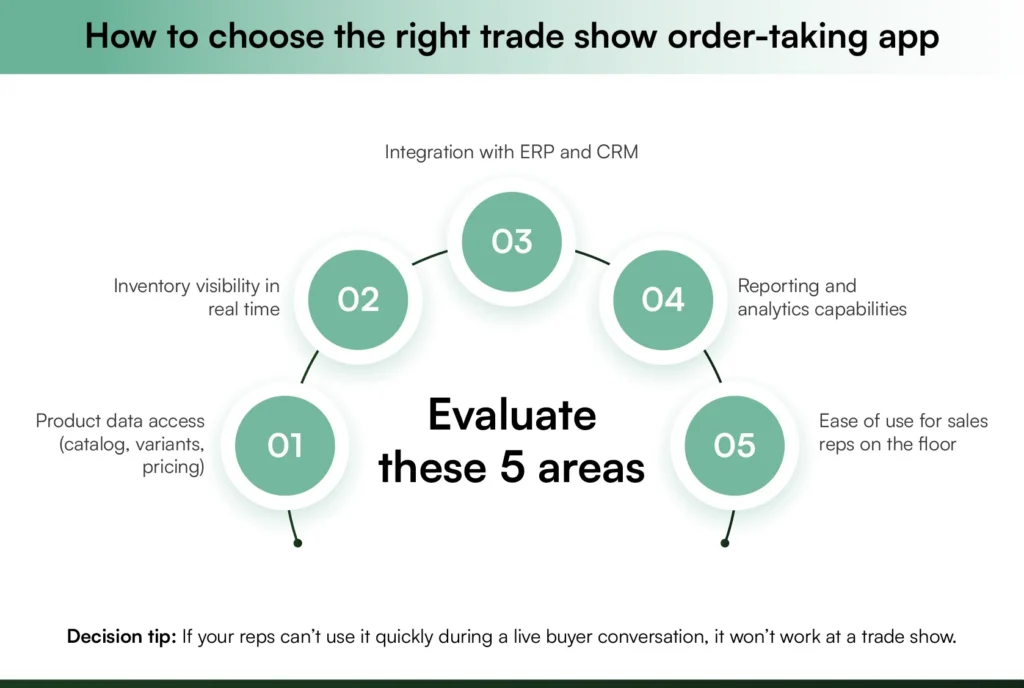
To select the best trade show order-taking app for your business, consider factors such as your specific order-taking needs.
- Look for an app that provides complete product information with inventory details right on your device, allowing you to stay informed and up-to-date.
- You should also explore other functionalities that empower your Sales team like Analytics and Reporting. These functionalities enable up-selling and cross-selling with personalized product recommendations, empowering you to seize every sales opportunity effortlessly.
- Integration capabilities are another crucial aspect to consider. Look for an app that seamlessly integrates with your existing ERP and CRM systems like Netsuite, SAP, and Microsoft Dynamics, ensuring efficient data management and eliminating the hassle of manual data entry. This integration provides a unified view of your trade show operations, making the order-taking process even smoother.
Strategies for efficient order-taking at trade shows
To make the most of your trade show experience, efficient order-taking strategies are essential. Look for an app that offers features to simplify lead tracking, such as capturing contact information, recording interactions, and categorizing leads based on their level of interest. With these tools, you can efficiently follow up after the trade show and convert leads into customers.
The app’s order management capabilities should also be considered. Look for features like real-time syncing, which ensures that orders are instantly reflected in your inventory and other systems, minimizing delays and discrepancies. Automated calculations help eliminate errors in pricing or discounts, providing a smooth and error-free order-taking experience. Instant order confirmations enhance customer satisfaction, leaving them with a positive impression of your business.
Optimizing follow-up actions is crucial for post-trade show success. Look for an app that allows you to leverage the data collected during the event to nurture leads and provide exceptional post-trade show support. With personalized communications and exceptional customer service, you can deliver a seamless experience that extends beyond the trade show.
Also read: Effective B2B Trade Show Marketing Strategies for Success
Practical setup process for a trade show order-taking app before the event
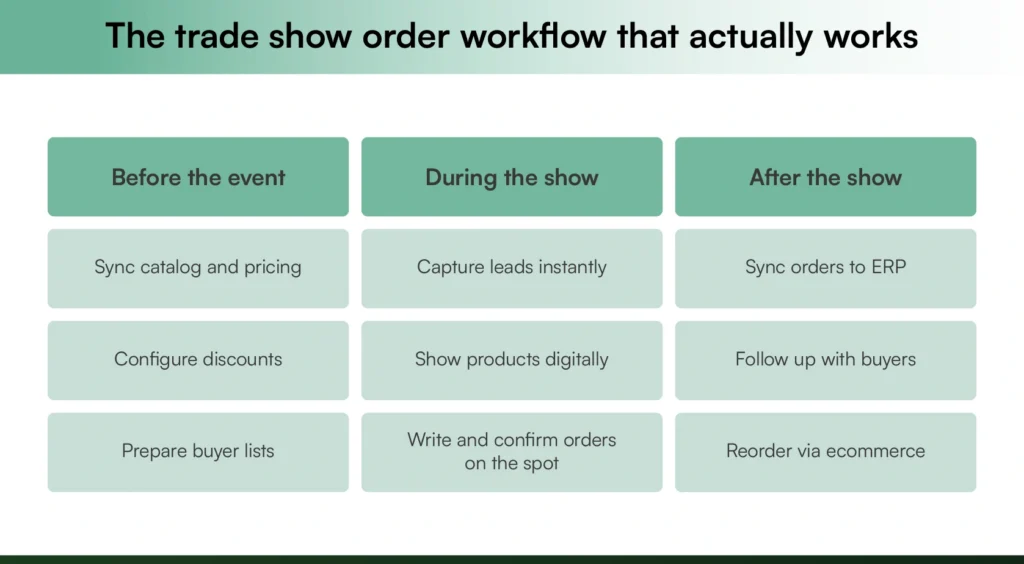
Arriving at a trade show without configuring your app in advance is one of the most avoidable technical issues exhibitors face. Here is how to set up your trade show ordering app properly before your next trade show, using WizOrder as a practical example.
- Sync your product catalog and inventory.
Before the event, upload or sync your full product catalog into the app, including variants, pricing tiers, and real-time stock levels. WizOrder pulls live inventory directly from connected ERP systems like NetSuite or QuickBooks, so sales reps always see accurate availability without needing to call the warehouse.
- Configure pricing rules and discounts.
Set up customer-specific pricing, bulk discount thresholds, and case pack options inside the app ahead of time. WizCommerce allows multi-level pricing management, so each buyer sees the rates relevant to their account the moment a rep pulls them up.
- Set up lead capture forms.
Customize your buyer intake forms in the app before the show opens. WizOrder’s Quick Add feature lets reps record new buyers, including scanning visiting cards , as soon as they walk into the booth, with no manual data entry required later.
- Test offline mode.
Many trade show venues have unreliable or congested Wi-Fi. Before you travel, test that your app functions fully without internet connectivity. WizOrder is built offline-first, meaning orders, catalogs, and lead capture all work without a signal and sync automatically once connectivity is restored.
- Create custom catalogs for anticipated buyers.
If you know key accounts are attending, build personalized catalogs inside WizOrder in advance. Reps can pull these up instantly during conversations, or share them digitally during or after the show , without scrambling to locate the right products under pressure.
- Brief your sales reps.
Run a short walkthrough session with your team before the event. WizOrder’s Showroom Mode allows any rep to take orders on behalf of another, so if someone is occupied with a buyer, no customer waits. Getting everyone comfortable with this workflow ahead of time reduces floor-level confusion significantly.
Proper pre-event setup turns your trade show order-taking app from a tool into a competitive advantage, and it is the single biggest factor separating exhibitors who leave with clean, complete orders from those still reconciling paper forms days after the show ends.
Conclusion
Every trade show is a chance to build relationships, write orders, and grow your wholesale business, but only if your process can keep up with the floor. The businesses that consistently get the most out of their shows are not necessarily the ones with the biggest booths. They’re the ones whose sales reps show up prepared, move efficiently, and leave with data that actually drives follow-up.
WizCommerce’s trade show app gives your team exactly that foundation; from catalog setup before the show to order writing on the booth to clean data synced and ready for follow-up after.
Book a demo now and see how much smoother your next trade show runs.
FAQs
How does a trade show ordering app work?
A trade show ordering app works by giving sales reps a mobile platform to browse your full product catalog, check live inventory, capture buyer information, and write orders directly on a device. Apps like WizOrder sync all orders in real time to your ERP or CRM, eliminating manual entry and reducing errors significantly.
Why should brands use a trade show ordering app?
Brands should use a trade show ordering app because it replaces slow, error-prone paper forms with a faster, more accurate digital process. Sales reps close orders on the spot, capture leads instantly, and leave with clean data ready for follow-up, directly improving trade show ROI and conversion rates after every event.
Can trade show ordering software work offline?
Yes, the best trade show ordering software works fully offline, which matters because internet connectivity at trade show venues is often unreliable. Apps like WizOrder are built offline-first, letting sales reps take orders, browse catalogs, and capture leads without a signal, then syncing everything automatically once connectivity is restored.
What security measures do trade show order-taking apps use to protect customer data?
Trade show order-taking apps protect customer data through encrypted data transmission, secure cloud storage, and role-based access controls that limit what each sales rep can view or edit. Leading platforms also comply with data privacy regulations and do not store sensitive payment details locally on devices, reducing exposure at trade show venues.
How do exhibitors take orders at trade shows digitally?
Exhibitors take orders digitally at trade shows by using a trade show app for order-taking that lets sales reps add products by barcode scan or search, apply customer-specific pricing, and confirm orders instantly via email. This replaces paper forms entirely and ensures every order is accurate and visible across the team in real time.
Is trade show ordering software suitable for B2B wholesale businesses?
Trade show ordering software is especially well suited for B2B wholesale businesses, which deal with complex catalogs, tiered pricing, and high order volumes. WizOrder is built specifically for wholesalers, distributors, and manufacturers, handling product variants, bulk discounts, case packs, and ERP integrations that generic apps cannot manage effectively.
What is the app for trade show leads?
A trade show app handles lead capture by letting sales reps scan buyer badges or business cards the moment someone enters the booth, recording contact details and interaction notes instantly. WizOrder’s Quick Add feature does exactly this, categorizing new buyers on the spot so post-show follow-up is organized, fast, and fully data-backed.