 Skip to content



Here’s a look at everything new this month across the WizCommerce platform. This release includes updates across WizOrder, WizShop, AI Order Entry Assistant (Ella), and WizStudio.
This month’s updates:
-
- Custom Sorting of SKU’s on Collection & Category Pages
- Merge Customers & Leads
- Product Search in Orders, Quotes & Drafts
- No-Code Landing Page Creation
- No-Code PopUp Creation
- Confidence Score – AI Order Entry Assistant
- Manual File Upload – AI Order Entry Assistant
- Notifications Tab – AI Order Entry Assistant
- Bulk Silo Image Editor – WizStudio
1. Custom Sorting of SKU’s on Collection & Category Pages
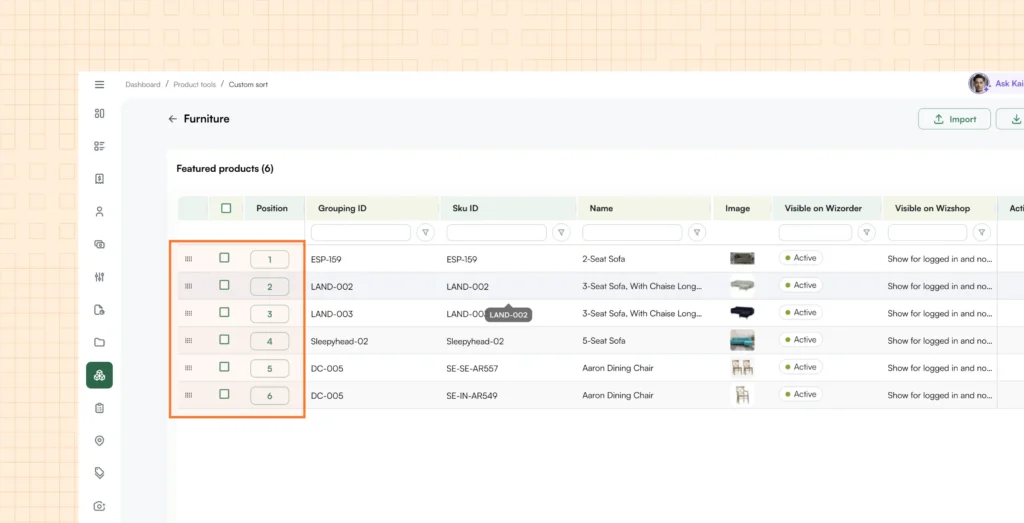
You can now manually control the order in which products appear on your category and collection pages.
Previously, product sorting on these pages was limited to system-driven defaults — alphabetical, by price, or other standard parameters. For most wholesale businesses, however, the first 10 to 15 products on a page carry outsized importance. Whether it’s a high-margin item, a seasonal bestseller, or a newly launched product — you need it front and center.
With Custom Sorting, you can navigate to the Sorting tab under Product Management, select any category or collection (across L1, L2, and L3 levels), and hand-pick the products you want to feature at the top. Add them to your Featured Products list, then drag and drop to set the exact display order. For the remaining products on the page, you can assign a default sort rule — such as New Arrivals, Price, or A-Z — so the rest of the catalog stays organized without manual effort.
This feature works across both WizOrder and WizShop, and also supports CSV-based import/export for teams that prefer to manage featured product lists in bulk.
Read more about Custom Sorting here.
2. Merge Customers & Leads
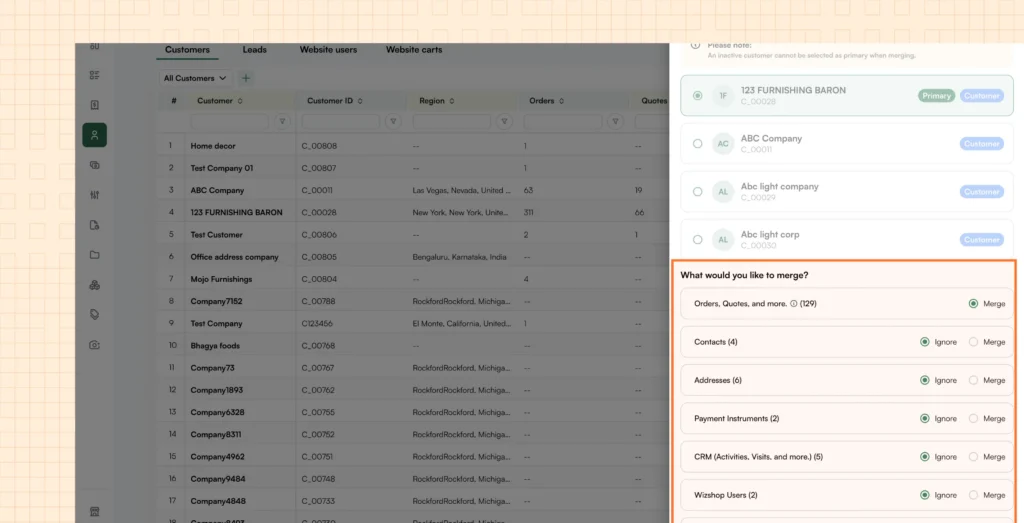
You can now merge duplicate customer and lead records into a single, unified entity — without losing any order history.
Duplicate records are one of the most common data quality issues in wholesale operations. Sales reps may unknowingly create multiple accounts for the same customer, or leads that converted into active buyers remain as separate entries. Previously, the only cleanup option was manual deletion, which meant permanently losing all order history, contacts, and payment details attached to the deleted record.
The Merge feature solves this. From the Customers tab in WizOrder, select the three-dot menu on any customer and choose Merge. You can then select up to 10 customers or leads to consolidate, designate one as the primary entity, and choose exactly which data to carry over — contacts, addresses, payment methods, and tokens. Orders and quotes are always merged automatically.
Progress is tracked in real-time through the notification bar. Once the merge is complete, the duplicate records are removed and the primary customer holds the full, combined history. The merge also handles ERP integration cleanly, so there’s no risk of downstream duplication.
This feature is enabled for all customers by default — no configuration or setup required.
Read more about Merge Customers & Leads here.
3. Product Search in Orders, Quotes & Drafts
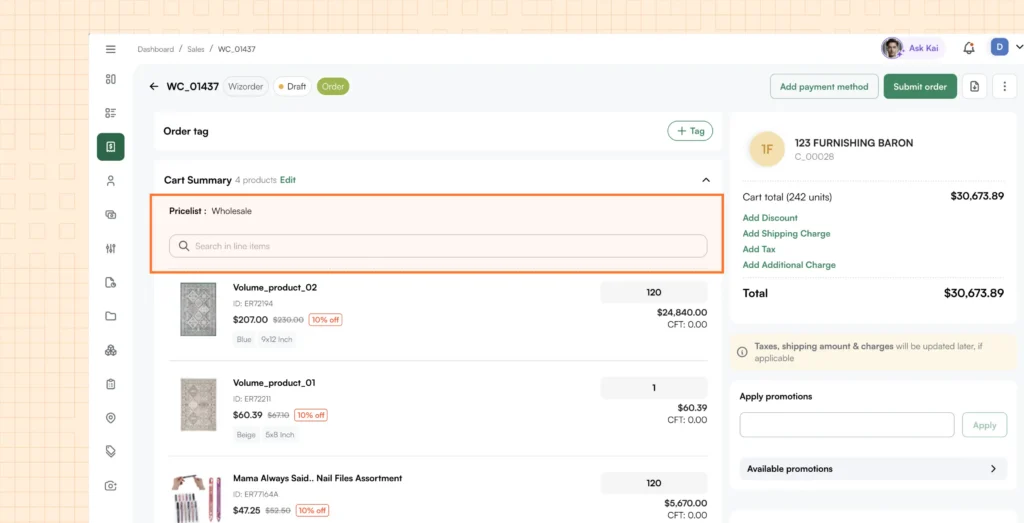
You can now search for specific products directly within any order, quote, or draft document.
When working with large orders containing 20, 50, or even 100+ line items, finding a specific SKU previously meant manually scrolling through the entire list. This was time-consuming and error-prone, especially when a rep just needed to quickly verify whether a product was included or check its quantity.
Now, every order, quote, and draft document includes a search field. Type in a SKU ID or product name, and matching items surface instantly. The search runs entirely client-side on the loaded document data, so results are immediate with zero network latency.
This works across all lifecycle stages — draft, confirmed, cancelled — and is available to all WizOrder users without any additional setup.
Read more about Product Search here.
4. No-Code Landing Page Creation
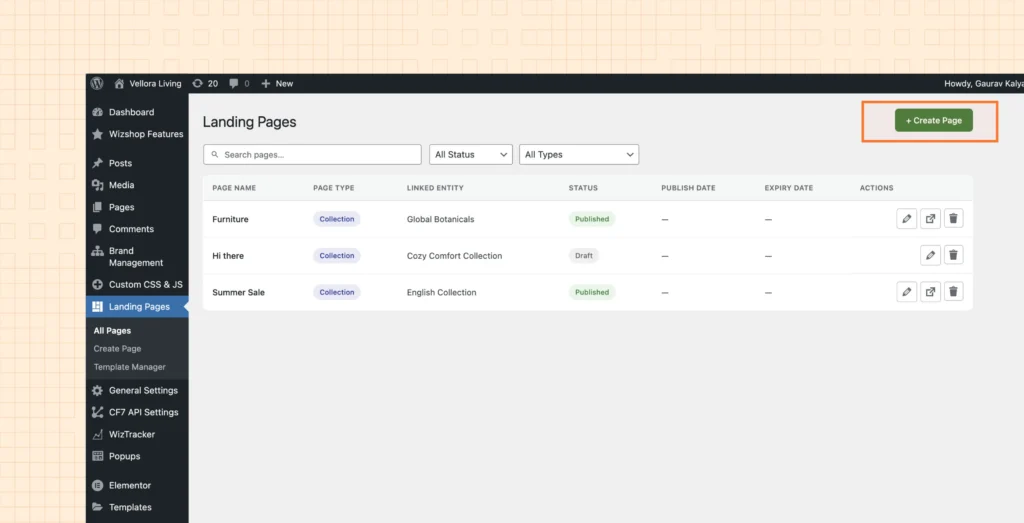
You can now create and publish branded landing pages on your no-code B2B e-commerce storefront – without writing any code or involving your development team.
Launching a new landing page for a seasonal promotion, product launch, or special campaign previously required coordination between marketing and development. A developer would build custom components, populate product data, test the page, and deploy it — a cycle that typically stretched to 2 to 3 weeks.
With No-Code Landing Pages in WizShop, the entire process takes approximately 5 minutes. Navigate to the Landing Pages section in your WordPress admin, select “Create New Landing Page,” and choose your product source — a collection, category, or product segment. The page automatically populates with the relevant products. From there, choose a ready-made template or start with a blank canvas, customize with your own images, videos, and copy, add SEO metadata, and select a custom URL.
You can preview your page before publishing, or schedule it for a future launch date. The system also applies intelligent design adjustments based on the customer viewing the page, ensuring a consistent branded experience across your buyer base.
Read more about No-Code Landing Pages here.
5. Confidence Score – AI Order Entry Assistant
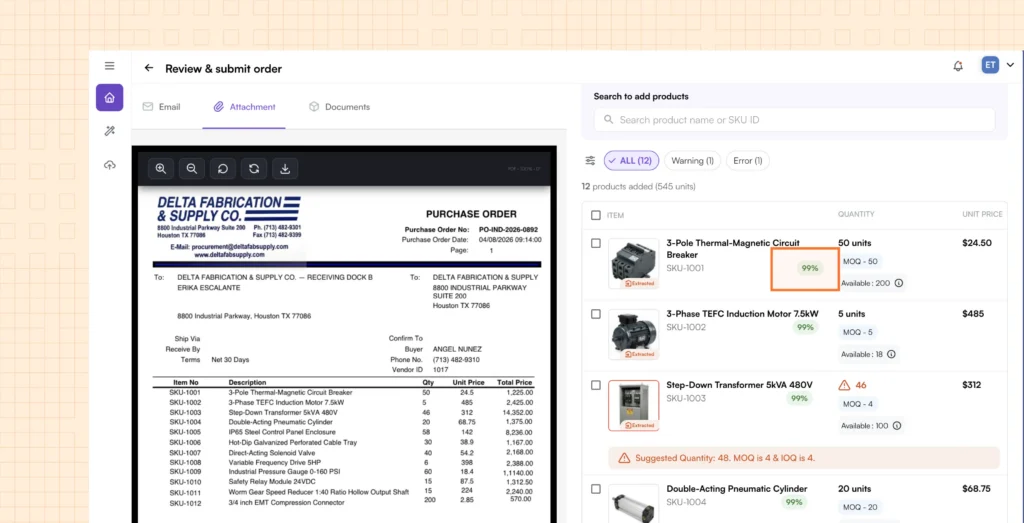
Ella now displays a confidence score for every field extracted from a purchase order, giving your team clear visibility into which data points need review and which can be trusted.
One of the most time-consuming parts of AI-assisted order entry was the manual verification step. After Ella extracted data from a PO, sales reps had to review every single field — SKU, quantity, price, customer details — to ensure accuracy. This manual check was necessary but undermined much of the time savings that automation was supposed to deliver.
The Confidence Score addresses this directly. Each extracted field now shows a score calculated through two layers of validation: first, the AI’s own assessment of how confidently it read the data from the document; second, a matching check against your ERP or system data, validating the SKU, description, and price against known records. The combined result is displayed as a visual indicator next to each field — making it immediately clear where human review is needed and where the extraction is reliable.
Low-confidence fields are highlighted so reps can focus their attention only where it matters, dramatically reducing review time. The scoring thresholds are configurable per tenant, and a future update will enable automatic ERP submission for orders that meet a defined confidence threshold.
Read more about Confidence Score here.
6. Manual File Upload – AI Order Entry Assistant
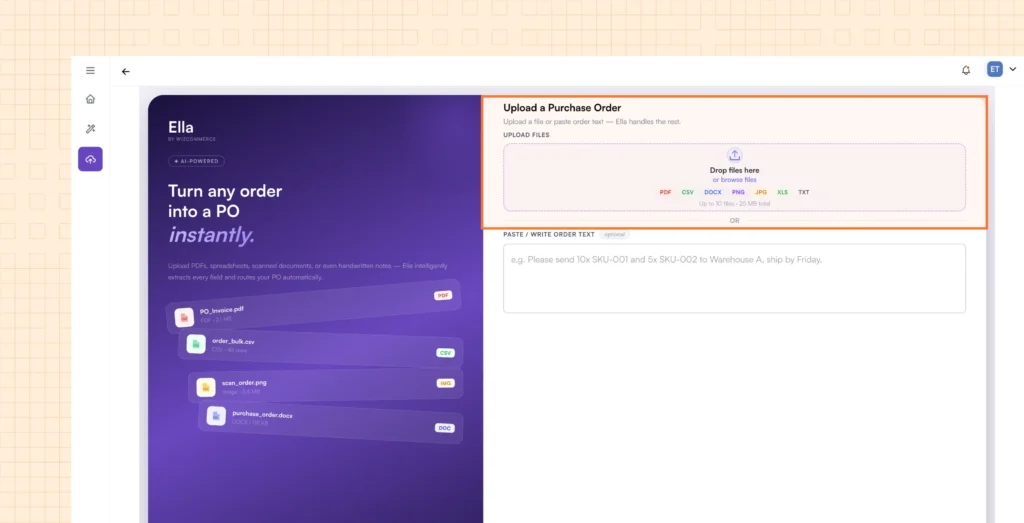
You can now upload purchase orders directly into Ella from any file, in any format — without routing them through email first.
Ella’s original workflow processed POs that arrived via connected email inboxes. But in practice, customers send purchase orders through many channels — WhatsApp messages, text, fax, or even handed over in person at trade shows. Forwarding these to a designated email address added an unnecessary step and delay.
With Manual File Upload, sales reps can go directly to Ella, open the Upload tab, and submit a PO in any supported format — PDF, Excel, Word documents, JPEG images, or plain text files. Before submitting, reps can also add natural language instructions specific to that order (for example, “apply the Q2 discount” or “ship to the Atlanta warehouse”).
The uploaded order is processed immediately through the same AI extraction pipeline and appears in the Ella dashboard once complete. Built-in duplicate detection prevents the same file from being processed twice within a session, avoiding duplicate orders and unnecessary processing costs.
Read more about Manual File Upload here.
7. Notifications Tab – AI Order Entry Assistant
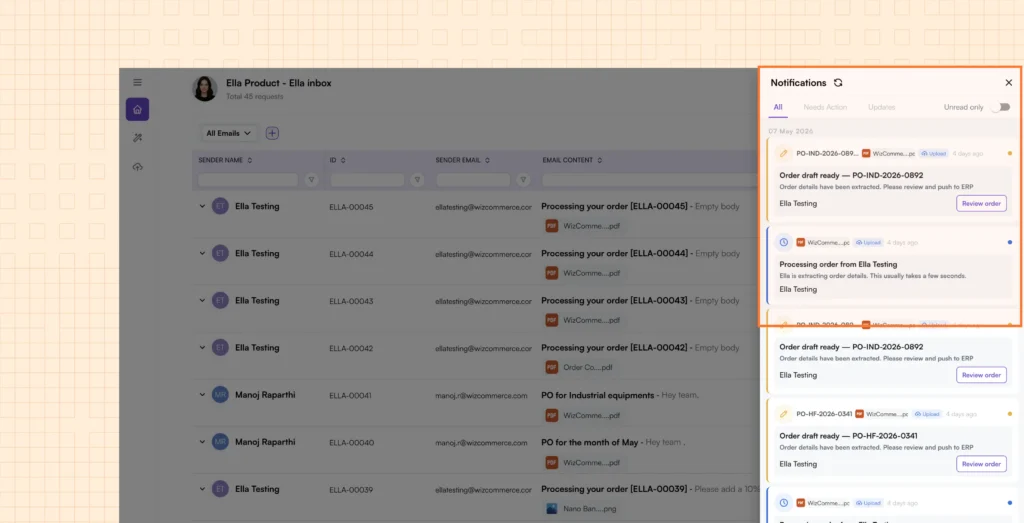
Ella now includes a dedicated Notifications Tab that provides a centralized, real-time view of every order’s status as it moves through the processing lifecycle.
As order volumes through Ella scale up, keeping track of which POs are still processing, which are ready for review, and which have been submitted to the ERP became increasingly difficult. Without a centralized view, orders could sit in draft state without anyone realizing they needed attention.
The Notifications Tab organizes all activity into three filterable categories. Needs Action surfaces POs requiring user review — items in draft status or flagged during processing. Updates shows system activity: orders processed successfully, submitted to ERP, or failed during submission. Unread filters to only new notifications, making it easy to catch up after time away.
This gives teams a single, always-accessible view of their Ella activity, ensuring no order falls through the cracks and action items are addressed quickly. A planned future enhancement will add workflow escalation — automatically flagging POs that remain unattended for more than 24 hours.
Read more about the Notifications Tab here.
8. Bulk Silo Image Editor – WizStudio
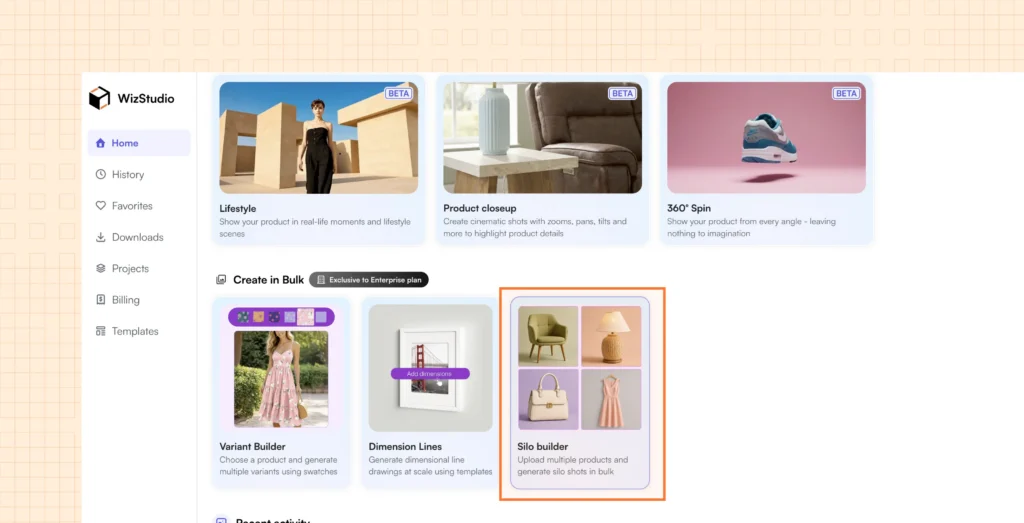
You can now transform up to 50 raw product images into clean, catalog-ready silo shots in a single batch — in seconds.
Wholesale businesses frequently receive unpolished factory photographs: cluttered backgrounds, inconsistent lighting, scratches, and reflections. Creating professional silo images from these raw shots traditionally meant editing each product one by one, a process that could stretch across 2 to 3 weeks for a full catalog update.
The Bulk Silo Image Editor eliminates this bottleneck. Upload up to 50 product images at once, and WizStudio automatically removes backgrounds, cleans up reflections and imperfections, straightens product angles, and applies consistent padding. From there, you can further customize in bulk or individually — add shadow presets, adjust background colors, or apply custom styling to match your brand.
You’re only charged when you download the finished images, at a rate of 0.2 credits per product. That means processing 50 product images costs just 10 credits.
This feature is available on the Free Trial and Project Plans, and included as part of the Yearly Enterprise Plan bundle.
Read more about the Bulk Silo Image Editor here.
9. Purchase Enterprise Plans – WizStudio
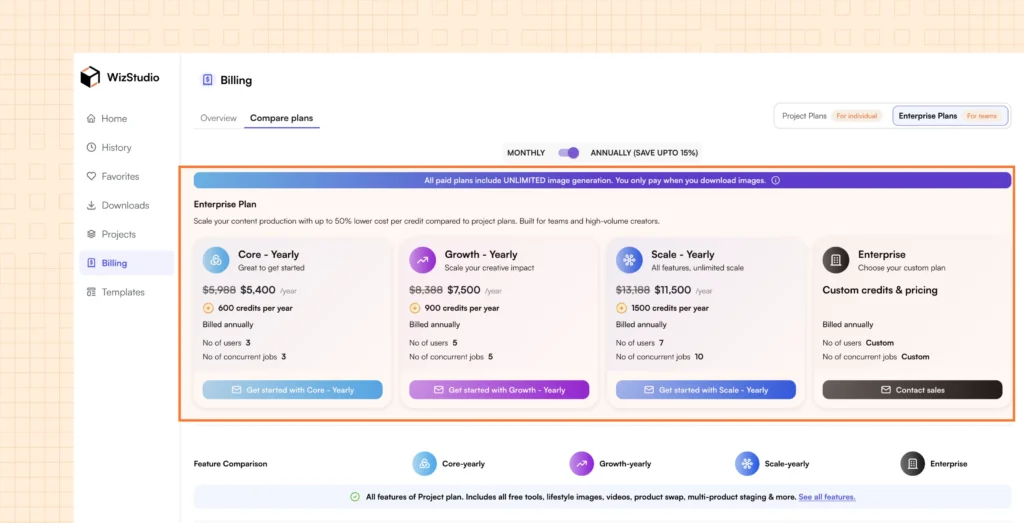
You can now purchase WizStudio subscription plans directly within the platform — no need to contact Sales.
Previously, upgrading to a paid WizStudio plan required reaching out to the sales team, waiting for a quote, and going through a manual procurement process. This created friction for teams that wanted immediate access to premium features and higher credit allocations.
Now, the WizStudio Billing page offers self-serve purchasing through integrated Stripe checkout. Browse the available plans — Growth, Core, and Scale — select monthly or yearly billing, and complete your purchase instantly. Credits are automatically added to your account based on your selected plan.
For teams with custom requirements, the Enterprise plan remains available through a dedicated “Contact Sales” option for a tailored engagement.
