Skip to content



When evaluating a B2B ecommerce platform, most wholesalers and B2B brands focus on one number: the monthly subscription fee displayed on the pricing page. While this figure may seem like the final cost of taking the B2B ecommerce route, it is only a small part of the overall investment. Zoey is a classic example of how this gap between “listed pricing” and “total cost of ownership” can emerge. In this guide, we will break down Zoey’s pricing plans in detail and help you understand what it truly takes to run your B2B business on this platform.

What is Zoey, and who is it best for?
Zoey is a B2B-focused ecommerce and order management platform that is designed primarily for wholesalers, distributors, and manufacturers. It is targeted at those looking to:
- Build an online channel to capture and process customer orders.
- Provide self-service ordering for their buyers.
- Offer mobile tools for their field sales teams.
- Gain structured controls for pricing visibility and approval workflows.
Zoey can integrate with several ERPs and accounting systems, making it relevant for companies with existing backend infrastructure. In addition to this, the platform supports the following B2B e-commerce features:
- Public and private storefronts
- Customer-specific ordering experiences
- Multi-user accounts with permissions
- Quick order forms
- Draft orders
- Automated billing
- Order splitting
If you are curious how Zoey fares against Shopify in terms of capabilities and value, check out this ultimate comparison guide: Zoey vs Shopify: Ecommerce Platform for B2B
Zoey pricing plans breakdown
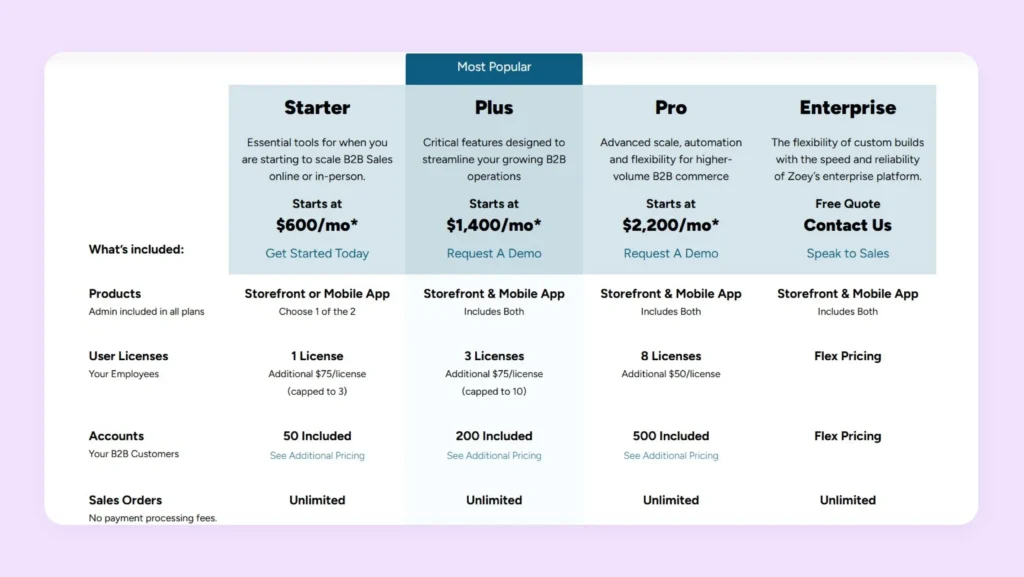
Zoey offers multiple pricing plans designed for different business sizes and goals. Here, we simplify each option by explaining who it is best for, what you get, and how much it costs for each plan:
1. Starter plan (Starts at $600/month)
Zoey’s Starter plan is designed for B2B businesses that are beginning to scale their online or in-person sales operations. It includes access to either the Zoey storefront or the mobile app. Apart from this, you get one user license and support for up to 50 customer accounts. Sales orders are unlimited, and you receive basic order management, CRM, invoicing, and payment features, such as saved cards and ACH.
2. Plus plan (Starts at $1,400/month)
This plan targets growing B2B companies that require more operational structure and system connectivity. It includes both the storefront and mobile app. You get three user licenses and support for up to 200 customer accounts. In addition to core ecommerce and CRM features, this plan introduces key integrations such as QuickBooks and ShipStation, API training, invoice automation, auto-pay, backorder management, and support for up to three inventory locations.
3. Pro plan (Starts at $2,200/month)
This plan is built for higher-volume B2B operations that need greater automation and system control. It includes eight user licenses and support for up to 500 customer accounts. You also gain access to all standard Zoey integrations. This tier offers advanced capabilities such as recurring orders, sales quotes, multi-currency and multi-language support, single sign-on, sandbox environments, and up to ten inventory locations.
4. Enterprise plan (Custom pricing)
This plan is designed for large or highly specialized B2B organizations that require custom workflows and development. It includes unlimited user scalability, unlimited inventory locations, and full access to all Zoey features, along with the ability to build custom functionality and system connections. This tier supports advanced API usage and custom integrations, making it suitable for companies with complex ERP, logistics, or multi-entity structures.
What are the additional Zoey costs to consider?
The prices outlined in the previous section reflect only the base cost of using the platform. Depending on your business size and operational complexity, you may incur certain additional expenses. Below are the key cost areas to consider when calculating your total investment:
Onboarding and Implementation Fees
Getting started with any advanced ecommerce platform like Zoey requires structured onboarding and implementation support. This is to ensure that the platform is configured correctly. Onboarding typically includes activities related to account setup, workflow configuration, team training, initial testing, etc.
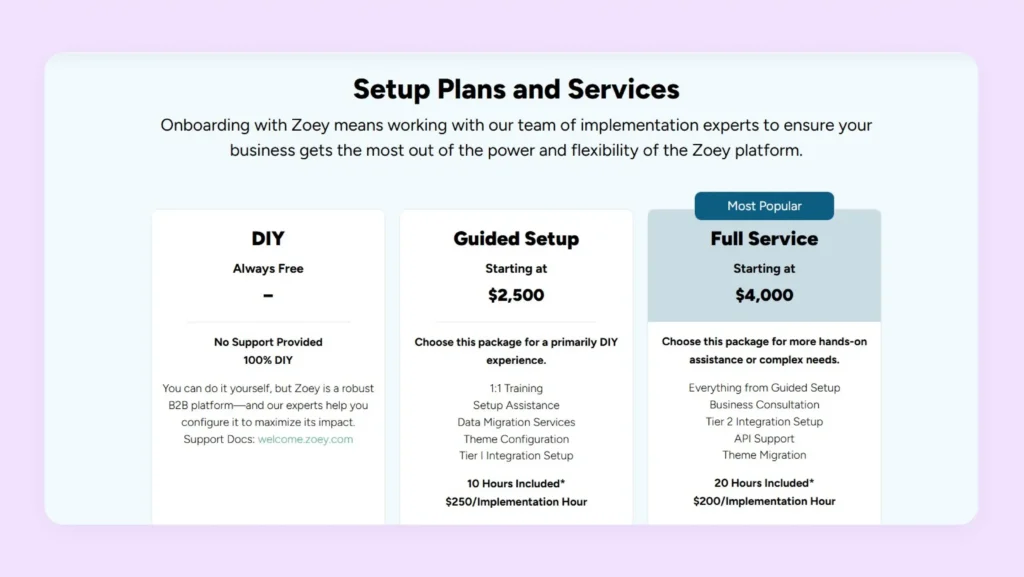
To help with these tasks, Zoey offers an add-on called Guided Setup that starts at $2500. It offers 1:1 training, setup assistance, data migration services, theme configurations, etc. Unless you have dedicated specialists in-house, you need to purchase this add-on to reduce launch risks.
Theme Migration
If you already have an existing storefront theme, migrating it into Zoey is often the right move. It helps preserve brand consistency and user familiarity during platform transitions. However, a poorly executed migration or complete redesign can negatively impact user experience and conversion rates. Now, theme migration is not included in Zoey’s standard plans or the Guided Setup add-on. It is available only through Zoey’s Full Service package, which starts at $4,000, making it an important cost to factor into your overall investment.
New Theme Design
Custom theme design strengthens your brand identity and improves usability across devices. A well-designed storefront enhances your credibility and can directly influence customer engagement and conversion rates.
For creating a fully customized storefront, Zoey offers a Theme Design add-on starting at $7,500. This package includes branding consultation, custom page development, mobile optimization, SEO review, and multiple revision cycles. It allows you to create a visually distinct and high-performing ecommerce experience tailored to your business goals.
Payment Gateways
Zoey integrates with major payment providers such as Stripe, Authorize.net, and PayPal to ensure that your transaction processing is seamless. However, these gateways charge their own transaction and service fees, which are separate from Zoey’s subscription. Typically, you can expect fees ranging from 2.5% to 3.5% per transaction, along with possible fixed charges per payment. As your order volumes increase, these recurring fees can become a critical part of the total operating cost.
Marketing, Accounting, and Communication Tools
To manage day-to-day operations efficiently, many businesses integrate Zoey with third-party tools for marketing, accounting, and customer communication. While Zoey supports connections with platforms such as QuickBooks, Klaviyo, and LiveChat, these tools are billed separately— and brands producing their own product visuals often add a tool like Flair.ai to that stack as well. These recurring software costs can significantly increase the total cost of running a Zoey-powered store over time. Here are the estimated expenses:
- Marketing tools: $150 to $750 per year
- Accounting tools: $100 to $500+ per year
- Communication tools: $100 to $500+ per year

Is Zoey worth the cost?
By now, you would have realized that when evaluating Zoey’s pricing, you have to look beyond the subscription fee. You need to consider the total cost of ownership, which includes costs associated with onboarding, theme migration, theme design, payment gateways, and third-party tools. These factors significantly influence Zoey’s long-term affordability.
Below is an indicative estimate of how additional expenses can add to Zoey’s Plus plan, which is the most realistic “default” for growing B2B brands:
| Category | Cost per year |
| Zoey Plus subscription | $16,800 |
| Guided Setup (add-on) | $2,500 |
| Theme Migration ( Extra cost to pay over the cost of Guided Setup add-on) | $1500 |
| Theme Design | $7500 |
| Payment Gateway Fees | 2.5% to 3.5% |
| Marketing Tools | $150-$750 |
| Accounting Tools | $100-$500 |
| Communication Tools | $100-$500 |
| Estimated Total Cost of Ownership | $28,650 – $30,050 + Payment Gateway Fees |
With a total cost of ownership hovering above $28,650, it’s clear that Zoey is better suited to the budget of large enterprises with deep pockets.
Companies with advanced workflows and multi-system integrations benefit most from its unified architecture, while small and medium-sized businesses may find the platform less cost-effective. For such businesses, Zoey alternatives are delivering better cost efficiency. WizCommerce is tailor-made for such businesses.
WizCommerce: A value-focused alternative to Zoey for wholesale brands
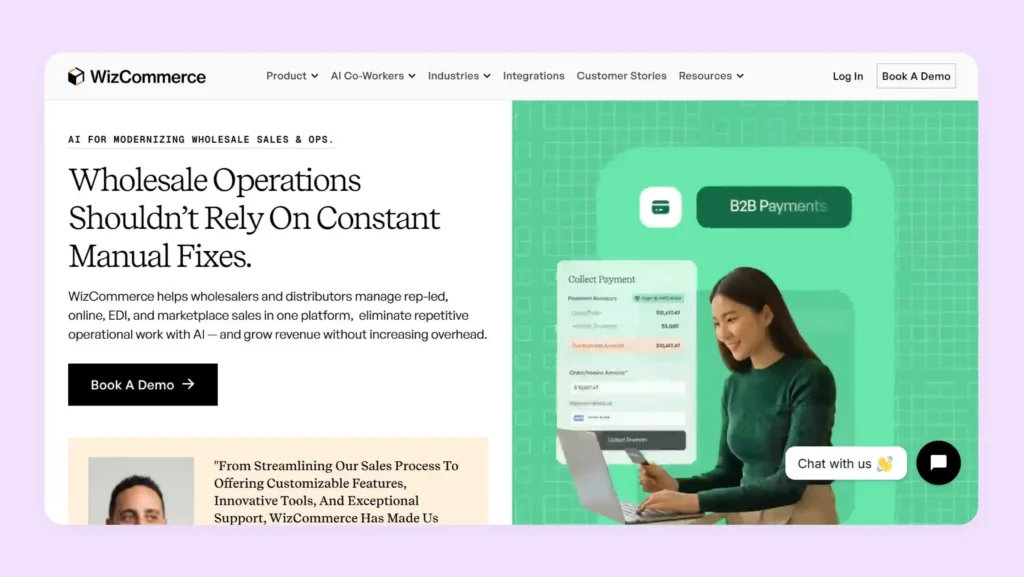
For B2B and wholesale businesses seeking a platform with advanced B2B features at more predictable costs, WizCommerce stands out in the list of Zoey competitors. While Zoey requires additional spending on setup, design, onboarding, and technical support, no such costs are required in WizCommerce as it is a beginner-friendly B2B ecommerce solution that can be configured and used without additional help.
Another key advantage is WizCommerce’s native support for wholesale workflows. Features such as customer-specific pricing, bulk ordering, order approvals, catalog management, support for trade shows, and sales rep tools are available out of the box. This eliminates the need for custom development or third-party tools, making day-to-day operations easier to manage.
Overall, WizCommerce is well-suited for wholesale brands that prioritize cost control, faster implementation, and built-in B2B functionality over extensive customization. Its all-in-one model makes it especially attractive for growing distributors and manufacturers that want reliable performance without escalating ownership costs.
Want to explore WizCommerce first-hand? Book a personalized demo to see how it fits your wholesale operations.
Frequently Asked Questions
Does Zoey offer a free trial or demo before purchasing a plan?
Zoey does not offer a free trial or demo before purchasing a plan in the traditional sense. However, interested businesses can request a personalized product demo to understand the platform’s features and suitability. These demos are usually guided by Zoey’s sales team and it is the only way to evaluate the platform before committing to a paid plan.
Are there any extra fees or hidden costs with Zoey pricing?
There are extra fees and additional costs with Zoey pricing beyond the base subscription. These include costs related to onboarding, theme migration, custom design, payment gateway fees, and third-party software subscriptions. Although not “hidden,” these expenses are often not reflected on the main pricing page and can significantly impact the total cost of ownership over time.
Can I switch between Zoey pricing plans easily if my business grows?
You can switch between Zoey pricing plans as your business grows, with upgrades from Starter to Plus or Pro handled through Zoey’s account management team. However, planned upgrades may involve contract changes and additional setup requirements, which will have an impact on your total cost of ownership. It’s advisable to discuss scalability and upgrade terms in advance to avoid unexpected costs or service disruptions.
Do Zoey’s advanced pricing features cost extra?
Zoey’s advanced pricing features do cost extra as they’re tied to higher-tier plans. Basic pricing tools are included in lower tiers, but capabilities like complex discounting and advanced integrations often require plan upgrades. In some cases, additional setup or customization fees may also apply.
Are discounts or promotions available on Zoey pricing plans?
Discounts or promotions are not typically advertised on Zoey pricing plans publicly. However, promotional pricing, custom offers, or negotiated rates may be available for long-term contracts and enterprise customers. You can discuss Zoey’s cost flexibility directly with Zoey’s sales team during the demo or onboarding process.
What kind of customer support is included with each Zoey plan?
Customer support included with each Zoey plan varies by tier and typically features ticket-based or phone support during business hours. Higher-tiered plans offer faster response times and access to shared account managers. Premium or enterprise-level support, which includes priority assistance and a dedicated customer success manager, is available only in the Enterprise plan.
Is Zoey’s pricing suitable for small businesses or startups?
Zoey’s pricing is not suitable for small businesses or startups due to high total cost of ownership. While the Starter plan provides basic functionality and a functional customer portal for your buyers to place orders, additional setup and configurations are required to streamline your day-to-day commerce operations. This can raise the overall investment. Zoey is generally better suited for large or established wholesale businesses that can fully utilize its advanced features and justify the higher total cost of ownership.
How does Zoey’s pricing compare to Odoo and Magento?
Zoey’s pricing compares to Odoo and Magento differently based on total cost of ownership. Zoey starts at $600/month with additional setup costs exceeding $28,000 annually. Magento requires significant development investment and hosting fees, often surpassing Zoey’s costs. Odoo offers modular pricing starting lower but scales with add-ons. For predictable B2B pricing without hidden costs, WizCommerce provides better value than all three platforms.