Skip to content



E-Commerce website architecture is the layered structure of systems (front-end, commerce logic, integrations, and data) that make an online store work. For B2B, that structure carries extra weight, because a wholesale site has to model customer-specific pricing and stay in sync with an ERP. This guide covers the reference architecture, the main architecture types, the B2B-specific layers, two diagrams, and how to choose a stack.
What is e-commerce website architecture?
E-Commerce website architecture is the way a store’s software layers are organized: the front-end presentation, the commerce engine (catalog, cart, pricing), the integration layer to back-office systems, and the data and infrastructure beneath them. It defines how those layers talk to each other and how the whole system scales.
For a B2B e-commerce website, architecture matters more than it does for a consumer store because of two requirements: pricing is customer-specific (so the commerce layer needs a real pricing engine), and the ERP is the source of truth (so the integration layer is first-class, not an afterthought). Get the structure right and the site stays fast and accurate; get it wrong and buyers see stale stock and the wrong price.
What does a B2B e-commerce website architecture look like?
A modern B2B e-commerce website architecture, whether custom-built or running on a B2B e-commerce portal for wholesale catalogs, has five layers: presentation, commerce, integration, data, and infrastructure. The design goal is to keep the ERP as the source of truth and never duplicate the product master in the storefront.
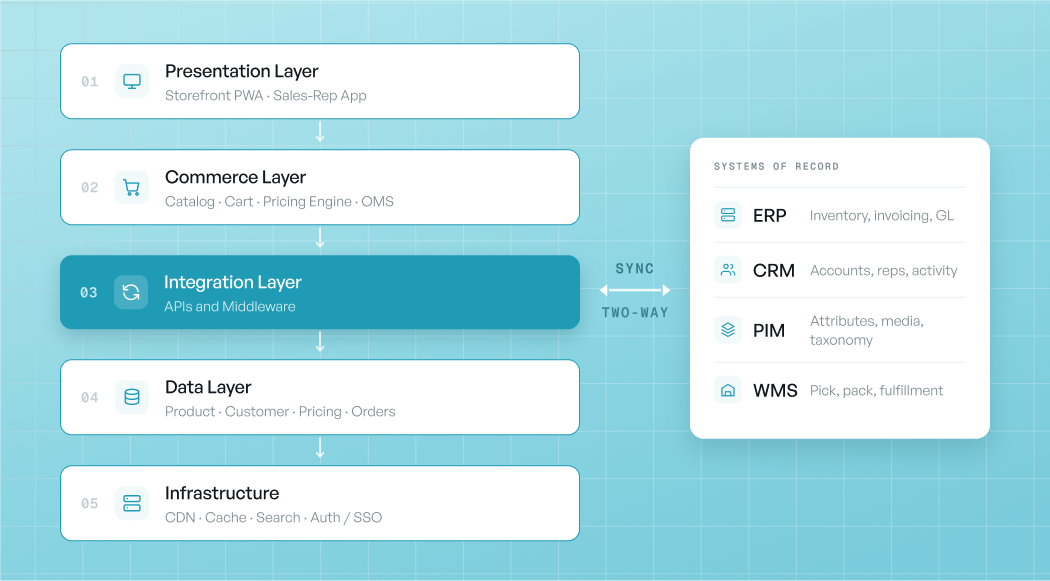
- Presentation layer: the storefront (often a PWA in React or Vue) and any sales-rep ordering app.
- Commerce layer: catalog, cart, order management, and the pricing engine that applies customer-specific and tier pricing.
- Integration layer: APIs and middleware connecting to the ERP, CRM, PIM, and WMS.
- Data layer: the canonical product, customer, pricing, and order records.
- Infrastructure: CDN, caching, search (such as Algolia or Elasticsearch), and authentication or SSO.
What are the main types of e-commerce website architecture?
The main types are monolithic, headless, microservices, MACH, and SaaS. They differ in how tightly the front-end, commerce logic, and integrations are coupled. Your choice sets how fast you can change the site and how much engineering you own.
| Architecture type | What it is | Best for | Trade-off |
|---|---|---|---|
| Monolithic | Front-end and back-end in one codebase | Simple stores, small teams | Hard to scale or change independently |
| Headless | Front-end decoupled from commerce back-end via APIs | Custom front-ends, fast UX changes | More moving parts to manage |
| Microservices | Commerce broken into independent services | Large, complex catalogs and teams | High engineering overhead |
| MACH | Microservices, API-first, cloud-native, headless | Enterprise composability | Most complex; needs mature teams |
| SaaS | Vendor-hosted, configured not coded | Most wholesalers wanting speed | Less low-level control |
For most wholesalers, a SaaS or headless B2B platform gives the right balance of speed and control. Monolithic and full-microservices sit at the two extremes. To compare actual platforms, see the best B2B e-commerce platforms.
What is monolithic vs headless architecture?
Monolithic architecture keeps the front-end and back-end in one system; headless separates them so the front-end calls the commerce engine through APIs. Headless lets each layer scale and change independently, which is why it underpins most modern B2B builds.
The practical difference: with a monolith, a front-end change can mean a full redeploy; with headless, the storefront and the commerce engine evolve separately. Headless also makes it easier to serve multiple front-ends (a buyer storefront and a sales-rep app) from one commerce back-end, which is common in B2B.
What are the B2B-specific layers most guides miss?
B2B e-commerce architecture adds four components a consumer store does not need: a pricing engine, an ERP integration layer, an account and catalog service, and punchout or EDI support. These are where general architecture guides stop and B2B begins.
- Pricing engine: applies customer-specific and tier pricing, contract pricing, and per-catalog price modes at request time.
- ERP integration layer: keeps the ERP as the source of truth, syncing products, prices, inventory, and orders bidirectionally. See B2B e-commerce ERP integration.
- Account and catalog service: resolves which catalog, assortment, and pricing each logged-in account sees.
- Punchout and EDI: connects to enterprise procurement systems for large buyers.
How does data flow through a B2B e-commerce website?
In a well-architected B2B site, products, prices, and inventory flow from the ERP into the storefront, and orders flow back to the ERP, with the ERP holding the canonical record. This one-way-source, two-way-sync pattern prevents the data drift that breaks older sites.
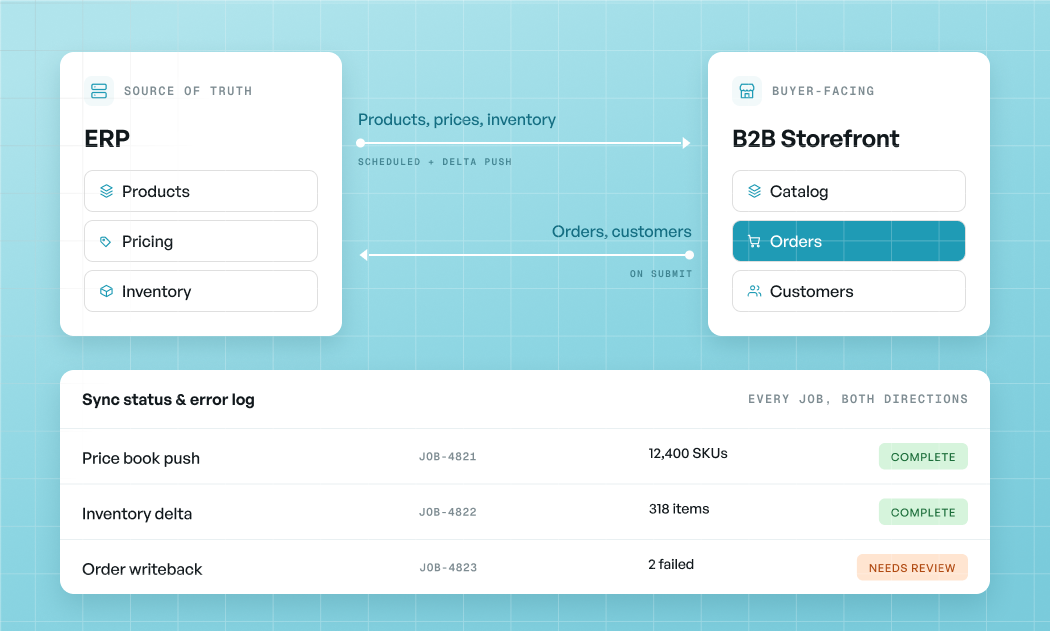
When the storefront keeps its own copy of products and prices instead, the two systems drift and buyers see stale stock. A visible sync-status log is what lets a team catch and fix failed syncs early.
How do search, caching, and performance fit the architecture?
Search and caching sit in the infrastructure layer and are what keep a large B2B catalog fast. B2B catalogs are often huge and searched by SKU or part number, so a dedicated search service matters more than on a small consumer store.
- Search: a dedicated engine (Algolia, Elasticsearch, or similar) for fast SKU, part-number, and parametric search.
- Caching: a CDN and application cache for catalog and content, with account-specific data (pricing, cart) kept dynamic.
- Performance: the pattern is to cache what is shared and compute what is personal, so account pricing stays correct while the catalog stays fast.
How do security and SSO work in B2B e-commerce architecture?
Security in B2B architecture centers on authentication, role-based access within accounts, and data isolation between accounts, layered on PCI-compliant payments. A single login can expose contract pricing, so access control is architectural, not cosmetic.
- Authentication and SSO: SAML or OAuth single sign-on, since buyers often use corporate identity systems.
- Role-based access: control who within an account sees pricing, places orders, and approves them.
- Account data isolation: one account can never see another’s pricing or orders.
- PCI-compliant payments: card and ACH data tokenized and handled by a compliant processor.
What are the scalability patterns for B2B e-commerce?
The main scalability patterns are horizontal scaling of stateless services, decoupling the front-end from the commerce engine, offloading search and media, and asynchronous ERP sync. These let a site grow with catalog size and traffic without a rebuild.
- Stateless, horizontally scaled services behind a load balancer.
- Decoupled front-end so traffic spikes do not stall the commerce engine.
- Offloaded search and media to dedicated services and a CDN.
- Asynchronous, queued ERP sync so a slow back-office job does not block the storefront.
What does a reference B2B e-commerce stack look like?
A typical modern B2B stack is a headless or SaaS commerce platform, a React or Vue front-end, a dedicated search service, pre-built ERP connectors, and cloud infrastructure with a CDN. The exact tools vary, but the shape is consistent.
A representative stack: a PWA storefront and a sales-rep app on the presentation layer; a B2B commerce solution with a pricing engine on the commerce layer; pre-built connectors or middleware (such as native connectors, MuleSoft, or Workato) on the integration layer; the ERP, PIM, and databases on the data layer; and a CDN, cache, search service, and SSO on the infrastructure layer. For how this gets built step by step, see how to build a B2B e-commerce website.
How does WizCommerce architect a B2B e-commerce website?
WizCommerce is a SaaS B2B commerce platform, so the pricing engine and ERP integration are core, which means wholesalers get a source-of-truth architecture without building it.
- Commerce layer with a pricing engine: customer-specific and tier pricing applied on login, with per-account catalogs.
- Integration layer as a first-class component: bidirectional sync with NetSuite, QuickBooks, Sage, and Microsoft Dynamics, keeping the ERP as the source of truth. See the NetSuite e-commerce integration.
- Multiple front-ends from one back-end: WizShop, the b2b e-commerce platform for buyers and WizOrder, the sales rep app for reps, sharing the same commerce engine.
- Infrastructure handled: search, caching, security, and SSO managed by the platform rather than your team.
See how a rug manufacturer streamlined ERP-connected ordering.

FAQs on B2B E-Commerce Website Architecture
1. What is e-commerce website architecture?
E-commerce website architecture is how a store’s software layers are organized: the front-end presentation, the commerce engine (catalog, cart, pricing), the integration layer to back-office systems, and the data and infrastructure beneath them. It defines how the layers communicate and scale.
2. What is the best architecture for a B2B e-commerce website?
For most wholesalers, a SaaS or headless architecture is best, because it balances speed to launch with the ability to model customer pricing and connect an ERP. Full microservices or MACH suit large enterprises with mature engineering teams.
3. What is the difference between monolithic and headless e-commerce architecture?
Monolithic keeps the front-end and back-end in one system, while headless separates them so the front-end calls the commerce engine through APIs. Headless lets each layer scale and change independently and can serve multiple front-ends from one back-end.
4. What are the layers of an e-commerce website architecture?
The five common layers are presentation (storefront and apps), commerce (catalog, cart, pricing engine, order management), integration (APIs and middleware to ERP, CRM, PIM), data (canonical records), and infrastructure (CDN, cache, search, authentication).
5. Why is ERP integration part of B2B e-commerce architecture?
Because the ERP holds the canonical product, price, inventory, and customer data. Making the integration layer first-class keeps the ERP as the source of truth and stops the storefront from drifting out of sync.
6. What is MACH architecture?
MACH stands for Microservices, API-first, Cloud-native, and Headless. It is a composable approach that lets enterprises assemble best-of-breed components, at the cost of higher complexity and a need for mature engineering.