Skip to content



Order entry is the back-office function that quietly decides how much revenue a B2B business captures. A miskeyed SKU, a missed price tier, or a PO sitting in an inbox for three hours; these are small leaks that compound into millions of dollars a year. AI order entry has moved from category curiosity to core operations layer in the last two years, and the shift is mostly invisible until a wholesaler runs the math on a single trade-show week.
This guide covers what the AI ordering, how it processes purchase orders, where it earns its keep across industries, and what it looks like inside wholesale and distribution operations specifically. The deep-dive layer goes to wholesalers and distributors because that is where order-entry chaos peaks.
What is an AI order entry?
AI order entry is the process of reading the incoming purchase orders in any format (email, PDF, Excel, EDI, scanned image, voicemail), extracts the line-item data, validates it against the ERP, and create a ready-to-submit sales order with exceptions flagged for review. It replaces the manual rekey step that sits between a customer’s PO and the system of record, and it does that without forcing customers to standardize how they send orders in the first place.
A working definition
The day-to-day reality is straightforward: a customer sends a PO, someone reads it, finds the customer record, maps each line to an internal SKU, checks pricing against the contract, and types the order into the ERP. AI order entry collapses every step of that into one automated pass that the operator only reviews when something is genuinely ambiguous.
The shift is from a chair-bound data-entry job to an exception-handling job, and the operator still owns the final decision on anything the system flags. Inside sales teams know the truth: when you key orders all day, errors stack up. The risk is not unique to any one operator. It is structural, and the only way out of it is to take the rekey step off the desk entirely.
How AI order entry differs from OCR
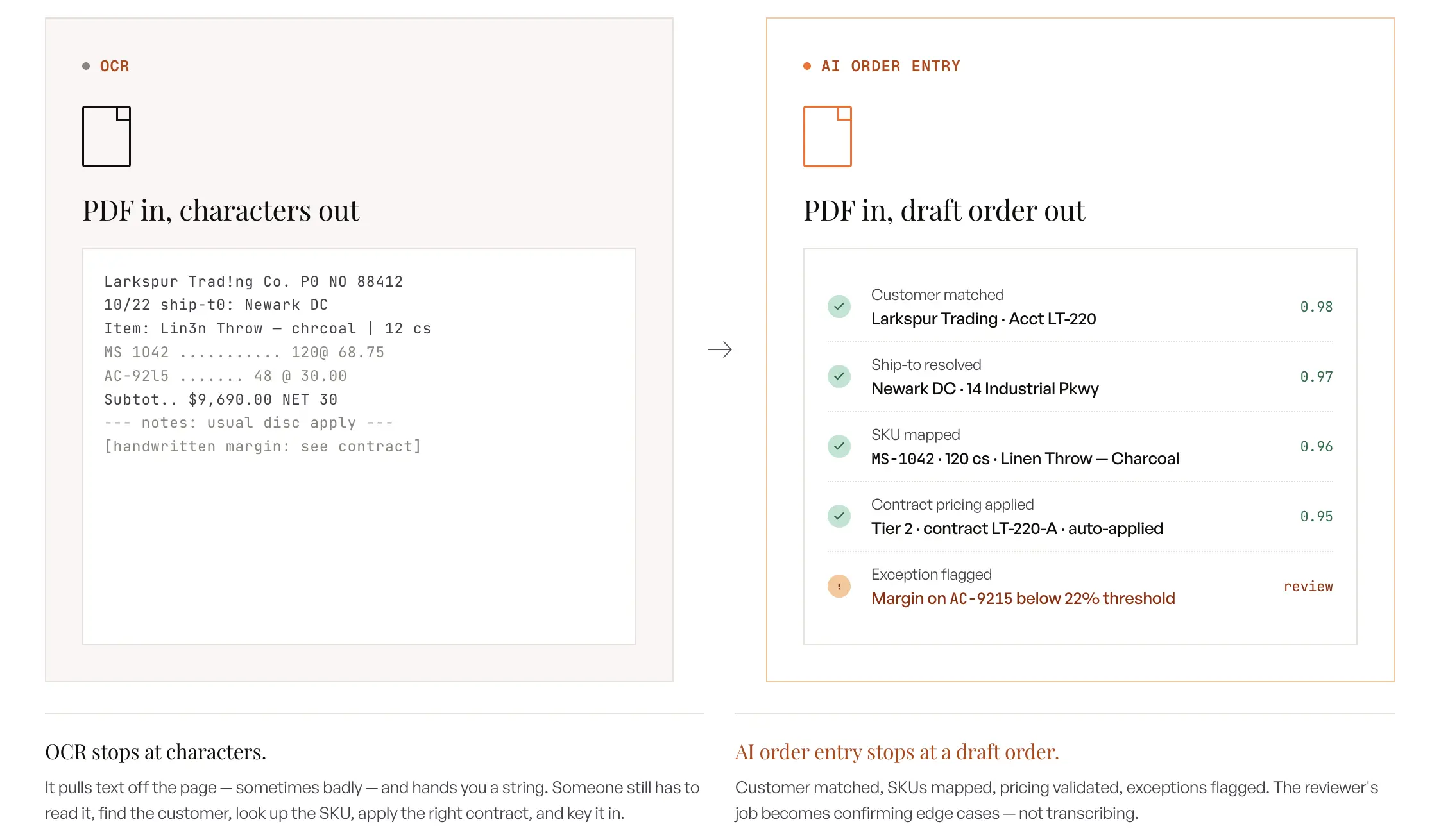
OCR is a literal conversion layer that turns pixels into characters and stops there, which means the operator still has to read the characters, find the SKU in the ERP, and key the order line by line. AI order entry starts where OCR ends. It maps the extracted text to the right SKU in the seller’s catalog, applies the customer’s contract pricing, checks inventory and MOQ rules, and produces a draft sales order ready for either auto-push or one-click review. The shift is from raw text to a fully validated order, which is what makes the workflow scalable across a real wholesale inbox.
How it differs from RPA (robotic process automation)
RPA scripts a fixed sequence of clicks across a fixed set of screens and breaks the moment a field moves or a layout changes. That brittleness is fine on a stable internal portal where nothing changes for a year, and it is fatal on an inbox where every customer ships a different format. AI order entry handles format variability natively because it reads documents semantically rather than positionally, which means a new layout from a returning customer does not break the pipeline. The maintenance cost is also fundamentally different, since AI learns new patterns from one correction while RPA needs a developer to update the script.
How it differs from EDI
EDI is a pre-negotiated schema between two trading partners, and it is genuinely the right tool for high-volume customers who can absorb the setup cost on their side. The problem is that EDI covers maybe the top ten to twenty customers in a typical wholesale book, while the long tail of buyers will never sign up for EDI no matter how hard the seller pushes. AI order entry covers that long tail without making customers change anything about how they place orders, which is the real unlock for wholesale operations.
Where it sits in the existing tech stack
AI order entry system lives between the inbound channels (email, fax-to-email, marketplace exports, rep submissions) and the ERP, and it does not replace either side. It feeds the ERP a cleaner queue of orders than a human typist ever could, and it pulls reference data from the ERP to validate every line before the order gets created. The right mental model is a cleaner feed into the existing system of record, not a rip-and-replace of anything currently in place. When wholesale operators evaluate an AI ordering system, they are not looking at a restaurant POS; they are looking at the inbound pipeline from email to ERP.
How does AI process purchase orders?
AI processes purchase orders in six steps: ingest, extract, map to SKUs, validate, flag exceptions, and create the order. Clean POs complete end-to-end in under two minutes. The flow is the same whether the inbound document is a PDF, a typed email body, a handwritten note, or a marketplace export.
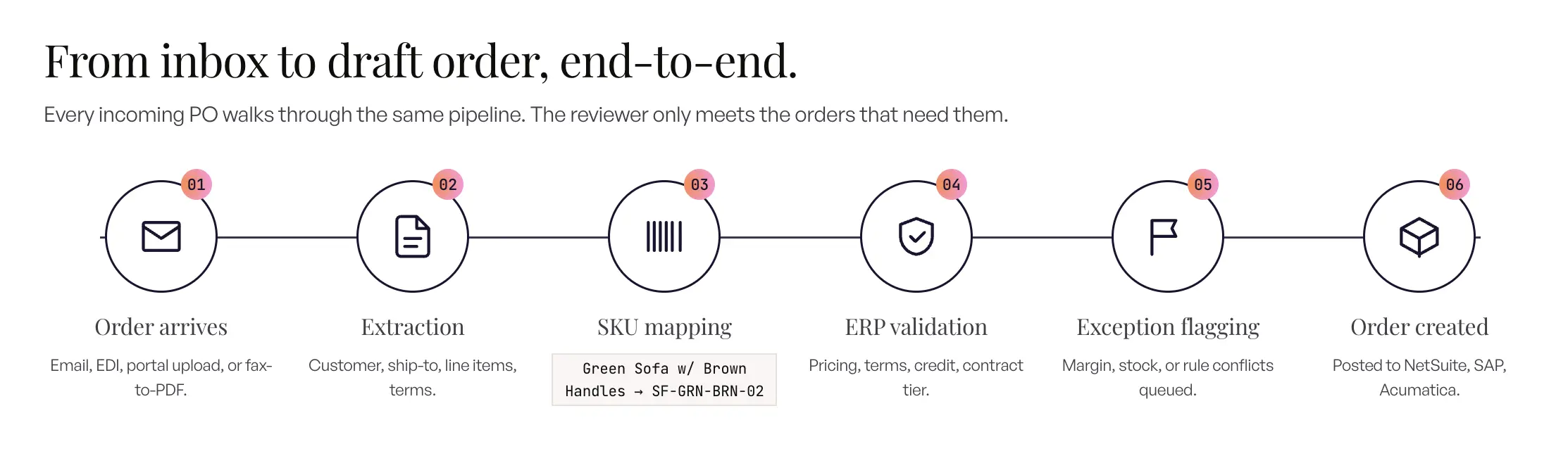
Step 1: Order arrives in any format (email, PDF, EDI, image, voicemail, API)
The PO lands in a monitored inbox, gets forwarded from a rep, uploads through an API, or arrives as a fax-converted image. Format does not matter at the intake layer because the system is built around the assumption that customers will send what they send, in whatever shape they choose. Sellers stop trying to standardize inbound and start standardizing the back-end, which is the cleaner half of the problem to own.
Step 2: Extraction across formats
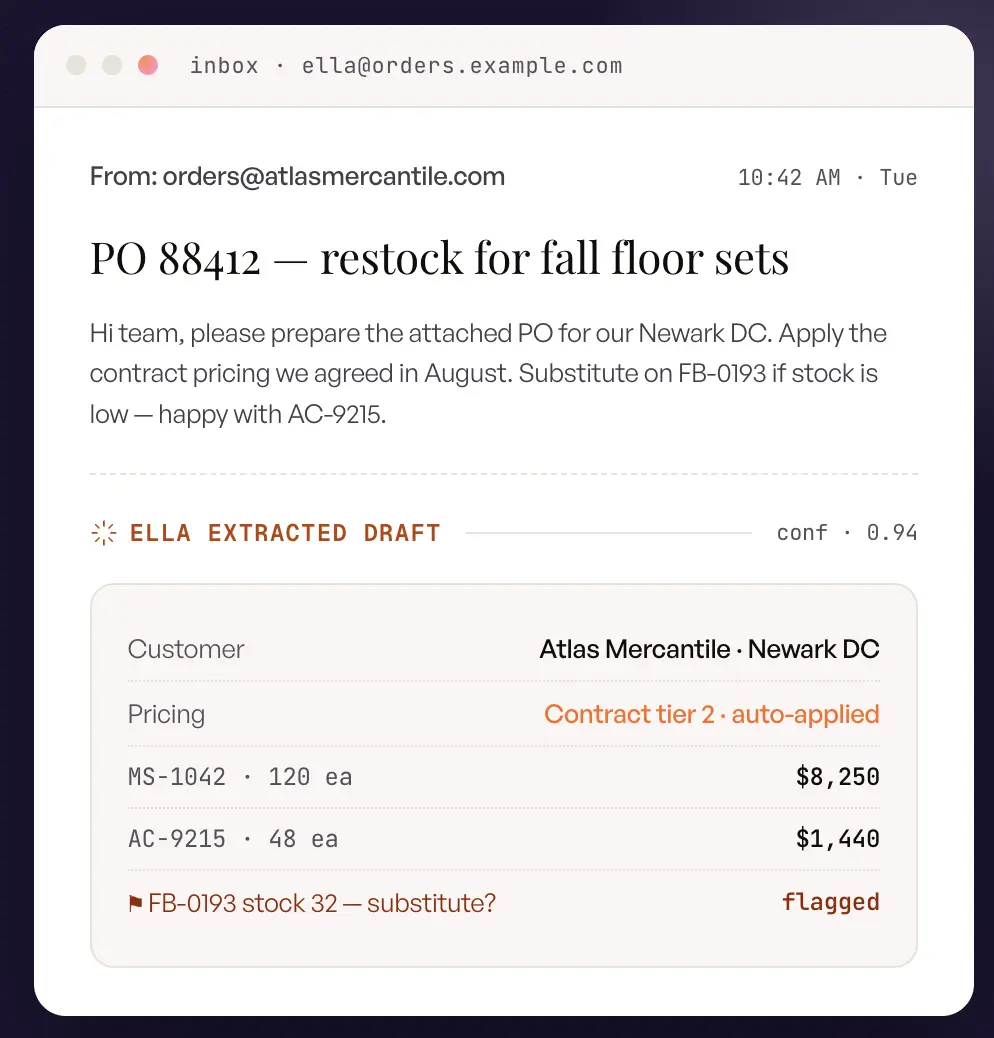
The AI identifies the customer, finds the line items, and pulls quantities, descriptions, prices, ship-to addresses, PO numbers, and free-text notes from inside the document. Scanned PDFs, handwritten notes, email-body orders, and Excel attachments with custom column headers all parse cleanly through the same extraction pipeline. The system reads documents semantically, which means a new format from a returning customer does not need a new template to be built. This is the heart of AI order processing as it runs in production.
Step 3: SKU mapping (including customer-specific part numbers)
This is the step where every static tool breaks and where AI order entry earns most of its keep. A customer might type “Green Sofa with Brown Handles” in the PO, and the system maps that description to internal SKU SF-GRN-BRN-02 using the catalog and any prior corrections on file. When a customer sends their own part numbers instead of the supplier’s, the AI maps them against a cross-reference learned from order history, and one operator correction holds forever. That is the difference between tribal SKU knowledge living in one CSR’s head and a cross-reference that survives the day the CSR leaves.
Step 4: ERP validation (pricing, MOQ, inventory, customer rules)
Every line gets checked against the customer’s pricing tier, contract pricing, MOQ, case packs, inventory levels, and backorder rules before the draft order is ever created. A common discovery question on AI order entry implementations is what happens when the customer’s contracted price does not match the discount in the ERP. The answer is straightforward: the system either applies the correct rule automatically or flags the conflict for a human to resolve. The validation layer is what turns extracted text into an order that can be fulfilled without a rework loop.
Step 5: Exception flagging
Low-confidence SKU matches, unresolved pricing, unknown customers, and inventory shortfalls all get surfaced to a reviewer queue with the specific line and reason called out. Reviewers see only the orders and lines that need them, which is the structural change that makes a 200-order-a-day desk survive. The shift in the operator’s job is from “verify everything” to “judge the exceptions,” and that is what makes the throughput math work.
Step 6: Order creation in the ERP
The clean, validated order pushes back into the ERP as a draft sales order with customer, ship-to, line items, pricing, taxes, and freight attached. New customers get created automatically on first order, and new ship-tos attach to existing customer records without manual intervention. The ERP stays in the system of record and the AI feeds it cleaner data than a human typist working under deadline ever could.
What a clean end-to-end cycle looks like
For a known customer in a recognized format, the full cycle from inbox to draft order completes in under two minutes, and the team only touches the orders that genuinely need human judgment. Operators move through their day approving rather than typing, and the floor stays calm even when volume doubles. That is the operational picture every wholesaler is trying to get to, and it is the reason the category has moved this fast.
What kinds of orders can AI order entry handle?
AI order entry handles every common B2B format: structured EDI feeds, semi-structured Excel and email, unstructured PDFs, scanned and handwritten documents, voice orders, and multi-PO documents. Format variability is the job, not a special case the tool gets to opt out of.
Structured formats (EDI, web forms, structured Excel/CSV)
EDI feeds, portal submissions, and consistent Excel templates parse directly because the schema is predictable from line one. Legacy automation handles this tier acceptably well, but across distributor inbound profiles studied for this guide, it only ever covers somewhere between 20 and 30 percent of total volume. The rest of the queue is where the operational pain lives, and that is what makes the next three tiers matter so much.
Semi-structured formats (email body, free-form Excel)
A buyer types line items directly into the email body, or attaches an Excel where every column header is different from the last one the seller saw. AI reads both, infers the schema from context, and maps the fields without anyone building a template. This is the tier where most legacy OCR pipelines start to fail quietly, which is also when the operator notices that the “automated” system is generating more rework than it saves.
Unstructured formats (PDFs: clean, scanned, multi-page)
PDF is the dominant wholesale format by a wide margin. Across the wholesale operators studied for this guide, the typical mix runs about 80 percent PDF and 20 percent Excel or email body, and customers will not standardize on a single layout no matter how hard the seller asks. Clean PDFs and scanned images parse with roughly equal accuracy because the extraction layer combines OCR with semantic interpretation rather than relying on fixed coordinates. Modern ai purchase order tools read clean PDFs and scanned faxes with similar reliability.
Images and handwritten notes
Trade-show paper orders, margin annotations on a printed sheet, and fax-to-email images all extract directly without an intermediate digitization step. The accuracy on handwritten and very low-quality scanned images is lower than on typed PDFs out of the box, and a reviewer still catches the genuinely illegible lines. The point is that the system gives the reviewer a starting draft instead of asking them to type the whole thing in from scratch.
Voice and conversational orders
Reps phone orders in from the field, customers leave voicemails overnight, and some buyers still call the office to place orders the same way they have for twenty years. Speech-to-text plus extraction turns those conversations into a draft order in the same queue as everything else, which means the office team works one workflow instead of three. That consolidation is more valuable than any single accuracy improvement, because it is what makes the team stop context-switching.
When customers send multiple POs in one document
A single PDF can carry seven or eight POs for different ship-tos, and that pattern is normal for chain retailers, large DC programs, and marketplace exports that bundle orders together. EDI works beautifully for the top trading partners who can support it, but it does not cover the long tail of customers who send orders through SPS Commerce or other portals that do not flow back into the seller’s ERP automatically. Those orders still get printed and rekeyed by hand in most shops today. AI detects the splits inside the multi-PO document, maps each ship-to, and produces N draft orders from a single inbound file. The deeper logic on multi-PO handling shows up in the operational-intelligence section further down.
Blanket and standing purchase orders
Blanket POs commit a customer to volume over months and release against it in increments, and standing orders repeat on a schedule. AI order entry recognizes both patterns: it links each release to its parent blanket order, checks the release quantity against the remaining commitment, and applies the negotiated blanket price rather than the list price. Standing orders get validated on every cycle instead of copied forward, so a price change or a discontinued SKU is caught the week it happens rather than the quarter after.
Where AI order entry is used (by industry and domain)
AI order entry shows up wherever orders arrive faster than humans can process them, which is most of the B2B economy. Three patterns hold in every vertical: format chaos, customer-specific rules, and peak-volume spikes. Industry context just changes the texture of the problem, not the shape of it.
Manufacturing (CPG, industrial, building products)
Manufacturers receive POs from distributors, big-box retailers, and end customers, and customer part numbers rarely match internal SKUs without a mapping layer. The cross-reference work is where most of the operator’s day goes, and plant routing logic adds another decision per order on top of that. The typical ERP stack is SAP, NetSuite, or Epicor, and the AI sits between the inbound channels and whichever of those is the system of record.
Wholesale distribution and B2B trade
This is the deep-dive section that follows. The headline is 50 to 500 orders a day across email, PDF, voicemail, and trade-show paper, running on NetSuite, Sage MAS 200, Epicor P21, or QuickBooks. Wholesale is where every source of order-entry chaos hits at the same time, which is also where the ROI on AI order entry is sharpest.
Retail and e-commerce
Retail buyers send store-by-store breakdowns. Typically one Excel with rows of SKUs and columns of stores, and the matrix needs to fan out into N orders, one per store, with the right ship-to attached to each. Marketplace PDFs from Wayfair and similar platforms do not flow into the seller’s ERP without a bridge, which is exactly the kind of long-tail integration problem AI order entry is designed for.
Food and beverage / foodservice
Repeat orders dominate the queue: the same buyer ordering the same SKUs on a weekly cycle, every week. Per-customer memory pays off almost immediately in this segment because the system learns the mapping once and reuses it forever. Seasonal peaks, promotional pricing, and trade pricing all need automatic validation, and EDI is cost-prohibitive for most mid-market foodservice distributors, with monthly EDI VAN and per-document costs commonly landing in the $3,000 to $7,000 range.
Conversational AI order taking also shows up here first, with phone and voicemail orders transcribed and structured into draft orders alongside the email queue.
Industrial distribution and MRO
Industrial POs run long: 50 to 200 line items, sometimes 25 pages, with per-line specs for pipe sizes, material grades, and Mil-spec callouts that have to be interpreted before the order can be created. Buyer-to-supplier cross-reference is tribal knowledge in most shops, and a new CSR takes months to ramp because the mapping lives in the heads of the experienced reps. A half-day rekey job on a 100-line PO compresses to a ten-minute review when AI does the heavy lifting upfront.
Healthcare, pharma, and medical supply
Regulated formats, lot tracking, GPO contract pricing, and strict accuracy thresholds make this segment unforgiving on errors. Structured GPO pricing runs alongside one-off direct POs, and the audit trail on every draft has to be intact for compliance. AI order entry fits because it produces a draft with the audit history baked in, which is the artifact compliance teams need to see.
3PL, logistics, and freight
3PLs ingest order files from dozens of brand customers, each on their own template, and the inbound has to standardize into one schema before it touches the warehouse management system. The format-variability problem is the entire job, and the static-template approach falls apart as soon as the customer count gets past about twenty. AI order entry handles the schema inference natively, which is why 3PLs are an early-adopter segment for the category.
Common patterns across all industries
Three patterns hold across every vertical: format chaos at the inbound layer, customer-specific rules that need to live somewhere other than tribal memory, and volume spikes that no headcount plan can absorb. AI handles all three at once because the same underlying capabilities (semantic extraction, learned cross-reference, elastic throughput) apply regardless of industry. The same AI order processing software architecture serves all of them; the configuration changes per vertical. Static automation never does all three, which is why the legacy tools plateau where they do.
AI order entry for wholesalers and distributors
The fastest way to streamline B2B order processing is to remove re-keying from the highest-volume channel first, which for most wholesalers means the email inbox. That is where sales order processing automation for wholesale starts.
Wholesalers and distributors get the sharpest AI order entry ROI because every source of chaos hits at once: unstructured formats, customer-specific logic, and volume spikes that scale faster than any reasonable headcount plan. This where the operational picture has changed the most over the past two years.
Why wholesale needs an AI agent for sales order entry, not a generic order tool
A mid-market wholesaler typically runs 50 to 500 orders a day across email, PDF, Excel, voicemail, fax, EDI for the top accounts, and a B2B portal that maybe a quarter of customers will use. Pricing is different for every customer because contracts overlap with tier pricing and ad-hoc discounts, and custom part numbers turn the SKU lookup into a small research project on every order. Trade-show season triples inbound volume in a single week, and the office team has to clear the backlog without slowing down regular orders. An AI agent for sales order entry in this environment has to handle ten different inputs at once and learn the rules of each customer.
The format problem at wholesale scale
Across the wholesale operators studied for this guide, email is the dominant inbound channel by a wide margin. It is not uncommon to see 90 to 95 percent of incoming orders arrive as email body text or PDF attachments forwarded from buyers, and the rest split across portal exports, trade-show paper, and the occasional fax. A typical mid-market furniture wholesaler runs about 80 percent PDF attachments and 20 percent Excel or email-body orders, and the customer base will not standardize on a single template no matter how nicely the supplier asks. The seller has to absorb whatever format the customer sends, which means the back-end is the only side of the workflow that can be controlled.
Customer-specific part numbers and tribal SKU knowledge
A Lowe’s buyer sends a Lowe’s part number, a Home Depot buyer sends a Home Depot part number, and the internal SKU in the supplier’s ERP is something else entirely. In a meaningful share of wholesale orders, an experienced CSR has to read the PO, interpret what the customer means, and key the right internal SKU into the ERP from memory. AI order entry builds the per-customer cross-reference from order history, which means the mapping survives a CSR leaving, a new buyer joining the customer side, and any other turnover event that resets the tribal-knowledge clock. One correction holds for every subsequent order from that customer, and the cross-reference compounds quietly in the background.
Tiered pricing, MOQ, case packs, and customer-specific discounts
Wholesale pricing is rarely a flat list. Most operators run tier A and tier B pricing, case packs at the SKU level, MOQ at the customer level, and contract overrides that sit on top of everything else. AI order entry applies the right rule per line at validation time, or flags the conflict when the PO price disagrees with what the ERP says it should be. The structural value is that the pricing logic lives in the validation layer instead of in the operator’s head, which is what lets pricing changes propagate without retraining the team.
Trade-show and peak-season volume spikes
Atlanta. High Point. Las Vegas. A wholesaler can take more orders in five trade-show days than in the preceding three months combined, and those orders all arrive as paper, photos, and follow-up emails in the days after the show closes. A reasonable benchmark for an inside sales rep doing manual order entry is somewhere between 100 and 150 orders per day, and beyond that productivity drops sharply while error rates climb. Linear headcount cannot survive the curve, which is why the standard answer used to be overtime and temp hires. AI absorbs the spike without either, because throughput scales with computers rather than with chairs in seats.
Integration with wholesale ERPs (NetSuite, Sage MAS, Epicor P21, QuickBooks, Microsoft Dynamics)
WizCommerce’s Ella ships with native bilateral integration for NetSuite, QuickBooks (Online and Desktop), Microsoft Dynamics 365, Sage, and Epicor P21, with custom adapters for the in-house ERPs that show up across the wholesale customer base. Detailed timelines and the known gotchas across each ERP show up in the integration section further down. The high-level shape of the integration is the same everywhere: reference data flows from the ERP into the AI nightly, finished draft orders flow back the other way as they are created.
Real customer math from wholesale deployments
When wholesale operators deploy AI order entry on a high-volume inbound queue, processing time for a typical order drops from 15 to 30 minutes of manual work down to under 2 minutes of AI-handled work with light human review on exceptions. Across a 100 to 300 order-per-day operation, the math compounds to entire FTEs of recovered capacity within the first month of stable operation. Operations leaders running this workflow at scale commonly cite double-digit downstream effects on revenue capture, mostly driven by faster order acknowledgement and fewer dropped orders. The pattern is consistent across furniture, home decor, industrial, and foodservice deployments.
AI Order Entry · Working session
See AI order entry on your own POs.
Forward a recent batch of incoming purchase orders and watch them turn into draft orders inside your ERP sandbox.
Is AI order entry just OCR with extra steps? No, here’s what changed
The next generation of AI order entry competes on operational intelligence, not extraction accuracy. Reading the document is table stakes at this point. What matters is applying customer context, learning per-account logic, and reasoning through exceptions before the order ever hits the ERP. AI order management software goes beyond the extraction step to include validation, exception flagging, and routing.
Why static automation is hitting its ceiling
Legacy OCR and RPA tools were built for consistent templates that never change, which is exactly the opposite of the world a wholesale inbox lives in. The moment a buyer changes layout or a rep scribbles a margin note on a printed PO, the static system breaks and the operator has to step in. Static automation has historically topped out around 50 to 60 percent straight-through processing in wholesale, a structural ceiling observed across legacy implementations. Anything above that needs a different architecture.
Pillar 1: prompt-based operational logic
Business rules live in natural language rather than in code, and that is the unlock that lets ops teams own their own automation without going through engineering for every change. Wholesalers using Ella set tenant-level and per-customer prompts for pricing exceptions, MOQ overrides, freight rules, substitute SKUs, and SKU mappings, all written as sentences a CSR can read. The CSR who knows that a specific customer always ships LTL freight under a particular account writes that down once, and the system applies the rule forever. An order management AI agent running on these prompts handles the customer-specific exceptions automatically, with humans intervening only on flagged conflicts. Cross-reference is tribal knowledge until somebody writes it down, and writing it down is where every distributor stalls. The prompt layer is where the writing-down finally happens at the speed of the operator.
Pillar 2: confidence-score-driven review
Field-level confidence scoring is what makes a 200-order-a-day desk survive without hiring linearly. Every extracted field gets a score, the reviewer screen highlights only the low-confidence ones, and the operator’s attention goes to the lines that need judgment. High-confidence orders auto-push to the ERP, medium-confidence orders drop into a draft-review queue, and new customers route to an always-draft mode until the system has built up enough history to trust them. The reviewer’s job shifts from “verify everything” to “judge the exceptions,” which is the reframe that makes the throughput math work.
Pillar 3: multi-PO intelligence
One email can carry several POs, and one PDF can hold seven or eight orders for different ship-tos in a chain or a marketplace export. The structural mess of B2B inbound is that the unit of arrival (the document) is not the unit of fulfillment (the order), and most automation tools quietly assume those two are the same thing. Ella detects the splits inside a multi-PO document, maps each ship-to to the right customer location, and produces N separate draft orders from one inbound file. That is the capability that lets marketplace volume flow into the ERP instead of getting printed and rekeyed.
Why AI order management is becoming the operating system for B2B inbound
AI order entry is becoming an operational decision layer for B2B businesses, not a faster typist for the existing one. The systems that win this category are not the ones with the best OCR engine; they are the ones with the deepest per-customer memory, the richest prompt layer, and the cleanest exception model. That thesis runs through every section of this guide, and it is the lens to use when evaluating any vendor in the space.
AI order entry agents: what changes when the AI acts
The vocabulary is shifting from software to agents, and the difference is more than branding. An AI order entry agent does not stop at reading a document: it validates the order against the ERP, applies the customer’s rules, creates the draft order, sends the confirmation, and escalates only the lines it is not confident about. The human moves from doing the work to supervising it.
In practice, an order management AI agent runs the same six-step pipeline described above but owns the handoffs between the steps. Where classic automation waits for a person to push each order forward, the agent carries the order from inbox to ERP on its own and reports what it did, with confidence thresholds deciding where it acts alone and where it asks.
This is also where AI for order entry stops being a single feature and becomes a role. Teams that deploy agents describe the change in staffing terms rather than software terms: the agent handles the routine 80 percent, and the ops team keeps the judgment calls, exceptions, and customer conversations.
When should you use AI order entry vs OCR, EDI, or manual?
Each approach earns its keep in different conditions, and the smart move is usually a hybrid stack rather than a single-tool bet. The table below cuts through the conflation that dominates most vendor pitches, where every category gets described as if it does everything the others do.
A side-by-side comparison
| Capability | Manual entry | OCR/RPA | EDI | AI order entry |
| Handles structured documents | Yes (slow) | Yes | Yes | Yes |
| Handles unstructured documents | Yes (slow) | Partial | No | Yes |
| Learns customer-specific rules | Tribal | No | No | Yes |
| Requires upfront mapping | None | Heavy | Heavy | Minimal |
| Scales with volume | Linearly | Plateaus | Yes | Elastically |
| Handles exceptions | Yes (costly) | Poorly | No | Yes (flagged) |
When OCR is enough
OCR is the right tool when the document set is genuinely consistent and the only job is text extraction. Clean scans of a single template, single-template invoices, and forms that never change layout are all fine territory for OCR alone. The moment formats drift in any direction, OCR stalls because the system has no semantic understanding of what the document means, and the operator goes back to manual cleanup on every order.
When EDI still wins
For the top 10 to 20 trading partners with high volume and a stable schema who can absorb the setup cost on their side, EDI still wins on cost-per-order at steady state. The classic case is a foodservice distributor running EDI with one or two large chain accounts that already have the infrastructure to support it. There is no good reason to displace EDI where it is already working, and the right play is to leave it in place while AI order entry covers the long tail of customers EDI will never reach.
When AI order entry is the right choice
AI order entry automation is the right choice for the long tail of customers who will never set up EDI, who send PDFs in varying layouts, who type orders into email bodies, and who add new SKU variants every quarter. That tail is typically about 80 percent of the customer base for a mid-market wholesaler, and it is the segment that consumes most of the office team’s day under the manual workflow. Customer-specific rules also need a place to live that is not tribal memory, and the prompt layer is what gives the ops team that surface.
How they complement each other (the hybrid future)
The mature stack runs EDI for top fixed-volume trading partners, AI order entry for the long tail of variable-format inbound, and manual review only for the genuinely ambiguous exceptions that need human judgment. Each layer does what it is best at, and the operational picture is calmer than any single-tool approach can deliver. That is the direction the category is heading, and it is the structure most wholesale operators eventually land on after a year or two of running the new workflow.
What ROI does AI order entry deliver for wholesalers?
The headline math is hours per order, FTE recovery, and accuracy, grounded in patterns observed across real wholesale deployments rather than industry-average filler. Each of the three levers below is independently meaningful, and they compound when run together.
Time saved per order (the headline number)
Per-order cycle time drops from 15 to 30 minutes of manual work down to under 2 minutes of AI-handled work with light human review on exceptions. Across a 100 to 300 order-per-day operation, the math compounds to entire FTEs of recovered capacity within the first month or two of stable operation. The reduction is not a one-time productivity bump; it persists as long as the AI is in place, and it grows as the per-customer memory deepens.
Accuracy improvements (from ~85-90% manual to ~98% AI)
Across wholesale operators studied for this guide, manual entry tends to hover around 85 to 90 percent accuracy, dragged down by fatigue, interruptions, and the genuinely hard SKU-mapping cases that take real attention to get right. AI ships at roughly 96 percent accuracy out of the box and climbs to 98 to 99 percent after 60 days of per-customer tuning on a stable catalog. The first error class to disappear is also the most expensive one: wrong SKU, wrong quantity, or wrong customer. Those errors generate chargebacks and return credits that often dwarf the order-entry labor cost.
FTE recovery and capacity elasticity
A 200-order-a-day wholesaler running two CSRs at 100 orders each can re-deploy one FTE to higher-value work (customer service, account growth, or quote follow-up) without losing throughput on the order desk. Five-rep operations that average 15 to 30 orders per CSR per day flip from a linear cost structure to an elastic one the moment AI handles the curve. The capacity is not just recovered; it becomes elastic in a way that linear headcount never gets to be.
Peak-season survival (trade shows, end-of-quarter spikes)
Trade-show weeks routinely generate three to five times normal inbound volume, and the office team has historically absorbed that with overtime and temp hires that never quite catch up to the backlog. Order entry for sales reps and trade shows absorbs the spike without either lever because throughput scales with the system rather than with chairs. The first trade show after deployment is usually the moment the ops team understands what changed, because the queue clears in real time instead of stretching into the following week.
How to model your own ROI in 5 minutes
The simple formula is (minutes per order × monthly volume × CSR hourly cost) − AI cost = monthly savings, and that is enough to get a defensible number on a notepad in five minutes. A 2,000-PO/month wholesaler at 15 minutes per order and a $25 CSR hourly rate burns roughly $12,500 per month on manual entry alone, before any error-related rework cost is counted. A typical AI order entry subscription cost for a mid-market wholesaler lands well under that monthly labor cost, which is what makes the ROI argument structurally clean rather than dependent on aggressive assumptions.
If your team is weighing an internal tool instead of a subscription, the build vs buy AI order entry software cost model swaps that AI cost line for engineering, infrastructure, and upkeep over three years.
How AI order entry automation works with your ERP: what to expect
AI order entry automation software runs on bilateral sync with the ERP, with reference data flowing inbound and finished orders flowing outbound, and implementation timelines that typically land between three and six weeks. The integration is the lowest-glamour part of the project and one of the most consequential pieces to get right.
What gets synced inbound (customer master, pricing, SKUs, addresses, contracts)
The AI needs the same reference data a CSR uses on every order: customer records, pricing tiers, contracts, product master, ship-to addresses, and freight terms. The sync runs nightly or incrementally, depending on the ERP, and the freshness of that reference data is what determines accuracy on validation. A weekly sync would be fine for catalog but not for pricing, which is why most implementations land on nightly or near-real-time for the price-sensitive tables.
What gets pushed outbound (orders, customers, ship-tos)
Draft orders push back to the ERP with all the line-level detail and the customer, ship-to, pricing, and freight attached. New customers get created on first order if the implementation allows it, and new ship-tos attach to existing customer records without manual intervention. The outbound side is where the ERP stays the system of record, and that boundary is part of what makes the architecture safe to deploy.
Common ERP stacks and depth of integration
NetSuite leads the wholesale ERP mix by a meaningful margin across the customers studied for this guide, with QuickBooks Online and Desktop in second place by call volume. The rest of the stack is Sage MAS 200, Epicor P21/Prophet 21, Microsoft Dynamics NAV, SAP, and a long tail of custom or legacy ERPs that need adapter work. The integration depth is generally proportional to how modern the ERP’s API surface is, with NetSuite and Dynamics on the deeper end and the older systems requiring more file-based work. Epicor sits in the middle of that range, and Epicor integration with AI order entry software is worth scoping separately because Kinetic, Prophet 21, and Eclipse each expose a different API surface.
Implementation timelines you should plan for
QuickBooks and Microsoft Dynamics deployments typically run three to four weeks end to end, including UAT on real customer data. NetSuite with full AI training on per-customer patterns runs closer to 45 days because the training data is richer and there is more pricing logic to validate. Sage MAS 200 and Epicor P21 sit between those two ranges, depending on how clean the underlying customer and pricing data is on day one.
Sandbox-first vs production-first rollout
Sandbox-first, every time, with no exceptions worth the operational risk on the other side. The two-week sandbox phase catches mismatches between PO pricing and ERP discount logic, customer-master duplicates, and SKU-mapping gaps that would otherwise hit production as exceptions on day one. The cost of that phase is dwarfed by the cost of a botched go-live, and any vendor unwilling to run a sandbox is selling something that is not high-grade.
Common integration pitfalls (the gotchas nobody mentions)
Three repeat offenders dominate the integration-pitfall list across implementations. The first is an out-of-sync customer master where the ERP has duplicates the AI cannot resolve cleanly. The second is pricing-rule mismatches between what the PO says and what the ERP discount logic produces, which generate a flood of exception flags until the ERP rules are fixed. The third is legacy ERPs without modern APIs, which need either a file-based adapter or a custom middleware layer to participate in the sync.
What are the limits of AI order entry?
AI order entry has real constraints, and those constraints need to be named clearly to avoid setting up failed pilots. This section names the trade-offs, and those trade-offs are part of why the implementation work matters.
Hallucination risk on ambiguous descriptions
When a line item is genuinely vague, like “the small one in blue with the handle,” the AI can guess wrong on which SKU to pick. Modern systems handle this with a low confidence score rather than a confident wrong answer, which is the right failure mode because it routes the line to a human instead of into a fulfillment cycle. The mitigation is per-customer memory plus strict draft-review on low-confidence orders, and the risk drops sharply once the system has seen a few orders from the same customer.
Catalog and master-data quality dependency (garbage in, garbage out)
If the ERP holds 12,000 SKUs and 3,000 of them are near-duplicates from years of merge events, the AI will mirror that mess back at the operator. Most pilots that struggle do so because of catalog quality, not because of AI capability, and the cleanup work needs to happen before the implementation rather than during it. A reasonably clean catalog and customer master is a non-negotiable input, and that is where the implementation discipline has to live.
Confidence calibration takes 2-4 weeks of customer-specific tuning
Out-of-the-box accuracy lands around 96 percent on a typical wholesale catalog. The climb to 98 to 99 percent requires two to four weeks of per-customer tuning, including resolving the first few exception clusters and writing the prompts that capture the customer-specific rules. Skipping that window leaves accuracy on the table, and the difference between a 96 percent and a 99 percent system is the difference between a useful tool and a transformative one.
When EDI is still the better choice
For fixed high-volume trading partners with a stable schema, EDI still wins on cost-per-order at steady state. If one customer represents 30 percent of inbound volume and is already running on an EDI program, the right move is to leave that program in place and use AI order entry for the rest of the book. Trying to displace working EDI is rarely the right call, and the hybrid stack reflects that reality.
Security, SOC 2, and data residency considerations
Order data carries customer pricing, contract terms, and sometimes financial information. SOC 2 status, data-residency commitments, and clear boundaries on whether the LLM provider trains on customer data are all required diligence items, particularly for operations in Canada and the EU where data-residency rules are stricter. Any vendor unwilling to answer those questions in writing is not wholesale-grade for regulated segments.
How to evaluate AI order entry software (buyer’s checklist)
Six questions separate wholesale-ready platforms from generic document extractors:
- Whether the system was built for wholesale or adapted from generic IDP
- How many formats it reads without templates.
- Which ERP integrations are named and sandbox-testable.
- Whether customer-specific rules are written in plain language rather than hard-coded.
- How confidence scoring routes exceptions.
- Whether the vendor will pilot on your actual POs in your actual ERP sandbox rather than on sample data.
A vendor who hesitates on the live-data pilot is telling you how production will behave. When you are ready to compare vendors, our roundup of the top AI order entry automation software.
Why Ella is the AI Order Entry Assistant built for wholesale
Ella is WizCommerce’s AI Order Entry Software, built from day one for the operational reality of wholesale and distribution and better B2B order management: every format, every customer-specific rule, every peak-volume spike. The buyer’s checklist above maps directly to how Ella was designed, which is the point of leading with capabilities rather than features in a vendor demo.
A purpose-built order-entry assistant, not a generic IDP
Ella is not a horizontal AI ordering system adapted for wholesale. It was designed for the inbound order pipeline that wholesalers and distributors run, which means the workflow starts with email forwarding and ends with a draft sales order in the ERP rather than with extracted JSON sitting in a queue. Every part of the system, from the customer-master sync to the multi-PO splitter to the confidence-score review screen, was built around how wholesale order intake works.
Reads every PO format wholesalers receive
Ella reads incoming orders in whatever format the customer sends, including clean PDFs, scanned faxes, email body text, Excel attachments with custom column layouts, web-form exports, handwritten notes photographed on phones, and voicemail transcripts. The extraction layer is semantic rather than template-based, which means a new format from a returning customer does not require a new template to be built. The same pipeline handles a 200-line PDF from a chain retailer and a three-line email order from a small specialty shop without separate configuration.
Learns customer-specific rules through prompts, not configuration
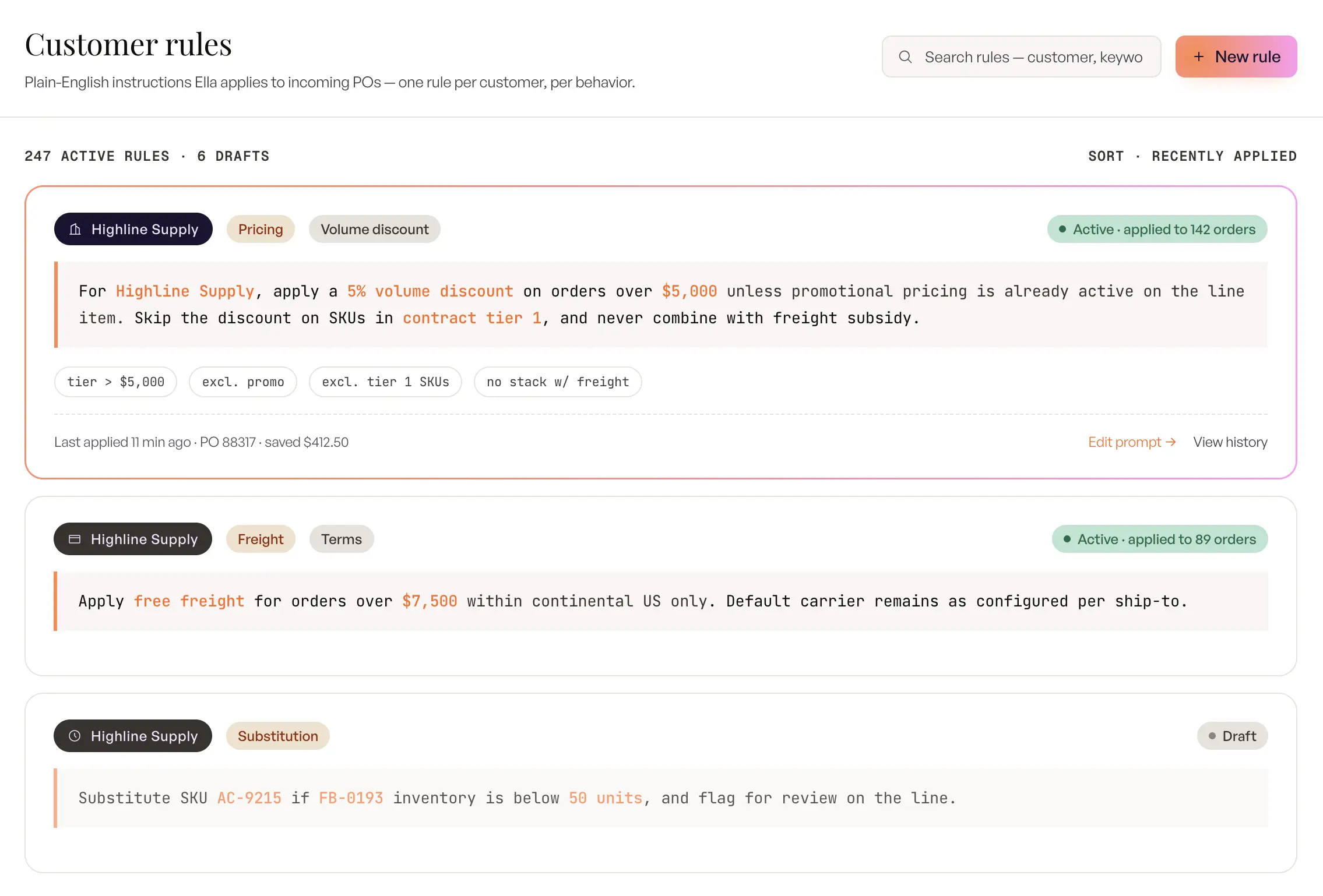
Inside Ella, business logic for a specific customer is defined in natural language rather than coded into a workflow engine. A wholesaler can describe a customer’s pricing behavior, shipping preferences, MOQ exceptions, or substitute-product rules as plain English prompts, and Ella applies those rules during PO processing without an engineering or ERP-customization project. The result is that tribal CSR knowledge moves from a person’s head into the system, where it survives turnover and scales beyond what manual review can hold.
Confidence-driven review built into the workflow
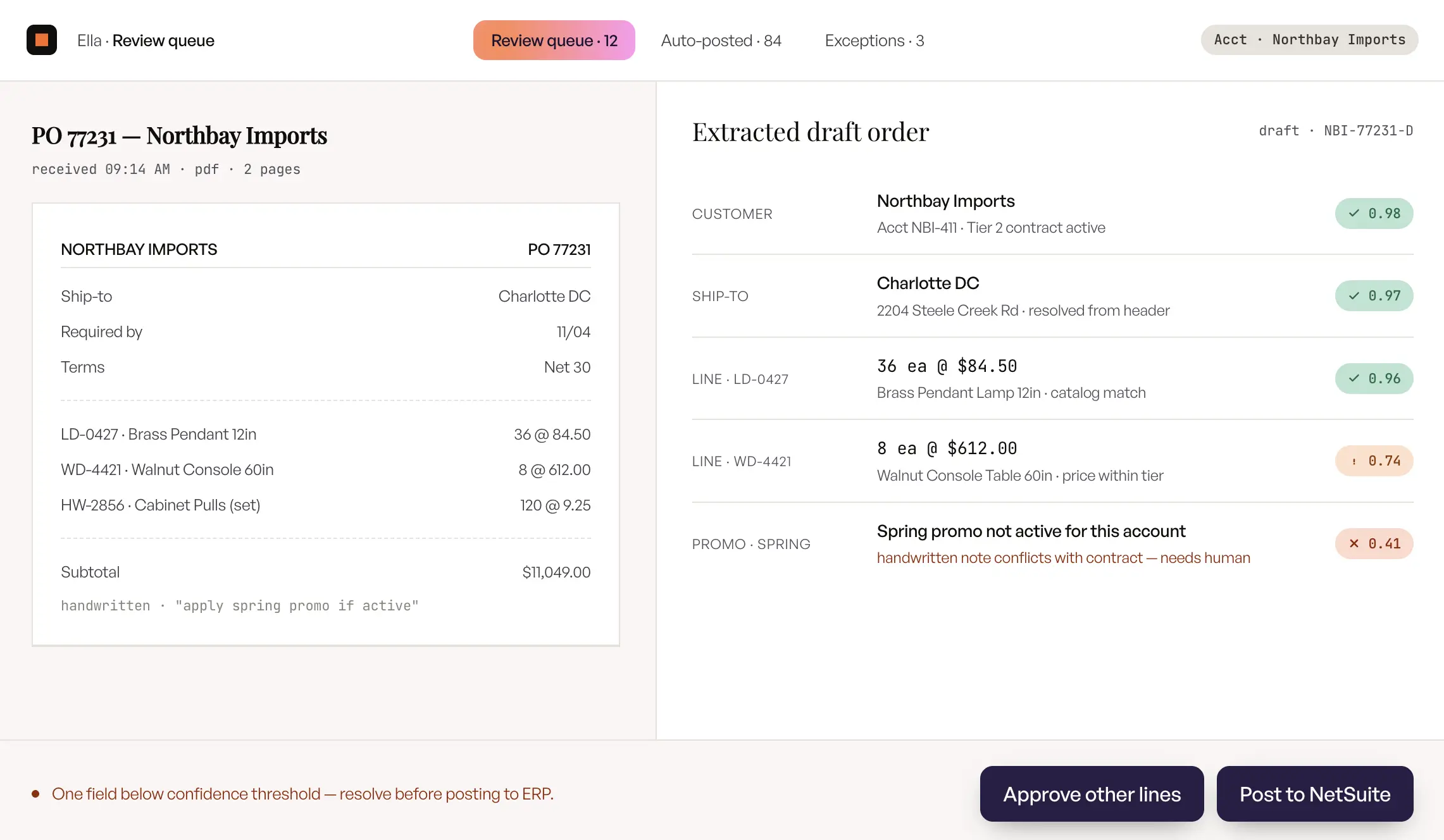
Every extracted field gets a field-level confidence score, and the reviewer screen surfaces only the low-confidence items rather than asking a human to check every line. Three review modes run side by side: high-confidence orders auto-push to the ERP, medium-confidence orders drop into a draft-review queue, and new customers route to an always-draft mode until the system has built up enough history to trust them. The reviewer’s day shifts from verification to exception judgment, which is the reframe that lets a 200-order-a-day desk scale to 500 without proportionate hiring.
Multi-PO and multi-ship-to detection out of the box
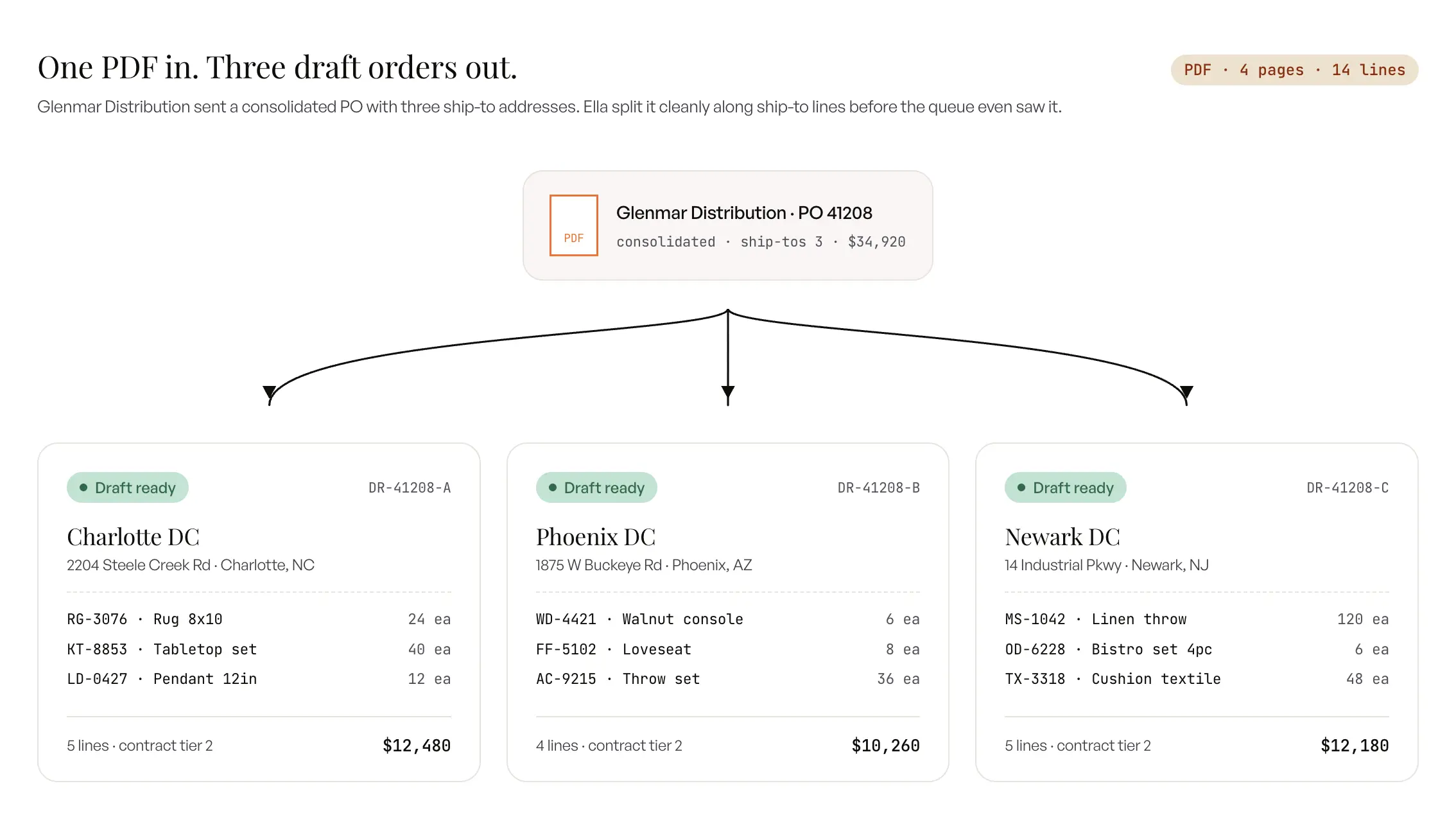
Ella detects when a single email or PDF contains multiple orders and splits them into separate draft orders in the ERP, one per ship-to. The capability handles the chain-retailer pattern, the marketplace one-bill-to-many-ship-to pattern, and the regional-DC consolidation pattern that account for a meaningful share of wholesale inbound volume. The structural mess of B2B inbound is that the unit of arrival is not the unit of fulfillment, and Ella is one of the few tools in this category that closes that gap automatically.
The bottom line
AI has moved order entry from a document-extraction utility to an operational intelligence layer. The teams winning with it run live pilots against their actual inbound queue, on their actual ERP sandbox, with real POs from real customers. That is where the time savings stop being theoretical and start showing up on your team’s calendar.
FAQs: Frequently Asked Question
1. What is AI order entry, and how is it different from OCR?
AI order entry reads incoming POs in any format, validates the data against the ERP, and creates a draft sales order with SKU mapping, pricing validation, and exception flagging built into the same pass. OCR only converts pixels to text and stops there, which means a human still has to map the text to a SKU and key the order. The difference is that AI produces an order while OCR produces a transcription, and that is a categorical gap rather than an incremental one.
2. Can AI do order entry without human review?
Yes, for high-confidence orders from known customers on stable formats. Three-mode operation (auto-push, draft-review, always-draft) gets most teams to 60 to 80 percent auto-push within 60 days of go-live, with the remainder routed to a draft-review queue. Full autonomy on every order is not the goal; the goal is shifting the operator’s job from typing to judgment, and the three-mode model is what makes that practical.
3. How does AI process purchase orders that arrive as scanned PDFs or images?
Modern systems combine OCR with semantic extraction in a single pipeline. Accuracy on scanned documents lands within a few percentage points of digital PDFs because the semantic layer interprets the extracted text in context rather than relying on fixed coordinates. Handwritten and very low-quality scans are the harder cases, and they typically route to a reviewer with the partial extraction already in place.
4. How does AI order entry validation differ from traditional EDI mapping rules?
EDI mapping rules are fixed schemas negotiated per trading partner, and they only apply to the customers who can support EDI on their side. AI validation uses the same ERP master data (pricing tiers, MOQ, contracts) but applies it dynamically to any inbound format from any customer, including the long tail that EDI will never reach. The two approaches complement each other in a mature stack rather than competing.
5. What is the typical straight-through processing rate for AI order entry tools?
Across the wholesale-native AI order entry deployments studied for this guide, mature tools land between 60 and 80 percent straight-through within 60 to 90 days of go-live, depending on catalog cleanliness and customer-specific rule density. Manual entry sits at 0 percent by definition because every order goes through a human typist, and static OCR or RPA tools cap out around 30 to 40 percent of inbound volume because they cannot handle format variability cleanly.
6. How does AI order entry handle customer-specific pricing that doesn’t match the ERP?
The system applies contract pricing if it is defined in the ERP and matches the PO. When the PO price differs from what the ERP says it should be, the line gets flagged for reviewer judgment rather than auto-corrected silently. That is the right default behavior because price mismatches usually reflect either a customer error or a contract change that has not propagated to the ERP yet, and either case needs a human decision.
7. What are the most common hidden integration challenges when implementing AI order entry?
Three repeat offenders show up across most wholesale implementations: dirty customer master data with duplicates the AI cannot resolve cleanly, pricing-rule mismatches between the PO and the ERP discount logic, and legacy ERPs without modern APIs that need file-based adapters. None of the three is technically hard to solve, and all three are easier to address before go-live than after.
8. Can AI order entry tools reconcile discrepancies against existing ERP records?
Yes, through side-by-side PO-versus-extracted views that surface variance on pricing, ship-to, customer, and SKU. The reviewer accepts, edits, or escalates per line, and the reconciliation history feeds back into the per-customer memory so the same variance gets handled correctly the next time. The reconciliation surface is one of the higher-value capabilities once the basic extraction is working cleanly.
9. How long does implementation typically take?
QuickBooks and Microsoft Dynamics implementations typically run three to four weeks end to end. NetSuite with full AI training on per-customer patterns runs closer to 45 days because the training data is richer. Sage MAS 200 and Epicor P21 sit between those two ranges, depending on how clean the underlying customer and pricing data is on day one.
10. How can AI help reduce mistakes in order entry?
AI reduces order entry mistakes by validating every extracted line against live ERP data before the order is created: SKUs are matched to the catalog even when the customer uses their own part numbers, prices are checked against the customer’s tier, and quantities are tested against MOQ and case-pack rules. Wholesale teams typically move from roughly 85 to 90 percent manual accuracy to about 98 percent with AI validation, because the errors that slip through manual entry are exactly the ones a rules-plus-ERP check catches.