Skip to content



Many businesses lose their momentum in the tiny space between “order received” and “order fulfilled.” Delays, frustrating customers, and errors draining revenue slowly creep into this gap. A single missed update or incorrect entry creates a ripple effect across inventory, finance, logistics, and customer service. Yet many organizations continue to treat manual order processing as a manageable operational task instead of recognising it as a growth barrier.
But things quickly turn around when they adopt automated order processing the right way. It quickly eliminates repetitive manual tasks and streamlines the entire order lifecycle from day one. The key is to implement it the ‘right way’ to gain the maximum benefits. In this blog, we will take you through seven smart ways to implement automated order processing and the key benefits it brings to you.
What is automated order processing?
Automated order processing is the use of technology to manage and optimize the order lifecycle of a business. Once an automated order processing system is successfully implemented, your employees need not manually:
- Enter order data
- Verify information
- Send approvals
- Update inventory
- Coordinate fulfillment through emails and spreadsheets, etc.
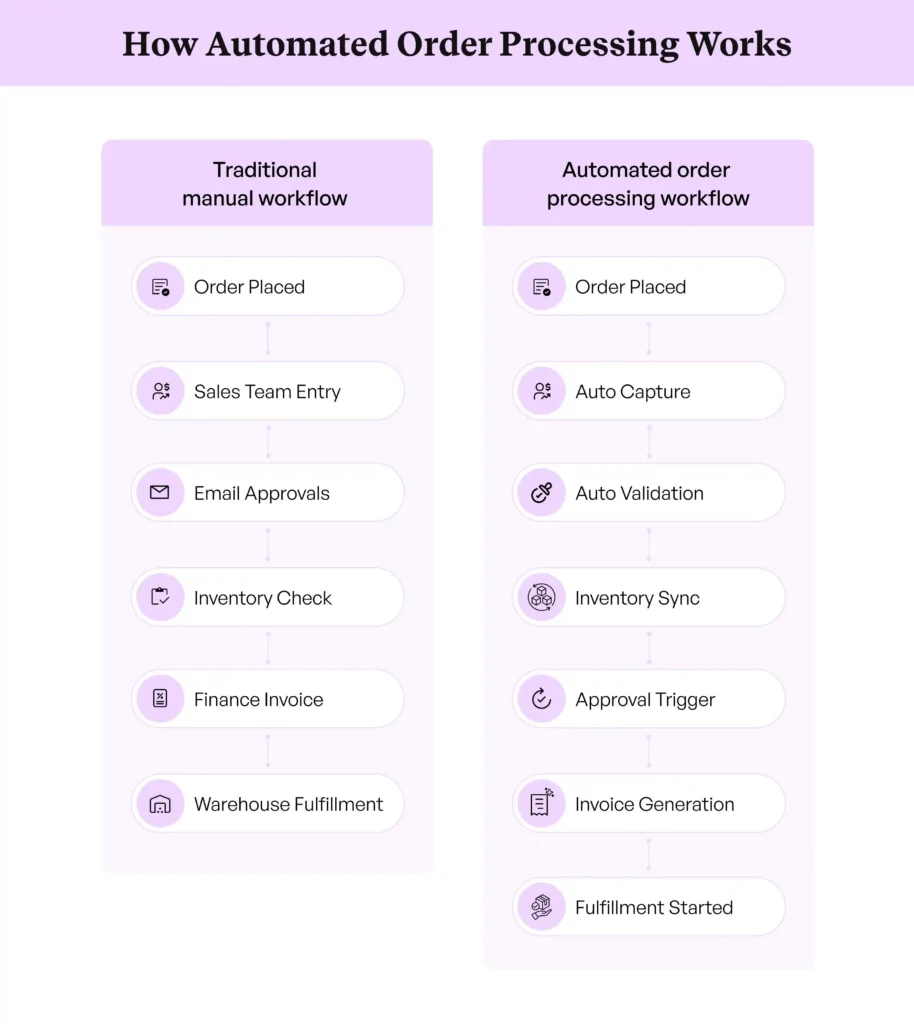
Automated order processing replaces these repetitive and error-prone manual order-related activities with rule-based digital processes. The moment an order is placed, the system automatically:
| Captures the order details → Validates the information → Checks inventory availability → Triggers approvals if needed → Generates invoices → Initiates fulfillment. |
This is a much smoother flow of information across departments when compared to traditional workflows, where order processing involves multiple disconnected steps: sales teams collect orders, operations teams validate them, finance teams handle invoicing, warehouse teams manage fulfillment, etc. Between these handovers, delays and mistakes
The manual order processing problem
Manual order processing may seem manageable in the early stages of your business growth. But as your order volumes increase, cracks will quickly appear. Here are some of the biggest order processing challenges you will face when handling it manually:
Inability to scale with growing order volumes
Manual processes work only up to a certain point. As your order volumes grow, your teams will find themselves overwhelmed with repetitive administrative tasks. Yes, you can hire more staff to manage increasing order loads, but that will raise your operational costs without necessarily improving efficiency.
Slow processing times
Manual order processing naturally slows down workflows because every stage depends on human involvement. Orders may need to be reviewed or transferred between departments. Even small delays at one stage can create larger disruptions throughout the order lifecycle.
Frequent data entry mistakes: wrong SKUs, wrong quantities, wrong pricing
Employees manually entering orders will make mistakes, particularly when they are handling large volumes under pressure. Almost all of those mistakes are wrong SKUs from part numbers translated by hand, wrong quantities from a case pack read as an each, or wrong pricing from a contract rate that sits outside the order entry screen. Each one surfaces later as a wrong shipment, an inventory mismatch, or an invoicing dispute.
Order backlogs that impact customer satisfaction
When order volumes rise faster than your teams can process them manually, backlogs begin to build. Orders remain stuck in approval queues or inboxes, causing delays across the fulfillment cycle. Backlogs can have a ripple effect throughout your business. Customer support teams will receive more complaints. Your finance teams will struggle with delayed invoicing and revenue recognition.
Benefits of automated order processing
Automated order processing does far more than simply reduce manual work. It transforms how your orders move through the business by creating a faster and more reliable workflow. Here are some automated order processing benefits you can experience:
Faster operations
Automation significantly speeds up the order lifecycle. Orders can be captured, validated, approved, and routed for fulfillment almost instantly through predefined workflows. This allows you to process higher volumes of orders in less time while improving coordination between your sales, finance, inventory, and logistics teams.
Improved accuracy
Wrong SKUs, wrong quantities, and wrong pricing each need their own control rather than a general accuracy improvement. AI order entry software matches customer part numbers against your ERP item master, converts units of measure and checks case packs and minimum order quantities, and applies the contract price list attached to that customer before the order is created. Ella runs every extracted line through those checks and assigns for reducing manual order entry errors, so your team reviews only the lines that failed a rule and the rest reach your ERP at up to 99% accuracy.
Cost savings
Automation helps reduce the volume of administrative tasks performed by your employees, allowing them to focus on higher-value activities such as customer service, strategy, and business growth. It also minimizes the hidden costs associated with order corrections and delayed shipments.
Better scalability
You can handle increasing order volumes without needing to proportionally expand administrative teams. As your demand grows, automated systems can continue processing orders consistently and efficiently across multiple channels and product lines. This gives you the flexibility to grow without compromising operational performance.
Enhanced customer experience
Customers expect fast confirmations and real-time updates throughout their buying journey. Automated order processing helps you meet these expectations by creating a smoother and more transparent experience. Fulfillment becomes more reliable, and customers receive timely notifications about their order status. The result is a more seamless purchasing experience that improves customer satisfaction.
Manual vs. automated order processing: Side-by-side comparison
The difference between manual and automated order processing becomes much more visible when you compare how each approach performs across day-to-day operational activities. The table below highlights some of the key differences between the two workflows:
| Factor | Manual Order Processing | Automated Order Processing |
| Speed | Orders are processed slowly due to manual data entry and coordination between teams. | Orders move through workflows instantly with minimal human intervention. |
| Accuracy | Higher risk of human errors and incorrect order details. | Real-time validation and automated data handling improve consistency and reduce mistakes. |
| Operational Cost | Requires more administrative effort and larger teams to manage growing order volumes. | Reduces manual workload and lowers operational overhead over time. |
| Scalability | Becomes difficult to manage as order volumes increase. | Easily handles high volumes without major operational strain. |
| Visibility and Tracking | Limited visibility across order stages and systems. | Provides real-time tracking and faster status updates. |
| Customer Experience | Delays and a lack of transparency can frustrate customers. | Faster processing and proactive updates create a smoother experience. |
| Order Backlogs | Backlogs build up easily during peak periods or high-demand seasons. | Automation helps process orders consistently, even during demand spikes. |
| System Integration | Often relies on disconnected spreadsheets and siloed platforms. | Integrates CRM, ERP, inventory, and fulfillment systems into a unified workflow. |
Order Management Automation Vs Order Processing Automation
The two terms get used interchangeably, and they should not be. Order processing automation moves a single order through its lifecycle: verification, approval, fulfillment, shipping, and invoicing. Order management automation is the wider layer that governs all orders at once, spanning inventory positions, customer records, channels, and reporting, which is the job B2B order management software does. Automated order management is what you get when every order runs through an automated process and the system managing them shares one source of truth.
7 Steps To Automate Order Processing Across The Order Lifecycle
Automating order processing is not about replacing every human task overnight. The most successful automation strategies are built step by step. When implemented thoughtfully, an automated order system can dramatically improve your processing speed and reduce your operational friction. Here are seven steps to implement automated order processing effectively:
Step 1: Automate Order Intake
Start by mapping every channel an order can arrive through: email, ecommerce, EDI, phone, and sales reps. Route all of them into a single intake queue, and set up automated capture so each order is read, extracted, and checked against your ERP the moment it lands. Pricing, SKUs, quantities, and ship-to details should be validated before the order is created, because an error caught at intake costs seconds, while the same error caught at the warehouse costs a return.
Order entry automation handles this stage: AI reads the incoming PO, matches customer part numbers to your catalog, applies the right pricing, and creates a validated order in the ERP without anyone re-keying a line. Our sales order processing automation guide walks through the full cycle step by step. With intake running automatically, every order enters the system clean, and that is what makes the remaining six steps reliable, because downstream automation is only as good as the data it starts with.
Step 2: Integrate With ERP Systems
Integrating your order processing workflows with ERP systems ensures that order information flows seamlessly across departments in real time. Once an order is validated, the integrated system can automatically update inventory levels, trigger invoicing, generate shipping instructions, and synchronize customer records without requiring manual intervention.
For instance, Ella by WizCommerce can be seamlessly integrated with a variety of ERP systems like NetSuite, Microsoft Dynamics 365, Acumatica, etc., to create a more connected operational environment where your teams work with the same real-time information. This not only improves efficiency but also strengthens visibility.
Step 3: Automate Order Verification, Approvals, And Holds
Once an order exists in the ERP, the first lifecycle decision is whether it can proceed. Set rules that verify each order automatically: credit status, pricing consistency, stock position, and any customer-specific requirements. Orders that pass flow straight on; orders that trip a rule go on hold with the reason attached, so nobody hunts through an inbox to find out why.
Automate what happens around holds too. Route approval requests to the right owner when an order exceeds a credit limit or discount threshold, trigger the release actions automatically the moment a hold clears, and handle urgent customer changes through task workflows instead of email chains. Automated order promising closes the loop by committing delivery dates from live inventory and fulfillment capacity rather than a guess.
Step 4: Automate Inventory Allocation And Order Fulfillment
Automated order fulfillment starts the moment an order is verified: the system allocates stock against the order, picks the fulfilling warehouse, and generates the pick list without anyone re-entering a line. Rules handle the judgment calls, like consolidating multiple orders from the same customer between picking and packing, splitting an order across warehouses, or buffering low-stock lines until a replenishment lands.
This is where logistics automation for order processing earns its keep in wholesale: the warehouse works from system-generated tasks instead of printed emails, and the order desk can see exactly where every order sits between confirmation and the dock.
Step 5: Automate Shipping And Carrier Selection
Carrier choice is a rules problem, not a judgment problem, for most orders. Automate carrier selection on weight, destination, service level, and customer preference, and let the system generate labels and shipping instructions as part of the same flow. Done well, this also cuts return-to-sender orders, because address validation and carrier fit get checked before anything leaves the dock rather than after it bounces.
This proactive validation process helps you catch errors early instead of allowing them to disrupt downstream operations. It also reduces the need for constant manual oversight while improving order accuracy and operational reliability.
Step 6: Automate Invoicing And Customer Notifications
The moment an order ships, finance and the customer should both know without anyone writing an email. Trigger invoice generation from the fulfillment event, sync payment status back to the order record, and send customers proactive updates at the stages they actually care about: confirmed, shipped, delivered, delayed. Faster invoicing is faster cash, and proactive notifications are the cheapest customer-satisfaction upgrade in the whole lifecycle.
Step 7: Handle Exceptions And Monitor Performance
Even the most advanced automation systems cannot handle every scenario independently. Some orders may contain incomplete information, unusual pricing requests, compliance concerns, or customer-specific requirements that need human review.
This is why exception handling is a critical part of successful automation strategies. Instead of forcing employees to manually review every order, you can create workflows that automatically flag only high-risk or unusual cases for human intervention.
For example, orders with pricing mismatches can be routed to the appropriate teams for approval while standard orders continue processing automatically. This human-in-the-loop approach allows you to maintain control without sacrificing efficiency.
You need to continuously monitor performance and refine workflows to maximize efficiency over time. Without proper tracking, it becomes difficult to identify bottlenecks or areas where automation can be expanded further.
You should track key operational metrics such as order processing time, error rates, fulfillment speed, exception frequency, backlog volumes, and customer response times. These insights will help you understand where workflows are succeeding and where improvements are still needed.
One Pipeline Across Email, Ecommerce, And EDI Orders
The most common automation trap is running each channel differently: key customers still email orders, the webstore posts orders through its own connector, and EDI runs on the side, and every channel gets its own half-automated workflow. Standardize the intake first, then run every channel through the same validation, ERP, and fulfillment pipeline. An emailed PO and a webstore order should look identical by the time they reach the warehouse: same fields, same checks, same fulfillment triggers. The same rule extends to wholesale ordering software, where retailers submit orders through a self-serve storefront: those orders should join the identical pipeline, not a parallel one.
Order Processing Automation For Distributors And Wholesalers
Distribution is where order processing automation pays back fastest, because the daily reality is high order counts, tight margins, and delivery windows that punish delay. For distributors, the sequence that works is holds and verification first (bad orders are expensive downstream), then fulfillment triggering, then carrier rules. Wholesale order processing has one extra wrinkle: trade seasonality, which means the automation has to absorb a 3-5x volume spike without adding temporary staff, and that is precisely what rule-based processing does best.
Seasonality is also the clearest dividing line between vendors, because the top order processing software absorbs a peak-season spike without extra headcount while template-bound tools need a new map for every new customer format.
WizCommerce: Automated order processing for wholesale
WizCommerce automates the whole lifecycle this page describes. Ella, an AI order entry software, gets every emailed PO and RFQ into your ERP as a validated order, WizOrder, a B2B order taking app captures rep-written and storefront orders into the same pipeline, and 200+ pre-built ERP connectors carry each order onward through inventory updates, fulfillment triggers, invoicing, and confirmations without a manual handoff anywhere in the chain. One pipeline, every channel, from received to fulfilled.
Book a demo today to see how WizCommerce’s AI Order Entry software can streamline your order processing workflows.
Frequently asked questions
What is automated order processing?
Automated order processing is the use of software and workflows to manage the entire order lifecycle with minimal manual entry. It automatically captures orders, validates information, makes inventory updates, generates invoices, and triggers order fulfillment. This helps you process customer orders faster, reduce errors, improve operational efficiency, and create a smoother experience for both your teams and customers.
What are the benefits of automating order processing?
The benefits of order processing automation vary across industries, but the core advantage is improved operational efficiency and the elimination of repetitive tasks. For instance, the benefits of automating order processing for wholesalers include better management of large order volumes with fewer manual errors. Similarly, the benefits of automating order processing for manufacturers include faster coordination between inventory, production, and fulfillment. The benefits of automating order processing for distributors largely revolve around better visibility, quicker order turnaround, and smoother communication across supply chain operations.
How do I implement automated order processing?
To implement automated order processing, start by automating order capture across all sales channels. Then introduce a sales order entry software that extracts and standardizes data from emails, PDFs, and spreadsheets. Then integrate workflows with your Enterprise Resource Planning software and create exception handling processes for unusual cases. Finally, monitor your order management process performance regularly and optimize workflows continuously.
What is the checklist for order processing?
A successful order processing checklist should include order capture, data validation, inventory verification, pricing confirmation, approval workflows, invoice generation, and fulfillment coordination. You should also ensure ERP integration, exception handling, and real-time tracking are in place. Regular monitoring of processing speed, backlog levels, and error rates is equally important for maintaining operational efficiency.
What are the key steps needed to be successful in automating a process?
Successful automation starts with identifying repetitive and high-volume tasks that slow down operations. You should standardize workflows, define clear business rules, integrate systems properly, and automate validation processes. It is also important to include exception handling for complex cases and continuously monitor performance metrics to improve efficiency and maximize the value of automation over time.
How does automation reduce the risk of manual data errors?
Automation removes the manual steps where errors get introduced, so nobody types a part number, a unit of measure, or a price by hand. Ella by WizCommerce is AI order entry software designed to reduce these manual order entry errors. It validates every extracted line against your ERP item master, price lists, and case pack rules before the order is created, reaching up to 99% accuracy on validated orders.
How much time can I save by automating sales orders?
The amount of time saved depends on order volume and workflow complexity, but automation can reduce processing time significantly. Tasks that previously took your employees several minutes per order, such as data entry, validation, and approvals, can often be completed within seconds.
How Do I Automate Order Holds And Approvals?
Define the conditions that should stop an order, such as credit limits, pricing mismatches, or first orders from new customers, and let the system place and release holds automatically. Approval requests route to the right owner with the order attached, and release actions like allocation and fulfillment trigger the moment the hold clears. The result is that held orders wait minutes for a decision instead of days in an inbox.
What Are The Key Components Of An Automated Order Processing System?
An automated order processing system needs six components: multi-channel order intake, rule-based validation against ERP data, approval and hold workflows, inventory allocation with fulfillment triggering, shipping and invoicing automation, and an exception queue with performance monitoring. If any one of them stays manual, that step becomes the bottleneck the rest of the pipeline waits on.
Can One System Automate Orders From Email, Ecommerce, And EDI Together?
Yes, and it should. The intake layer reads each channel in its native format, then every order joins the same validation, ERP, and fulfillment pipeline. Running channels through separate half-automated workflows is how inconsistencies and re-keying creep back in, so channel-agnostic processing is the design goal to hold vendors to.
Which Tools Automate Order Processing?
Look for tools that cover intake through invoicing rather than a single step: format-flexible order capture, ERP validation, hold and approval workflows, fulfillment triggering, and exception handling. The top AI order entry automation software platforms combine all five in one system, which is what separates lifecycle automation from point tools that only extract data.