Skip to content



Manual sales order processing has a ceiling. It holds at low volumes, then breaks visibly when order counts climb, customer-specific pricing multiplies, and purchase orders arrive in six different formats from six different buyers before noon.
For wholesale distributors and manufacturers, the problem is specific. Buyers send POs by email, fax, spreadsheet, and portal. Each document has different SKU codes, pricing references, and delivery instructions that must align with internal ERP rules before any single line item moves toward fulfillment. Without automation, someone on your operations team is manually re-keying all of it. Every day.
This blog covers how sales order automation works in practice, where manual workflows break, and what sales order automation software needs to do for wholesale teams. We will also cover how WizCommerce’s AI order entry capability removes the most expensive parts of the problem without replacing your ERP or changing how your buyers communicate with you.
TL;DR:
|

What is sales order processing automation?
Sales order processing automation is the use of software to handle the steps from a customer placing a purchase order to that PO being entered into ERP or fulfillment systems. It removes manual data entry and validates orders against business rules before they hit the ERP. The workflow flags exceptions cleanly and scales as order volumes grow across sales channels.
A modern order entry system handles three jobs that manual processing cannot scale cleanly:
- Extracts structured data from unstructured documents: The system reads PDFs, scanned faxes, emailed spreadsheets, and inline emails to produce clean sales order data without templates.
- Validates orders against business rules: Every line item is checked against pricing terms, SKU catalogs, inventory levels, and customer contracts before any ERP record gets created.
- Routes exceptions with context attached: Issues reach the right reviewer with the source document and matched customer record, so resolution takes minutes.
What does the sales order processing cycle look like?
The sales order processing cycle moves from purchase order receipt through invoicing in five distinct stages. Each stage carries handoff risk in manual workflows. Modern B2B order management software compresses each stage by validating data earlier and reducing manual touchpoints across the sales cycle.
- Order receipt and intake: Customer orders arrive through email, phone, electronic data interchange, web portals, and sales rep submissions. Without a unified intake layer, each channel needs its own handling step. Teams juggle PDF attachments, inline email text, handwritten fax images, and multi-tab spreadsheets daily during data capture.
- Order validation and pricing confirmation: Each order must match internal pricing rules, customer-specific contract rates, current product availability, and credit limits before commitment. Mismatches at this stage create order holds that delay fulfillment and lengthen the sales order process for repeat accounts.
- Inventory check and allocation: Orders move to stock confirmation against live inventory data. Partial allocation, backordering rules, warehouse routing, and stock reservation decisions all happen here. Without ERP connectivity, over-commitment errors surface at shipping time rather than at order acceptance, hurting customer satisfaction.
- Order acknowledgment and fulfillment trigger: Confirmed orders generate a buyer acknowledgment and send a fulfillment trigger to the warehouse. Manual processes at this stage create lag between order acceptance and pick-pack instructions. High-volume periods make this gap visible to buyers checking order status updates.
- Invoicing and payment capture: The completed order generates an invoice against confirmed delivery, applying payment terms and credit management rules. Delays here extend the order-to-cash cycle and reduce cash flow visibility for finance teams tracking overdue receivables.
Also read: Distributor Order Management System Guide
Where does sales order processing break down without automation?
Sales order processing breaks down when buyer formats, SKU codes, pricing terms, and ERP rules do not align. These problems grow as order volumes rise. Teams then depend on inboxes, spreadsheets, manual checks, and repeated follow-up.
Emailed purchase orders in inconsistent formats
Buyer purchase orders arrive as PDFs with custom layouts, scanned faxes with handwritten notes, spreadsheet attachments with merged cells, and inline email bodies with free-form product descriptions. Each format requires the same person to interpret it before any data hits the ERP.
Operations teams running order entry automation avoid this manual interpretation step. Without it, even ten new buyer formats per week creates a backlog that throttles the entire fulfillment process.
Pricing and SKU mismatches between buyer and seller systems
Buyers often use their own product codes. Sellers manage separate SKU catalogs, contract prices, discounts, and master data. When these records do not match, every order needs a lookup before order creation.
Pricing mismatches create holds that delay fulfillment. They also increase customer support requests because buyers want updates on order status. This hurts customer satisfaction when teams cannot respond with confidence.
ERP data entry as a daily bottleneck
Orders outside EDI channels often require manual entry into an ERP (enterprise resource planning) system. This slows order capture and increases the risk of typing errors. Errors can surface during shipping, invoicing, or credit review.
During peak periods, manual entry creates backlogs. Customer service teams chase documents, while sales reps wait for updates. This is where automation software can reduce processing time and prevent errors from reaching downstream business systems.
What should sales order automation software do?
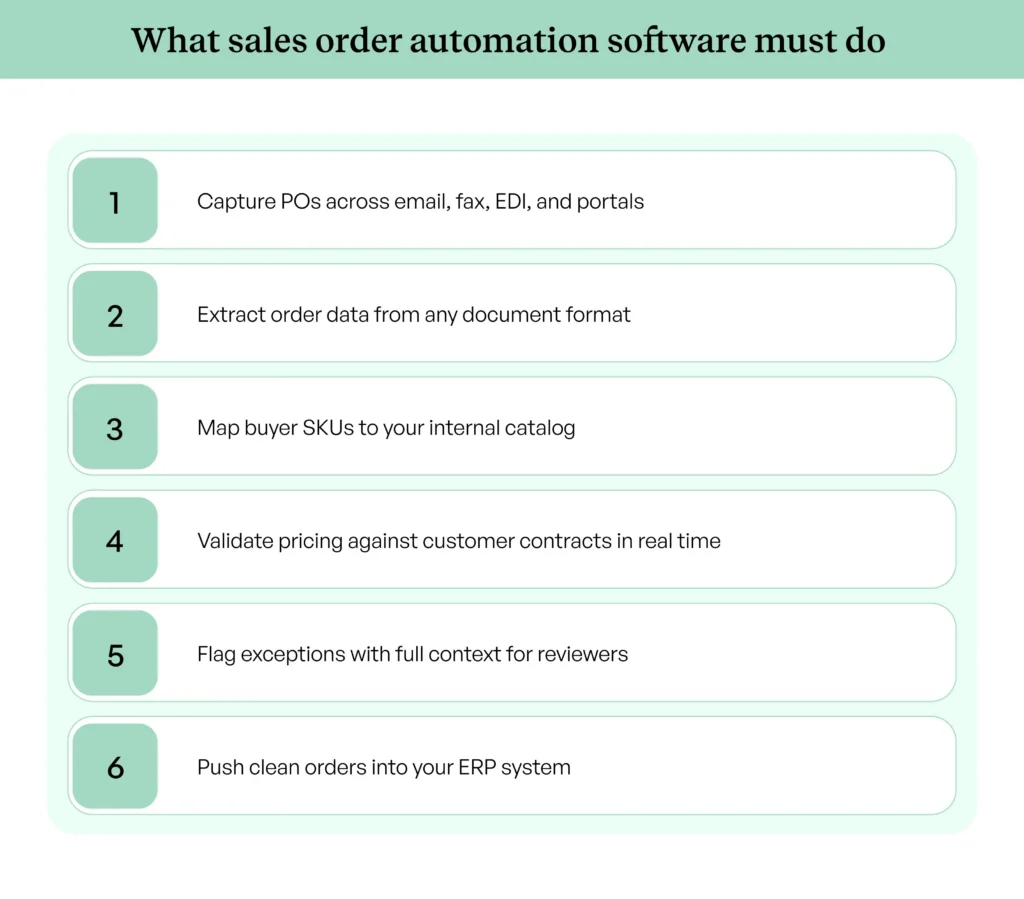
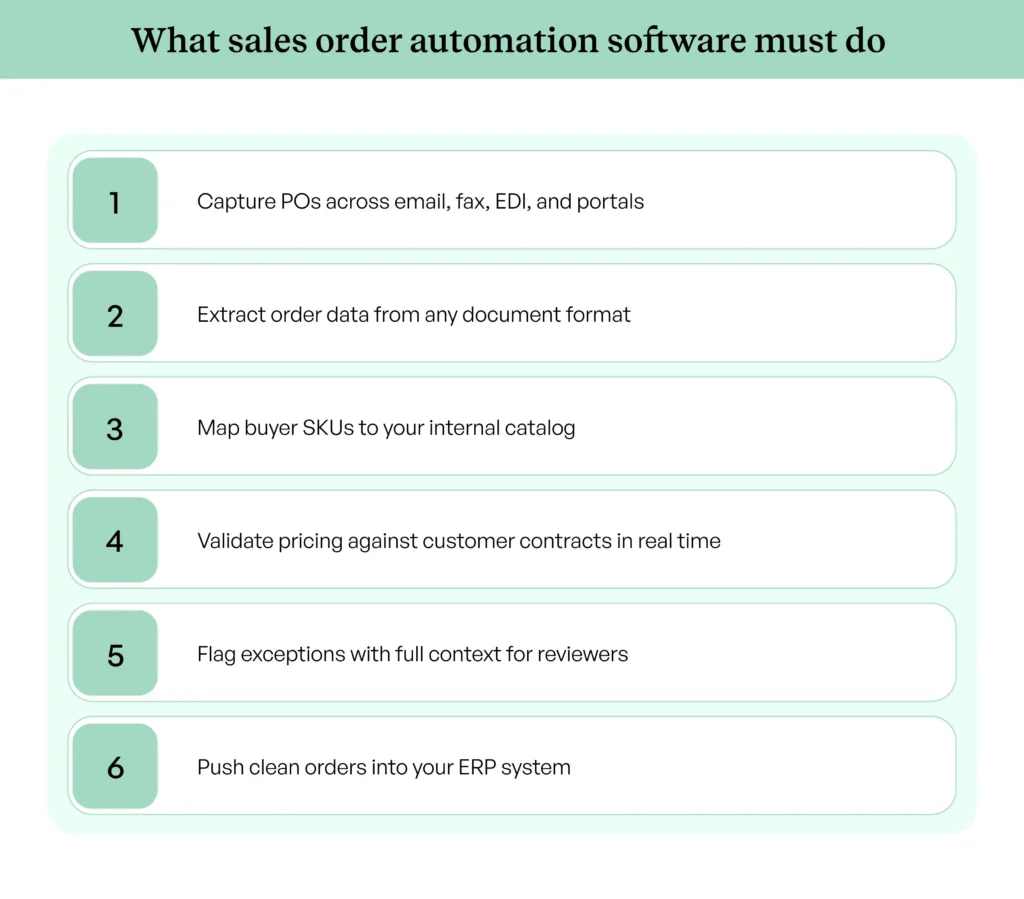
Sales order automation software should capture orders from any channel, extract order details, validate line items against business rules, and produce ERP-ready records. For wholesale teams, it must also handle buyer-specific SKUs, customer contracts, inventory data, and credit limits. Strong sales order automation software treats exception handling as a core part of the workflow, not an edge case.
Those capabilities are also what separate the best order processing software from document capture tools that stop at extraction and leave validation to a person.
- Multi-format document ingestion: The software handles emailed PDFs, scanned fax images, spreadsheet attachments, and inline email text in one intake layer. Buyers do not need to change how they send purchase orders. Operations teams skip the per-customer template setup that older OCR-based automation tools demand.
- Automated SKU and pricing validation: Each order should be validated against internal SKU catalogs, customer-specific pricing, current inventory, and credit limits before any ERP entry happens. Exceptions need to surface with full context for a reviewer. Resolution should take under two minutes, not a fifteen-minute investigation across multiple business systems.
- Buyer SKU mapping without manual setup: Most B2B buyers use their own product codes on purchase orders. The software should map buyer SKUs to internal SKUs through artificial intelligence and learn from corrections. Manual translation tables maintained per account become a liability once you cross a few hundred active customer relationships. The same liability lands on your engineers if you build the mapping layer yourself, which a build vs buy AI order entry software breakdown makes visible before the project starts.
- ERP-ready output with error handling: ERP systems accept only structured data. Every validated order should produce a record formatted for your specific ERP setup. Error fields stay flagged with attached context, so problem orders route back for review rather than landing as rejected documents in a queue.
Also read: AI Order Entry Software
How do you implement sales order processing automation without disrupting operations?
Sales order processing automation works best when teams roll it out in phases. Parallel processing, clear validation rules, and ERP testing protect order accuracy. This approach helps teams reduce manual work without risking live customer orders.
Map your current intake channels first
Document every channel where purchase orders arrive today: email inboxes, fax lines, EDI feeds, customer portals, and sales rep submissions. Each channel carries its own volume profile and exception rate. Skipping this step leaves blind spots that surface as production issues weeks after go-live. Most operations teams find at least two channels they had stopped tracking because volume was low but consistent.
Define your validation rules and exception thresholds
Validation rules need to reflect your actual pricing tolerance, SKU hierarchy, customer-specific terms, and review conditions for credit limits. Set thresholds before configuration starts. A 2 percent pricing tolerance for repeat orders might mean a different rule than for new accounts. Documenting these best practices gives the operations team something concrete to test against during user acceptance testing.
Connect automation to your ERP before going live
ERP field mapping decides whether clean orders move through without issue. ERP integration in B2B ecommerce for order automation requires partial-match handling, error logging, field validation, and built-in rollback paths from day one. Test with at least 100 sample orders before production cutover. Most teams find three or four mapping gaps in this phase that would have led to order rejections later, especially regarding tax codes and shipping details.
Run parallel processing during the transition period
Run automation and manual entry side by side for two to four weeks. Compare outputs against the same purchase order set every day. Look at exception rates by buyer account and refine process automation rules from real data rather than predictions. This window also gives the sales team time to update buyer accounts where pricing rules or order patterns have shifted.

How does WizCommerce automate sales order processing for wholesale teams?
WizCommerce’s order entry automation software was built to remove one of the biggest bottlenecks in wholesale: messy purchase order intake. Buyers send POs through email attachments, PDFs, spreadsheets, scanned documents, and forwarded inboxes. ERP systems cannot read these files directly, which is why operations teams end up doing manual entry every day across the order management process.
Our AI order entry platform sits between your buyers and your ERP. It captures incoming purchase orders, extracts order details, validates each line item, maps buyer SKUs to internal SKUs, checks customer contracts, and creates ERP-ready records. The workflow does not require a separate template per buyer account or any rebuilds during onboarding.
- Inbound PO ingestion from any channel: We capture emailed PDFs, inbox attachments, scanned documents, spreadsheets, and inline email text in one intake layer. Your operations team stops chasing files across inboxes or handling each buyer format with a separate process.
- Buyer SKU to internal SKU mapping: Most buyers use their own product codes on purchase orders. WizCommerce maps buyer SKUs to your internal SKUs through artificial intelligence, learning from corrections over time. The system removes the manual translation sheets that operations teams used to maintain per account.
- Pricing validation against customer contracts: Each line item is checked against agreed pricing for that customer account before any ERP entry. If a contract rate does not match, we flag the exception with full context so your team can review and approve it quickly.
- ERP-ready output with exception handling: Clean orders move forward as ERP-ready records through your sales order management software workflow. Exceptions surface with the attached context, so reviewers resolve issues within minutes rather than rechecking the full order each time.
- ERP, inventory, and CRM integration: WizCommerce connects with NetSuite, QuickBooks, Fishbowl, Sage, Microsoft Dynamics, and other enterprise resource planning systems. Order data flows across connected systems without manual re-entry. CRM integration also keeps customer information and order history aligned across the sales cycle.
Beyond automated intake, our AI Sales Copilot supports reps with real-time account context, prior order data, and product information. The copilot surfaces upsell suggestions and helps reps respond to buyer questions during live conversations. The result is a tighter loop between selling and order automation across the sales process, with stronger customer communication.
For trade shows, showrooms, road sales, and field selling, WizOrder gives sales reps an offline B2B order-taking app that captures orders offline on any device and syncs them into the same validation and ERP workflow as inbound POs emailed by buyers.
Book a free demo to see WizCommerce AI order automation software in action and explore what this workflow looks like for an operation like yours.
FAQs
What is sales order automation?
Sales order automation uses software to capture, validate, enrich, and submit customer orders into ERP systems with little human intervention. It removes manual entry from the workflow and routes exceptions for fast review. The benefits of sales order automation include fewer errors, faster processing times, greater visibility into inventory management, and smoother customer communication.
How does sales order processing work in an ERP system?
Sales order processing in an ERP system follows a structured workflow: order creation, validation, inventory allocation, fulfillment trigger, and invoicing. The ERP handles allocation, warehouse routing, shipping coordination, and invoicing as native functions. It needs an upstream automation layer to ingest unstructured purchase orders before they enter the system as clean records. That upstream layer is the order management software, and it is where capture, validation, and routing actually live.
How do you automate sales order processing end-to-end?
End-to-end automation needs four pieces: multi-channel order capture, document data extraction, validation against pricing and inventory rules, and ERP integration with exception handling. WizCommerce delivers all four pieces in one platform. Best practices include phased rollouts and parallel processing to maintain order accuracy throughout the order management process.
What is the sales order processing cycle from receipt to fulfillment?
The sales order processing cycle covers order receipt, validation, inventory allocation, acknowledgment, fulfillment, and invoicing. Each stage relies on accurate data from the previous one. Automation reduces handoff risk by validating customer data at intake rather than catching errors later in the order fulfillment process.
What are the biggest bottlenecks in manual sales order processing for distributors?
The biggest bottlenecks are inconsistent purchase order formats, buyer SKU mismatches, customer-specific pricing exceptions, and manual ERP re-keying. Purchase orders, and related documents arrive in formats that ERPs cannot parse directly without manual intervention. Distributors handling 100-plus orders per day usually hit the ceiling on manual workflows within months and need stronger customer support tooling.