Skip to content



For any business in 2026, speed and visibility are the biggest competitive advantages. Forward-thinking business owners who know this invest heavily in sales and customer experience optimization. Yet surprisingly, many still rely on outdated procurement processes. Purchase orders in particular, are still managed through scattered email approvals and manual follow-ups. As a result, their teams lose valuable time tracking approvals and resolving errors. This growing gap between operational complexity and outdated procurement workflows is why more and more businesses are turning to purchase order automation. In this guide, we will cover what purchase order automation is, how it works across the PO lifecycle, the 10 major benefits it delivers, the real cost of staying manual, and the step-by-step path to implementing it successfully.
What is purchase order automation?
Purchase order automation is the use of software, AI, and integrated workflows to capture, route, approve, and process purchase orders without manual data entry. It spans the full PO lifecycle, from the moment an order intent is created to the moment payment is released or a sales order ships. An automated purchase order system handles the work that used to require a team of people reading emails, typing into spreadsheets, and pasting into ERPs, using extraction logic, approval rules, and ERP integrations instead. A clean implementation cuts per-order processing time from 15 to 30 minutes down to under 2 minutes, and that per-order unit is what every other saving in this article compounds from.
Inside most operations, the workflow touches several teams. Procurement creates POs to send to vendors. Finance and AP teams process incoming invoices against those POs through three-way matching. Operations and customer-service teams handle incoming customer POs and turn them into sales orders in the ERP. Automation can sit at any of these touchpoints, and the right starting scope is wherever the most hours are leaking today.
PO Automation Vs Procurement Automation Vs AP Automation
The three terms overlap, and they are not the same thing. Procurement automation is broader: it covers sourcing, supplier onboarding, contract management, spend analysis, and PO workflows together. Accounts payable automation is narrower: it focuses on the invoice-to-payment stretch and the controls that protect it, including three-way matching. Purchase order automation sits at the operational center, the workflow everything else is built around. If you are scoping a project, name which of the three you are buying so the requirements stay clean.
How does purchase order automation work?
Purchase order automation replaces the manual hand-offs in the PO lifecycle with software-driven capture, validation, routing, and ERP entry. It runs in two directions, and knowing which one you are automating keeps vendor conversations honest.
The inbound workflow: Customer POs into sales orders
A customer PO arrives by email, PDF attachment, API, fax conversion, or photographed image. The engine extracts the structured fields: customer identity, line items, quantities, pricing, shipping details, and inline notes. Line items map to your internal SKU catalog through fuzzy matching that handles buyer part numbers, abbreviations, and freeform descriptions. The order validates against ERP price rules, customer-specific tiers, minimum order quantities, case packs, and inventory. Exceptions get flagged for review while clean orders proceed, and a draft sales order lands in the ERP with confirmations going out to the rep and the customer. That handoff is the core of sales order processing automation software. Done well, the whole cycle closes in under two minutes, and this is the front half of automated order processing, which carries the order onward through fulfillment, shipping, and invoicing.
The outbound workflow: Requisition to vendor PO
On the buyer side, the workflow starts with a requisition. Approval routing applies rules based on spend thresholds, department, item type, or vendor status. Once approved, a PO generates from a template or sourcing catalog and goes to the vendor by email, portal, or EDI. When goods arrive, the receipt logs against the PO, and when the invoice arrives, three-way matching compares all three documents before payment is authorized. Every step is rule-driven and audit-logged. The generational change is the capture layer: template-bound OCR tools cleared roughly a third of orders without human touch, while AI agents that read intent rather than field positions clear 75 to 80 percent on first contact and climb past 99 percent on repeat customers.
The true cost of manual purchase order processing
Manual purchase order processing is often viewed as a minor operational inconvenience by many. They think slower approvals and limited scalability are the only downsides. In this process, they miss many hidden costs that quietly impact their employee productivity and customer relationships over time. Here are three such hidden costs:
FTE cost = (Time per order × order volume)/employee working hours
FTE (Full-Time Equivalent) cost is the total expense associated with employing one full-time employee. Before you derive the FTE cost, you must understand that every manual purchase order requires time for data entry, verification, approvals, follow-ups, and corrections. While all these activities may only take a few minutes for a single order, the total operational burden becomes significant when multiplied across thousands of orders each month.
For example, imagine you are a wholesaler.
- Number of purchase orders processed every month = 5,000
- Time taken to manually process each PO = 12 minutes
- Total time spent on PO management alone every month = 60000 minutes or 1,000 employee hours
- FTE cost = 1000፥(8X5X4) = 6.25
Assuming your employees work 8 hours a day, 5 days a week, 4weeks a month, 1000 employee hours is roughly equal to the working hours of 6 full-time employees.
Error rates and chargeback costs
Manual processing significantly increases the likelihood of human error. Incorrect pricing, duplicate orders, wrong quantities, missing SKUs, and shipping mistakes can all originate from manual data entry and disconnected approval processes.
For example, your sales representative manually enters an order for 1,000 units instead of 100 units because of a typing mistake in a spreadsheet. The incorrect order gets approved and shipped before the error is noticed. You now face return shipping costs, warehouse handling expenses, customer dissatisfaction, and possible chargebacks from the buyer.
Even a small percentage of manual errors can create substantial financial losses, particularly when you process large order volumes every month. Beyond direct costs, these mistakes also impact supplier trust and customer retention. Catching these errors before they ship is a systems job: B2B order management software validates pricing, quantities, and SKUs against one source of truth, so a typo dies at the order screen instead of on a truck.
Opportunity cost = Inside sales time lost to data entry
One of the most overlooked costs of manual purchase order processing is the opportunity cost associated with highly skilled employees performing low-value administrative work.
For example,
- Your inside sales executive spends nearly 3 hours every day copying customer order information from emails into ERP systems and checking pricing approvals.
- Over a month, that adds up to more than 60 hours spent on administrative work instead of prospecting, nurturing leads, or closing deals.
- The executive typically generates $500 in revenue per productive sales hour.
- Opportunity cost = 60 X $500 = $30,000 per month per employee
- So, losing 60 hours to manual work could represent a potential revenue loss of $30,000 per month.
When your sales team is tied up with repetitive operational tasks, you lose valuable opportunities to improve customer relationships and generate additional revenue.
10 Benefits of purchase order automation
As your business processes higher-order volumes and faces rising customer expectations, purchase order automation becomes one of the most impactful investments you can make, as it helps build a resilient operational workflow that supports long-term growth. Here are 10 benefits of automating purchase orders you must know:
1. Reduce order processing time
Manual purchase order management typically takes 8–12 hours of combined processing time. It involves back-and-forth emails, updating of spreadsheets, waiting for approvals, and repetitive data entry tasks. Businesses are increasingly turning to AI-powered order entry system that eliminates the manual step by instantly capturing order data and updating systems in real time. When fully automated, the PO process typically takes only 15–30 minutes from creation to approval, compared to the 8–12 hours that manual workflows commonly require.
2. Eliminate keying errors and chargebacks
Manual order entry increases the risk of pricing mistakes, incorrect quantities, duplicate entries, and shipping errors. Industry estimates place critical error rates in manual PO processing at between 1–3%, with even small percentages translating to significant financial exposure at high order volumes. Even small mistakes can result in costly chargebacks and customer disputes. Automated systems validate order information before processing. This ensures that data is accurate and standardized. End result – reduced errors and heightened customer trust.
3. Scale order volume without adding headcount
As you grow as a business, manual processes will push you to hire additional staff to manage increasing order volumes. Automation removes this requirement by allowing you to process significantly more orders without proportionally increasing operational teams. For instance, if you were handling 2,000 orders monthly, you may be able to scale to 10,000 orders using the same team once automation is implemented.
4. 24/7 order processing
Manual processing depends heavily on business hours and employee availability. This invariably creates backlogs during peak periods or after working hours. Automated systems can process incoming purchase orders around the clock, ensuring that your orders move through the system immediately, regardless of when they arrive. This helps eliminate delays and maintain operational continuity.
5. Improve customer satisfaction
Customers always expect quick responses and accurate order confirmations. Delayed processing often creates uncertainty, which negatively impacts customer experience. With automation, orders are validated and confirmed almost instantly. Faster confirmations improve communication and create a smoother buying experience for customers.
6. ERP data accuracy and audit trail
Manual data entry often leads to inconsistent records across ERP and accounting systems. Missing information and formatting issues can create reporting and compliance challenges. Purchase order automation ensures that clean and standardized data flows directly into your ERP systems while maintaining a complete audit trail of approvals and transactions. This improves reporting accuracy and simplifies audits and compliance checks.
7. Redeploy inside sales to actual selling
Highly skilled sales teams often spend a significant portion of their day on administrative tasks such as entering orders and updating spreadsheets. Automation removes these repetitive responsibilities and allows your inside sales teams to focus on revenue-generating activities like nurturing leads and closing deals. This improves both productivity and sales performance. The same shift happens in the field, where the best sales rep order entry software moves reps from paper order pads to validated carts, and selling time rises for the same reason: the admin work stops existing.
8. Lower operational costs
According to procurement benchmarking research, the cost of manually processing a single purchase order ranges from $14 to $54, depending on workflow complexity and approval layers, and the number of manual touchpoints involved. This is largely due to the many hidden operational costs like labor expenses, rework, delayed processing, and error correction. By reducing manual intervention and improving workflow efficiency, automation could lower this cost while increasing output.
9. Real-time order visibility and insights
Manual workflows often make it difficult to track order status or generate accurate operational reports. Automation provides centralized dashboards and real-time visibility into order processing, approvals, exceptions, and fulfillment status. This helps you make faster decisions and identify opportunities for operational improvement.
10. Faster order-to-cash cycle
Slow order processing delays invoicing, fulfillment, and ultimately customer payments. This extends the order-to-cash cycle and impacts cash flow. By accelerating order approvals and processing, automation helps you invoice customers faster and reduce payment delays. Faster cash collection improves working capital and supports healthier financial operations.
Also read: Wholesale Ordering Software
Three-way matching: Where procurement, ops, And finance meet
Three-way matching is the financial control that compares a purchase order, a goods receipt, and a vendor invoice to confirm all three align before payment is released. Two-way matching skips the goods receipt and compares only the PO and the invoice, which works for low-risk spend but misses delivery discrepancies: a vendor billing for what was ordered but not fully delivered, or partial deliveries invoiced as complete. Most companies above mid-market scale require three-way matching for spend above a defined threshold, and many regulated industries require it across the board.
The control used to be a paper-trail exercise, and volume has outgrown it. Partial deliveries, currency conversions, quantity tolerances, and freight allocations all create legitimate variances that traditional matching tools flag as exceptions. AI-powered matching resolves those legitimate variances on its own and flags only genuine discrepancies, which makes the workflow touchless for the 70 to 80 percent of transactions with no real problem. Industry data from PO matching vendors shows AI three-way matching cuts duplicate payments by 33 percent and accelerates invoice approval by 25 to 40 percent. Procurement gets faster cycles, operations gets cleaner supplier data, and finance gets tighter controls without a larger AP team.
How does purchase order automation integrate with ERP systems?
The integration matters more than the automation itself: a tool that cannot push clean data into your specific ERP becomes a parallel workflow, not a replacement for one. Modern platforms connect through pre-built connectors and REST APIs that write sales orders or POs directly into NetSuite, SAP, Microsoft Dynamics Business Central, Epicor Prophet 21, QuickBooks, Sage, and other major ERPs.
The evaluation question is never whether a vendor “supports” your ERP; it is whether they have production customers running your specific version, in your industry, at your volume. QuickBooks Desktop deserves special attention, because its file-based syncing looks nothing like the QuickBooks Online API, and a vendor reference on the wrong version proves nothing. Epicor has the same trap in a different shape: AI order entry integration with Epicor works differently across Kinetic, Prophet 21, and Eclipse, so a reference customer on one tells you very little about the other two.
The largest hidden gap sits in marketplaces and partial EDI. Marketplace and portal orders often arrive as notifications or PDFs that staff print and re-key, quietly doubling the cost of every one of those orders. Automation that ingests marketplace inboxes and portal exports the same way it ingests email attachments closes that gap, and for many wholesale operations it is the single largest source of newly automated volume. This also answers a question distributors ask constantly: PO automation does not require your suppliers or buyers to adopt a portal, because the automation reads whatever they already send.
Comparing PO automation approaches: OCR, RPA, and AI Agents
Mid-market distributors comparing PO automation approaches are really choosing between three capture tiers. OCR is template-bound: cheap, mature, and brittle, because every customer format needs a template and every format change breaks one. RPA scripts clicks through ERP screens: useful for stable, repetitive flows, and equally brittle when a screen or layout changes. AI agents read intent rather than positions: they handle a 12-page technical takeoff, a handwritten note, and a one-line email order with the same logic, learn each customer over time, and adapt when a buyer changes their template overnight. For an operation with 200+ suppliers or customers who mostly respond by email, the trade-off is simple: templates multiply with every relationship, while agent-based tools carry no per-relationship maintenance. That maintenance line, not the license fee, is where the approaches truly diverge in cost. Per-relationship maintenance is the line to check when shortlisting, because the top order processing software carries none of it while template-based tools add a map for every account you win.
Buyer-by-buyer exceptions are the other decision point. When a buyer requires extra order or invoice data the standard flow does not support, the stable operating pattern is rules captured per customer in plain language, not custom code: state the quirk once (“this buyer’s SKUs sit in the second column”, “route anything above $10k to a manager”), and the system applies it on every subsequent order from that buyer. Platforms without a per-customer rules layer force a fork: either the exception goes back to manual handling forever, or IT maintains custom logic that breaks quietly. Ask where buyer-specific rules live before you buy, because that answer predicts your exception backlog a year out.
The same question applies when IT proposes building the tool itself, and a build vs buy AI order entry software analysis shows who would own those buyer-specific rules after launch.
| Approach | Handles Emailed PDF POs | Per-Customer Templates | Where It Breaks |
|---|---|---|---|
| Template-bound OCR | Yes | Required for every customer format | New sender, moved field, or multi-page PO can break extraction |
| RPA | No — only works from a structured source | Required upstream | Any layout change can break the script |
| AI Agents | Yes, any layout | None | Low-confidence lines and first-time customers still need review |
How to build the business case for PO automation?
Purchase order automation initiatives often fail to move forward, not because the technology is unavailable, but because businesses struggle to clearly demonstrate the financial and operational value internally. Building a strong business case requires more than highlighting efficiency improvements. The most successful automation proposals are backed by clear operational data and a compelling explanation of how automation supports broader business objectives. Here are three main steps to build the business case for PO automation:
Step 1: Calculate the current cost baseline
The first step is understanding the true cost of your current manual process. Many businesses underestimate how much time and operational inefficiency are tied to purchase order management because these costs are spread across multiple teams and workflows.
Start by measuring:
- Monthly purchase order volume
- Average processing time per order
- Employee labor costs
- Manual error rates
- Chargeback and correction costs
- Delays caused by approvals or rework
For example, if you process 6,000 purchase orders monthly and each order takes 10 minutes to process manually, that equals 1,000 labor hours every month dedicated purely to order handling. Once you quantify labor costs, error-related expenses, and operational bottlenecks, you can portray a much clearer picture of how expensive manual processing truly is.
Step 2: Project savings with automation
After establishing your current cost baseline, the next step is estimating the improvements automation can deliver. This includes both direct cost savings and broader operational gains. You should estimate:
- Reduction in manual processing time
- Reduction in labor requirements
- Reduction in errors and chargebacks
- Reduction in order turnaround times
- Increase in order handling capacity
- Increase in productivity for sales and operations teams
Going back to the same example, if automation could reduce manual processing time by 80%, the 1,000 labor hours spent on order handling could potentially be reduced to just 200 hours.
You should also account for indirect benefits such as improved customer satisfaction, better ERP data quality, and faster order-to-cash cycles, all of which contribute to long-term operational efficiency and revenue growth. The projection method transfers directly to the sales-order side too, where automated order processing compounds the same baseline-reduce-remeasure math across fulfillment, shipping, and invoicing.
Step 3: Present it to the CFO / IT leadership
Different stakeholders care about different outcomes, so the business case should be framed accordingly. For CFOs and finance leaders, focus on:
- ROI and payback period
- Annual operational cost savings
- Reduced labor dependency
- Improved cash flow
- Lower financial risk from errors and chargebacks
For IT leadership, focus on:
- ERP integration capabilities
- Scalability and system reliability
- Data accuracy and governance
- Security and compliance improvements
- Reduction in manual workflows and technical debt
Rather than positioning automation as simply a process improvement initiative, present it as a strategic operational investment that improves efficiency and is an enabler for your team to focus on higher-value business activities. A strong business case combines financial impact and strategic growth potential into a clear narrative that aligns with executive priorities and long-term business goals.
Implementation timeline of purchase order automation
The implementation timeline of purchase order automation largely depends on the type of solution you intend to adopt. For instance, cloud-based solutions are generally faster to deploy, easier to maintain, and more cost-effective, with most implementations going live within four to eight weeks. On-premise solutions offer greater control over data and infrastructure but usually require significantly more IT involvement and longer deployment timelines, often extending to six months or more. The overall timeline also depends on factors such as ERP complexity, workflow customization, data readiness, and internal team alignment.
Typical implementation process includes:
- Discovery and workflow assessment
- Data cleanup and standardization
- ERP and system integrations
- Workflow configuration and approval setup
- Testing and pilot rollout
- Team onboarding and training
- Full deployment across departments
- Ongoing optimization and performance monitoring
Common challenges in implementing purchase order automation
While purchase order automation can significantly improve operational efficiency, you can face several challenges during implementation. Here are some of the most common obstacles you might encounter, along with a way to solve them :
Data inconsistencies across systems
One of the biggest challenges in purchase order automation is dealing with inconsistent or incomplete data. Most businesses looking to automate their PO process have previously managed past orders through a combination of spreadsheets, emails, ERP systems, and manual records simultaneously. As a result, their records are often filled with duplicate entries, outdated information, and formatting mismatches. When such inaccurate data flows into a newly implemented purchase order automation software, you may continue experiencing order errors at scale instead of eliminating them.
How to solve: Complete a thorough data cleanup and establish data standardization practices before implementing PO automation.
ERP and system integration complexity
Many organizations rely on legacy systems for procurement, inventory, finance, CRM, and order management. Integrating a purchase order automation solution into such an environment can quickly become complicated, as it will demand heavily customized workflows. Without proper ERP integration, you may face delayed data synchronization, disconnected workflows, duplicate entries, and limited visibility across departments. Instead of simplifying operations, poor integration can create new inefficiencies and force your teams to continue relying on manual workarounds.
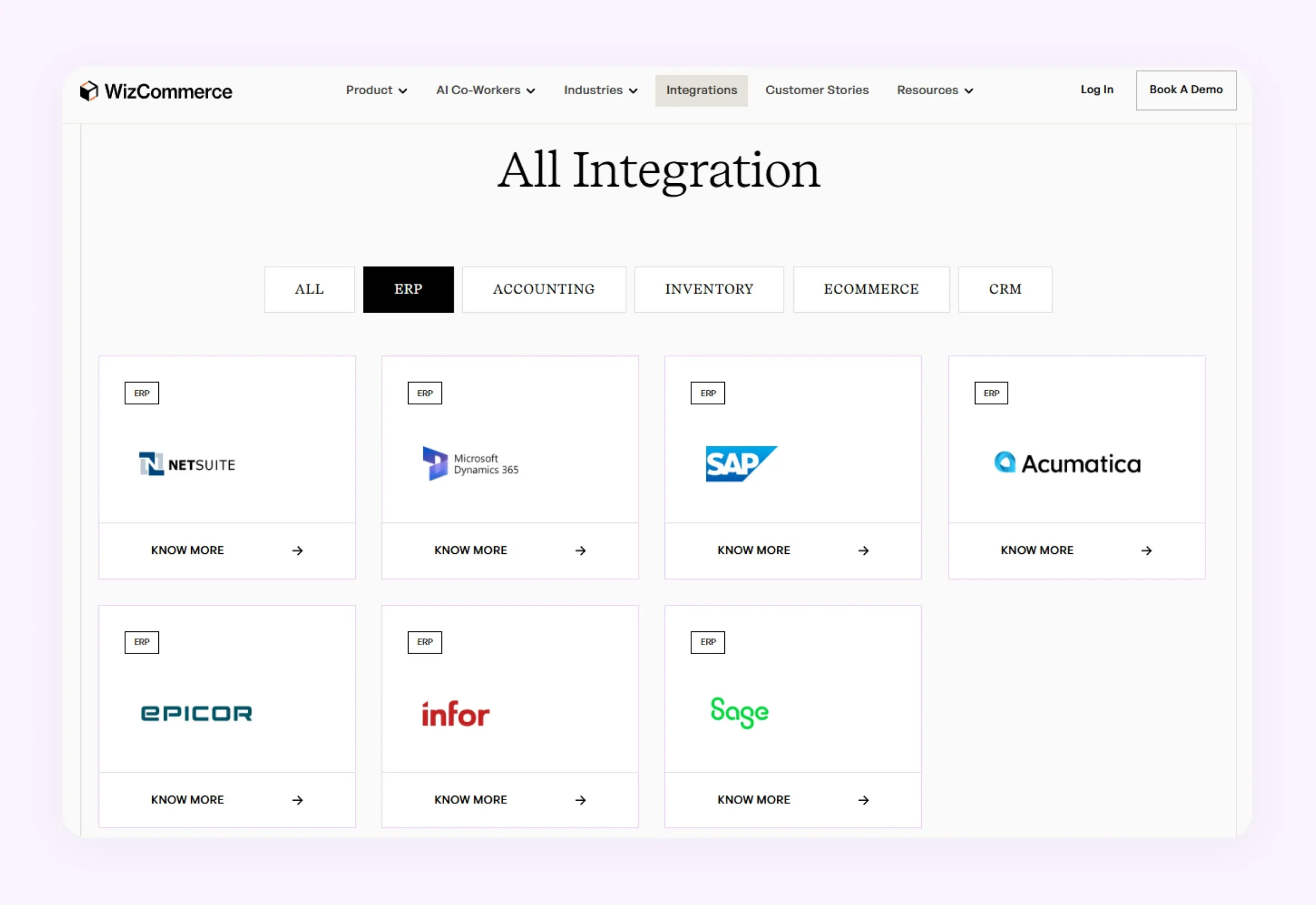
How to solve: Choose a purchase order automation platform like Ella with strong ERP integration capabilities and the ability to connect seamlessly with your existing business systems.
Change management and team adoption
Technology alone does not guarantee successful automation. Employees who are used to manual workflows may initially resist adopting new systems, particularly if they are unfamiliar with the technology. Without proper change management, your teams may continue using manual processes alongside the new system, reducing the effectiveness of the purchase order entry automation initiative.
How to solve: Invest in proper onboarding, team training, and cross-functional alignment to ensure employees understand the benefits of PO automation and adopt the new workflows confidently.
Handling exceptions and complex orders
Not every purchase order follows a standard structure. If you frequently deal with customer-specific pricing, multi-level approvals, partial shipments, custom product requests, etc., and your purchase order automation platform is too rigid, it may struggle to handle these exceptions internally. As a result, your teams will be forced to switch back to manual processing for complex orders, which limits the overall value of automation.
How to solve: Choose a flexible automation platform like Ella – an AI Order Entry Platform that can adapt to custom workflows, approval structures, and complex order scenarios without requiring constant manual intervention.
Unable to pick the right purchase order automation software
Many businesses struggle to identify which purchase order automation solution best fits their operational requirements. Some platforms may lack flexibility, while others may not integrate properly with existing ERP systems or support industry-specific workflows. Choosing the wrong platform can lead to poor adoption, implementation delays, workflow limitations, and higher long-term operational costs. You need a solution that not only automates purchase orders but also supports scalability, customization, reporting, and seamless integrations.
How to solve: Evaluate platforms based on integration capabilities, workflow flexibility, scalability, ease of use, customer support, and long-term business fit instead of focusing only on pricing or basic automation features. The top AI order entry automation software are scored on exactly these criteria, which is a faster shortlist than a features-and-pricing spreadsheet built from vendor sites.
Simplify purchase order automation with Ella by WizCommerce
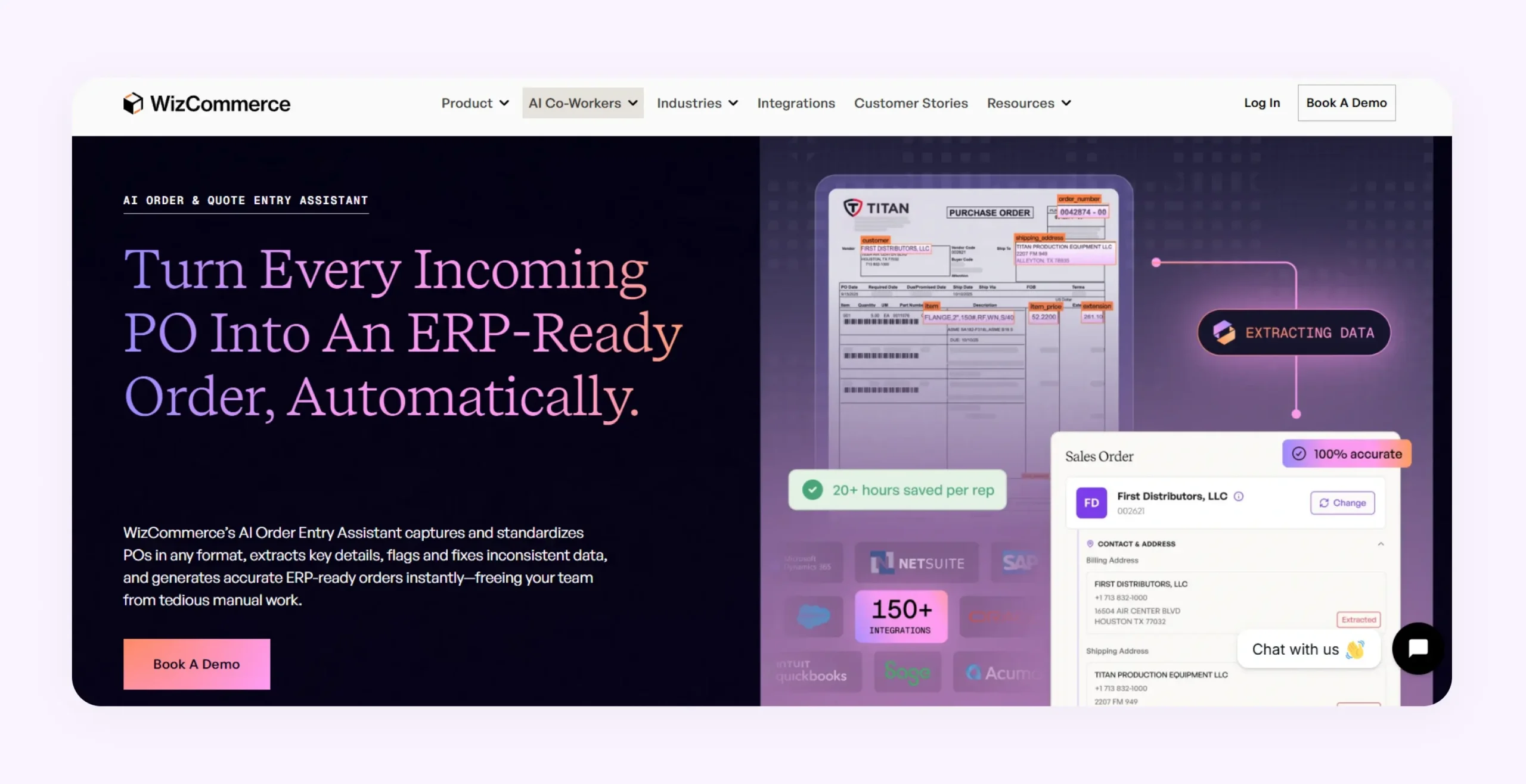
Elly by WizCommerce addresses all the above challenges, it is designed specifically for wholesale and B2B businesses. The platform automates the complete order intake workflow, right from capturing data from any channel to generating ERP-ready POs with minimal manual intervention.
Key capabilities of the platform include:
- Capturing purchase orders from emails, PDFs, spreadsheets, scans, voice messages, and handwritten documents.
- Automatically extracting SKUs, quantities, pricing, customer details, and line-item information.
- Detecting missing fields, pricing mismatches, duplicate entries, and inconsistent order data.
- Validating extracted information against ERP records, inventory, price lists, and historical orders.
- Mapping customer-specific part numbers and product codes to internal SKUs automatically.
- Creating structured ERP-ready orders without manual re-keying.
- Supporting review and approval workflows before pushing orders into the ERP.
- Sending automated order confirmations to customers and internal teams.
- Integrating with existing ERP systems through pre-built connectors and APIs.
Per-customer rules live in plain language: tell Ella once that a given buyer’s SKUs sit in the second column or that their shipments route to a specific DC, and the rule applies on every future PO from that buyer. And when one email carries multiple POs or one PO covers multiple ship-to locations, Ella detects, splits, and creates separate orders, each routed correctly.
Unlike traditional OCR-based tools that struggle with inconsistent PO formats, this pairing of AI extraction with business-rule validation is what AI order entry changes about the inbound workflow: accuracy climbs per customer instead of breaking per format change.
So, if you are looking to eliminate manual order entry and scale purchase order processing without adding operational overhead, book a demo with WizCommerce to see how order entry automation software can fit into your existing workflows.
Frequently Asked Questions
What are the benefits of a purchase order automation system?
The benefits of automated purchase order workflows are plenty. For starters, they help reduce manual effort, eliminate costly mistakes, improve order accuracy, and accelerate approvals. Other key benefits include better control and visibility into order workflows, improved ERP data consistency, reduced operational costs, and support for handling larger order volumes without increasing headcount.
Why should businesses automate purchase orders?
You should automate purchase orders to reduce costly errors and eliminate repetitive manual tasks. An automated purchase order system accelerates order processing and supports faster order confirmations. It also helps you scale operations more efficiently while improving customer satisfaction, supplier relationships, and overall workflow visibility.
How does purchase order automation improve efficiency?
Purchase order automation improves efficiency by eliminating repetitive manual tasks such as data entry, order validation, approvals, and ERP updates. Automated workflows process orders faster and improve accuracy across departments. This allows your team members to handle more orders in less time while maintaining operational consistency.
How does PO automation save time?
A PO automation software offers great time savings by automatically capturing order details, validating data, routing approvals, and updating ERP systems without manual intervention. Instead of spending hours processing emails, spreadsheets, and PDFs, your procurement teams can complete order workflows in minutes.
Why do wholesalers need purchase order automation?
Wholesalers often manage high order volumes and complex inventory workflows, making manual order processing difficult to scale. Purchase order automation helps wholesalers reduce processing delays, improve order accuracy, eliminate repetitive data entry, and manage multi-channel orders efficiently while maintaining better visibility across sales and procurement operations.
Can wholesale POs be automated across multiple suppliers?
Yes, modern purchase order automation platforms like WizCommerce’s AI Order Entry Software can automate wholesale POs across multiple suppliers and order channels. These advanced purchase order automation platforms can capture orders from emails, PDFs, spreadsheets, and portals while validating supplier-specific pricing and workflows.
What are the benefits of PO automation in manufacturing?
In manufacturing, PO automation helps improve procurement accuracy and maintain better inventory control. Automated workflows accelerate supplier communication and improve visibility into purchasing operations. This helps manufacturers optimize supply chain efficiency and achieve faster production and fulfillment cycles.
What is purchase order automation software?
Purchase order automation software is technology that captures, validates, routes, and processes purchase orders without manual data entry. Modern platforms use AI agents to read POs from any format, map line items to ERP SKUs, validate against pricing rules, and create clean sales orders or vendor POs. The best tools handle inbound and outbound workflows in a single platform.
What is the difference between PO automation and procurement automation?
PO automation handles the purchase order workflow specifically: capture, approval, vendor delivery, and matching. Procurement automation is broader and covers sourcing, supplier onboarding, contract management, spend analysis, and PO workflows together. Most procurement platforms include PO automation as one capability, but a dedicated PO automation tool can outperform on the specific workflow.
What are the benefits of three-way matching for purchase orders?
Three-way matching ensures the PO, goods receipt, and vendor invoice align before payment, which prevents overpayment, catches partial-delivery fraud, and tightens audit controls. AI-powered matching cuts duplicate payments by 33 percent and accelerates invoice approval by 25 to 40 percent, and it runs touchless for the 70 to 80 percent of transactions with no real discrepancy.
How does purchase order automation integrate with NetSuite And SAP?
Modern PO automation tools connect to NetSuite and SAP through REST APIs that push sales orders or POs directly into the ERP. NetSuite integrations use SuiteScript for advanced customizations, and SAP integration mechanics vary by version. Ask vendors for production references on your specific version, in your industry, at your volume.
What is the ROI of automating purchase order workflows?
Typical results run 80 to 90 percent reduction in per-order processing time, one to two full-time equivalents redeployed from data entry to revenue work, and fewer error-driven chargebacks. Industry analysis pegs top-quartile programs at a 52 percent reduction in the cost of ordering materials and services. Teams hit year-one ROI when the tool handles every format on day one and the rollout covers all order types, not just the easy half.