Skip to content



Most order operations start to strain in the same way. A shared inbox fills with orders faster than anyone can process them. A spreadsheet built three years ago holds the real logic, and only one person fully understands it. And every afternoon there is a scramble to make sure nothing slips through before the warehouse closes.
Buyers, meanwhile, expect more than ever: real-time confirmations, accurate stock levels, and instant updates when something changes. Meeting that expectation while keeping orders moving by hand is where most teams hit a wall.
Order management software is what takes the manual work out of that flow. This guide breaks down what an order management system is, how the order lifecycle works, the features that matter, and how modern AI-driven platforms are changing what is possible, including where order management gets genuinely complex for wholesalers, distributors, and manufacturers.
What is an order management system (OMS)?
An order management system tracks every order from placement through fulfilled shipment and settled invoice. It connects the people, systems, and data involved in inventory, warehouse management, and fulfillment so nothing gets manually chased, re-entered, or missed between the moment a buyer places an order and the moment the warehouse ships it.
At its simplest, that means capturing an order, confirming payment or terms, checking stock, routing the order to the right location, and closing the loop with an invoice. A good OMS does all of this without a person rekeying data at each step.
Where order management gets harder is when orders arrive in many formats and pricing is not a single number per product. That is common in wholesale and distribution, and it is where AI-driven platforms make the biggest difference. More on that below.
The order management lifecycle and how it works?
1. Order capture and entry
The order arrives. That might be through a self-serve portal, a checkout cart, a sales rep taking an order in the field, an email with a PDF attached, or a message on WhatsApp. A modern order management platform handles all of these channels without forcing the buyer to change how they order. Portal and checkout orders flow in directly, and AI-powered systems read and process unstructured inputs like emails and PDFs automatically.
2. Validation and approval
Before an order moves forward, it needs to be checked. Does the inventory exist? Is the pricing correct for this specific customer? Does the purchase order match the quote that was sent? A strong OMS pulls stored customer information to apply your business rules automatically, flags discrepancies in order details, and routes exceptions to the right person for review rather than letting errors continue downstream.
3. Routing and allocation
Once validated, the order needs to go somewhere. If you operate multiple warehouses, use a 3PL, or have drop-ship vendor relationships, this routing decision has a real cost attached to it. Intelligent order routing weighs inventory levels, warehouse location relative to the buyer, and fulfillment cost to send each order to the right place automatically, without someone making that call by hand every time. That decision rests on multi-warehouse inventory allocation, which reserves stock by location before an order is routed.
4. Fulfillment and shipping
The warehouse picks, packs, and ships the order. At this stage, the OMS generates the documentation the shipment needs, including the Bill of Lading, packing slips, and shipping labels, and updates order status in real time. Buyers get full visibility without having to call in.
5. Invoicing and reconciliation
The final step pushes completed order data into your accounting software or ERP. Payment terms are applied, the invoice is generated, and the transaction closes. When the OMS has a real-time, two-way integration with your ERP, this happens automatically, with no separate data entry task at the end of every order.
Core features to look for in an order management system
1. Omnichannel order intake
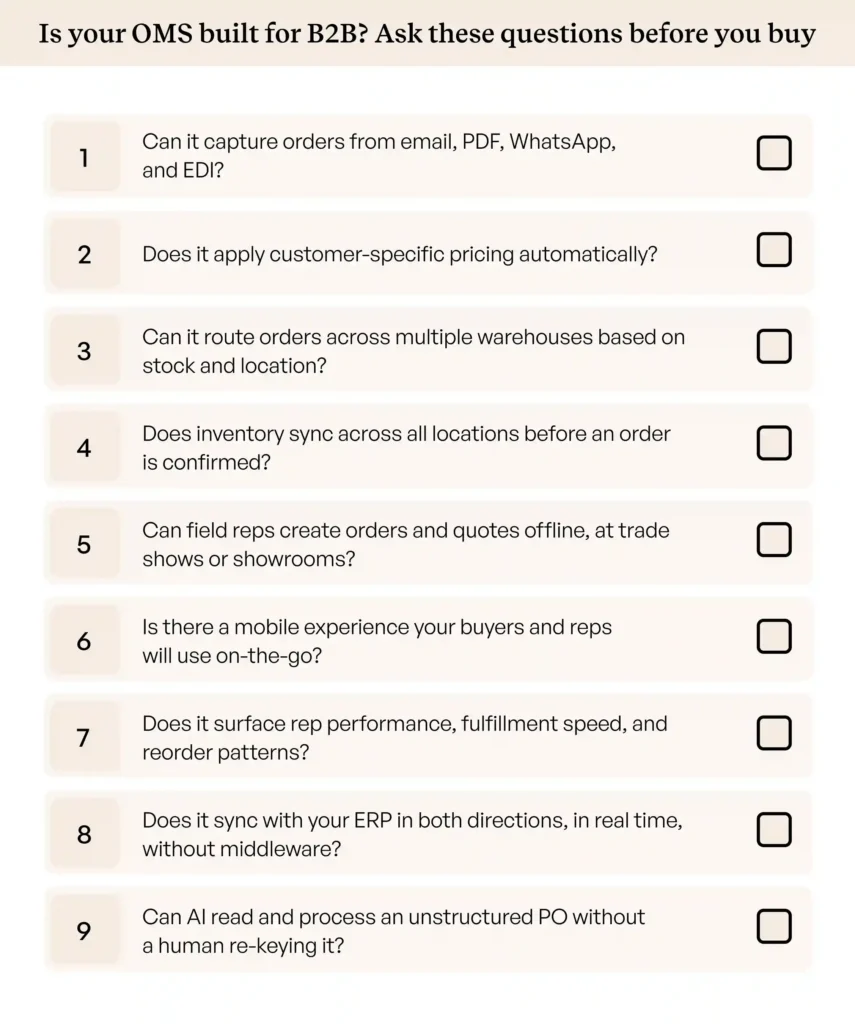
Your buyers will not all order the same way, and the right order management platform should not require them to. Look for a system that supports self-serve web portals, field sales apps for reps, and AI-powered processing for orders arriving by email, PDF, or spreadsheet. If the platform only handles portal orders natively and treats everything else as manual work, it is solving half the problem, and the same test applies one level up, where a wholesale management system has to hold the catalog, stock levels and negotiated price lists, not just the transaction itself.
2. A pricing engine that handles real complexity
Pricing is rarely a single number per SKU. It involves customer-specific price tiers, volume discount thresholds, contract pricing negotiated at the account level, and promotional overrides. The OMS needs to apply the correct pricing for each buyer on every order automatically, without a rep cross-referencing a spreadsheet to figure out what to charge. That pricing should also be visible to the buyer wherever they shop.
3. Intelligent order routing and allocation
When an order comes in, the system should determine the most cost-effective fulfillment path on its own: which warehouse has the stock, which is closest to the buyer, and whether any portion needs to be drop-shipped from a vendor. Manual routing at scale is a bottleneck that grows with every new warehouse or supplier relationship you add.
4. Live inventory visibility
Accepting an order you cannot fulfill is worse than not accepting it at all. Real-time multi-warehouse inventory control across all locations means the OMS is always working from accurate stock data when it validates orders, allocates inventory, and communicates availability to buyers.
5. Field sales and offline capabilities
A significant share of orders in many industries are still written in person, at trade shows, in showrooms, and during sales visits. Reps need to create orders, build quotes, and access customer pricing without relying on an active internet connection, and those orders should sync automatically the moment connectivity returns, with no re-entry required.
6. Mobile access for reps and buyers
Buyers placing quick reorders from the warehouse floor and reps approving quotes between meetings both need a usable mobile app. For field-heavy operations, this is a core part of how orders get placed and approved on any given day, not a nice-to-have.
7. Advanced analytics and reporting
Knowing that orders were fulfilled is not enough. A strong OMS surfaces the data behind your operations: fulfillment speed by warehouse, sales data by rep and account, order volume trends, and purchasing patterns that signal upsell or reorder opportunities. These are the insights that help operations teams improve rather than just maintain.
8. AI assistance
Modern platforms increasingly lean on AI to remove administrative bottlenecks. Look for automatic order entry that extracts data from unstructured purchase orders (messy emails or PDFs) and converts them into system-ready sales orders. That capability sits at the center of sales order processing automation software. Quote automation can compress the negotiation cycle by generating accurate proposals against complex pricing rules. And an AI sales copilot can surface high-intent buyers, suggest relevant upsells based on historical purchasing patterns, and draft routine communications for your reps.
9. Deep ERP integration
Your OMS and ERP should share real-time, bidirectional data, updating inventory, pricing, and returns instantly without maintenance-heavy middleware. WizCommerce enables this through native, pre-built connectors for major ERPs like NetSuite, SAP Business One, Microsoft Dynamics 365, QuickBooks, and Sage.
OMS vs ERP vs ecommerce platform vs B2B OMS: What’s the difference?
These three systems are often confused because they overlap, and because some modern order management tools blend more than one function.
Standalone OMS acts as the traffic manager for your order operations. It captures, validates, routes, and tracks orders through to fulfillment, sitting between your sales channels and your back-office systems, and today it is almost always delivered as a cloud order management solution rather than software you install and maintain in-house.
E-commerce platform is the digital storefront. It captures demand from buyers who are placing orders online, but typically hands off to order management solutions or ERP for everything that happens after checkout. Platforms like Shopify and WooCommerce are common examples; wholesalers running the latter often need to extend it further, which our guide to WooCommerce order management covers in detail.
ERP-embedded OMS treats order management as one module within a larger system of financial record-keeping, inventory accounting, and business reporting. It is comprehensive but often rigid, and rarely built with the front-end experience of sales reps or buyers in mind.
A CRM sits alongside all three. The OMS records the order, the ERP records the transaction, and a wholesale distribution CRM records the account behind both — who owns it, what was quoted, when it last bought and when it’s due to buy again. Most distributors find they need one once the order data is finally clean and nobody can still say which accounts stopped ordering.
B2B order management software is where purpose-built platform like WizCommerce come in. WizOrder is WizCommerce’s dedicated order management module, designed specifically for the way wholesale and distribution businesses operate. It handles the full order lifecycle from AI-powered intake across email, PDF, and WhatsApp through to validation, routing, and ERP posting without the complexity or cost of an enterprise-grade implementation. Unlike horizontal OMS tools that treat wholesale as one of many verticals, WizOrder is built around the specific logic B2B teams need: customer-specific pricing, multi-warehouse routing, field sales ordering, and real-time ERP syn.
Modern platforms often blend the B2B e-commerce and OMS layers into one system that feeds directly into the ERP, so a single B2B e-commerce platform with real-time inventory covers both. If the account layer is the piece you’re missing rather than the order layer, our comparison of the best CRM for wholesalers is the place to start.
Key benefits of using order management software
1. Eliminating manual data entry errors
Every time a staff member rekeys an order from a PDF or email, there is a chance of a wrong SKU, a transposed quantity, or a misapplied price. At 50 orders a day, a 2% error rate means one mistake per day. At 300, it means six. Those errors ripple forward into incorrect shipments, credit notes, and calls your customer service team has to resolve, all of which damage customer satisfaction. AI-powered order entry software removes the re-keying step, so the error rate drops to near zero.
2. Scaling without adding headcount
Order volume during peak seasons can spike 5 to 10 times in a matter of weeks. Without automation, that spike means temporary hires, overtime, and a growing queue of unprocessed orders. With an AI-driven OMS, the same team handles the surge because automated intake and routing take care of the manual work. The platform supports growth without a linear increase in headcount, and cost per order drops as volume rises instead of climbing with it.
3. Faster order-to-cash cycle
Every day between receiving an order and sending the invoice is a day cash is not moving. When order entry, validation, and ERP posting all happen automatically, that cycle compresses from days to minutes. Invoices go out faster, payment terms start sooner, and the business collects revenue more predictably.
Best order management software for businesses in 2026
| Software | Best For | AI Order Entry (PDFs/Emails) | Field Sales / Offline App | Pricing Complexity | Setup Time |
| WizCommerceS | ellers seeking AI automation & handling complex catalogs | ✅ Yes (Native) | ✅ Yes | High | < 30 Days |
| Brightpearl | Retailers doing light | ❌ No | ❌ No | Medium | Months |
| Cin7 | Mid-market multichannel brands | ❌ No | ❌ No | Medium | Months |
| Zoho Inventory | Early-stage startups | ❌ No | ❌ No | Low | Days |
| Orderful | Strict EDI trading partners | ❌ No (EDI only) | ❌ No | N/A (Data routing) | Months |
| NetSuite | Enterprises that can handle manual work | ❌ No (Requires apps) | ❌ No | High | 6+ Months |
| SimplyDepo | CPG brands & distributors with heavy field/route operations | ❌ No | ✅ Yes | Medium | Days |
| OrderEase | Suppliers & manufacturers handling multi-channel intake incl. EDI | ⚠️ Partial (PDF/CSV via Direct Order Suite) | ✅ Yes | Medium | Weeks |
| B2B Wave | SMB wholesalers wanting a simple self-serve portal | ❌ No | ⚠️ Partial (mobile app, limited offline) | Medium | Weeks |
WizCommerce is the only platform in this list with native AI order intake built in. Every other tool requires a separate integration, a manual entry step, or is limited to structured EDI data for order capture.
How to choose the right order management software
Choosing the right platform comes down to four practical questions.
Cost. Will the software eliminate enough manual data entry hours to pay for itself quickly? Calculate the time your team currently spends processing orders by hand and compare it against the platform cost. For most mid-market teams, the math is straightforward.
Utility. Does the platform work for how your business actually operates? That means offline capability for field reps, a mobile experience buyers and reps will actually use, and AI-powered intake for the formats your customers send orders in today, not just the formats you wish they used.
Friction. Does the platform require your buyers to change how they order? A solution that forces customers into a portal when they have been emailing PDFs for years will face adoption resistance that undermines the automation entirely. The best order management software works around your buyers, not the other way around.
Growth. Does it integrate natively with your current ERP, and can it scale with your catalog and order volume without forcing a re-platform in two years? Check whether the integration is pre-built or custom, and whether pricing scales reasonably as your order count grows.
Conclusion
Order management is no longer just about tracking inventory and printing shipping labels. It is about capturing orders from every channel your buyers use, applying the right business logic automatically, and pushing clean data into your ERP without anyone typing it in by hand.
The more complex your orders are, negotiated pricing, multi-line POs, field sales, trade show orders, and buyers who will never use a web portal, the more you need a platform built for that complexity rather than a retail tool stretched to fit.
WizCommerce is built for exactly that. It captures orders from every channel, applies your pricing and routing logic automatically, processes orders your customers send across email, PDF, and WhatsApp, posts them straight to your ERP, and goes live in under 30 days. Book a demo to see what that looks like for your business.
FAQs
1. Which order management system is best?
The best order management software combines AI-powered intake, complex pricing support, and native ERP integration; WizCommerce is the strongest option for teams that need all three. Enterprises with large IT teams may consider NetSuite or SAP, but those tools require significantly longer deployment timelines and do not handle unstructured order inputs natively.
2. What is the difference between ERP and OMS?
An ERP is the system of record for your business: financials, inventory accounting, and reporting. An OMS is the operational layer that manages the order lifecycle from capture to fulfillment. The two work best when connected in real time, with the OMS handling front-end complexity and the ERP maintaining the financial record.
3. What are the 4 stages of order management?
The four core stages are order capture, order validation, order fulfillment, and invoicing and reconciliation. Validation is often the most complex stage, especially when it involves checking customer-specific pricing, confirming inventory, and matching an incoming PO against an existing quote.
4. How does an OMS handle omnichannel sales?
A strong OMS connects all of your sales channels, i.e., web portal, email, field sales app, EDI, and trade show, into a single order queue. Each order is processed using the same validation rules and routing logic regardless of where it came from, so there is no separate workflow for each channel.
5. What are the core stages of the order lifecycle in an OMS?
Order capture, validation and quote approval, routing and warehouse allocation, pick, pack and ship, and finally invoicing and ERP reconciliation. Modern platforms automate most of these stages, reserving human review for exceptions rather than routine transactions.
6. Does an OMS support agentic orders?
Agentic order management refers to AI that takes action on behalf of a user without requiring human input at each step. WizCommerce supports this: when a customer emails an order, the AI reads it, validates it, and posts it to the ERP without a rep needing to review or approve routine transactions. Exceptions are flagged automatically for human review.
7. What are the features of an order management system?
Core features include multi-channel order intake, pricing and validation rules, inventory visibility, order routing, fulfillment tracking, returns management, and ERP integration. More advanced features include AI-powered document processing, customer-specific pricing tiers, quote management, field sales tools, and offline ordering capability.
8. Which OMS offers automation features?
WizCommerce offers the deepest automation for order entry, including AI-powered intake from emails, PDFs, and WhatsApp, automatic SKU matching, and direct ERP posting with no manual steps. Other platforms offer basic workflow triggers or EDI automation but do not handle unstructured order inputs natively.
9. How do wholesalers manage bulk orders efficiently?
The most effective approach combines an AI-powered order intake layer with a real-time ERP integration. Orders arrive in any format, the AI converts them into validated line items, and the ERP updates inventory and triggers fulfillment automatically. WizCommerce is built specifically for this workflow, handling the bulk order volume that manual entry teams cannot keep up with during peak periods.