Skip to content



Integrating AI order entry software with NetSuite comes with its own set of challenges. The software may be able to read a purchase order accurately, but that is only one part of the job. Before choosing an integration approach, you need to understand how the system will work with the way your NetSuite account is genuinely configured.
Pricing structures, customer-specific rules, item data, units of measure, custom fields, scripts, approval workflows, permissions, and existing integrations can all affect how smoothly the setup works. You also need to think about the architecture itself, meaning where processing happens, how data moves between systems, what gets written back to NetSuite, how exceptions are handled, and what happens when something fails.
This guide covers those decisions from an implementation perspective, including architecture, connection methods, data movement, order creation, exception handling, governance, security, testing, and the questions worth answering before you integrate AI order entry software with NetSuite.
What an AI Order Entry Integration With NetSuite Actually Involves
Integrating AI order entry software with NetSuite means connecting a system that reads inbound customer purchase orders to the ERP that holds your customer, item and pricing data, so that a validated sales order is created without anyone re-keying it. The reading and the matching happen outside NetSuite. What enters NetSuite is a structured order that has already been checked against your own records.
What sits on each side of the integration
The integration boundary is the line in the architecture where your ERP’s responsibility ends and the order entry platform begins, and almost every decision in this guide follows from where you draw it.
On one side sits the order entry layer, which receives documents, reads them, and works out what they say. This is where extraction runs, where a customer gets identified, and where line items get matched against a catalogue.
On the other side sits NetSuite, holding the records that make validation possible and receiving the orders that come out the other end. Your item master, your customer records, your price levels and your inventory positions are the reference data the order entry layer checks against. NetSuite remains the system of record throughout, and nothing about this integration changes that.
What crosses the boundary, in both directions
Reference data moves out of NetSuite continuously, covering customers, contacts, addresses, items, cross-reference codes, price levels and inventory positions, because without it the software would be guessing at whether a part number is real and whether a price is right. Validated orders move in, and optionally new customer records alongside them, which is a decision worth making deliberately rather than inheriting as a default. Order status then flows back out as the record moves through approval, fulfillment and invoicing, so the order entry layer shows a current picture rather than a stale one.
Where NetSuite’s Native AI Stops?
NetSuite ships real AI capability, and none of it is built to read an inbound customer purchase order and turn it into a sales order. The gap is structural rather than a matter of maturity, and it is the reason a separate integration exists at all.
The NetSuite AI Connector Service is Oracle’s own path for connecting external AI to NetSuite, built on Model Context Protocol. It gives an AI assistant structured access to NetSuite records and reports through standard tools for record retrieval, record creation and update, saved search execution and SuiteQL queries. Oracle’s own datasheet for the service does not mention orders, sales orders or any transaction type anywhere in the document.
Three constraints in Oracle’s own documentation explain why. The tools cannot make outbound calls to external destinations, so a tool cannot reach a document parsing service to read a PDF. The service runs under deliberately restricted roles rather than elevated ones, so it is not designed to sit unattended writing transactions at volume. And the interaction model assumes an assistant, a prompt and a person, with no inbound trigger for a document that lands in a mailbox at midnight.
NetSuite’s native document capture points at supplier bills in accounts payable rather than customer purchase orders in accounts receivable. Those are opposite ends of the same building.
None of this is a criticism of Oracle. They built a strong data access layer for AI assistants, and they did not build an order entry system.
Architecture of an AI Order Entry Integration With NetSuite
The architecture of an AI order entry software integration with NetSuite resolves into four distinct layers. An intake layer receives documents, an extraction and matching layer turns them into structured orders using master data pulled from NetSuite, a validation layer checks every line against your rules before anything is written, and an integration layer authenticates to NetSuite and creates the record. Everything except the final write happens outside your ERP.

The components, and where each one runs
The intake layer sits closest to your customers and furthest from your ERP. It monitors a mailbox, accepts uploads, or receives documents through an API. It does no interpretation, so its only job is to capture a document reliably and hand it onward with enough metadata to trace it later.
How AI order entry software for NetSuite reads and structures the document
Extraction converts an unstructured document into a structured order, and it is the only stage in the whole chain that never touches NetSuite. Everything it produces is a claim about what the document says rather than a fact about your business, which is why validation exists further down. The system identifies the header information, meaning who sent it, which purchase order number it carries, where it ships and on what terms, then reads the line table and pulls a part reference, a description, a quantity and a price for each row.
How it identifies the customer before anything else
Customer identification runs first because everything downstream depends on getting the account right. Pricing, customer-specific part-number cross-references, ship-to addresses, payment terms, and credit status all depend on the customer record, so matching an order to the wrong account is worse than failing to process it. The primary signal is the sender’s email domain, matched against contacts and customer records pulled from NetSuite, but that can break when domains are shared across agencies or buying groups, when customers have similar legal names, or when duplicate customer records exist.
To resolve these cases, better systems layer in additional signals such as bill-to and ship-to details, PO numbering patterns, and previous orders from the same source. When a reviewer corrects a customer match, that correction should also be remembered and applied to similar orders in the future.
How it matches lines against your NetSuite item data
Line matching follows a hierarchy, with each step becoming more dependent on data quality and AI as it moves down. An exact match on your own SKU is the cleanest case, followed by customer part-number cross-references, where the customer’s internal code is mapped to your SKU. If these cross-references are maintained in NetSuite, they provide a strong foundation, although many accounts have gaps in this data. When neither is available, the system falls back to descriptions and attributes, matching the order line against item names, descriptions, and custom fields.
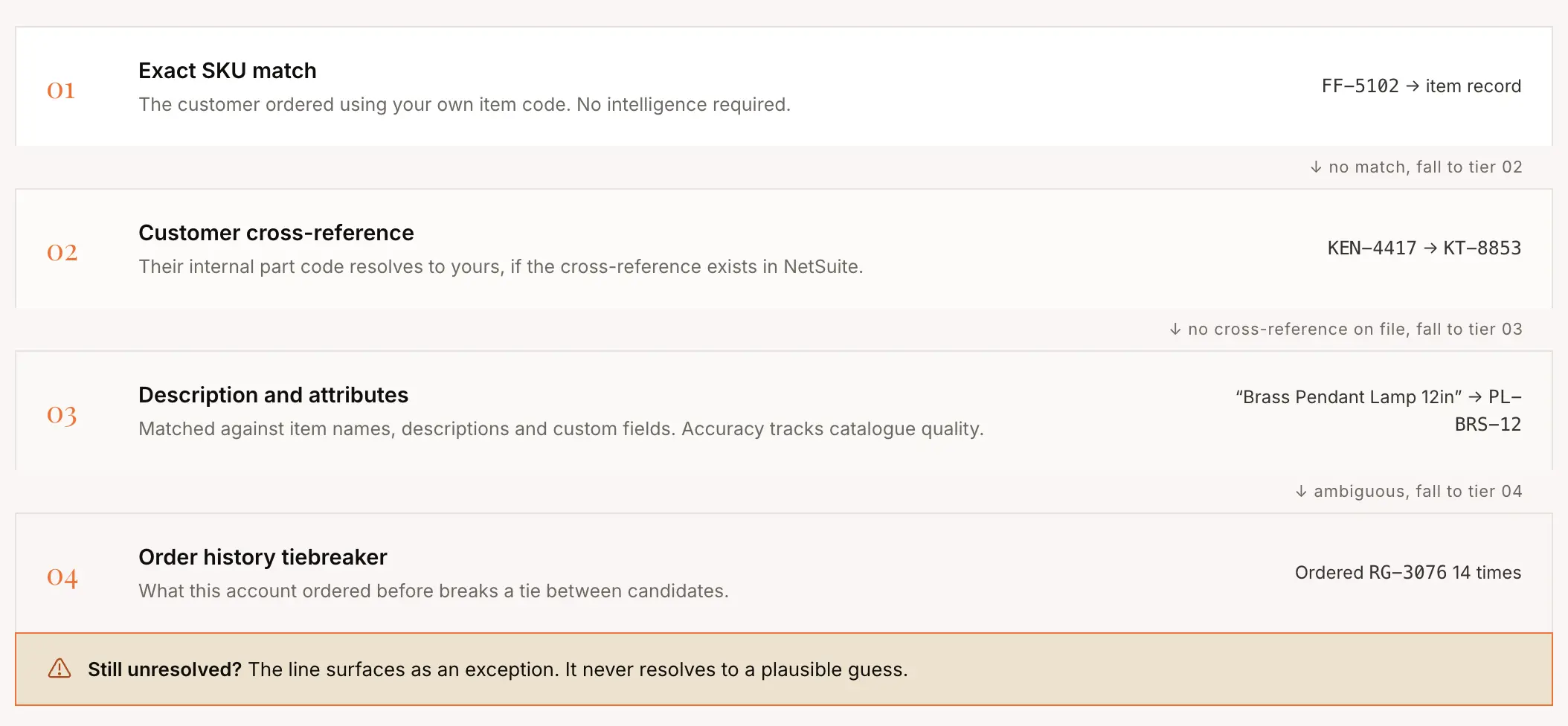
This is where AI does most of the work and where accuracy depends heavily on the quality of the product catalogue. Finally, order history can act as a tiebreaker, using previous purchases to strengthen a match. The system should never silently guess at a line it cannot resolve. Anything below the confidence threshold should surface as an exception rather than map to a plausible but potentially incorrect item.
How it validates against NetSuite before anything is written
Validation is the step that requires the integration to exist. Extraction alone tells you what a document says, which is useful and nowhere near sufficient. During validation, three checks run against data pulled from NetSuite. Price validation compares the extracted price against the pricing rules that apply to that customer, availability validation checks the quantity against current inventory, and order rule validation checks case pack multiples, minimums and increments. All of this happens before an order reaches NetSuite.
How the validated order reaches NetSuite
Once the validation is done, the order is confirmed and pushed into the ERP but if validation pops an exception then it routes to a reviewer rather than writing in the ERP. The sales rep can resolve the exception in about fifteen seconds and approve. The integration layer authenticates to NetSuite, creates the sales order with the status your configuration specifies, and records the NetSuite internal ID against the source document so the whole chain stays traceable. Total elapsed time from arrival to a record in NetSuite is under three minutes, of which the human contributed about forty seconds.
Three Ways to Integrate AI Order Entry Software With NetSuite
To integrate AI order entry software with NetSuite, three primary deployment approaches are available:
- Native SuiteApp
- Direct API
- Middleware or iPaaS
The main difference is where the integration runs and how much of it is managed inside NetSuite.
| Connection shape | Where document processing runs | What your administrator approves | Where it fits |
|---|---|---|---|
| Native SuiteApp | Inside your NetSuite account | A packaged application installed into the account | Teams that want every moving part inside one governed boundary |
| Direct API integration | On the vendor’s infrastructure | An integration record, an access token, sometimes a script deployment | Most mid-market deployments, where processing load stays off the ERP |
| Middleware or iPaaS | On the integration platform | That platform’s own connection plus whatever it deploys into NetSuite | Organizations already standardized on a single integration platform |
What methods move data between AI order entry and NetSuite?
The deployment approach determines where the integration runs. The methods below determine how the AI order-entry platform exchanges data with NetSuite. A well-designed integration can use different methods for different workloads, such as creating sales orders, retrieving customer and item data, or extracting large amounts of master data.
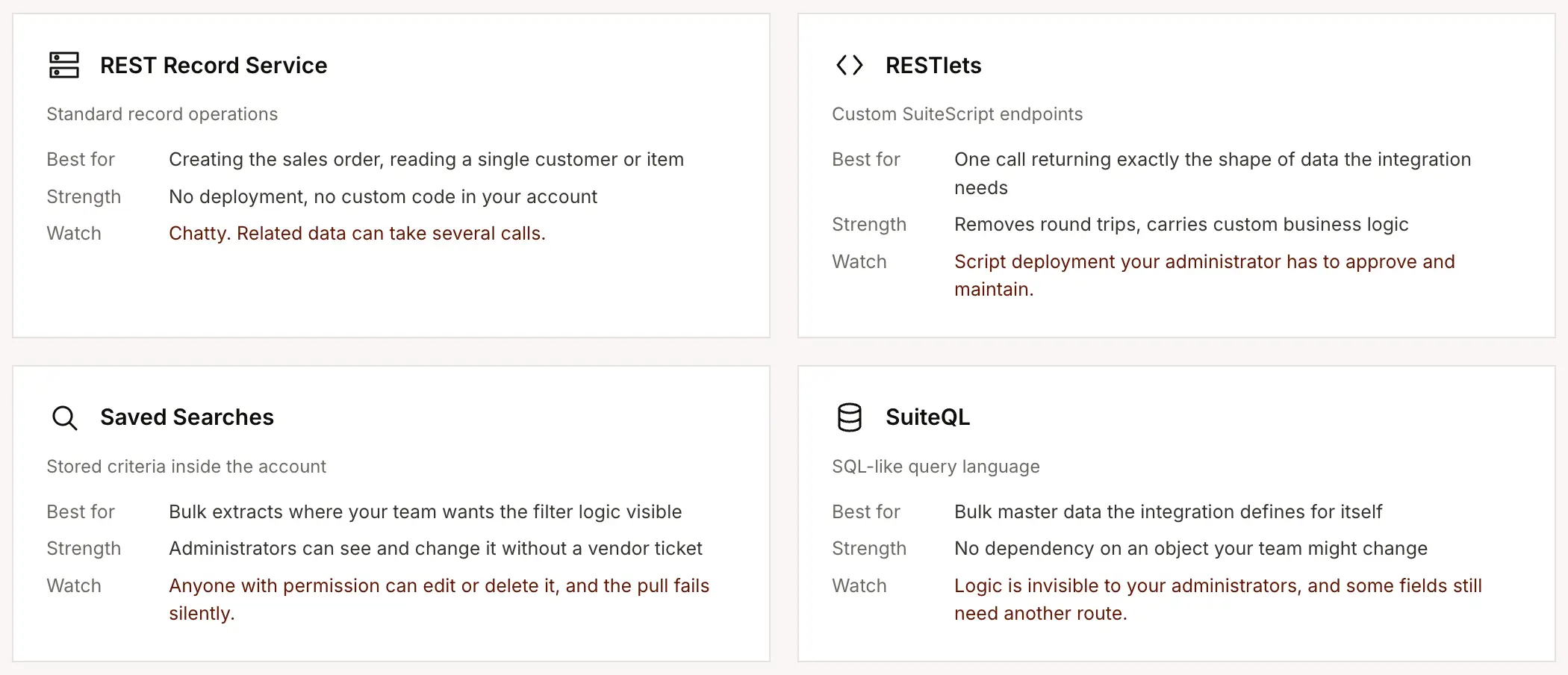
REST Record Service
The REST Record Service is NetSuite’s standard REST API for working with records. An AI order-entry platform can use it to retrieve customer and item records, check relevant order information, and create or update records such as Sales Orders. It is the most straightforward option for standard record operations, but complex workflows can require multiple API calls to retrieve related data.
RESTlets
RESTlets are custom SuiteScript endpoints deployed inside the NetSuite account. They let an integration expose a purpose-built endpoint that returns exactly the data the AI order-entry system needs. For example, instead of making separate calls for a customer, address, pricing information, and related records, a RESTlet can combine the required data into a single response. This makes RESTlets useful when standard REST APIs would require too many calls or when the integration needs custom business logic.
Saved Searches
Saved Searches are predefined searches created and stored inside NetSuite. An integration can execute them to retrieve specific customer, item, pricing, inventory, or other data without defining the filtering logic each time. Their main advantage is visibility, because NetSuite administrators can see and manage the criteria directly in the account. The trade-off is that changing or deleting a Saved Search can unintentionally affect an integration that depends on it.
SuiteQL
SuiteQL is NetSuite’s SQL-like query language for retrieving structured data. Instead of relying on a Saved Search configured by an administrator, the integration can define its own query and retrieve the specific records and fields it needs. This provides more control over complex data retrieval, particularly for bulk operations, but the query logic is less visible to NetSuite administrators and some record data may still require another interface to retrieve.
How the integration authenticates with NetSuite
Direct integrations typically use token-based authentication rather than a username and password. The connection consists of an account ID, consumer key, consumer secret, token ID, and token secret. The account ID identifies the NetSuite account, the consumer credentials identify the integration application, and the token credentials authorize that application through a specific user role. This also lets administrators revoke the integration without affecting the user’s normal login. The token secret is displayed only when the token is created, so it should be stored securely.
NetSuite features and permissions required
The administrator typically needs to enable REST Web Services and Token-Based Authentication under Setup → Company → Enable Features → SuiteCloud. Server SuiteScript may also be required when the integration uses RESTlets. The administrator then creates the integration record under Setup → Integration → Manage Integrations and generates access tokens under Setup → Users and Roles → Access Tokens. Permissions should be limited to the NetSuite records the integration genuinely needs, such as customers, items, pricing, inventory, and sales orders.
Data Flow Between AI Order Entry Software and NetSuite
The integration pulls reference data out of NetSuite on a schedule and pushes finished orders in as they are approved. Master data moves out because matching and validation are impossible without it. Orders move in because that is the point. Status updates move back out so the picture stays current.
What the integration pulls out of NetSuite, and why it needs it
Customer data comes out first, including the customer record, its contacts, its addresses, its assigned sales rep, its payment terms and its price level assignment.
Item data comes out next, covering item records, types, descriptions, units of measure, case pack configuration and any customer part number cross-references you maintain. This is the reference set that line matching runs against.
Pricing comes out as a distinct extract because it does not live in one place. Depending on your configuration this can mean price levels on items, customer-specific item pricing, price group assignments, quantity break tables and contract pricing. Inventory comes out on the fastest clock, because it changes constantly and stale availability produces exactly the kind of error this system exists to prevent.
What it writes back, and when
An order is written once it has cleared validation and whatever review your configuration requires. Everything else the integration is capable of writing is optional, and treating it that way during configuration is the safer instinct.
New customer records and new contacts can also be written, depending on a policy decision you should make deliberately. You can allow the integration to create a customer when no match exists, because it keeps orders moving.
Scheduled pull and real-time push
The pattern is asymmetric and there is a good reason for it. Pulls run on a schedule because master data changes at a predictable pace and polling is efficient. Pushes happen in real time because an approved order should not wait for the next cycle.
Choosing a sync cadence per entity
Cadence should differ by entity because the entities differ, and a single global setting is a design smell. Inventory moves continuously, pricing moves on a release cycle, and item records move whenever somebody remembers to update them. A cadence that treats all three identically is either wasting request capacity on the slow ones or running the fast one far too cold.
| Entity | Typical cadence | Why that clock | What a slower clock costs you |
|---|---|---|---|
| Inventory | Every 30 to 60 minutes | Availability changes continuously and drives real promises | Orders validated against stock that has already gone |
| Customers, contacts, addresses | Hourly to a few times a day | New accounts and changed terms matter, rarely within the hour | A new customer’s first order parks as an exception |
| Items and cross-references | Once or twice a day | Catalogues change on a release cycle rather than continuously | New codes fail to match for a day after they are created |
| Pricing | Daily, and immediately after a price file update | Prices change on a schedule you control | Validation compares lines against superseded prices |
What Happens When an AI Order Entry Creates an Order in NetSuite?
Once an order is validated, the integration creates the appropriate record in NetSuite and stores its internal ID. NetSuite then applies its configured workflows, approval rules, payment terms, and credit controls, which can affect the order’s final status.
How NetSuite determines the order status
Most integrations create a standard Sales Order so existing NetSuite workflows and scripts can continue to run. Depending on the account configuration, the order may enter Pending Approval or another status before fulfillment.
Customer status, payment terms, credit rules, and custom workflows can affect the final status. These scenarios should be tested with representative orders before the integration goes live.
What happens when a customer or item is missing?
The integration needs a defined rule for missing master data, which is to create the record, hold the order, or reject it. A common approach is controlled customer creation while blocking automatic item creation.
Creating an incorrect item can affect inventory, pricing, and downstream fulfillment, so unresolved item matches are typically safer to route for review rather than create automatically.
How are quotes and estimates handled?
A quote request may need to create an Estimate rather than a Sales Order. The integration should distinguish between quote requests and confirmed POs so that the wrong document type is not created.
When an Estimate is later converted to an order, the relationship between the two records should be preserved. If a customer references an existing quote in the PO, the integration should also define how that reference is matched.
How are duplicate POs prevented?
Before creating a Sales Order, the integration can check whether the PO number already exists for the same customer. Potential duplicates can then be flagged for review instead of creating another order.
NetSuite can also have duplicate-PO controls configured, but the exact behavior depends on the account’s validation rules and workflows. An upstream check adds another layer of protection before the order is created.
Where Human Review Fits in the NetSuite Workflow
Human review can happen either before the order is written to NetSuite or after it is created there. The choice determines whether unverified orders ever enter the ERP and where your team manages exceptions.
Reviewing before or after the NetSuite write
With pre-write review, orders with unresolved exceptions are held by the order entry system until a person reviews them. Only approved orders are created in NetSuite, keeping unverified data out of the ERP.
With post-write review, the order is created in NetSuite, typically in a held or approval status, and the reviewer resolves the exception there. This gets the order into the ERP sooner but means downstream processes may see an order that has not yet been reviewed.
Most implementations use one of three modes:
- Always review: Every order requires approval before being written to NetSuite.
- Exception review: Clean orders write automatically; only flagged orders require review.
- Full automation: All orders write automatically, with issues handled afterward.
For most teams, exception review becomes the target once the integration has been tested against real orders, while always-review is useful during the initial rollout.
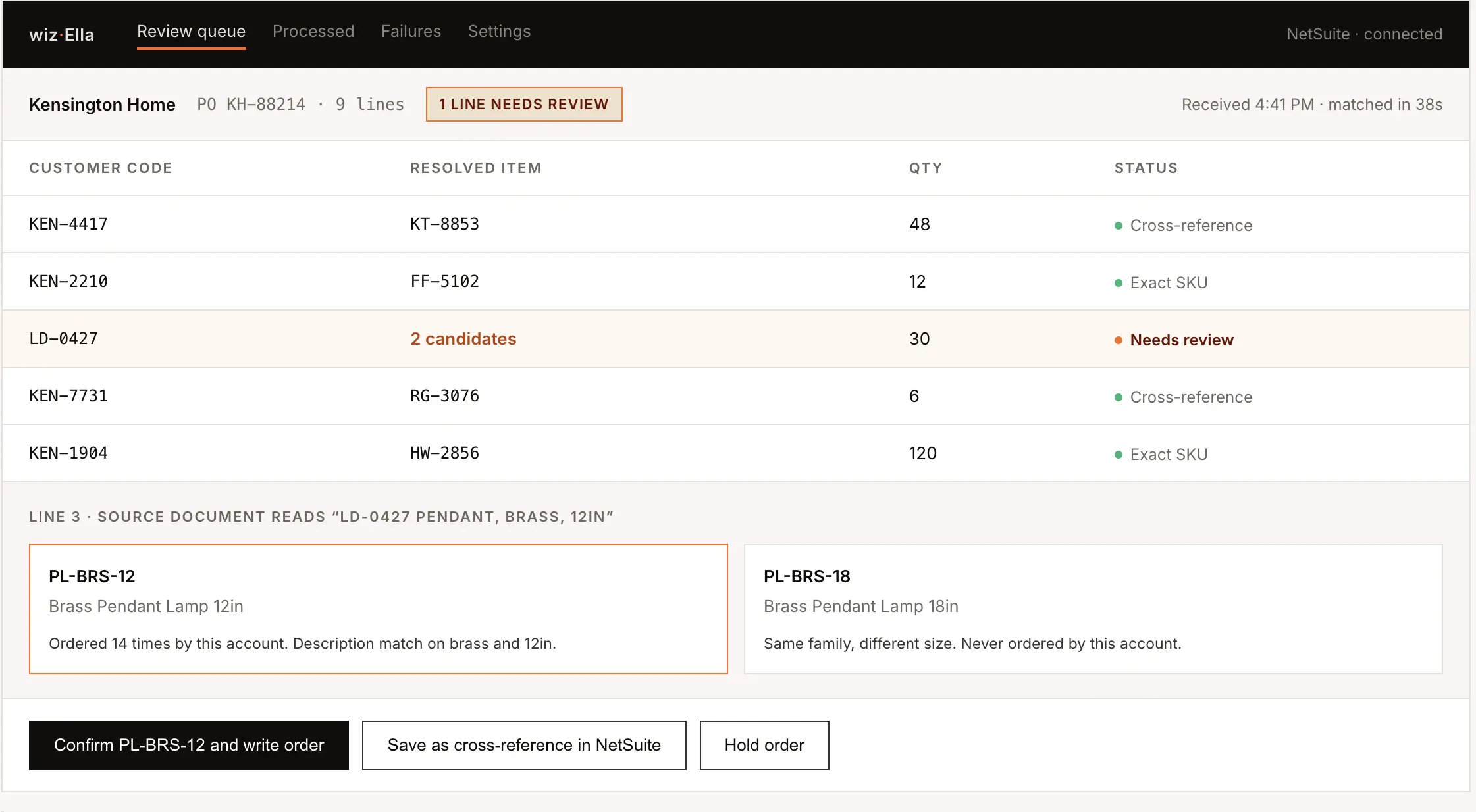
What happens when a line cannot be matched?
A low-confidence or unresolved line should not be silently mapped to an item. The integration can hold the entire order for review, flag the line for review inside NetSuite, or use another configured exception workflow.
The important question is whether the system blocks uncertain matches or allows them through. This should be tested using products with similar descriptions, part numbers, or specifications.
Where should reviewers work?
Review can happen in the order entry platform or directly inside NetSuite. Reviewing inside NetSuite can reduce context switching because the team already works there and the ERP remains the system of record.
If exceptions are handled in NetSuite, the order can be created in a held status with an exception reason, allowing the reviewer to resolve the issue and release the order without moving between systems.
Handling NetSuite Integration Errors and Failed Writes
Integration errors typically come from three areas. NetSuite can reject the write, a custom script or workflow can block the order, or a failure can go unnoticed because it never surfaced clearly enough for anyone to act on it. The integration should make each failure visible and provide a clear path to resolve and retry it.
Why a write gets rejected by NetSuite
Most write failures come from missing or invalid data. Common causes include a missing customer or item, a required field that was not populated, an invalid field value, or a field type mismatch.
NetSuite requirements can vary by account because of custom forms, fields, scripts, and workflows. These scenarios should be tested in a sandbox before production.
How custom scripts and workflows cause failures
NetSuite accounts often have user event scripts, workflows, and validation rules that run when an order is created, including orders created through an API. These customizations can reject an otherwise valid order if required data is missing or a business rule is not satisfied.
The implementation should therefore test the integration against the account’s existing customizations and make script or workflow errors visible to the team responsible for resolving them.
How should failures be surfaced?
A failed write should have a clear status and error reason, appear in a failure queue, and trigger a notification to a designated owner. This gives the team both a record of what failed and a clear way to act on it.
The goal is to prevent orders from remaining unwritten simply because an alert was missed or sent to the wrong person.
How are failed orders retried?
After the underlying issue is fixed, the preferred recovery path is to retry the original order rather than create a new one manually. The integration should preserve the original order context and prevent a successful retry from creating a duplicate.
This is particularly important when a timeout occurs after NetSuite has already created the order. A retry should first check whether the original record exists before creating another Sales Order.
Key Risks in an AI Order Entry NetSuite Integration
Integrating AI order entry software with NetSuite introduces risks around data matching, pricing, master data, connectivity, and exception handling. Most can be reduced by validating data before the NetSuite write, defining clear exception workflows, and testing the integration against your specific NetSuite configuration.
Customer and item matching
Incorrect customer or item matches can result in orders being created against the wrong NetSuite records. The integration should validate matches against NetSuite customer records, item records, and customer-specific cross-references, with uncertain matches routed for review.
Incorrect pricing
An AI order entry system can extract a price from an incoming document, but that does not necessarily mean it is the correct NetSuite price. Validate order prices against the applicable customer pricing rules and send significant discrepancies for review before creating the Sales Order.
NetSuite master data quality
Duplicate customers, outdated addresses, incomplete item records, and missing cross-references can increase exceptions during order processing. Cleaning and validating relevant NetSuite data before go-live can improve matching and reduce failed writes.
NetSuite connection failures
Expired credentials, API errors, configuration changes, or NetSuite availability issues can prevent validated orders from being written. The integration should retain failed orders in a visible queue and support retrying them once the underlying issue is resolved.
Exception handling and human review
Not every order can be processed automatically. The integration should clearly identify exceptions, assign them to the appropriate reviewer, and prevent unresolved orders from being written incorrectly to NetSuite.
NetSuite Governance and Performance Limits to Plan For
AI order entry software shares NetSuite’s available integration capacity with other connected systems. High request volumes, inefficient data retrieval, and poorly configured syncs can affect how reliably orders and master data move between the two systems.
Concurrency is shared across integrations
NetSuite’s concurrent request capacity is shared across integrations connected to the account. An AI order entry integration therefore uses the same capacity as existing ecommerce, shipping, reporting, and other integrations.
Before deployment, review the account’s available concurrency and existing integration activity. The AI order entry vendor should also be able to explain the expected request volume at your order and record volumes.
Sync only the data the integration needs
AI order entry software typically needs customer, item, pricing, inventory, and cross-reference data from NetSuite. Pulling the entire customer or item database on every sync can create unnecessary request volume.
The integration should filter data at the NetSuite side where possible and retrieve only the records required for order matching and validation. Ask how the integration handles incremental syncs and how frequently it retrieves each data type.
Account time zone can affect incremental syncs
Incremental syncs rely on timestamps to identify records that have changed. If the integration and NetSuite account use different time zones when calculating those windows, records can potentially be missed or processed incorrectly.
The NetSuite account time zone should therefore be confirmed during setup, along with how the integration calculates its incremental sync windows.
Access, Permissions, and Security Requirements for Integration
The NetSuite integration needs controlled access to read customer, item, pricing, and inventory data and create or update order records. It should use a dedicated integration user, token-based authentication, and only the permissions required for the configured workflows.
Use a dedicated integration user
Create a dedicated NetSuite user and role for the integration rather than using an employee’s account. This keeps integration activity separate in audit logs and prevents the connection from breaking when an employee changes roles or leaves the company.
The role should include only the permissions required for the records and operations used by the integration.
Use least-privilege access
The integration typically needs read access to customers, contacts, items, pricing, and inventory, along with permission to create or update Sales Orders. Additional permissions may be required if the integration handles Estimates, custom scripts, or specific NetSuite data retrieval methods.
Administrator access should not be the default. If a vendor requires broader permissions for the NetSuite connection, they should explain which capabilities require them.
How is order data handled?
Purchase orders contain commercially sensitive information, so confirm how the provider stores, processes, and retains that data. Key questions include whether customer data is used to train models serving other customers, where it is processed and stored, and what happens to the data when the relationship ends.
If your organization has specific data residency or compliance requirements, confirm that the provider’s infrastructure and subprocessors meet them before deployment.
What should the audit trail capture?
The integration should provide a record of documents received, orders created, failed writes, and human decisions made during review. This makes it possible to trace what happened to an order and why.
Also confirm how long integration logs and audit records are retained, particularly if your organization needs records beyond the retention period of NetSuite’s native integration logs.
Testing and Rolling Out the NetSuite Integration
Test the integration in a NetSuite sandbox, validate it against real-world order scenarios, and run it alongside the existing process before moving fully to production.
Test in a NetSuite sandbox
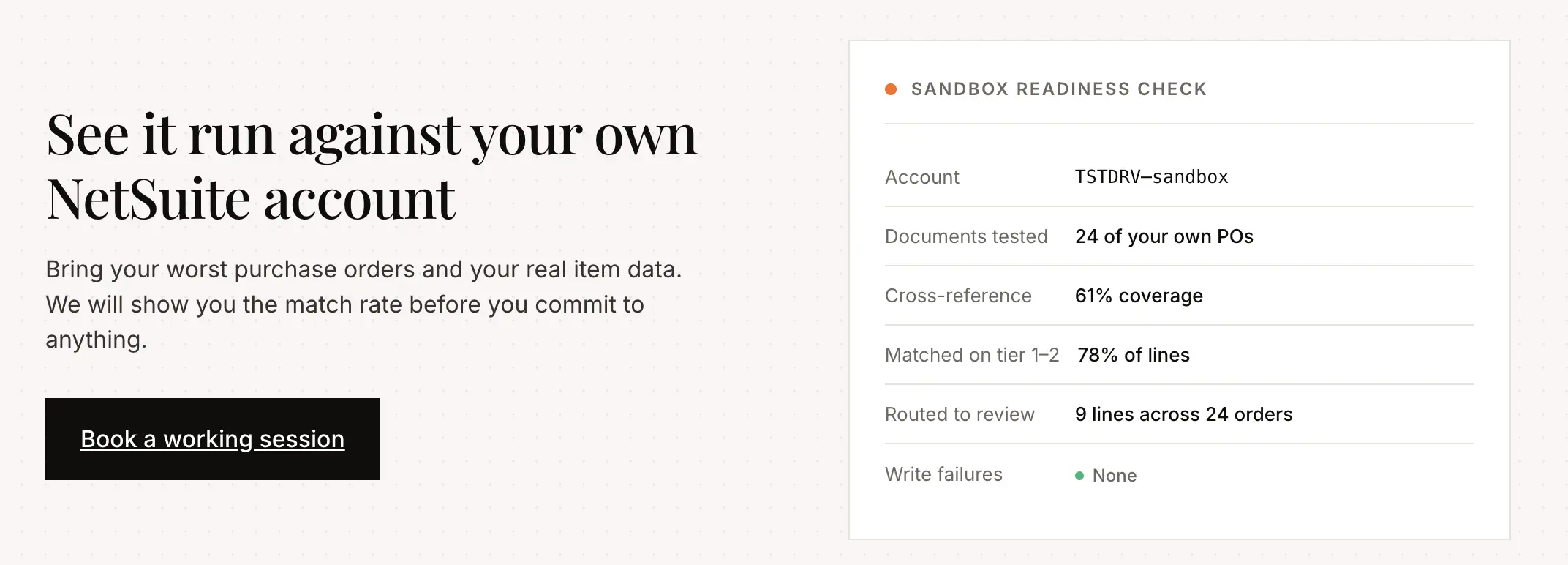
Use a sandbox to validate authentication, data mapping, order creation, validation rules, and exception handling before production. Make sure the test environment contains representative customers, items, pricing, inventory, and cross-reference data.
If the sandbox is refreshed during testing, integration credentials and related configuration may need to be re-established.
Test with real order scenarios
Use representative purchase orders from your own customers rather than relying only on clean sample documents. Include different document formats, customer-specific part numbers, duplicate POs, pricing discrepancies, missing data, and other exceptions the integration is expected to handle.
This helps validate the complete flow from document extraction and matching through validation and the NetSuite write.
Run a parallel test before cutover
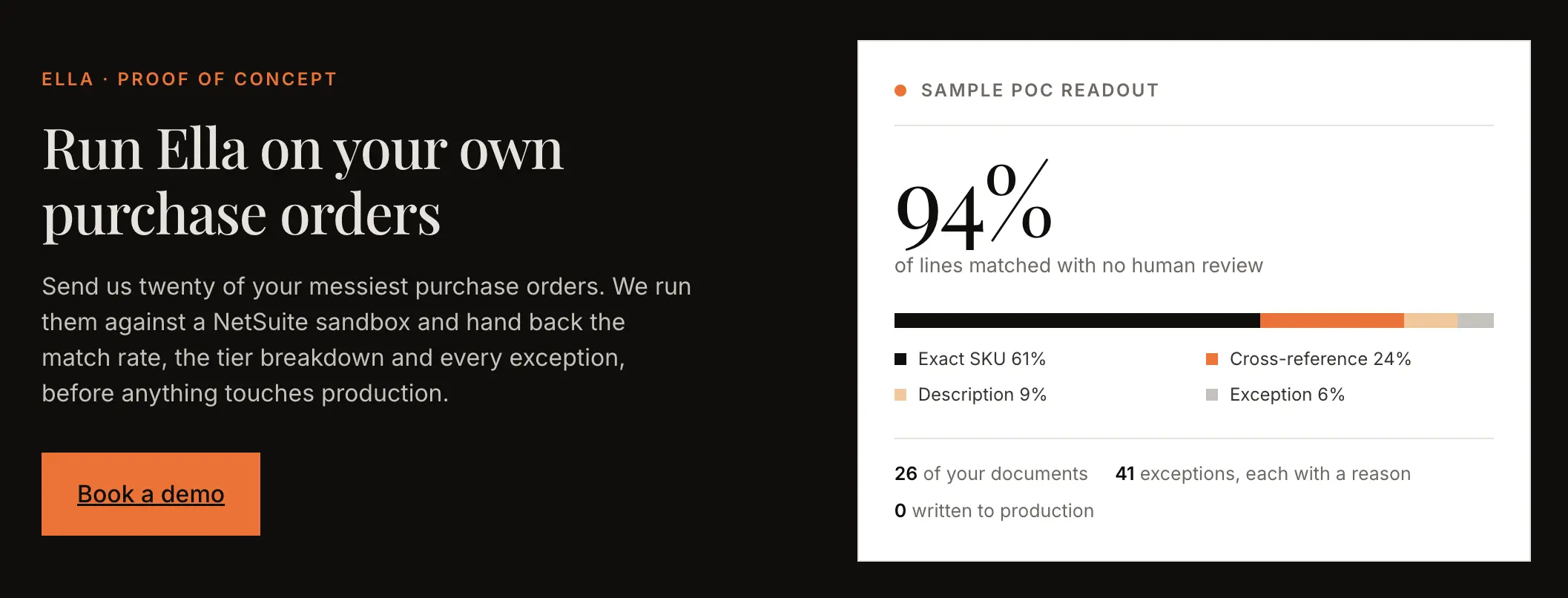
Run the integration alongside the existing manual process for a defined period and compare the results. This gives you a baseline for match rates, exception rates, write failures, and the amount of human review required.
Define the criteria for production cutover in advance, including acceptable exception rates and a period without unexplained failures.
Assign ownership after go-live
Assign a NetSuite administrator, ERP analyst, or systems lead to own the integration after launch. This person should coordinate configuration changes, monitor exceptions, and work with the integration provider when issues arise.
Continue monitoring match rates, exception reasons, failed writes, and processing volume after go-live so recurring issues can be identified and addressed.
That ongoing ownership is a cost line of its own, and it grows when the AI layer is built in-house, which is why build vs buy AI order entry software costs should be modeled over three years rather than one.
NetSuite Integration Requirements for Wholesale Distribution
Wholesale businesses often require the integration to handle customer-specific pricing, order quantities, and sales-rep attribution alongside the standard customer and item data exchanged with NetSuite.
Customer-specific pricing and order rules
Wholesale pricing can involve multiple rules at the same time. A customer may have a price level, item-specific overrides, category discounts, and quantity breaks, so the integration needs to determine the applicable price for each line before comparing it with the order.
Quantity rules also need to be validated before the order is written. Case-pack multiples, minimum order quantities, and order increments can all affect whether a line is valid.
The integration should read these values from the relevant NetSuite records rather than maintaining a separate copy of pricing and order rules. This keeps NetSuite as the source of truth and reduces the risk of conflicting configuration.
Holding orders before they are finalized
Some wholesale workflows require orders to remain on hold before they are released for fulfillment. This can apply when orders are still being reviewed, revised, or consolidated before they become final.
If this workflow is required, the integration should support writing orders into an appropriate held or approval status rather than treating every successfully created order as ready for fulfillment. The source of the order can also be stored on the NetSuite record so teams can identify where it originated.
Attributing orders to sales reps
Wholesale businesses may receive orders from independent or external sales reps who do not have access to NetSuite. The integration therefore needs to associate the order with the correct customer and sales representative when the order is created.
Where sales-rep information is maintained in NetSuite, the integration should use that existing assignment rather than maintaining a separate rep mapping. The workflow can also send a confirmation when an order has been created, giving reps visibility without requiring direct NetSuite access.
How to Evaluate an AI Order Entry Integration Partner
When evaluating a partner for AI order entry software integration with NetSuite, focus on how they connect to NetSuite, how they handle failed writes, how well they understand your specific NetSuite configuration, and how they handle lines they cannot match.
Architecture and connection
- Where does document processing run, inside NetSuite or on your infrastructure?
- How do you authenticate, and what credentials do you need?
- Do you install a SuiteApp, deploy scripts, or neither?
- Which NetSuite interfaces do you use for master data and which for creating orders?
- Do you depend on saved searches we maintain, and what happens if one is changed?
- What is your typical daily request volume at our record counts?
- How do you filter what you pull?
- What sync cadence do you recommend per entity, and can we change it?
- Does the integration user consume a NetSuite licence under our agreement and edition?
- Is a sandbox included or charged for?
Failure, recovery, and audit
- What happens when a write to NetSuite fails?
- Where does that failure appear, and who gets told?
- Can a failed order be corrected and retried, or do we duplicate and resubmit?
- How do you prevent a retry from creating a duplicate order?
- What happens when one of our own scripts rejects your order?
- How long do you retain source documents?
- What audit record exists of who approved what, and how long do you keep it?
NetSuite configuration
- How do you handle matrix items that are not configured to the standard?
- How do you resolve a ship-to when NetSuite stores addresses in an address book rather than fixed fields?
- Which pricing mechanisms do you support, and how do you resolve precedence when a customer has more than one?
- How do you handle kit and assembly availability given that stock sits on components?
- How do you map custom fields that store internal IDs rather than display text?
- How do you determine subsidiary on a OneWorld account?
AI order entry NetSuite integration accuracy and review
- What is your match rate on a catalogue like ours, and how is it measured?
- What happens to a line you cannot match confidently?
- Do you use confidence scoring or deterministic rules, and why?
- Do reviewer corrections feed back into matching?
- Can we review inside NetSuite rather than in your interface?
- Can review rules differ from one customer to another?
- Who receives exception notifications, and can that be configured per rule?
Integrating Ella by WizCommerce With NetSuite for AI Order Entry
Ella goes beyond extracting a PO and creating a sales order in NetSuite. Built for wholesale order intake, it connects to NetSuite through an authenticated integration and uses NetSuite customer, item, pricing, and inventory data throughout the order workflow. It adds a layer of customer-specific logic between the incoming document and the ERP, so the order can be interpreted the way your business genuinely operates.
Teams can write instructions in simple language to define how a particular customer’s orders should be handled. Ella can use those instructions to apply customer-specific logic around quantities, pricing, units of measure, product matching, and other order rules without requiring those workflows to be rebuilt manually each time.
As Ella reads an order, it assigns confidence at the line-item level. Instead of forcing someone to review the entire PO, the system can surface the specific lines where the extracted or matched data is uncertain. A reviewer can then focus only on the parts that need attention before the order moves into NetSuite.
Ella can read PDFs, spreadsheets, email text, scans, and images without requiring a fixed template for every customer. If one document contains multiple purchase orders, Ella can separate them and process them as individual orders rather than treating the file as a single transaction.
Once the order is matched against NetSuite data, checked, and any exceptions are resolved, Ella sends the validated sales order into NetSuite. NetSuite stays the system of record, while Ella handles the interpretation, customer-specific logic, and exception management that normally sits with the order-entry team.
Conclusion
A successful AI order entry integration with NetSuite depends on much more than extracting data from a purchase order. The real test is whether the system can work with your customer records, item data, pricing rules, inventory, units of measure, custom fields, and approval workflows without creating more exceptions for your team to manage.
NetSuite should remain the system of record, while the AI order entry layer handles document intake, matching, validation, and exception review before a clean sales order is created. The best implementations are tested against real customer documents, real edge cases, and the actual configuration of your NetSuite account.
Before choosing a platform, look closely at how it connects, how it handles uncertain matches, what happens when a write fails, and how much manual review remains. Those details will determine whether the integration works reliably once it moves from a pilot into day-to-day order processing.
Frequently asked questions
How do you integrate AI order entry software with NetSuite?
AI order entry software typically integrates with NetSuite through an authenticated connection that reads customer, item, pricing, inventory, and other master data, then writes validated sales orders back into NetSuite. The connection may use a native SuiteApp, a direct API integration, or middleware depending on the vendor and your NetSuite setup.
Can NetSuite’s own AI read incoming customer purchase orders?
NetSuite’s native AI capabilities are not designed specifically to read and process inbound customer purchase orders into sales orders. NetSuite provides AI and integration services, while dedicated AI order entry platforms handle document intake, extraction, matching, validation, and sales-order creation.
Do I need a SuiteApp installed in NetSuite?
Not always. Some AI order entry platforms use a SuiteApp, while others connect directly through NetSuite APIs using an integration user, access tokens, and supporting scripts where required. The exact setup depends on how the vendor has designed its NetSuite integration.
What NetSuite permissions does the integration need?
The integration typically needs read access to customers, items, pricing, inventory, addresses, and related reference data, along with permission to create or update sales orders. Most setups use a dedicated integration role with token-based authentication and only the permissions required for the configured workflow.
At what status do integration-created orders appear in NetSuite?
The order status depends on your NetSuite configuration. An integration can create a sales order in Pending Approval or another configured status, after which your existing approval workflows, credit rules, payment terms, and customer settings determine what happens next.
What happens if an order fails to post to NetSuite?
A failed order should remain visible with the reason for the failure rather than disappearing from the workflow. The system should identify the error, route it for review, and allow the order to be corrected and retried without requiring someone to recreate it manually.
Will the integration create a customer or an item if it cannot find a match?
That depends on how the workflow is configured. Some implementations allow new customer records to be created automatically, while others hold the order for review. Item creation is usually handled more cautiously because creating the wrong item can affect pricing, inventory, and fulfillment downstream.
Does this work with matrix items, kit items and OneWorld subsidiaries?
It can, but these workflows depend heavily on how they are configured inside your NetSuite account. Matrix items, kits, assemblies, subsidiaries, custom fields, and other account-specific structures should be tested during implementation to make sure the integration interprets and writes the correct records.
Will the integration conflict with our existing NetSuite integrations?
It should not conflict with them when implemented correctly, but all integrations share NetSuite resources such as API concurrency and request capacity. The integration should therefore be designed around your existing ecommerce, shipping, reporting, middleware, and other connected systems rather than treated in isolation.
Do our customers have to send orders to a new email address?
Usually not. AI order entry software can typically work with the inbox your customers already use, either by monitoring it directly or through forwarding rules. Customers can continue sending purchase orders in the same way they do today.
Is our order data used to train the AI model?
That depends on the provider’s data policy. For enterprise order entry, customer purchase orders and ERP data should remain isolated from other customers and should not be used to train shared models unless you have explicitly agreed to it. The provider should also clearly define how your data is stored, processed, retained, and deleted.
Does every order have to be reviewed in a separate dashboard?
No. A well-configured AI order entry workflow can allow clean orders to move through automatically while routing only exceptions for review. Depending on the platform, reviewers may work inside the order entry system, inside NetSuite, or through an exception workflow connected to the ERP.
How long does the integration take, and who does the work on our side?
The timeline depends on the complexity of your NetSuite environment, including customer data, product data, pricing rules, custom fields, scripts, and workflows. Most implementations require involvement from a NetSuite administrator, ERP analyst, or systems owner who can help with authentication, mapping, testing, and approval.
How often does the integration sync, and can we change it?
Sync frequency can usually be configured by data type. Inventory may need to refresh more frequently than items, customers, or pricing, while validated sales orders can be pushed into NetSuite as soon as they are approved. The right cadence depends on how often your data changes and the capacity available in your NetSuite account.