Skip to content



OCR and AI order entry tools chase the same goal: fewer hours spent typing orders by hand. They get there in very different ways, and for a wholesale or distribution business that difference matters more than it first appears. Every day your inside sales team opens an inbox full of purchase orders in a dozen formats, then re-keys them into your ERP one line at a time.
The right tool has to do more than read text off a page. It has to read a messy PO, map the buyer’s part numbers to your SKUs, check the price against the customer’s contract, and drop a clean order into your system. This guide compares the OCR and AI order entry tools for the job you have: capturing orders accurately, at volume, without hiring another person every time you grow.
Why the OCR vs AI choice matters for wholesalers
For a wholesale order desk, the OCR vs AI choice comes down to one thing: how well a tool copes with purchase orders that are never uniform. Your buyers send orders in whatever format suits them, and that variety is exactly where the two approaches split.
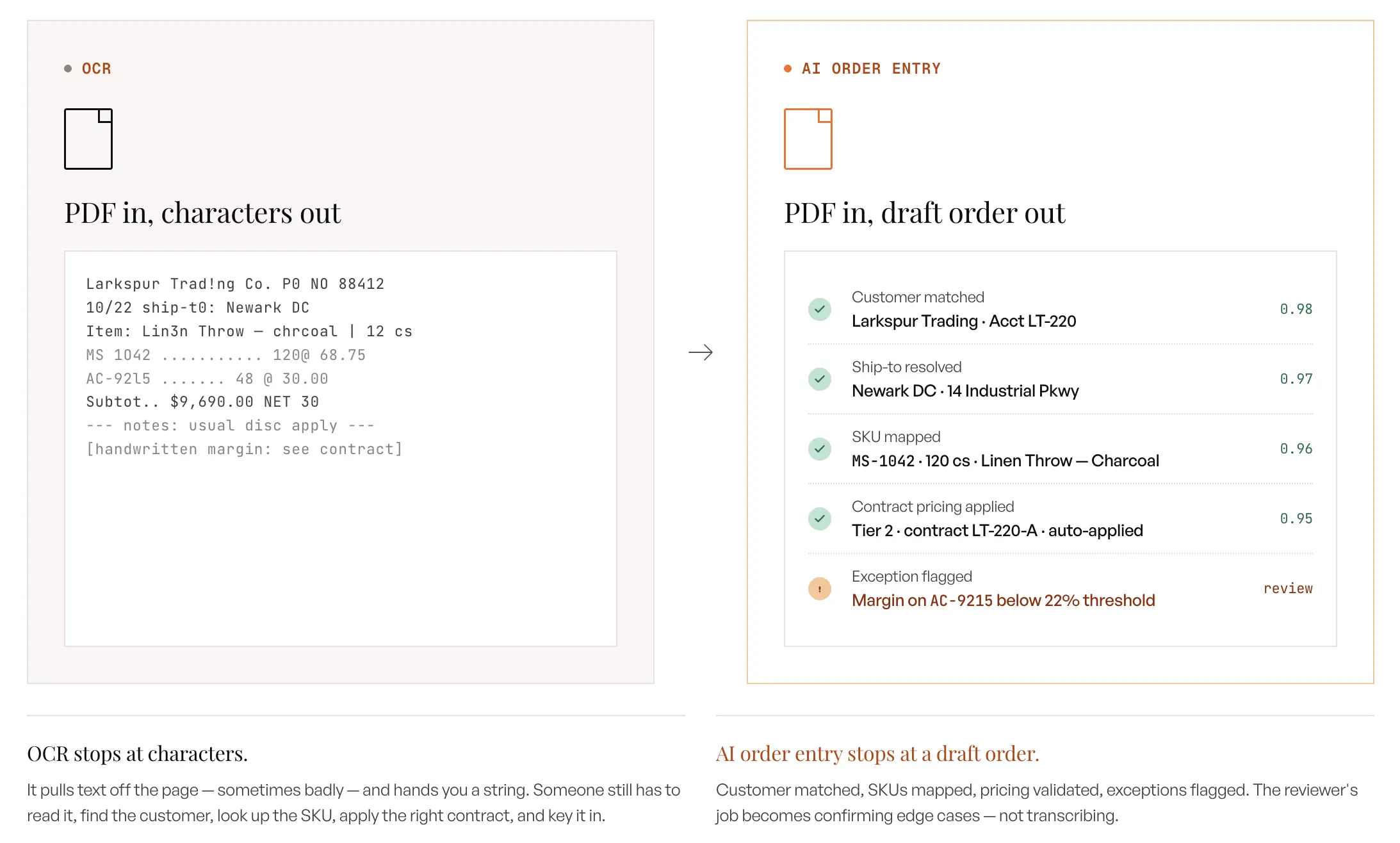
The order-entry problem OCR was never built for
A wholesale order desk absorbs whatever format the customer chooses to send. One buyer emails a PDF, another pastes a list into the email body, a third attaches an Excel sheet, and a rep at a trade show photographs a handwritten form and sends it from the show floor. Your team cannot force any customer to standardize, so someone sits down and types each order into the ERP by hand. A single CSR can key somewhere between 30 and 100 orders a day before the backlog starts to grow, and that ceiling is the real constraint on how fast you can scale.
OCR was designed to solve a narrower task than this. It reads pixels, recognizes characters, and returns text, which is useful when a document always looks the same. A purchase order that arrives in fifty different layouts breaks that assumption immediately, because OCR needs to be told where each field lives before it can pull anything reliably.
Reading text is not the same as capturing an order
The useful comparison is not which technology reads text better on a clean page, since both can do that reasonably well. It is which one can turn an unpredictable purchase order into a validated sales order without a person retyping it. That is the job an order desk needs done, and it is a higher bar than simple text recognition.
Once you frame the choice that way, it stops being about character recognition and starts being about understanding, mapping, and validation. Those three steps are where OCR and AI order entry genuinely diverge, and they are the lens this guide uses throughout. Everything that follows compares the two on how well they handle a real order, not just a clean document.
What is OCR in order entry?
OCR (Optical Character Recognition) is a technology that converts scanned documents, PDFs, and images into machine-readable text, but on its own it does not understand what that text means. In an order-entry context, OCR can read the words and numbers off a purchase order, yet it cannot tell you which number is the quantity, which is the price, and which SKU the customer wants.
How OCR works
OCR scans an image, detects the shapes of characters, and matches them against a library of known letters and numbers to produce a text output. To pull specific fields out of that text, it relies on a template that says where each value sits on the page, so the “customer PO number” is always in the top right and the line items always start at a fixed position. This works beautifully when every document follows the same layout, which is why OCR has been a workhorse for standardized forms for decades.
The catch is that templates are brittle by design. If a vendor moves a field, adds a long shipping address that pushes everything down, or sends a new layout, the template no longer matches and the extraction fails. The system either returns the wrong value or nothing at all, and someone has to notice and fix it.
Purchase Order OCR
Purchase order OCR applies templates to inbound POs, and it inherits every strength and weakness above. It performs well on system-generated POs from large accounts that never change their layout, and it fails on the long tail of buyers who write POs in their own formats. Because a purchase order carries commercial meaning that plain text does not capture, PO OCR alone still leaves someone confirming that the extracted part number, price, and quantity are actually right.
Sales Order OCR
Sales order OCR is the same technology pointed at the documents your own team generates or receives for sales orders, including faxed order forms and scanned order sheets. The economics are identical: predictable layouts digitize cheaply, everything else needs proofing. Teams usually adopt sales order OCR as a digitization step and then discover the interpretation work, deciding what the text means and whether it is valid, still lands on a person.
What OCR order entry does well
OCR order entry genuinely shines when your inbound documents are clean, printed, and consistent. If a handful of large accounts always send the exact same structured file, OCR can process those quickly and cheaply, because the layout never changes and the template never breaks. High-volume, fixed-format documents are the environment OCR was built for, and it remains a solid fit there.
It is also mature and inexpensive for that narrow use case. The technology is well understood, widely available, and fast at converting a predictable page into text. For a distributor whose orders genuinely arrive in one repeatable format, OCR can carry a meaningful share of the load, OCR order automation can carry a meaningful share of the load.
Where OCR breaks in a real order desk
The trouble starts the moment your orders stop looking identical, which for most wholesalers is every single day. Teams that adopt template-based OCR often find they can automate their largest or cleanest customers and still leave a long tail of accounts on manual entry, because building and maintaining a template for every buyer is not practical. One distributor’s experience captures the pattern well: even after training the tool on their easiest customers, a large block of orders still flowed through by hand.
OCR also has no judgment. It will read a part number without knowing whether that part number exists in your catalog, and it will capture a price without checking it against the customer’s contract. A prior-generation OCR user summed up the ceiling neatly: you still have to proofread everything it did. That proofing step is where the promised time savings quietly leak away.
What is an AI order entry tool?
An AI order entry tool is software that reads a purchase order in any format, understands its contents the way a person would, maps the items to your catalog, validates them against your ERP, and creates a ready-to-submit sales order. Instead of matching pixels to a template, it reasons over the document, which means a brand-new layout does not stop it.
How AI order entry software works
It reads the order in any format, extracts every line, matches each item to your internal SKU, validates the result against your pricing and inventory rules, and leaves a draft sales order in your ERP with only genuine problems flagged for review. The full pipeline, from semantic extraction to ERP posting, is covered step by step in our guide on how AI order entry works.
Is OCR considered AI?
OCR is not the same as AI, though the two are often confused and increasingly overlap. Traditional OCR is a pattern-matching technology that recognizes characters; it does not learn, reason, or understand context. Modern AI systems can incorporate OCR as one input, then add the comprehension layer that decides what the recognized text means.
So a tool can use OCR under the hood while being far more than an OCR tool. The useful distinction for order entry is whether the system merely reads the page or understands and validates the order. The first is recognition. The second is comprehension.
OCR vs document AI vs AI order entry
These three terms describe increasing levels of capability, and knowing the difference helps you evaluate vendors. Plain OCR converts an image to text. Document AI adds understanding, so it can classify a document and pull fields from varied layouts without a rigid template. An AI order entry tool goes one step further by connecting that understanding to your ERP, so it does not just read the order, it maps SKUs, validates pricing, and creates the sales order.
Many vendors use “AI” loosely, so this ladder is worth holding onto in demos. If a tool reads varied documents but cannot map part numbers to your catalog or validate against your price lists, it is document AI, not a true order entry tool.
How do OCR and AI order entry tools compare head to head?
For varied wholesale purchase orders, an AI order entry tool beats OCR on accuracy, flexibility, and total cost of ownership, while OCR only holds an edge on clean, fixed-layout documents at very high volume. The table below breaks the comparison down across the factors that decide order-desk performance.
Comparison table
| Factor | Traditional OCR | AI order entry tool |
| Setup | Build a template per layout | Connect to ERP, no templates |
| Format flexibility | Breaks on new or messy layouts | Reads PDF, Excel, email, fax, handwriting, photos |
| SKU / part-number matching | Not built in | Maps buyer part numbers to your SKUs |
| ERP validation | None; text only | Checks pricing, MOQs, case packs, inventory |
| Handwriting and photos | Weak to unusable | Handles them with vision models |
| Accuracy over time | Static; degrades as formats drift | Improves per customer as it learns |
| Scalability | Add templates and headcount | Scales with volume, not staff |
| Maintenance | Ongoing template repair | Vendor-managed; self-adjusts |
| Cost model | Setup plus per-template upkeep | Subscription tied to volume |
| Accuracy controls | None, every output needs proofing | Field-level confidence scores route only exceptions to review |
| Business rules | Not supported | Plain-English prompts apply your order logic per account |
Accuracy: pattern-matching vs reasoning
Accuracy is where the two approaches diverge most sharply in practice. OCR accuracy depends on the document matching its template, so it can post strong numbers on a stable layout and then collapse the moment a customer changes anything. Because it has no view of your catalog or pricing, it also cannot catch the errors that cost you the most, like a valid-looking part number that does not exist in your system.
The OCR data entry numbers vendors quote deserve one caveat: character-level accuracy in the high nineties on clean print is not order accuracy. A SKU with one wrong digit is 99% character-accurate and 100% wrong, and only a system that checks the result against your catalog can tell the difference.
An AI order entry tool reasons about the whole order, which lets it stay accurate across formats and improve for each customer over time. A well-built system can start with around 96% accuracy out of the box precisely because it is reasoning rather than waiting to be trained on hundreds of sample documents. As it processes more of a given customer’s orders, its accuracy on that account climbs toward 98-99% after the first weeks of implementation, since it learns how that buyer writes part numbers and structures their POs.
Total cost and maintenance over time
The sticker price is only part of the OCR vs AI for order entry cost picture, and the cheaper-looking option often costs more once you account for upkeep. Template-based OCR carries a hidden maintenance tax, because every new customer format and every layout change needs engineering time to build or repair a template. That work never ends, and it grows as your customer base grows.
An AI order entry tool shifts that burden off your team. There are no per-customer templates to maintain, the vendor manages the model, and the system adapts to format changes on its own. The result is a cost that tracks your order volume rather than the number of distinct layouts you have to support.
Where does OCR order entry fall short in wholesale distribution?
OCR order entry struggles in wholesale because distribution generates exactly the conditions OCR handles worst: constant format variety, buyer-specific part numbers, and orders that arrive through channels no template anticipated. None of these are edge cases, since they make up the daily reality of an order desk where no two customers order the same way.
Template fragility when every customer sends a different PO
Your customers will never standardize their purchase orders for your convenience, so any approach that depends on a fixed layout is fighting the business model. A template built for one buyer’s PO breaks when a second buyer sends a different structure, and it breaks again when the first buyer updates their own format. Teams end up maintaining a sprawling library of templates that still fails to cover the long tail of smaller accounts.
An AI order entry tool sidesteps this entirely because it reasons over the document instead of relying on field positions. When a customer sends a brand-new layout, the system still reads it correctly, since it understands what a quantity and a line item are rather than where they usually sit. That difference is the whole reason distributors move off template-based tools once volume and variety grow.
Customer part numbers vs your internal SKUs
One of the most expensive problems in wholesale order entry is that buyers order using their own part numbers, not yours. A customer might reference an item by their internal code, a shortened description, or a name that only loosely resembles your catalog entry, and a human has to know that their code maps to your SKU. OCR cannot do this, because reading the text is not the same as knowing what it refers to.
An AI order entry tool treats SKU mapping as a core job rather than an afterthought. It matches the buyer’s part number, description, or attributes against your catalog and order history, so it can resolve a loose reference to the correct internal SKU. You can also teach it a specific customer’s quirks directly, telling it that when a given buyer writes one code, they mean a particular SKU in your system.
Marketplace and partial-EDI orders still get re-keyed
Many distributors assume their marketplace and EDI volume is already automated, then discover the mid-tier channels still land on the order desk by hand. Large accounts may flow through full EDI, but marketplaces and partial-EDI portals often deliver only a notification or a PDF, which staff still print and re-key into the ERP. The marketplace fee plus the manual labor quietly doubles the cost of each of those orders.
An AI order entry tool closes that gap by ingesting the order document those channels produce and turning it into an ERP-ready order automatically. It does not care whether the PO came from a direct email or a marketplace alert, because it reads and validates both the same way. That removes the manual bridge step that marketplaces silently reintroduce.
The trade-show handwritten-order surge
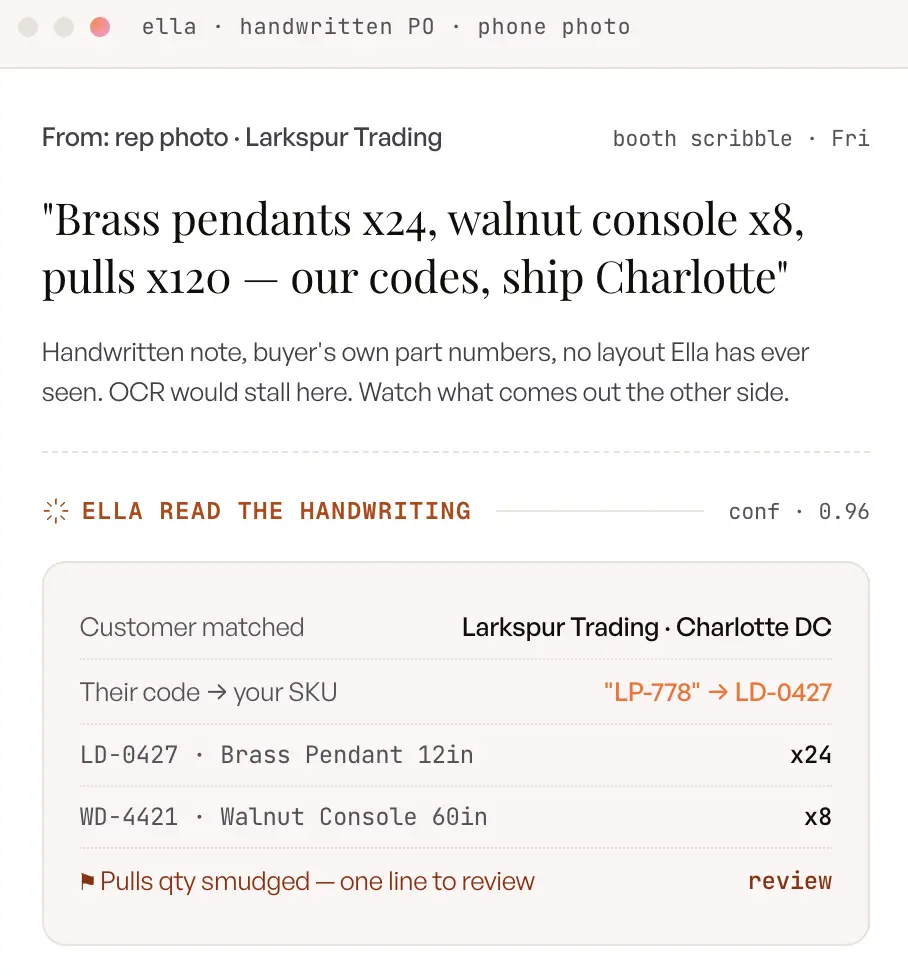
Trade shows create a burst of orders that no template-based system can absorb, and for many wholesalers shows are a primary revenue event. Reps write orders on paper at the booth, capture them on their phones, and email them in, which leaves the office team facing a backlog of handwritten and photographed forms the moment the show ends. This is the exact input OCR handles worst, because handwriting and inconsistent layouts defeat character templates.
An AI order entry tool reads those handwritten and photographed orders using vision models, so the backlog processes while reps are still on the floor. When a distributor tests it on a genuinely messy handwritten form, a well-built system can pull every line item correctly rather than choking on the penmanship. That turns the post-show scramble into a review queue instead of a week of overtime.
Ella · No templates, any format
Send us the messiest PO on your desk
The handwritten one. The 80-line takeoff. The buyer who renames every SKU. Ella reads it, maps it to your catalog, and drafts the order in about two minutes.
Accuracy Controls: How You Stay In Charge Of The Automation
The best AI order entry softwares do not ask you to trust a black box; they give you two concrete controls, prompts and confidence scores, that decide how orders are handled and when a human steps in. This is the part of the OCR vs AI story that generic comparisons skip entirely, and it is where the technology earns real trust on a busy order desk.
The Prompt feature: set up your order logic in plain English
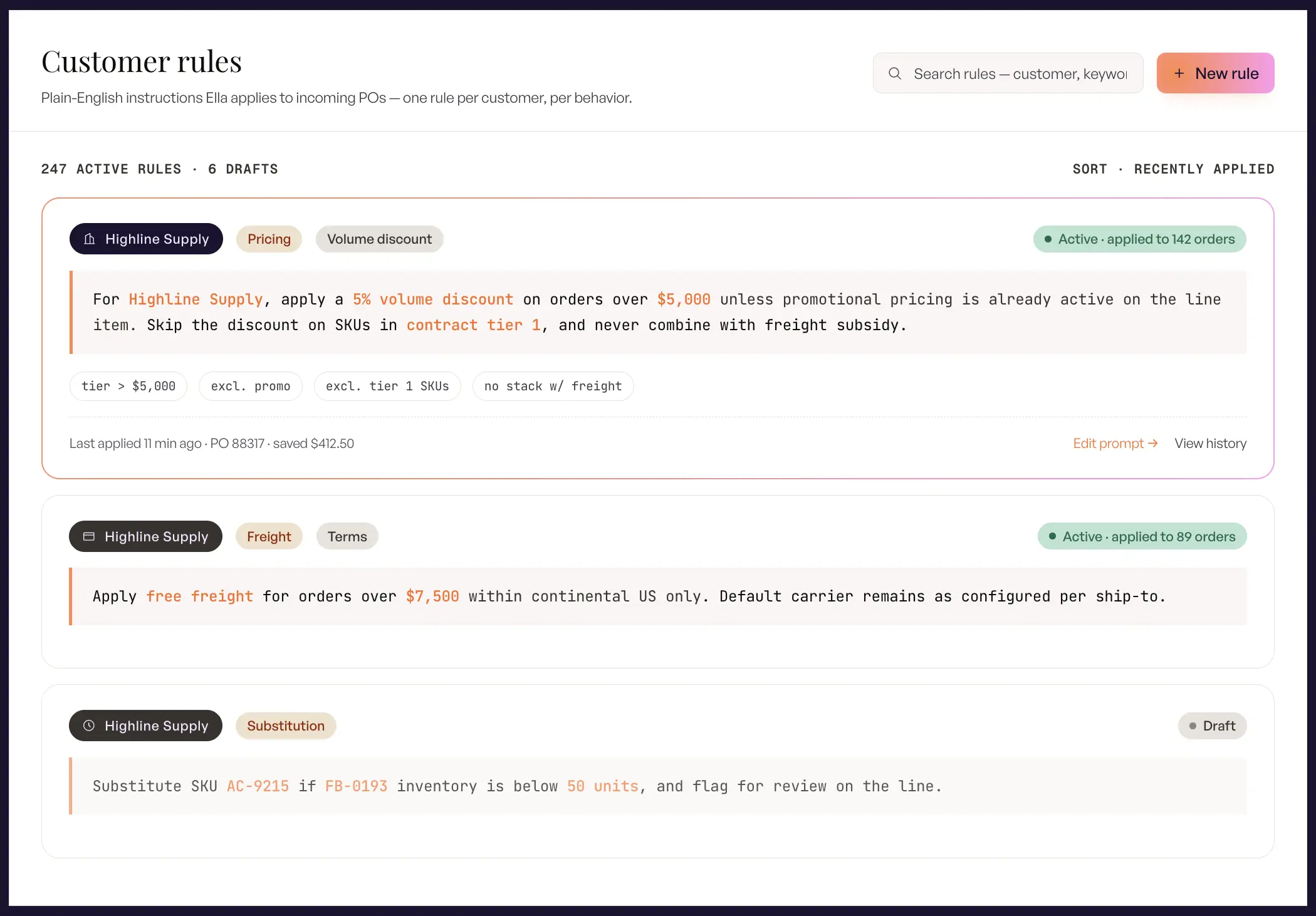
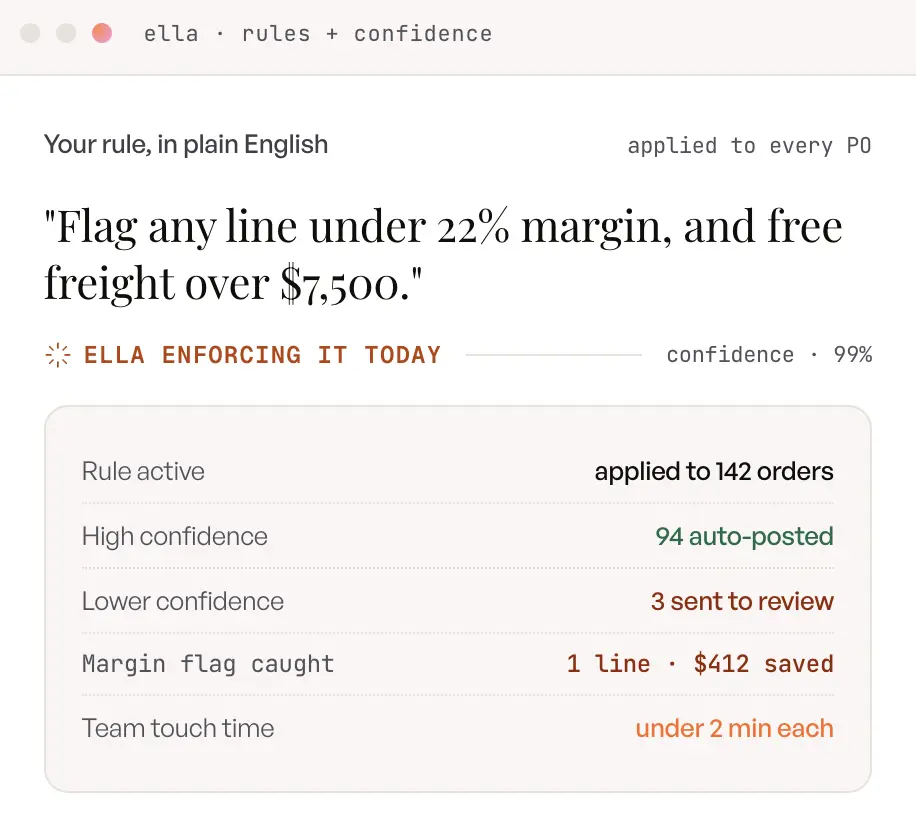
Prompts are rules you write in plain English, the way you would coach a new hire: a buyer’s code always maps to one of your SKUs, orders above a threshold get a set discount, a customer’s shipments route through a preferred carrier. The system applies them on every order, account-wide or per customer, and your ops team owns them without code or templates.
The Confidence Score: automate the clean orders, review only the exceptions
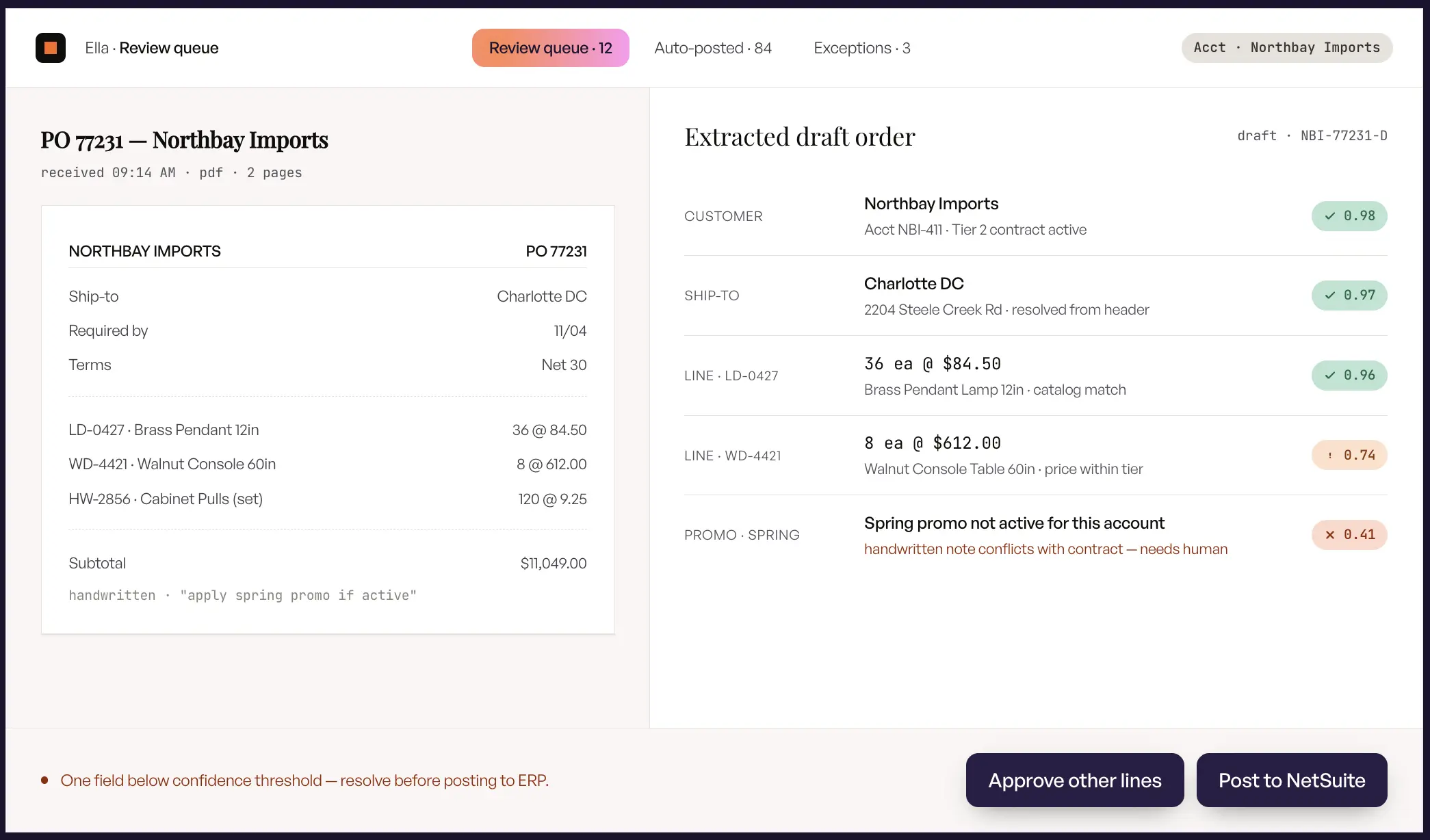
Confidence scores are how the system routes work. Every field and every order gets a score; clean orders above your threshold post straight to the ERP, and anything the AI is unsure about lands in a review queue. That is order entry automation that still lets you review exceptions: the AI drafts everything, your team approves only what genuinely needs judgment, and you raise the automation level per customer as the system proves itself. OCR offers no such dial, which is why every OCR output needs proofing.
Human-in-the-loop: why AI order entry isn’t “hands-off”
AI order entry is not about removing people; it is about pointing them at the orders that need human judgment. The default mode for most teams keeps a human in the loop, so the AI drafts the order and a person approves it, which addresses the reasonable concern about trusting automation with revenue. As the system proves itself on a given customer, you can raise the automation level for that account with confidence.
This is a meaningful contrast with OCR, which offers no such dial. OCR either extracts correctly or it does not, and it cannot tell you how sure it is, so every output needs proofing. The combination of prompts and confidence scores lets you scale automation deliberately, tightening the reins where accuracy is proven and keeping them loose where it is not.
OCR vs AI order entry tool: which should you choose?
Choose OCR only when your inbound orders are clean, high-volume, and truly uniform; choose the best AI order entry tool when your POs vary in format, use customer-specific part numbers, or need validation against your ERP. For most wholesalers and distributors, the second description fits, which is why the market is moving toward AI for this job.
When OCR (or OCR-only tools) is enough
OCR can be the right call when your document reality is genuinely narrow and stable. If your orders arrive from a small set of accounts that always send the identical structured file, and you mainly need to convert those pages into text for a downstream system, OCR does that job cheaply and quickly. It is also reasonable as a pure digitization step when a person or another system will handle the interpretation afterward.
The honest test is variety. If you can count your PO formats on one hand and they never change, OCR’s brittleness may never bite you. The moment that stops being true, the maintenance and proofing costs start to erode the savings.
When you need an AI order entry tool
An AI order entry tool becomes the clear choice the instant your orders are varied, high-volume, or tied to catalog and pricing logic. If buyers send different formats, use their own part numbers, submit handwritten or photographed orders, or come through marketplaces that still require re-keying, you need a system that understands and validates rather than one that only reads. This is the profile of nearly every growing distributor.
You also need AI when accuracy has real financial stakes. A wrong SKU or a missed price on a wholesale order means returns, chargebacks, and a damaged customer relationship, so validation against your ERP is not a luxury. The ability to scale order volume without adding an order-entry hire for every increment is often the deciding factor.
When OCR, EDI, And AI Work Together
The three technologies are not mutually exclusive, and mature order desks usually run all three. EDI keeps winning for your largest trading partners who already exchange standardized documents; ripping out working EDI to route those orders through anything else adds risk for no gain. OCR survives inside modern AI pipelines as the raw text-extraction layer, with the AI providing the comprehension and validation on top. And AI order entry takes the long tail that neither of the others can touch: the emails, the changed layouts, the handwritten market orders, which for a typical mid-market wholesaler is most of the customer list. The practical architecture is EDI for the standardized head, AI for the unstructured tail, and OCR working quietly inside the AI rather than competing with it.
How Ella brings AI order entry to wholesale distributors
Ella is WizCommerce’s b2b order entry platform, built specifically to read inbound purchase orders, map them to your catalog, validate them against your ERP, and create clean sales orders your team only has to review. It applies everything above to the exact workflow a distribution order desk runs every day.
Purpose-built for inbound purchase orders, not generic documents
Ella is designed for wholesale order entry rather than general document processing, which is what separates it from repurposed OCR tools. It understands the shape of a purchase order, the role of a line item, and the relationship between a buyer’s request and your catalog, because that is the only job it was built to do. That focus is why it handles the long tail of small accounts that template tools leave on manual entry.
Reads any format your customers send
Ella reads purchase orders in whatever format they arrive, including PDFs, Excel files, plain email text, faxes, and photos of handwritten forms. Your customers keep sending orders the way they always have, and Ella absorbs the variety instead of asking you to standardize it. That means no per-customer template and no failed extraction when a buyer changes their layout.
Smart SKU mapping against your catalog and order history
Ella matches each item on an incoming order to the correct internal SKU, even when the buyer used their own part number, an abbreviation, or a loose description. It draws on your catalog and past order history to resolve those references, which is the step plain OCR simply cannot perform. Over time it learns each customer’s ordering patterns, so accuracy on repeat accounts keeps climbing.
ERP validation and pre-built connectors
Ella validates every order against your ERP before it becomes a sales order, checking customer-specific pricing, minimum order quantities, case packs, and inventory. It connects to the systems distributors already run, including NetSuite, Epicor, Microsoft Dynamics, QuickBooks, and many others, and it sits on top of the ERP rather than replacing it. There is no rip-and-replace project, which removes the usual IT objection.
Prompts and confidence scores you control
Ella gives you the prompt feature and confidence scoring described earlier, so you keep control of how orders are handled. You write your rules in plain English at the account or customer level, and you set the confidence thresholds that decide what auto-submits and what routes to review. The result is automation you can dial up per customer as Ella proves itself, not a black box you have to trust blindly.
What getting started looks like
Getting started with Ella means connecting your ERP and letting the system begin reading real orders, with a human reviewing drafts while you build confidence. The ROI math is straightforward: multiply the minutes saved per order by your monthly order volume and your CSR’s hourly cost, and the savings become obvious quickly for any team keying dozens of orders a day. Ella also sits alongside the AI Sales Copilot and AI Quoting Assistant in the WizCommerce family, and pairs with WizShop for teams capturing orders through a B2B storefront.
Ella · Prompts + Confidence scores
Write one rule. Watch Ella hold the line on every order.
Write a prompt in plain English, and let Ella’s confidence score push the clean orders straight through while your team reviews only the flagged ones.
The bottom line
The shift underneath the OCR vs AI order entry tool question is a shift from recognition to comprehension. OCR digitized the page; AI order entry understands the order, maps it to your catalog, and validates it before it reaches your ERP. If your purchase orders vary in format, lean on customer part numbers, or need real validation, evaluate an AI order entry tool against the criteria here, then run a pilot on your own messy POs and watch what makes it through.
Frequently Asked Questions
What is the difference between OCR and an AI order entry tool?
OCR converts images and PDFs into text using templates, while an AI order entry tool reads any format, understands the order, maps items to your SKUs, and validates them against your ERP. OCR stops at recognition; AI order entry produces a ready-to-submit sales order. That difference is why OCR needs constant proofing and AI order entry does not.
What is OCR in order entry?
OCR in order entry is the use of character-recognition technology to digitize a purchase order into text. It captures the words and numbers on the page but does not interpret them, so it cannot tell a quantity from a price or confirm that a SKU exists. To become a usable order, that text still needs a template or an AI layer on top.
What does AI mean for order processing?
AI turns order processing from manual typing into automated reading, mapping, and validation. It extracts every field from a PO in any format, matches items to your catalog, checks pricing and inventory against your ERP, and creates a draft order for review. The practical effect is that a clean order can be ready in about two minutes instead of fifteen or more.
What is better for order entry, OCR or AI?
For varied wholesale purchase orders, an AI order entry tool is better because it handles any format, maps part numbers to your SKUs, and validates against your ERP. OCR only competes when your documents are clean, uniform, and high-volume. Most distributors deal with too much format variety for OCR alone to keep up.
How does AI handle handwritten notes compared to standard OCR tools?
AI uses vision models to read handwriting, napkin orders, and photographed POs without a template, while standard OCR struggles with anything outside a trained layout. That is why AI order entry can clear a trade-show backlog of handwritten forms that OCR would flag or misread. A well-built system can pull every line item from a genuinely messy handwritten order.
How does an AI order entry tool validate data against my existing ERP catalog?
It cross-checks each extracted item against your ERP, confirming the SKU exists, applying the customer’s contract pricing, and enforcing minimum order quantities, case packs, and inventory rules. Anything that fails a check gets flagged for review instead of flowing through as a silent error. This is the validation step plain OCR cannot perform because it has no view of your catalog.
How do AI order entry tools integrate with my ERP system?
Modern AI order entry tools connect through pre-built connectors to systems like NetSuite, Epicor, Microsoft Dynamics, QuickBooks, and SAP, and they sit on top of the ERP rather than replacing it. There is no rip-and-replace project, which keeps IT risk low. The tool pulls your customer, pricing, and SKU data in, and pushes validated orders back out.
Will an AI order entry tool change how my team works or add training?
Your team shifts from typing every order to reviewing the exceptions the system flags, which usually reduces workload rather than adding to it. There are no per-customer templates to build or maintain, so the ongoing engineering burden disappears. Reps and CSRs become order approvers, which most teams find is a better use of their time.
How do OCR and AI compare for high-volume order processing?
OCR can be fast on identical, fixed-layout documents at high volume, but it fails as soon as formats vary, and every failure means manual rework. An AI order entry tool scales across formats and customers without adding headcount, and it gets more accurate per account over time. For high-volume desks with format variety, AI sustains throughput that OCR cannot.
Can AI order entry work for B2B eCommerce, not just emailed POs?
Yes. AI order entry captures orders across email, portals, marketplaces, and B2B storefronts, so it fits eCommerce operations as well as traditional order desks. Paired with a B2B ecommerce platform like WizShop, it unifies self-serve and assisted orders into the same validated pipeline into your ERP.
How do I choose between an OCR and an AI order entry system?
Match the tool to your PO variety, your volume, your SKU-matching needs, and your ERP. If your orders are uniform and stable, OCR may be enough; if they vary in format, use customer part numbers, or need validation, choose an AI order entry system. Running a short pilot on your own real purchase orders is the fastest way to see which one holds up.
When Should You Use A Sales Order Agent Instead Of A Third-Party OCR Tool?
Use a third-party OCR or document-capture tool when you only need text extracted from uniform documents and another system will interpret it. Use a sales order agent when you need the order understood end to end: SKUs mapped to your catalog, pricing validated against your ERP, and a draft sales order created with exceptions flagged. The dividing line is whether interpretation and validation still land on your team afterward.
Can OCR Read Purchase Orders From Emails?
Plain OCR reads attachments like PDFs and scans, but it cannot parse an order typed into the email body, and it needs a template per layout to extract fields reliably. Tools that read POs from emails effectively combine extraction with language understanding, so they handle body-text orders, attachments, and forwarded threads in one pipeline. If email is your main order channel, that comprehension layer is the capability to test first.
Does AI Order Entry Still Let You Review Exceptions?
Yes. Confidence scoring routes every uncertain field or order to a review queue, and you set the thresholds, so clean orders post automatically while your team approves only the flagged ones. Most teams start with a human reviewing every draft and raise the automation level per customer as accuracy proves out. Automation decides what needs your attention; it does not remove your control.