 Skip to content

WizCommerce Field Guide
The B2B Trade Show Booth Tech Checklist
A system-by-system plan for the technology your booth runs on. It covers the wholesale specifics most trade show checklists skip: offline order writing, customer-specific pricing, lead retrieval fields, and the ERP handoff.
For wholesale, distribution & manufacturing
Every step from the internet drop to the follow-up window, grouped into seven clear systems rather than vague show phases.
A verification test on every line. Each check names what done looks like, so nothing is marked complete on an assumption.
A T-tag from T-30 through T+5, so you know exactly how far ahead of the show each item is due.
Move without losing orders, pricing, or search traffic.
Get the PDF you can tick in your viewer or print as a project tracker.
No spam. Just the checklist and the occasional wholesale playbook.
What you can do with this checklist
Replatforming goes smoothly when every phase builds on the one before it. This checklist takes you from the first decision to lasting adoption, with the wholesale specifics built in at each step.
PHASE 01
Lock the connection and the power
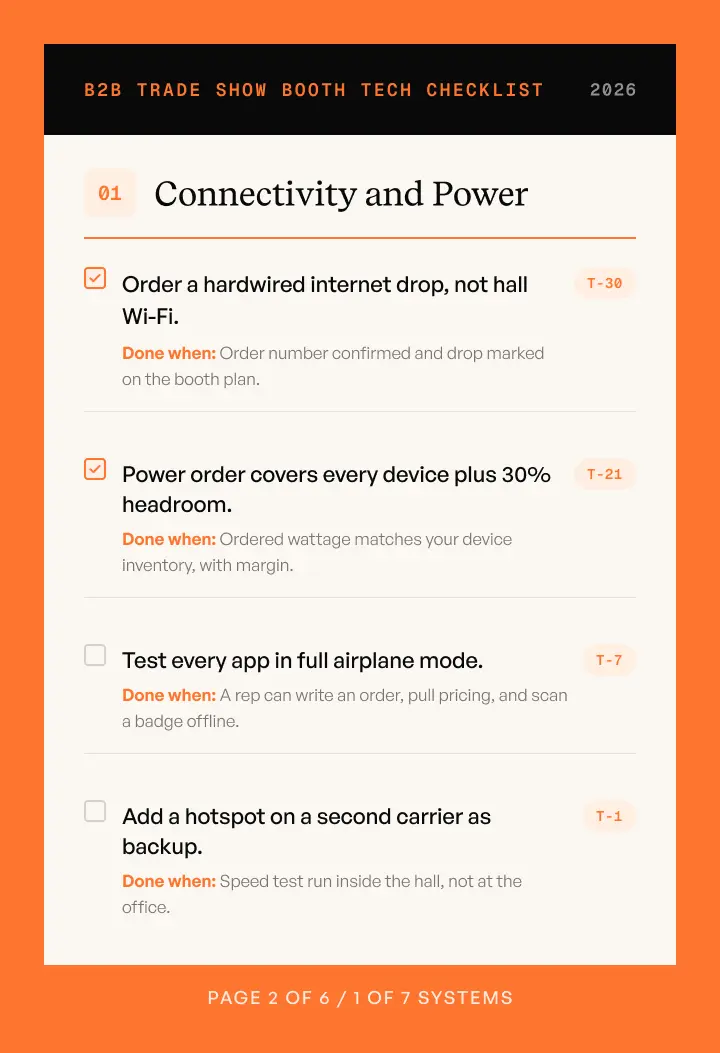
Order a hardwired drop from the show provider, add a second-carrier hotspot, confirm power with headroom, and test every app in full airplane mode.
PHASE 02
Write orders at the booth
Load show pricing and promotions, enforce case pack rules at entry, enable multi-cart, and preload catalogs for your top 50 accounts.
PHASE 03
Capture leads that arrive complete
Confirm the lead retrieval export format in writing, agree five qualifying fields, map them to your CRM, and assign an owner at the moment of scan.
PHASE 04
Get the catalog on screen
Audit image coverage for every show SKU, add lifestyle and on-white variants, store files locally, and point your QR code at the buyer portal.
PHASE 05
Collect payment on the floor
Agree accepted methods in writing, take deposits inside the order flow, pre-approve terms for named prospects, and test readers on both networks.
PHASE 06
Hand off cleanly to your ERP
Tick items in your PDF viewer as you complete them, or print the whole thing and run it as a shared tracker across teams.
PHASE 07
Work the 48 hour follow-up window
Load templates before you travel, segment the day’s leads the same night, send quotes inside 48 hours, and record the four numbers that matter.
PHASE 08
Run it as your booth tracker
Tick items in your PDF viewer as you complete them, or print the whole thing and run it as a shared tracker across sales, operations, and IT.
Where booth tech wins back the show
Most of the risk on a trade show floor sits in five places. Get these right and the rest of the booth follows.
Close the load-bearing sections first
Connectivity, order writing, and ERP sync carry everything else on the list, so the checklist tells you to finish those before the rest.
Trust the Done when test
Every check names what done looks like. A check counts only when its verification test passes, not when someone believes it is handled.
Tick as you go, or print and track
Tick items in your PDF viewer as you complete them, or print the whole thing and run it as your shared project tracker.
Deposits taken on the floor
Payment captured inside the order flow with the balance recorded against the order, so a conversation at the booth becomes a commitment.
An ERP handoff you have already tested
One test order posted end to end before you travel, a named owner watching sync during show hours, and a route for anything that fails validation.
Who this checklist is for
Replatforming touches every team that runs your wholesale business. This checklist gives each of them a clear view of their part in the move.
Sales leaders & reps
Confirm the floor team can write orders, quote from the catalog, and collect deposits before the booth ships.
Operations & fulfillment
Protect order paths, case pack rules, and inventory visibility through the busiest days of the year.
IT & ERP owners
Validate the sync path, set a check interval, and decide where an order goes when it fails validation.
Ecommerce & Marketing
Line up catalog imagery, digital line sheets, and portal links for every SKU standing on the floor.
Finance & customer service
Confirm accepted payment methods, credit limits, and terms for named prospects ahead of the show.
Founders & executive sponsors
Set the targets, then read the four numbers afterward to see what the booth returned.
Why wholesalers replatform to WizCommerce
WizCommerce is the AI commerce platform built for wholesalers, distributors, and manufacturers. It’s designed around the way wholesale actually sells — across reps, online buyers, EDI, and marketplaces — so a move forward is a move toward less manual work, not more.
Native ERP integrations
Keep pricing and inventory in sync in real time with NetSuite, SAP Business One, Sage 100, Epicor Prophet 21, QuickBooks, and more.
Self-serve buying that sells
WizShop gives buyers a portal with customer-specific pricing, catalogs, and easy reordering.
Fast rep ordering
WizOrder lets reps write orders quickly, online or offline, so no order path is left behind.
Modernize wholesale order intake workflows
Sales Rep App
Turn online buying into a wholesale sales channel
B2B Online Storefront
Create catalog-ready imagery without photoshoots
AI Catalog Imagery
Manage payments as part of the sales workflow
B2B Payments
Migrating from a legacy system? Wholesalers have moved to WizCommerce from RepZio, MarketTime, Magento, BigCommerce, and Shopify.
Top benefits of this checklist
Cut through generic advice and run a structured, wholesale-ready move — so your final platform keeps revenue, rankings, and customer trust intact.
Nothing slips before the doors open
Seven systems, each with its own checks and its own deadline, so no dependency is discovered on show morning.
Every wholesale detail is built in
Customer-specific pricing, case pack rules, lead retrieval fields, and rep ordering, which generic checklists leave out.
Orders and deposits land on the floor
Offline order writing and in-flow deposits turn booth conversations into recorded commitments.
Numbers that earn next year’s budget
Four figures recorded before you unpack, so booth technology has a return you can point at.





- Nitesh Chaudhary
- Director of Innovation, Jaipur Living
"Switching to WizCommerce has drastically improved efficiency for us, thanks to seamless ERP integration and AI tools that eliminate manual work, giving our reps more time to sell."
10%
increase in revenue
2-5
hours saved per rep daily

- Luis Ruesga
- CEO, Zuo Modern
"WizCommerce represents the change and the future of technology. It's a platform that keeps getting better, always pushing out new features. It’s helps us save time and increase sales."
40+
hours saved every week
2x
faster Quote & Catalog Generation
30%
increase in revenue

- Michael Novak
- head of marketing & product, PD Home
"Our reps can process orders faster, access real-time data on orders, customers, and inventory, and even keep working when they’re offline. It’s made their jobs easier & helped them close more sales."
25%
decrease in order entry time
30~
day seamless implementation

- Samuel Leiaghat
- CEO, Pom Pom at home
"Achieving NetSuite integration in just 30 days was beyond expectations. Now our reps have full visibility into order, customer, and inventory data, making their jobs much easier."
30~
day Netsuite integration
20%
lift in revenue
4+
rep hours saved weekly
Make your move the smooth one
Download the checklist to plan your replatforming, then book a demo to see how WizCommerce keeps pricing, inventory, and every order path in sync.
Frequently Asked Questions
What should be on a trade show booth tech checklist?
A booth tech checklist should cover seven systems: connectivity and power, order writing at the booth, lead capture and badge scanning, catalog and product imagery, payments and deposits, sync and ERP handoff, and follow-up and review. Sort by system rather than by phase, because a missing internet drop affects order writing, lead capture, and payments at the same time. Give every item a verification test so you can confirm it is done rather than assume it.
How do you write orders at a trade show without reliable Wi-Fi?
Order a hardwired internet drop from the show’s exclusive provider and add a cellular hotspot on a second carrier as a backup path. Then test every app in full airplane mode before you travel, so reps can write an order, pull up pricing, and scan a badge with connectivity switched off. An order app that queues offline and syncs on reconnect keeps the booth working through the busiest hours of the hall.
What is lead retrieval, and what should you capture on every scan?
Lead retrieval is the badge scanning service sold by the show organizer, which turns a scanned badge into a contact record. Confirm the export format in writing before the show, because some organizers provide a CSV, some an API feed, and some portal access only. Decide five qualifying fields you capture on every scan, map them to your CRM fields before doors open, and assign a lead owner at the moment of the scan.
