Announcing our $8M fundraise to bring AI to wholesale. Read our manifesto

Native SOS Inventory Ecommerce Integration For Modern Wholesale Operations

Sync customers, orders, inventory, payments, shipments, and invoices between SOS Inventory and WizCommerce — through a direct API integration built for wholesale distributors who run inventory on SOS alongside QuickBooks.

SOS-Hero

Why WizCommerce Is The Best B2B Commerce Platform To Integrate With SOS Inventory

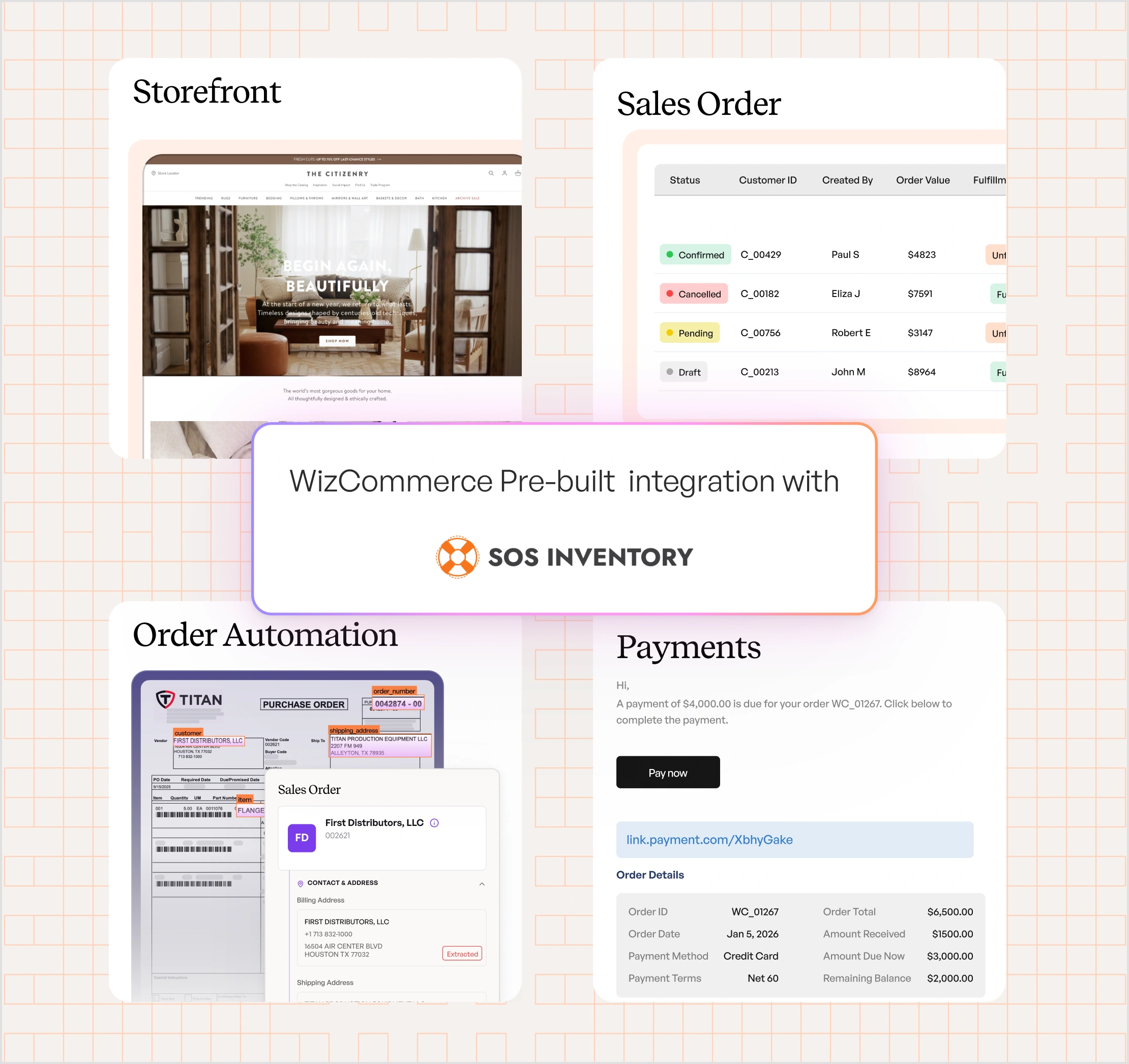
Distributors who run SOS Inventory already have a working setup: QuickBooks for the books, SOS for inventory, purchase orders, and freight that QuickBooks alone can't handle. What they don't have is a B2B selling layer that respects that setup. WizCommerce adds it. SOS stays the inventory system of record. WizCommerce sits on top with the selling capabilities SOS was never built to provide:

  1. B2B ecommerce storefronts for wholesale buyers
  2. Sales rep order taking and assisted selling on the road
  3. A self-serve buyer portal with live invoice and shipment visibility
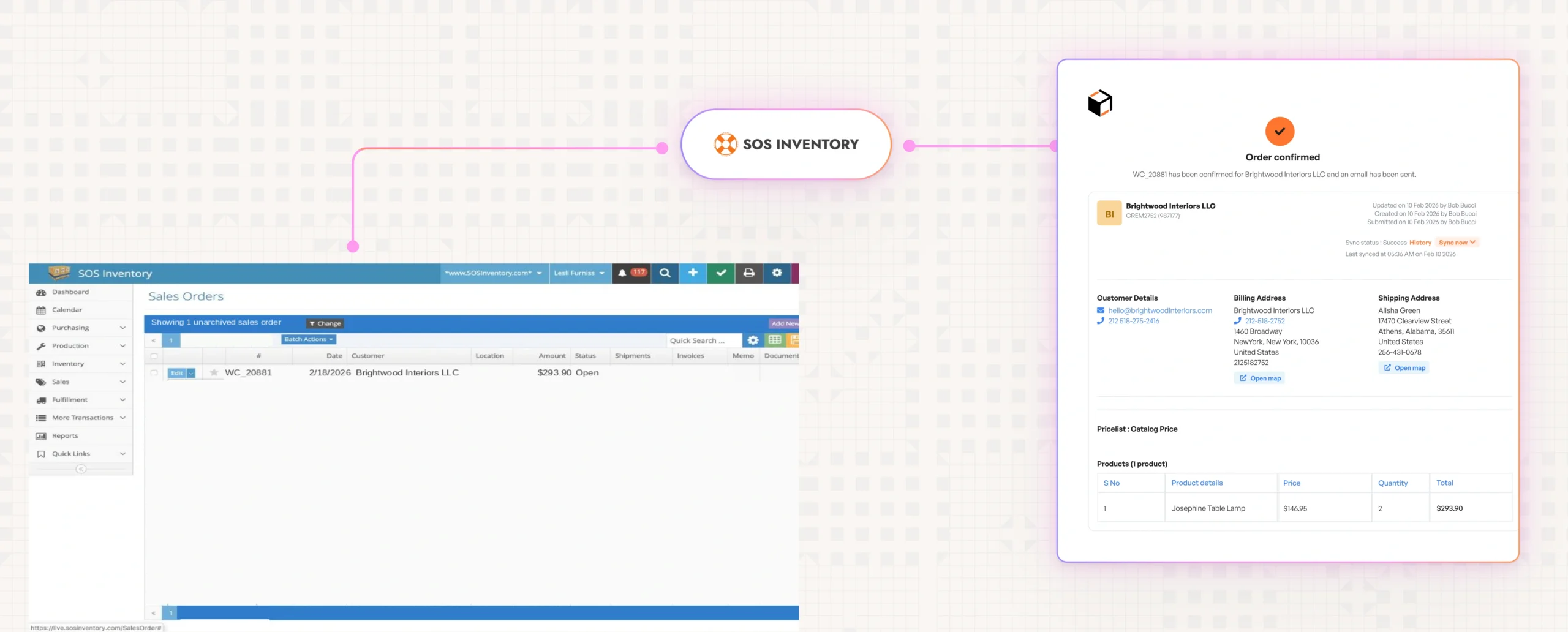
  4. Real-time order push to SOS the moment a buyer confirms

Orders flow into SOS instantly. Inventory, shipments, and invoices flow back automatically. Your QuickBooks-and-SOS stack stays in charge.

SOS-Integration

A SOS Inventory Ecommerce Integration
Built For Real Wholesale Workflows

WizCommerce connects directly to SOS Inventory via API-based integration. Orders push in real time. Inventory, products, and customers sync on configurable schedules. No middleware. No CSV uploads. No manual data entry.

How WizCommerce Connects To SOS Inventory

What The Integration Supports In SOS Inventory

NO MIDDLEWARE.  NO BLACK-BOX CONNECTORS.

JUST A CLEAN, NATIVE INTEGRATION THAT KEEPS SOS INVENTORY IN CHARGE.

"We believe information is power. WizCommerce seamlessly integrated with our existing tools, helping us create a unified sales ecosystem where data flows freely to and from systems."

SOS Inventory And WizCommerce
Integration Workflow And Touchpoints

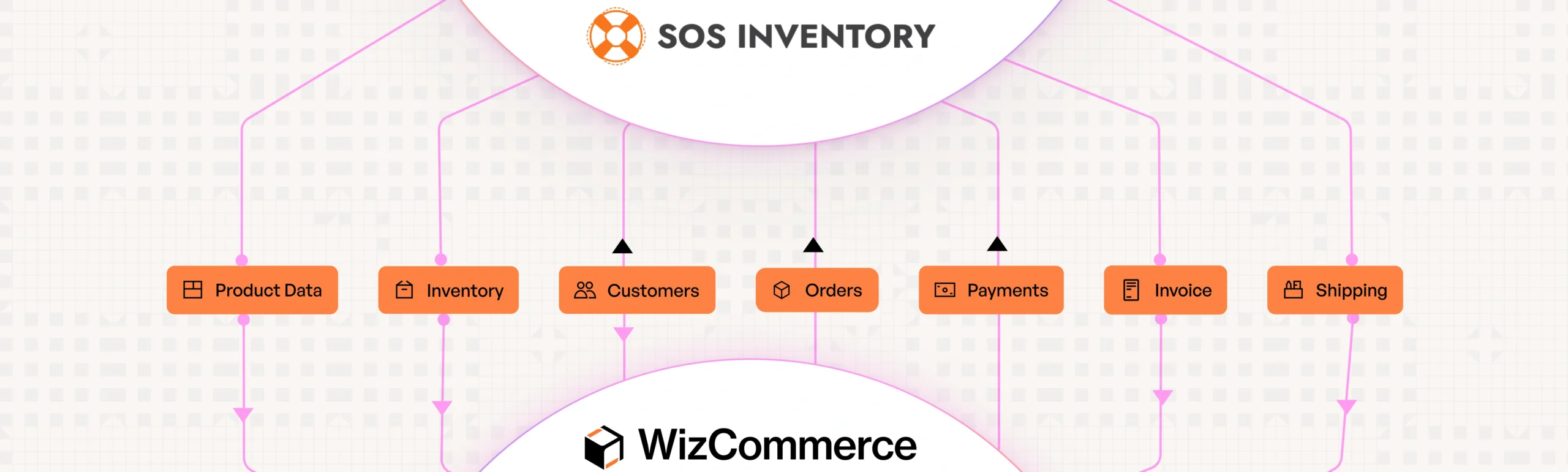
Customer and order data flows bi-directionally with SOS Inventory. Payments push from WizCommerce to SOS. Inventory, shipments, and invoices pull from SOS on a configurable schedule. Push happens in real time. Pulls run every 2 hours by default, adjustable to 30-minute minimum.

SOS-Workflow

How WizCommerce Handles SOS Inventory Reliably

SOS Inventory has technical realities that not every integration platform handles well — no webhooks, scheduler-based pulls, and inventory that doesn't get reserved on the SOS side when an order is placed. WizCommerce is built around those realities, not in spite of them. The result is a SOS integration that holds up in real wholesale operations.

Direct SOS API connection — no middleware

WizCommerce connects to SOS Inventory through its native API. No third-party connector layer, no extra subscription fees, no black-box behavior to debug. The integration is built and maintained in-house.

Real-time order push to SOS

The moment a buyer confirms an order in WizCommerce, it's pushed to SOS Inventory in real time. Once the order lands in SOS, SOS becomes the source of truth — fulfillment, modifications, and lifecycle management happen on the SOS side, matching how your team already runs operations.

Oversell protection between inventory syncs

Because SOS doesn't reserve inventory when an external order is placed, WizCommerce temporarily adjusts available stock locally when buyers add items to cart. That prevents overselling during the gap between scheduled SOS pulls.

Configurable pull cadence for trade-show pace

SOS inventory and invoice pulls default to a 2-hour cycle. During high-volume periods like trade shows, the schedule can be adjusted down to a 30-minute minimum — closer to real-time without overloading the SOS API.

Designed around SOS's actual API behavior

SOS doesn't expose webhooks, so WizCommerce uses polling-based pulls instead of pretending to be event-driven. The cadence is tuned per entity — 5-minute minimum for inventory, longer for invoices and shipments — built around what SOS's API can actually deliver in production, not what sounds good in a demo.

Go Live On SOS Inventory In As Few As 30 Days

A structured implementation designed to minimize internal effort and get your wholesale operations live quickly, while keeping SOS Inventory in charge of stock and fulfillment.

Week 1

Discovery & scoping:

Align on customer, order, inventory, and invoice flows. Confirm SOS API access and sync cadence requirements.

Week 2

Mapping & configuration:

Set up product reference ID mapping between WizCommerce and SOS database IDs. Configure sync schedules and oversell protection.

Week 3

Build & testing:

Connect to SOS Inventory, validate end-to-end flows, and run UAT with staging data.

Week 4

Go-live & hypercare:

Production rollout with active monitoring, sync cadence tuning, and oversell protection validation.

Enterprise-grade security & compliance

Our SOS Inventory integration is built with security controls that meet the standards of wholesale distributors managing sensitive customer, order, and financial data.

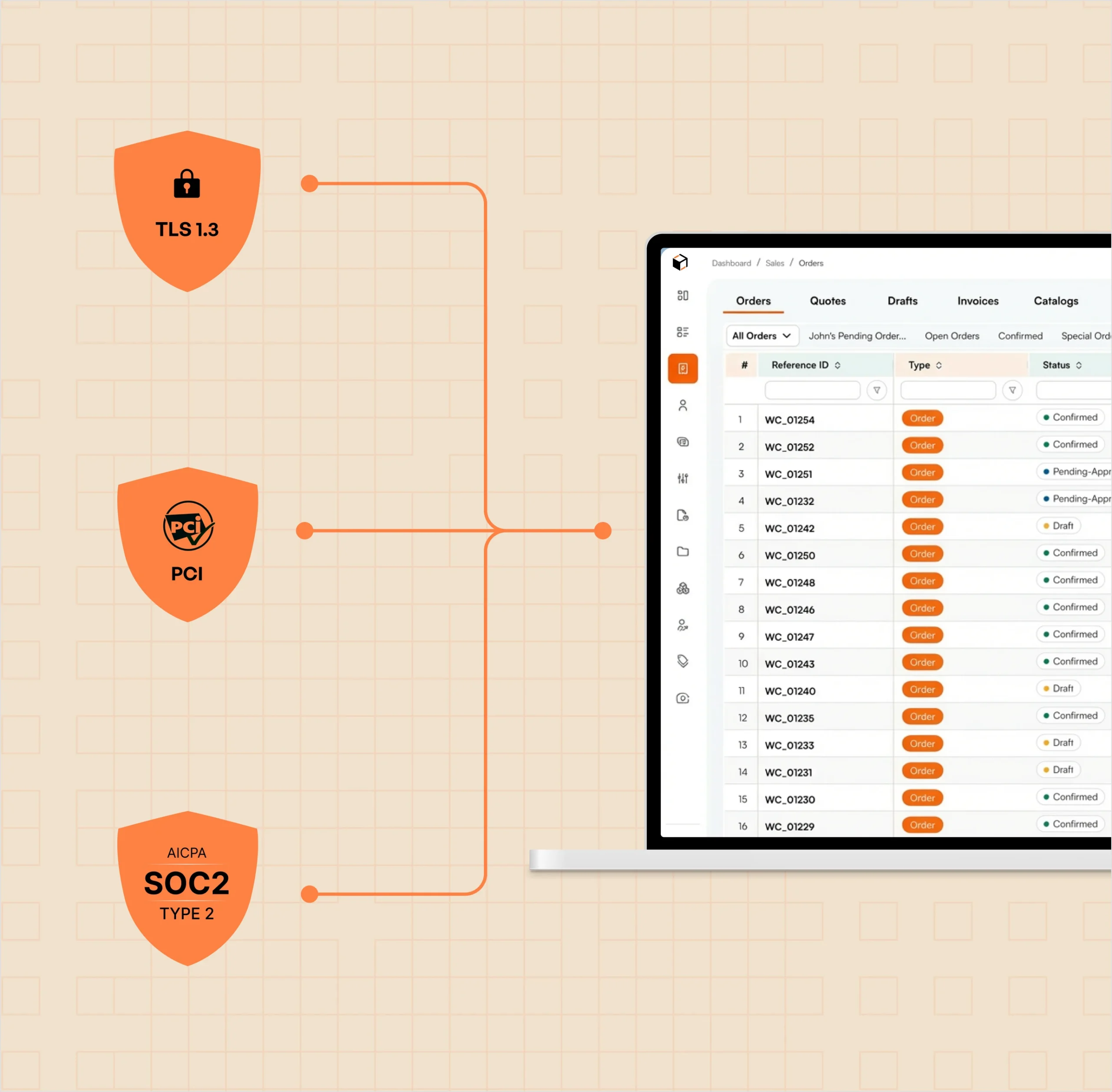
1. TLS 1.3 encryption for data in transit
2. Encrypted storage of all SOS API credentials
3. Role-based access controls
4. Audit logs for every integration activity
5. PCI-compliant payment handling (tokenized)
6. SOC 2 best-practice infrastructure

SOS Inventory Ecommerce
Integration Built For Reliability

Wholesale operations don't pause for sync failures. The WizCommerce SOS Inventory integration is built to handle real-world conditions: high order volume during trade shows, the gap between scheduled inventory pulls, and the limits of SOS's API behavior.

  • Real-time order push to SOS with continuous monitoring of every sync
  • Local inventory adjustment on cart-add to prevent overselling between SOS pulls
  • Independent sync per entity — a failed invoice pull never blocks order pushes
  • Configurable pull cadence down to 30 minutes for trade-show pace
  • Detailed, actionable error logs with AI-assisted review
  • Proactive alerts when sync issues need human attention

Frequently Asked Questions

WizCommerce connects directly to SOS Inventory’s native API — no middleware, no third-party connector. The integration is built and maintained in-house by the WizCommerce team.
Six entities. Customers sync bi-directionally. Orders and payments push from WizCommerce to SOS in real time. Inventory, shipments, and invoices pull from SOS on a configurable schedule (2-hour default, 30-minute minimum).
Products are not auto-synced from SOS. They’re managed through WizCommerce with a reference ID that maps to SOS database IDs, giving you full control over product catalog presentation in your storefront while keeping SOS in charge of stock. Your team uses an Excel-based product setup that’s straightforward for ongoing updates.
SOS doesn’t reserve inventory when an external order is placed, so WizCommerce handles this on its side. When a buyer adds an item to cart, WizCommerce temporarily adjusts available stock locally — preventing overselling during the gap between scheduled SOS pulls.
Order push to SOS is real-time. Inventory, shipments, and invoice pulls run every 2 hours by default — and can be tightened to a 30-minute minimum for high-volume periods like trade shows.
Yes. SOS Inventory is built to work alongside QuickBooks — your books stay in QuickBooks, your inventory and order management stay in SOS, and WizCommerce adds the B2B selling layer on top. Nothing about your existing QuickBooks + SOS workflow needs to change.
You do. SOS Inventory remains the system of record for inventory and fulfillment. WizCommerce reads from and writes to SOS through its API — it doesn’t replace or duplicate the source of truth.

Integrations

Connected to your Tech Stack from day one

With 1,000+ pre-built connectors, WizCommerce creates Order Entry Assistant creates orders directly inside your ERP—no middleware, no custom builds, no manual entry.

Vector
Vector (1)
Vector (7)
Vector-1
Group
Vector
Vector (9)
Vector (10)
Vector
Vector (1)
Vector (7)
Vector-1
Group
Vector
Vector (9)
Vector (10)
vcbcv
xbvb
cvnvnbv
Group
authorize.net logo
fbdfb
Vector (7)
Ebizcharge logo
vcbcv
dfvnb
xbvb
cvnvnbv
Group
fbdfb
Vector (7)

Get in touch

Modernize Your Wholesale Business