Skip to content



If you are considering WooCommerce for B2B or are currently using it but running into its limits, you have likely asked yourself more than a few hard questions. Do you need a developer? Can it handle your catalog? Why is it running so slowly? Choosing WooCommerce without answering these questions first can cost you significantly in time, money, and lost sales.
In this blog, we address the 12 most important questions about WooCommerce for B2B to help you make a confident, informed decision, then show you the purpose-built WooCommerce alternative wholesalers switch to.
Q1. How does WooCommerce work?
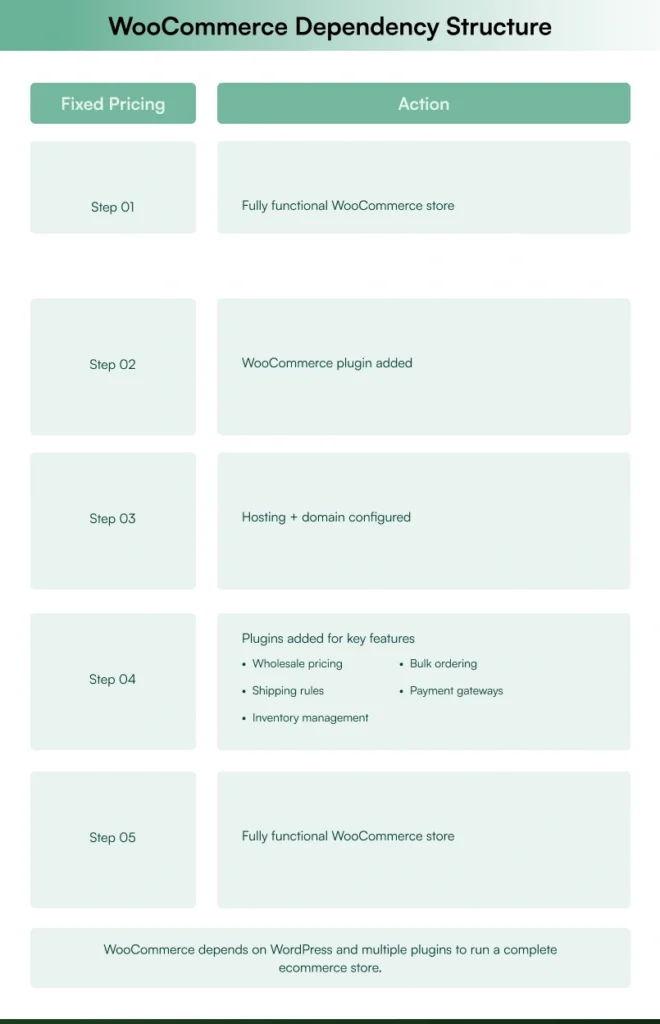
WooCommerce is a WordPress plugin that transforms a standard WordPress website into a WooCommerce store. Since it is not a standalone platform, businesses must first install WordPress, set up hosting, and then add the WooCommerce plugin to start selling products.
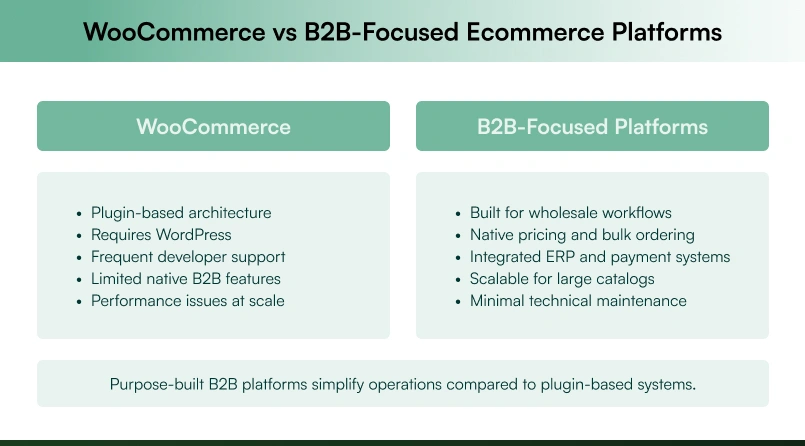
While WooCommerce provides product listings, shopping carts, and checkout as core features, it heavily relies on third-party plugins to deliver wholesale pricing, bulk ordering, inventory management, and advanced shipping methods. This creates compounding complexity when scaling, as it requires continuous plugin updates, maintenance, and troubleshooting.
For businesses that need a seamless and scalable solution, a purpose-built B2B ecommerce platform provides everything needed without the technical overhead.
Q2. Does WooCommerce charge payment processing fees?
Yes, WooCommerce charges transaction fees for payment processing, which vary based on payment method and location. While WooCommerce is free to install, payment processing comes at a cost, and businesses must be aware of these additional expenses.
Here’s a breakdown of WooCommerce Payments fees:
- For U.S. transactions: 2.9% + $0.30 per transaction for U.S.-issued credit or debit cards.
- For non-U.S. transactions: An additional 1% surcharge applies to transactions made with non-U.S. cards.
- Other fees: Additional costs may be incurred by banks, credit card companies, or third-party payment processors.
For B2B businesses handling large orders, these transaction fees quickly add up, compressing profit margins. Unlike B2B-focused platforms that offer flexible payment methods, WooCommerce’s reliance on third-party payment processors can make it harder to support custom payment terms, ACH transfers, or bulk order invoicing—critical for many B2B operations.
Q3. Can I use WooCommerce without WordPress?
No, you cannot use WooCommerce without WordPress. WooCommerce is not a standalone ecommerce platform, it’s a WordPress plugin designed to add ecommerce functionality to WordPress websites. Since it is built on WordPress’s framework, it cannot function independently or integrate with other CMS platforms.
Businesses must install WordPress and the WooCommerce plugin to operate a WooCommerce store, meaning they need a WordPress-compatible hosting provider. For businesses looking for a WooCommerce for B2B solution without the additional burden of maintaining a WordPress site, this adds unnecessary setup and security overhead.
WooCommerce’s WordPress-based architecture can constrain the scalability, flexibility, and performance that wholesale and distribution businesses specifically need. Understanding what WooCommerce is used for at a fundamental level helps set realistic expectations before committing.
Q4. Can WooCommerce connect to QuickBooks Online (QBO)?
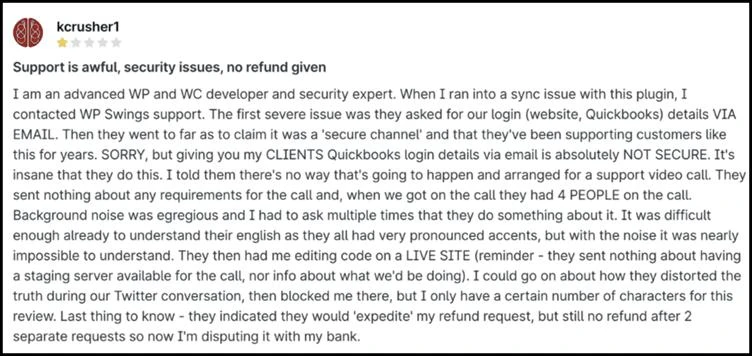
Yes, WooCommerce can connect to QuickBooks Online (QBO), but the experience isn’t seamless. The integration is managed through third-party plugins like “QuickBooks Integration for WooCommerce,” which have limitations, security concerns, and unreliable support experiences.
Businesses must install WordPress and the WooCommerce plugin to operate a WooCommerce store, meaning they need a WordPress-compatible hosting provider. For businesses looking for a WooCommerce for B2B solution without the additional burden of maintaining a WordPress site, this adds unnecessary setup and security overhead.
WooCommerce’s WordPress-based architecture can constrain the scalability, flexibility, and performance that wholesale and distribution businesses specifically need. Understanding what WooCommerce is used for at a fundamental level helps set realistic expectations before committing
Q5. Is WooCommerce free?
Yes, WooCommerce is free to download and use, but running a fully functional WooCommerce store comes with hidden costs that can quickly add up. Unlike an all-in-one B2B ecommerce solution, WooCommerce requires separate expenses for hosting, domain registration, payment processing, and essential plugins.
Here’s what a basic B2C store setup will cost:
- Hosting – Ranges from $3 to $50+ per month, depending on performance needs.
- Domain name – Typically $10 to $20 per year.
- Themes and templates – Premium themes range from $50 to $100+.
- Plugins and extensions – Essential add-ons for payment processing, shipping, SEO, and analytics can cost between $30 and $300+ per year.
- Security & maintenance – SSL certificates, backups, and security plugins can add more costs.
For companies using WooCommerce for B2B needing tiered pricing, bulk orders, and advanced automation, multiple premium plugins become necessary, increasing costs and complexity. The free version can quickly become an expensive and time-consuming solution once B2B requirements are factored in.
Q6. Could WooCommerce handle a 300,000-product site?
Technically, WooCommerce can handle large product catalogs, but not efficiently. When scaling to 300,000+ products, WooCommerce faces severe performance bottlenecks. Without custom indexing, Elastic Search, or a high-powered hosting setup, businesses struggle with slow load times and an increasingly poor user experience.
Store owners commonly report that WooCommerce runs extremely slowly with 30,000+ products, and even top hosting providers cannot adequately support it. Some businesses report that even minor updates can take considerable time to deploy.
Scaling WooCommerce for B2B to handle high-volume transactions requires expensive hosting, database customizations, and external search solutions. If you need a platform that natively supports large product catalogs without compromising on ease of use, WooCommerce may not be the most reliable choice.
Q7. Why do WooCommerce product images keep deleting?
Many WooCommerce users experience randomly disappearing product images, which disrupts the shopping experience and frustrates business customers. Cache conflicts, incorrect file permissions, broken database connections, or WooCommerce plugin incompatibilities commonly cause this issue.
Since WooCommerce relies on multiple plugins and third-party themes, updates or conflicts between them can lead to missing images. Externally hosted or CDN-based images can also disappear due to improper syncing or server issues. Some store owners report images vanishing after updates, requiring manual reuploads or database fixes. For WooCommerce for B2B businesses managing thousands of SKUs, dealing with disappearing images is not just frustrating, it is a direct drag on productivity and user experience.
Q8. Do you need a developer for WooCommerce?
If you are running a small, tech-savvy operation, you might manage a basic WooCommerce store on your own. However, things get significantly more complex as your business grows, especially when using WooCommerce for B2B territory.
Scaling WooCommerce for B2B sales requires multiple plugins for bulk orders, wholesale pricing, advanced checkout page workflows, and ERP integrations. The problem is that these plugins do not always work together. Conflicts cause coding issues and site crashes, and most businesses end up requiring ongoing developer support to maintain stability. Relying on constant developer assistance makes WooCommerce for B2B an expensive and time-consuming solution. A platform built for wholesale business from the start eliminates these technical dependencies entirely.
Q9. Why is my WooCommerce site so slow?
WooCommerce sites are often slower than expected because they rely on multiple plugins to function as a complete ecommerce store. As you scale, adding features like bulk ordering, custom pricing, and inventory management, the number of plugins increases—leading to longer load times, performance bottlenecks, and frequent crashes.
This becomes a more significant issue for B2B businesses with expansive product catalogs and complicated workflows. As the WooCommerce database grows, it can slow down queries, and too many plugins can lead to conflicts that degrade overall performance. WooCommerce sites are, on average, 20% slower on mobile than desktop, which poses a further challenge in delivering a seamless shopping experience.
Speed isn’t just a convenience, it directly affects revenue. According to the report, a 1-second delay in page load time on an ecommerce site generating $100,000 daily could result in $2.5 million in lost sales annually. If your WooCommerce site is slowing you down, it may be time to explore a B2B-optimized ecommerce platform that delivers speed and scalability without the hassle of excessive plugins.
Q10. Does WooCommerce support wholesale pricing and tiered pricing natively?
This is one of the most important questions when evaluating WooCommerce for B2B. The short answer is no. WooCommerce does not natively support wholesale pricing, or tiered pricing out of the box. To offer different prices to wholesale users, you need a dedicated wholesale plugin such as WooCommerce Wholesale Pro or the wholesale suite.
These add-ons introduce pricing rules, discount rules, and user role-based access but require careful configuration to function correctly. Managing wholesale customers, applying bulk pricing, and creating minimum order rules for specific user roles all depend on how well these plugins integrate with each other and with your existing setup.
For businesses where dynamic pricing and wholesale discounts are central to operations, this plugin-dependent model introduces real risk as you scale. Understanding how to evaluate WooCommerce for pricing flexibility is essential before committing.
Q11. Can WooCommerce manage wholesale user roles and access control?
WooCommerce for B2B requires different experiences for different user roles, including wholesale users, guest users, wholesale buyers, and retail customers. While WooCommerce does support user roles through WordPress, implementing wholesale user roles with proper access control requires additional plugins like the wholesale suite or YITH WooCommerce.
Managing user management across wholesale customers involves configuring a registration form, setting up email notifications, and controlling which products are visible to which specific user roles.
WooCommerce catalog mode and the YITH WooCommerce Catalog Mode plugin are commonly used to hide pricing from guest users or to display a quote button in place of the add-to-cart option. The registration process alone can become a technically complex workflow requiring ongoing maintenance.
Q12. Does WooCommerce offer tools for managing wholesale orders efficiently?
When evaluating WooCommerce for B2B, order management efficiency is a key concern. WooCommerce wholesale order processing relies heavily on plugins such as the WooCommerce product table plugin or a dedicated wholesale order forms solution to enable wholesale orders at scale.
The WooCommerce product table lets wholesale buyers view and order multiple products from a single page, while wholesale order forms simplify the reordering experience for repeat business customers. Tools like the WooCommerce quantity manager help enforce minimum order rules and minimum order value thresholds. Some businesses also implement a complete wholesale package combining order forms, pricing tiers, and WooCommerce catalog mode into a single workflow.
The challenge is that each of these tools requires separate configuration, and combining them creates a fragile system that demands consistent technical oversight. If you are choosing WooCommerce for order management, the plugin complexity is a serious operational consideration. Explore B2B ecommerce catalogs to understand what a streamlined ordering experience can look like.
Why is WizCommerce the better choice for B2B ecommerce?
After reviewing the challenges of WooCommerce for B2B, it is clear that a plugin-dependent, B2C-focused platform is not built for wholesale, distribution, and large-scale transactions. WizCommerce was. WizShop, the B2B ecommerce platform built for wholesalers, gives buyers a personalized digital storefront with customer-specific pricing options, curated product catalogs, and real-time inventory, all without a single third-party plugin.
WizOrder, the B2B Order Taking App for Sales Reps, empowers your sales team to present your full catalog, apply wholesale prices, and close bulk orders on the spot — at trade shows, in-person visits, or remote calls. Together, WizShop and WizOrder form the most complete wholesale store infrastructure available for businesses that have outgrown the limitations of WooCommerce for B2B. For a broader comparison, read WooCommerce vs Shopify along with our full guide to best wholesale ecommerce platforms.
1. No hidden transaction fees
Unlike WooCommerce, which charges 2.9% + $0.30 per U.S. transaction, WizCommerce offers built-in B2B payment solutions with the industry’s lowest processing fees and flexible payment terms. WizCommerce’s WizPay ensures that B2B businesses can process large transactions without excessive third-party costs, helping you maximize revenue and keep operations efficient.
2. Seamless QuickBooks and ERP integration
Unlike WooCommerce’s buggy and unreliable QuickBooks integration, WizCommerce natively integrates with QuickBooks Online (QBO) and other ERP systems, ensuring real-time financial data, inventory tracking, and order management without technical issues
3. Truly scalable for large product catalogs
As WooCommerce struggles with performance for large product databases, WizCommerce is engineered to work with 300,000+ SKUs without a hitch. It supports infinite product variants and complex modifiers, so even the most complicated catalogs are simple to handle. Buyers can find the right product instantly with AI-powered image search, typo-tolerant search functionality, and advanced multi-level filters.
4. Reliable product image management
With WizCommerce, missing product images are a thing of the past. All media assets are securely managed, ensuring that images remain intact, even during updates so businesses no longer waste time reuploading lost files. Uploading images is effortless, even for product variants, with intuitive swatches that enhance visual display and improve the buying experience.
5. No plugin chaos—B2B features built-in
WooCommerce requires dozens of plugins to add essential B2B features, leading to conflicts and slowdowns. WizCommerce, on the other hand, offers built-in bulk ordering, seamless account management, and customer-specific pricing. It supports catalog mode (showing products without pricing) and customer approval workflows, ensuring everything works seamlessly from day one.
6. Lightning-fast performance
Unlike WooCommerce, which slows down as more plugins and products are added, WizCommerce is built for speed. An optimized infrastructure, AI-powered search, and seamless mobile, tablet, and desktop responsiveness ensure a smooth and fast shopping experience, no matter how large your catalog grows.
7. Intuitive and developer-free management
With WooCommerce, businesses often rely on developers to maintain and troubleshoot plugins, especially as B2B needs grow more complex. WizCommerce eliminates this hassle with a fully integrated, out-of-the-box solution packed with all the essential B2B features from day one. Our team handles any customizations or new feature developments, ensuring zero technical dependencies for you.

Conclusion
Choosing the right ecommerce platform is one of the most consequential decisions a wholesale business makes. WooCommerce is popular, but it consistently struggles to meet the specific demands of wholesalers, manufacturers, and distributors, resulting in underperforming sites, disjointed workflows, and unexpected overheads.
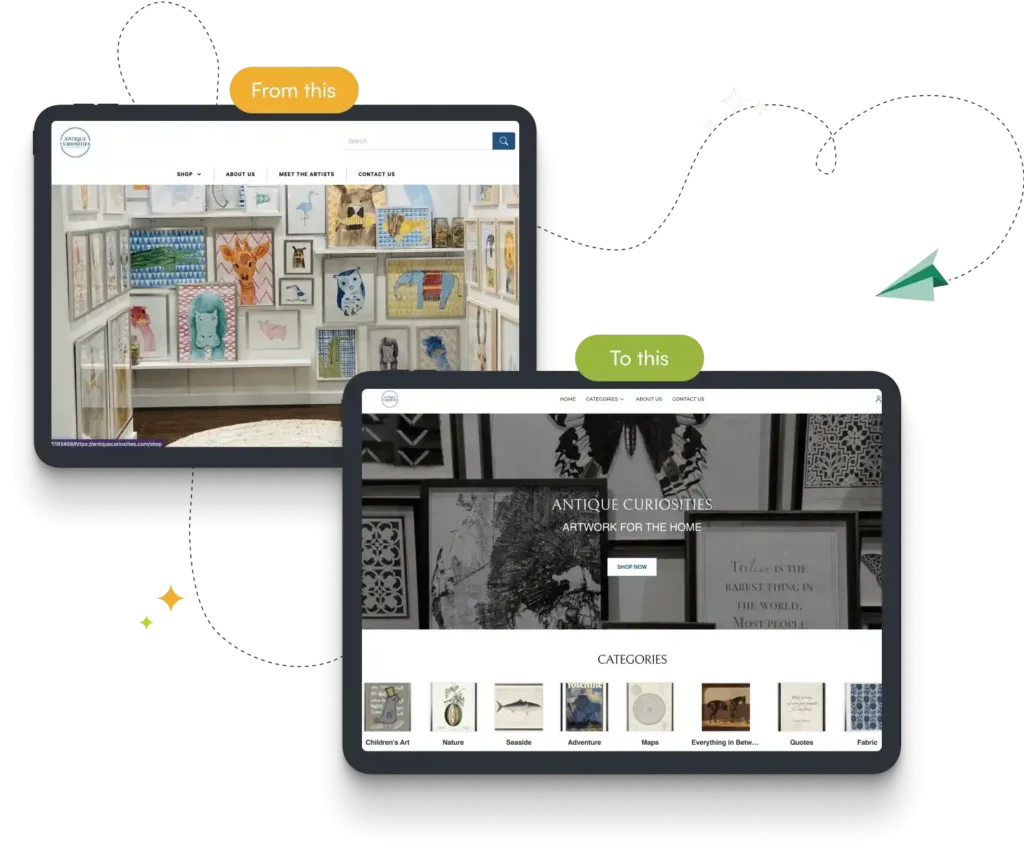
The proof is in the results. Antique Curiosities, a leading wholesale art company, struggled with the limitations of WooCommerce and Repzio, which made managing their complex product catalogs inefficient. Slow performance, difficult navigation, and outdated workflows were holding them back. After switching to WizCommerce, they gained a seamless wholesale store with intuitive product modifiers, complete order visibility, and streamlined workflows.
The impact was immediate: 20% revenue growth, a 90% drop in navigation issues, and 10+ hours saved in order processing each week. With a platform built for wholesale business, they can now focus on creativity and scaling without technical roadblocks.
Businesses that invest in the right technology today will lead their markets tomorrow. If you have been asking whether WooCommerce for B2B is the right fit, these 12 questions should give you a clear answer. Ready to see what a purpose-built alternative looks like?
Book a demo with WizCommerce and make the switch with confidence.
FAQs
What are the disadvantages of WooCommerce?
WooCommerce relies heavily on third-party plugins for core WooCommerce for B2B features such as tiered pricing, bulk orders, and access control, which creates plugin conflicts, security risks, and performance slowdowns. Hidden costs across hosting, plugins, and developer maintenance make it more expensive than its free price tag suggests. Scalability issues worsen significantly with large product catalogs.
Which platform is best for B2B?
For most wholesalers, distributors, and manufacturers, a purpose-built platform like WizCommerce outperforms WooCommerce for B2B in every measurable way: native wholesale pricing, built-in catalog mode, seamless ERP integrations, and zero plugin dependency. What WooCommerce does through a fragile stack of add-ons, WizCommerce delivers natively.
Is there a fee to use WooCommerce?
The WooCommerce plugin is free to download, but operating a complete WooCommerce store for wholesale business is not. Hosting, premium themes, essential plugins including the wholesale suite, payment processing fees, and developer costs all add up quickly. For WooCommerce for B2B specifically, the free version is rarely sufficient, and total costs often exceed those of a dedicated B2B platform.
Can I sell digital products on WooCommerce?
Yes, you can sell digital products on WooCommerce including digital product sales, downloads, and subscriptions. The platform supports digital delivery through its core features and additional plugins. However, for wholesale business operations selling digital products in bulk, managing pricing tiers, discount rules, and tax exemption for wholesale customers still requires additional configuration through a dedicated wholesale plugin or wholesale suite.
What kind of stores use WooCommerce?
The stores that use WooCommerce which it’s most relevant for include small to mid-sized B2C retail stores, bloggers adding simple product sales, and businesses already embedded in the WordPress ecosystem. While some businesses do use WooCommerce for B2B, the platform is fundamentally built for consumer retail. Store owners with complex B2B requirements, wholesale user roles, or large product catalogs typically find they need purpose-built alternatives to handle the operational demands of wholesale buyers.
Can I use WooCommerce without WordPress?
No. WooCommerce is exclusively a WordPress plugin and cannot function without it. Choosing WooCommerce means fully committing to the WordPress ecosystem, including its hosting requirements, security obligations, and maintenance overhead. For businesses evaluating WooCommerce against standalone B2B platforms, this WordPress dependency is a key constraint to weigh, particularly as operations grow in complexity and scale.