Skip to content



B2B customer portals are changing how businesses manage customer accounts, strengthen customer relationships, and grow revenue. As companies move toward digital operations, having the right B2B e-commerce portal, where your customer can log-in 24/7, see their specific pricing, volume discounts, customised catalog, previous order status and then place an order without involving a rep or waiting for an email reply, has become essential for staying competitive. B2B customer portal software provide exactly that experience while making operations easier for the businesses that serve them.
But successful B2B customer portal implementation requires more than just picking software. You need to understand different portal types, choose features that fit your business model, connect with existing systems, and plan for user adoption.
This guide covers everything you need to know about B2B customer buying portals. You’ll learn how they work, explore different types and their uses, follow a proven setup process, and discover best practices for choosing the right B2B commerce platform for your business.
What is a B2B customer portal and how does it work?
A B2B customer portal is a secure, web-based platform that allows your business customers to access their account information, browse product catalogs, view their negotiated pricing, and manage their relationship with your company online.
Unlike B2C websites, B2B e-commerce customer portals are designed specifically for business transactions, featuring custom pricing, multi-user accounts and role-based permissions, and account-specific product catalogs.
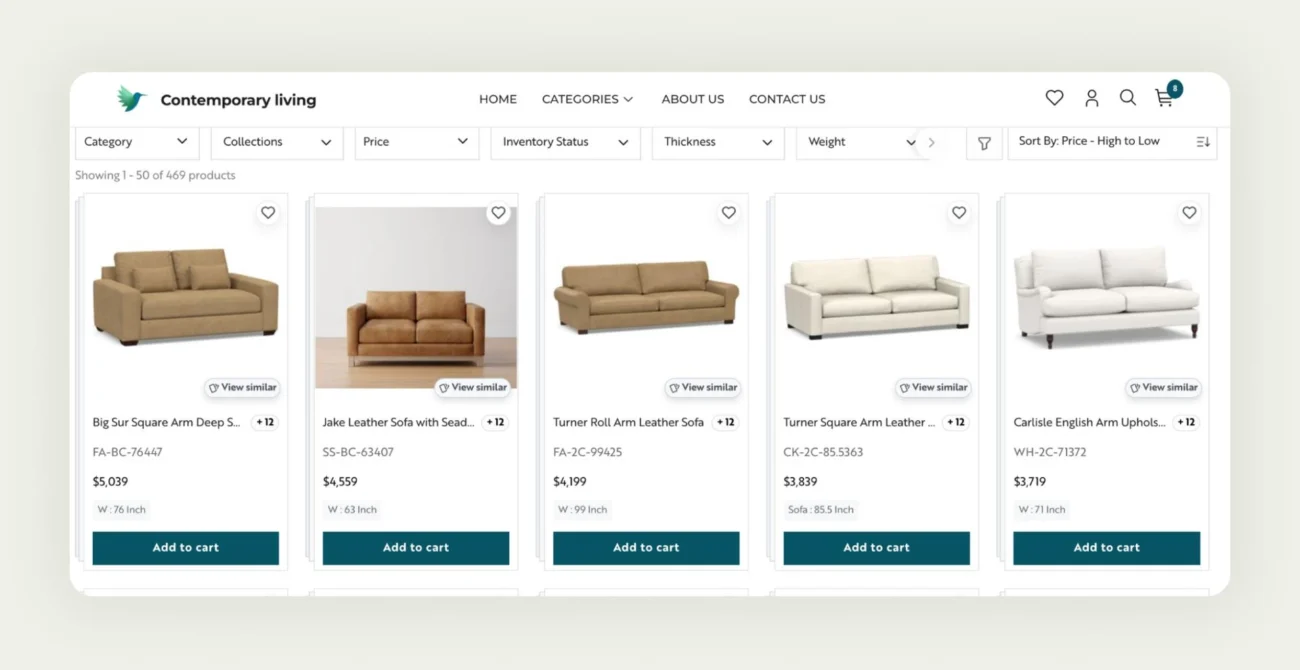
How does a B2B customer portal work?
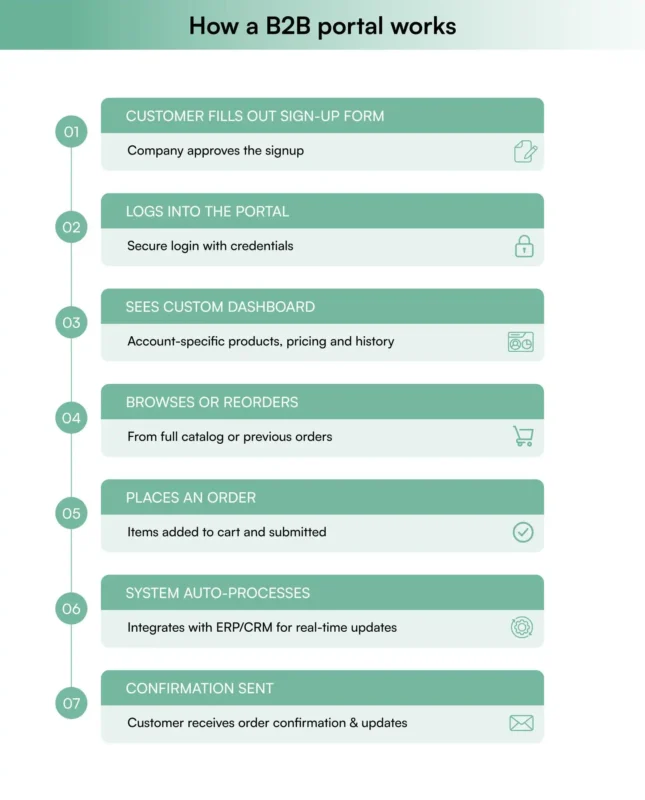
A B2B customer ordering portal connects to the systems that already hold your data – your ERP, your inventory management software, accounting software and whichever CRM your sales team runs on. If that last one is still undecided, our comparison of which CRM software is best for distributors covers the options. When customers log into your online B2B portal, they see information specific to their account, such as negotiated pricing, order history, available inventory, and products relevant to their business.
The basic workflow is straightforward. Customers log in with their credentials and instantly see their account: negotiated pricing, order history, available inventory, and the catalog authorized for them – all kept in sync with your back office, without manual intervention from your team.
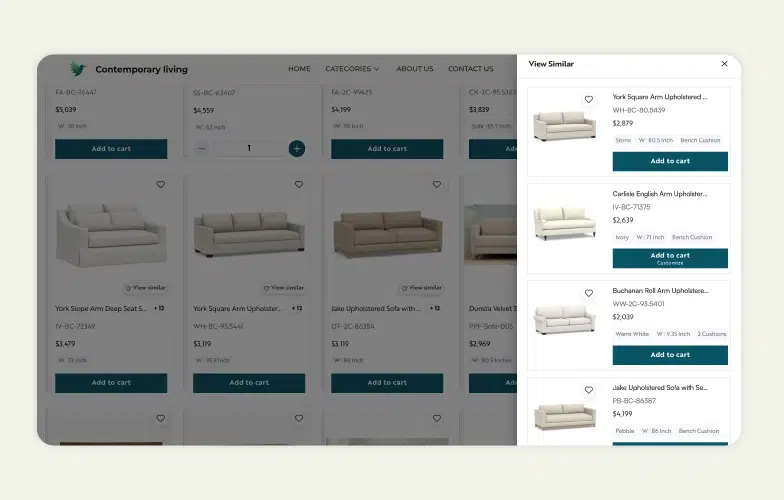
Advanced platforms like WizCommerce streamline this further with AI-powered, typo-tolerant search. Further, WizCommerce features smart image-to-image search, specific filters, and AI recommendations of similar products, all to help you find just the product you need with minimal effort.
B2B customer portal software vs traditional account management
Traditional B2B account management relies on phone calls, emails, and manual lookups that create delays and potential errors. B2B customer portals digitize the whole relationship, giving customers 24/7 self-service access to their account, pricing, and order history without waiting for business hours or staff availability. A portal digitises the buyer’s half of that. The seller’s half – who owns the account, what was agreed on the last call, which accounts have gone quiet since their last order – belongs in CRM software for distributors running beside it. A portal reduces the number of calls your team fields; it doesn’t tell them which calls still need making. That’s where a unified platform like WizCommerce, that combines customer ordering portal and a wholesale CRM, with-in a single platform, come handy. It gives complete visibility to your sales and back end teams on the incoming orders as well which account need immediate priority from a reach-out perspective.
| Aspect | Traditional ordering | B2B customer portal software |
| Availability | Business hours only (mostly) | 24/7 access |
| Account lookup | Call or email the rep, wait for a reply | Self-service, instant |
| Communication | Phone calls with sales rep, emails, back-and-forth | Self-service, instant |
| Pricing access | Request quotes, wait for response | Instant, personalized pricing |
| Staff time | High (manual processing) | Low (automated processing) |
| Inventory info | Call to check availability | Real-time inventory levels |
If your buyers’ priority is placing and reordering online rather than account management, then you will need a strong B2B ordering portal.
Now that you understand how B2B customer portals work and their advantages over traditional methods, let’s explore why implementing one has become critical for business success in 2026.
Why do you need a B2B ecommerce customer portal in 2026?
The B2B buying landscape has shifted dramatically, and companies that haven’t adapted are losing ground to competitors who have. Here’s why B2B e-commerce customer portals have become essential:
1. Buyer expectations have changed
Business buyers now expect the same convenient, self-service experience they get as consumers. B2B purchasers, especially younger procurement professionals, prefer researching and buying online rather than going through traditional buying processes. They want to:
- Compare products on their own timeline
- Check pricing instantly
- Access their account and invoices outside business hours
- Track shipments in real-time
- Remote work demands flexible solutions
With distributed teams and hybrid schedules, the old model of phone-based account management during standard business hours no longer works. Your customers need tools and a self-service experience that fit their flexible work arrangements.
2. Competitive pressure is intensifying
If your competitors offer B2B customer portals while you’re still relying on phone and email orders, customers will choose the more convenient option. Companies that adapt fastest are capturing market share from those that haven’t modernized.
3. Manual processes are too expensive
Traditional account handling requires staff time for every lookup and confirmation, creates opportunities for errors, and limits how many customers your team can serve. B2B portal software automates routine work, freeing your team for higher-value activities.
4. Customers demand transparency
Today’s buyers want real-time visibility into inventory levels, account status, and delivery schedules. Manual account management can’t provide this transparency without significant manual effort.
5. Growth requires scalability
As your customer base expands, manual account handling becomes a bottleneck. Online B2B portals let you serve more customers without proportionally increasing staff.
The bottom line? Companies relying solely on manual account management risk losing customers to competitors offering more convenient alternatives.
Understanding why you need a B2B portal is just the first step. Let’s look at the specific benefits these platforms deliver and how they impact your bottom line.
Also Read: How B2B Customer Ordering Portals are enabling growth for wholesalers and distributors in 2026
What are the key benefits of B2B customer portal?
B2B commerce portals deliver measurable value across multiple areas of your business, from reducing operational costs to driving revenue growth.
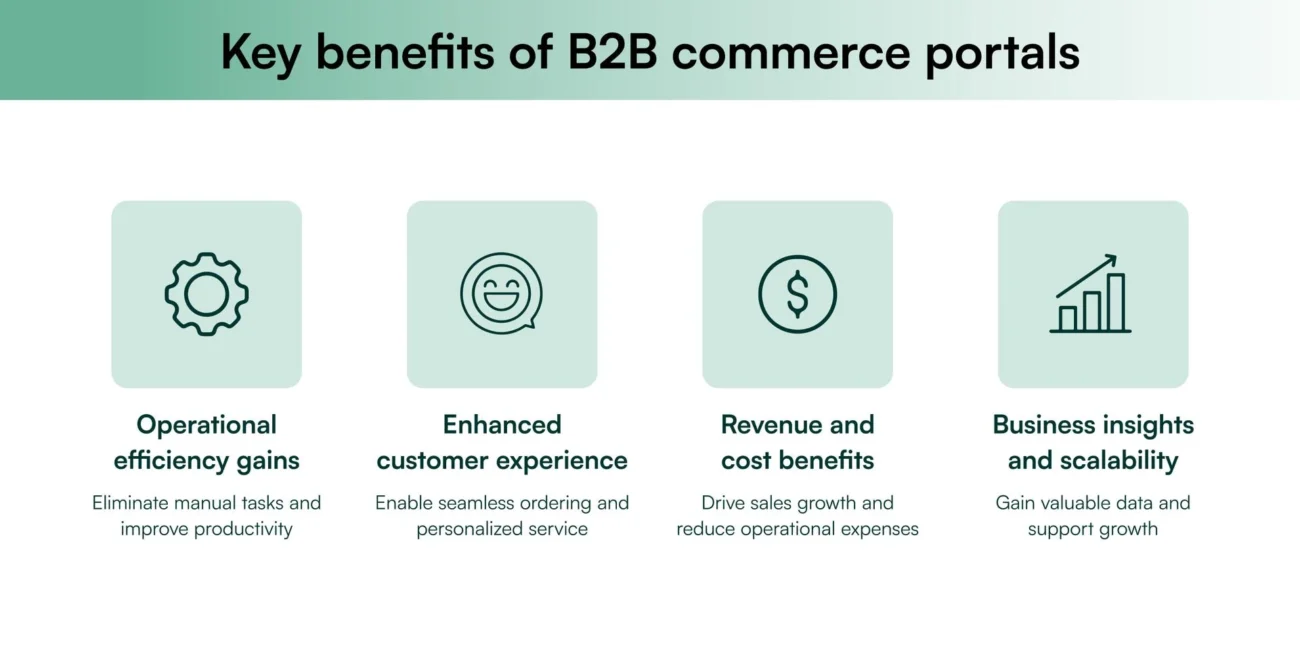
Operational efficiency gains
B2B customer portals eliminate manual account handling, reduce data entry errors, and surface real-time information to buyers directly. Your team spends less time on routine lookups and more time on strategic activities that grow the business.
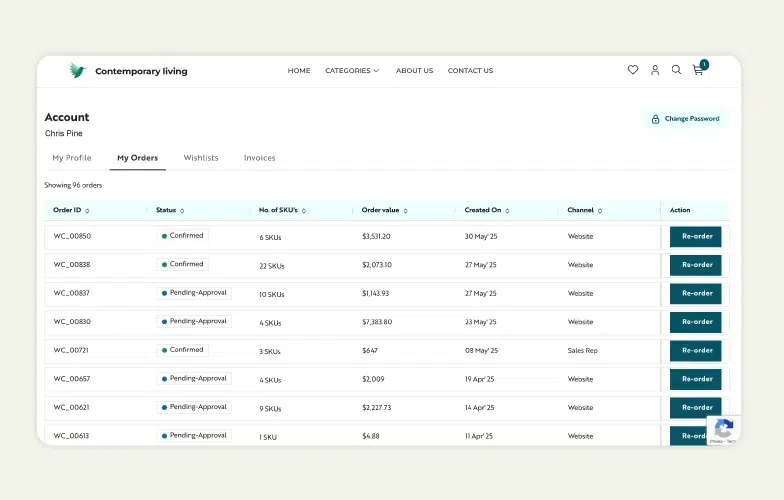
WizCommerce customers typically see 83% reduction in order taking time through features like one-click reorders and AI-powered product discovery that suggests complementary items based on purchase history.
Enhanced customer experience
Customers get 24/7 access to their pricing, invoices, and order history. Self-service account management and complete visibility make the relationship effortless, leading to higher customer satisfaction and loyalty.
Revenue and cost benefits
B2B customer portals create new revenue opportunities through product discovery and personalized recommendations. Simultaneously, they reduce operational costs by automating routine account tasks and decreasing customer service calls.
Business insights and scalability
B2B portal software provides valuable data on customer behavior, product performance, and account activity. Most importantly, portals scale with your business – serving more customers and accounts without proportionally increasing staff.
These benefits work together to make B2B commerce portals strategic investments that support long-term business growth rather than simple operational improvements.
What are the different types of B2B customer portals?
Not all B2B customer portals are the same. The type you choose depends on your business model, customer base, and industry requirements. Here are the main categories and what makes each one unique.
01. Ecommerce customer portals
The most common is B2B ecommerce customer portals that are designed for businesses selling directly to other businesses. These portals give each account personalized pricing, an account-specific catalog, and real-time inventory behind a secure login plus a branded storefront look for each business.
| Best for: Manufacturers, distributors, and service companies wanting to give customers a self-service account experience. |
02. Partner portals
Partner portals serve channel partners, resellers, and affiliates rather than end customers. They provide access to marketing materials, training resources, sales tools, and program management features.
| Best for: Companies that sell through channel networks and need to support reseller relationships. |
03. Distributor and wholesale portals
Designed for high-volume wholesale relationships, these portals handle complex pricing structures, tiered discounts, credit limits, and territory-based selling at the account level. They support volume-based pricing, quantity breaks, and sophisticated inventory management. Distributors usually get this as one module inside broader distributor ecommerce software rather than as a standalone portal.
| Best for: Wholesale businesses with high-volume transactions, credit limits, and territory-based selling. |
04. Supplier portals
While not customer portals, these serve supply chain relationships through RFQ processing, order tracking, performance analytics, and procurement workflow automation.
| Best for: Companies wanting to streamline supplier relationships and procurement processes. |
Choose the portal type that matches your primary business relationships and sales model. Many businesses start with one type and expand as their digital strategy evolves.
Once your customers can self-serve, the next step is giving them a complete online ordering experience with multi-cart support, one-click reordering, and ERP-synced order capture, all powered by a wholesale ordering platform.
A quick word of caution: repurposing a B2C portal for B2B traffic is almost always a false economy. Consumer storefronts typically lack core B2B capabilities (which we cover later in this blog). Retro-fitting those capabilities into a B2C stack consumes time, budget, and margins. Instead, starting with a portal purpose-built for B2B will spare you costly re-platforming down the road.
Now that you know which type of portal fits your business model, let’s walk through the practical steps to set up your B2B customer portal from planning to launch.
How to set up your B2B customer portal?
Setting up a B2B customer portal might seem complex, but it doesn’t have to be. With the right plan and tools, you can build a seamless, self-service experience for your buyers. Here’s a simple step-by-step guide to help you get started.
Step 1: Plan your B2B customer portal requirements
Thorough planning is key to creating a B2B customer portal that aligns with your business goals and meets customer expectations. With B2B e-commerce sales expected to hit $3 trillion by 2027, having clear objectives will help shape your strategy effectively.
Define your business goals
As 83% of B2B buyers now prefer digital commerce, focus on measurable targets that drive digital adoption and boost revenue. Examples include:
- Improved customer service: Reduce support tickets and speed up response times through self-service options.
- Faster account handling: Automate lookups and confirmations to minimize manual work.
- Higher digital adoption: Transition existing customers to the portal.
- Revenue growth: Set specific targets for increasing both average order value and purchase frequency.
Identify essential features
Based on your business model, determine must-have functionality. Most B2B customer portals need user authentication, account-specific catalogs with custom pricing, invoice and payment visibility, role-based permissions, and account dashboards. Consider industry-specific requirements like compliance features, approval workflows, or specialized reporting.
Additional considerations
Over 74% of B2B customers research online before making a purchase, so your portal should support research and growth. Focus on defining user roles, integration needs, data security, and scalability.
To meet the expectations of modern buyers, combine user-friendly B2C features with the specialized tools required for B2B. This includes personalized catalogs, detailed product variations, and a checkout process tailored for business transactions.
Step 2: Choose your B2B customer portal software
Picking the right B2B Customer Portal software is essential for supporting your current needs while preparing for future growth. Research B2B portal software options that fit your requirements and budget. Prioritize solutions with real-time ERP integration like WizCommerce’s native integrations to QuickBooks, NetSuite, and Fishbowl – this eliminates the inventory sync delays that frustrate customers when they order products that appear available but aren’t. Having an B2B customer portal with native ERP integration so that the pricing and inventory data sync in the real time is an advantage not all B2B eCommerce platform vendors provide. Hence this should be an important evaluation criteria for your next B2B eCommerce customer ordering portal.
Evaluate key capabilities
Prioritize solutions with strong integration capabilities, mobile-responsive design, customization options, and security features. The software should handle your current order volume and scale as your business grows.
Consider implementation support
Choose vendors that provide implementation assistance, training, and ongoing support. B2B portal software projects succeed when you have expert guidance through setup and launch.
Review pricing models
Understand total cost of ownership, including licensing, implementation, customization, and ongoing maintenance. Factor in both upfront costs and long-term expenses.
Step 3: Set up your B2B customer portal
Now that you’ve defined your requirements, it’s time to configure and tailor your B2B Customer Portal to align with your business goals and reflect your brand.
Brand your customer portal
Creating a cohesive brand experience helps build trust with your B2B customers. Pay attention to these key branding elements:
| Branding element | Details to implement |
| Visual identity | Incorporate your company logo, brand colors, typography, and design consistent headers and footers. |
| Navigation | Ensure an intuitive menu, quick-access links, a well-placed search bar, and a layout optimized for mobile devices. |
| Content style | Use a professional tone, industry-specific terms, consistent messaging, and clear calls-to-action (CTAs). |
Once your portal’s branding and navigation are set, move on to defining user roles for better access management.
Create user access roles
Assigning user roles helps secure your portal and streamline its daily operations. Here’s how to structure them:
- Administrator role: Full access to manage users, update catalogs, and configure system settings.
- Customer service role: Limited administrative access for handling customer inquiries, managing orders, and updating content.
- Customer roles: Create differentiated access levels for various customer types:
- Procurement managers: Full purchasing capabilities.
- Department buyers: Limited purchasing authority.
- Account viewers: View-only access for order tracking and history.
With user roles in place, the next step is to focus on organizing your product catalog.
Build product catalogs
Upload your products with detailed product descriptions, images, and specifications. Configure customer-specific pricing, volume discounts, and product availability. Organize products logically with categories and search functionality.
Organize your catalog logically, using a clear hierarchy of categories. Include detailed product specifications, high-quality images, variants (e.g., size, color, finish), configurable modifiers (custom engravings, add-on accessories, service bundles), and customer-specific pricing. To enhance usability, enable one-click reordering for past purchases—automatically preserving the exact variant and any modifiers previously selected. This structure ensures customers can easily find and order what they need efficiently.
Step 4: Add customer self-service tools
Self-service features are a must-have for modern B2B Customer Portals. In fact, more than 81% of users now expect self-service options to handle their needs independently. Let’s break down the tools that can empower your customers.
Order management features that are essential for simplifying your customers’ day-to-day account management:
| Feature | Function | Customer benefit |
| Quick reorder | Repeat previous orders with one click | Saves time on recurring purchases |
| Order status | Track current orders in real time | Reduces the need for support calls |
| Invoice access | Download and manage invoices easily | Simplifies accounting workflows |
| Payment history | View and export past transactions | Eases financial reconciliation tasks |
These tools should be available 24/7 to meet the needs of a global customer base. With U.S. B2B ecommerce sales are expected to surpass $3 billion by 2027 and grow at an annual rate of 10.7%, offering seamless self-service options is more important than ever. But order management is just one piece of the puzzle – real-time data access takes customer independence to the next level.
Live data access
Providing real-time data transforms your portal into a dynamic business tool, not just a login page:
| Data type | Function | Impact |
| Inventory levels | Show current stock availability | Helps avoid backorder frustrations |
| Shipping updates | Automate tracking and notifications | Reduces customer follow-up inquiries |
| Price changes | Reflect pricing updates immediately | Ensures accurate and confident orders |
| Product availability | Offer live stock forecasts | Supports better purchase planning |
Step 5: Connect your business systems
Integration ensures your B2B customer portal works seamlessly with existing operations.
Link your ERP
Connect for real-time inventory updates, automated order processing, and synchronized customer data. This integration eliminates manual data entry and keeps information current.
| Integration aspect | Business impact | Customer benefit |
| Inventory sync | Real-time stock updates | Accurate information availability |
| Price management | Automated pricing updates for customer tiers | Consistent pricing experience |
| Order processing | Orders flow directly to fulfillment | Faster order completion |
| Product data | Centralized management of product details | Up-to-date specifications and details |
Add CRM connection
Sync customer information, track portal usage, and maintain comprehensive customer profiles. CRM integration helps your sales team understand customer behavior and preferences.
| CRM feature | Benefit to portal | Business value |
| Customer history | Full view of past interactions and purchases | More informed customer support |
| Account management | Automated syncing of customer data | Reduced manual data entry |
| Marketing tools | Promotions tailored to buying behavior | Higher conversion rates |
| Support tickets | Unified communication tracking | Faster issue resolution |
Connect accounting software
Automate invoice generation, payment processing, and financial reporting. This connection reduces manual work and improves accuracy.
| Accounting process | Integration benefit |
| Invoice generation | Automatic creation and delivery |
| Payment processing | Real-time payment validation |
| Credit management | Automated updates to credit limits |
| Tax calculations | Dynamic, region-specific tax computation |
Real-time synchronization across these systems keeps your portal accurate and efficient. This not only streamlines your operations but also builds trust with customers by providing consistent and reliable information at every touchpoint.
Step 6: Test and go live
After integrating your system in Step 5, the next steps are thorough testing and preparing users for the portal’s launch.
Run your B2B customer portal tests
Testing ensures everything runs smoothly before customers start using the portal. Focus on these key areas:
| Test area | Key checks | Verification points |
| Order processing | Place test orders ($1 value) | Payment processing, order status updates, admin panel visibility |
| System integration | Data flow between systems | Real-time inventory updates, pricing accuracy, customer data sync |
| Mobile responsiveness | Multi-device testing | Layout adjustments, feature accessibility, loading speed |
| Security | Access controls | User role permissions, data encryption, secure checkout |
| Notifications | Communication flow | Order confirmations, status updates, profile updates |
Use a $1 test product to simulate real transactions, including payment processing, to confirm everything works as expected. Ensure orders appear correctly in the admin dashboard and are marked as “Paid” when using online payment processors.
Once testing confirms the system is functional, shift your focus to training users on the portal.
Train users on B2B customer portal
Provide training materials tailored to different user groups to help them navigate the portal effectively.
| User group | Training materials | Key focus areas |
| Staff | Admin guides, video tutorials | Order processing, customer support protocols, troubleshooting |
| Customers | Quick-start guides, walkthroughs | Account setup, ordering process, self-service tools |
| Account managers | Role-specific documentation | Customer onboarding, account management, issue escalation |
For customer accounts, implement a login system that allows multiple users from the same organization, assigning permissions based on their roles.
Provide clear documentation for essential tasks:
- Account setup and configuration: Step-by-step instructions for logging in and setting up profiles.
- Order placement workflow: Detailed guidance on browsing catalogs and making purchases.
- Support resources: Information on accessing help documentation and contacting customer service.
Finally, test notification systems for critical events like profile updates, order submissions, payment confirmations, and security alerts to ensure users receive timely and accurate updates.
Following these steps systematically helps ensure your B2B customer portal launches successfully and delivers the benefits you’re expecting. Now that you know how to implement a portal, let’s explore the specific features that make B2B portal software effective for business use.
What features to look for in a B2B portal software?
When evaluating B2B portal software, focus on features that directly impact your business operations and customer experience. Here are the critical capabilities to prioritize:
1. Core account functionality
Your B2B customer portal needs robust account features built for business relationships. Look for custom pricing engines that handle complex B2B pricing structures, multi-user accounts, role-based permissions, and approval workflows for large purchases. The platform should support multiple payment methods including purchase orders, credit terms, and online payments.
2. Advanced search and filtering
Business customers often have large catalogs to navigate. Prioritize platforms with typo-tolerant search, advanced filtering by specifications, and AI-powered product recommendations. These features help customers find products quickly and discover items they might not otherwise consider.
AI-powered upselling goes beyond basic ‘customers also bought’ suggestions. WizCommerce’s recommendation engine analyzes industry trends, seasonal patterns, and company-specific data to suggest relevant products.
3. Integration capabilities
Your portal must connect seamlessly with existing systems. Look for pre-built integrations with major ERP platforms, CRM systems, and accounting software, and if the ERP-native sana commerce competitors on your list are built around SAP and Microsoft Dynamics, confirm your own system is a supported connector and not a custom build quoted separately. API-first architecture ensures you can connect custom systems or add new integrations as your business evolves.
4. Mobile optimization
B2B buyers increasingly use mobile devices for research and account management. Ensure the platform provides full functionality on smartphones and tablets, not just responsive design.
5. Security and compliance
B2B portal software must protect sensitive business data and transactions. Look for PCI DSS compliance, role-based access controls, secure payment processing, and data encryption. If you operate in regulated industries, ensure the platform supports relevant compliance requirements.
6. Customization and branding
Your portal should reflect your brand and business processes. Evaluate platforms that allow custom branding, configurable workflows, and flexible product catalog structures. The ability to customize without extensive development work saves time and money.
7. Analytics and reporting
Advanced platforms offer predictive insights – WizCommerce’s AI sales copilot lead scoring identifies which customers are likely to place large orders based on browsing patterns and purchase history, helping sales teams prioritize follow-ups where 75% of recommended leads convert.
Understanding what features you need is just the beginning. Here’s how to systematically evaluate and choose the right platform for your business.
How do I choose the right B2B customer portal?
Selecting the right B2B customer portal software requires a systematic evaluation process that goes beyond features and pricing.
Start with technical assessment
- Document your current systems and integration requirements
- Identify data volumes, user counts, and transaction needs
- Assess existing IT infrastructure and technical constraints
- Consider future growth and scalability requirements
Evaluate vendor credibility
- Research vendor track record and financial stability
- Review customer testimonials and case studies
- Assess support quality and response times
- Check sales experience and B2B expertise
Test with real scenarios
- Request demos using your actual products and pricing
- Test with your business processes and workflows
- Evaluate mobile experience with real use cases
- Verify integration capabilities with your systems
Calculate total investment
- Factor in licensing, implementation, and customization costs
- Include training, maintenance, and support expenses
- Consider potential upgrade and scaling costs
- Compare long-term value versus upfront savings
Plan for implementation
- Understand realistic timelines and resource requirements
- Evaluate implementation support and training provided
- Assess change management needs for your organization
- Plan for testing, rollout, and go-live phases
Make the decision
Choose the platform that best balances functionality, cost, implementation timeline, and vendor support. Remember that the cheapest option often becomes expensive if it requires extensive customization or lacks adequate support.
Ready to move forward? Here’s how WizCommerce can get your B2B portal up and running quickly.
Build your B2B customer portal with WizCommerce in 30 days
WizCommerce specializes in B2B customer portals designed specifically for manufacturers, distributors, and wholesalers. Unlike generic ecommerce platforms adapted for business use, we built our solution from the ground up to handle complex B2B requirements.
| Feature | How it helps your business | Customer benefit |
| Customer approval workflows | Streamlines large purchase approvals and maintains buying controls | Procurement teams can set spending limits and approval chains |
| AI search and filters for fast product discovery | Reduces support calls for product location and specifications | Discovers relevant products faster with typo-tolerant search and smart filtering |
| One-click reorders | Increases repeat purchase frequency and reduces order processing time | Saves time on recurring purchases with instant reorder from history |
| Custom price lists, payment types, and terms | Handles complex B2B pricing structures and payment arrangements | Shows personalized rates, volume discounts, and preferred payment terms |
| All orders in one place (Sales app, ERP, and website integration) | Eliminates order fragmentation and provides complete sales visibility | Unified order history whether purchased online, through reps, or via phone |
| Variants and modifiers | Manages complex product configurations without catalog bloat | Easily configure product options like size, color, material, and custom specifications |
| AI-powered recommendations | Increases average order values through intelligent cross-selling | Discovers complementary products based on purchase patterns and industry trends |
| Smart lead scoring | Prioritizes high-intent prospects for sales team follow-up | Ensures timely support and communication for ready-to-buy customers |
| Real-time inventory sync | Prevents overselling and reduces backorder frustrations | Accurate availability information prevents ordering out-of-stock items |
| Mobile-optimized portal | Enables ordering from anywhere, increasing sales opportunities | Full functionality on smartphones and tablets for on-the-go purchasing |
Getting started with your B2B customer portal through WizCommerce is straightforward. In just 30 days, you’ll have a fully tailored online B2B storefront ready to go. After the initial setup, the focus shifts to quick implementation and ongoing support to ensure everything runs smoothly.
WizCommerce’s team handles secure data migration and offers 24/7 support to make the transition effortless. Once your portal is live, the right onboarding and ongoing support are key to its success. WizCommerce ensures this by offering:
- Tailored onboarding: A plan designed to match your specific business goals.
- Secure data handling: Compliant and safe data migration.
- System integration: Easy connection to your existing ERP systems and other business tools.
Ready to give your customers a modern self-service account experience? Schedule a personalized demo to see exactly how WizCommerce will work with your products, pricing, and business processes.
FAQs on B2B customer portals
1. Which portal is used for B2B?
B2B customer portals are specialized platforms designed for business-to-business transactions. Popular options include WizCommerce for manufacturers and distributors, Shopify Plus for companies wanting B2C-style experiences, and industry-specific platforms like Oracle Commerce for large enterprises. The best choice depends on your business model, integration requirements, and industry needs.
2. What’s the difference between a B2B customer portal and a B2B ordering portal?
A B2B customer portal is the account layer: logins, user hierarchies, role permissions, pricing tiers, and invoice and payment management. A B2B ordering platform is the action layer on top: placing orders, multi-cart, one-click reorder, real-time tier pricing, and order tracking. The portal is the identity; the ordering platform is the action. Both live inside WizCommerce.
3. What are the 4 types of B2B customers?
The four main types of B2B customers are: Producers (manufacturers who buy raw materials and components), Resellers (wholesalers and retailers who buy to resell), Government buyers (agencies purchasing for public use), and Institutional buyers (schools, hospitals, and nonprofits). Each type has different purchasing processes, approval requirements, and portal needs.
4. Which is the best B2B portal in the USA?
The best B2B portal software depends on your industry and requirements. WizCommerce excels for manufacturers, distributors, and wholesalers with its AI-powered features and industry-specific tools. Other strong options include Shopify Plus for companies wanting consumer-like experiences, BigCommerce Enterprise for mid-market businesses, and Magento Commerce for highly customized solutions.
5. What is the world’s largest B2B portal?
Alibaba.com is the world’s largest B2B marketplace portal, connecting millions of buyers and suppliers globally. However, most companies need their own B2B customer portals rather than marketplace presence. For proprietary portals, Amazon Business and major distributors like Grainger operate some of the largest B2B e-commerce platforms.
6. What should be in a B2B customer portal?
A comprehensive B2B customer portal should include: user authentication and account management, personalized product catalogs with custom pricing, shopping cart and checkout functionality, order history and tracking, invoice and payment management, real-time inventory visibility, customer service tools, and mobile-responsive design. Advanced features might include approval workflows, bulk ordering, and analytics dashboards.