Skip to content




When you scroll through the pages of successful ecommerce brands, you will notice that their products don’t just appear. They command attention. This is thanks to the brilliant visuals that accompany them. In a world where buyers make decisions in milliseconds, ecommerce photography is no longer about making your products look good. They have added responsibilities like making your products instantly trustworthy and desirable. To help you achieve this for your own brand, we are going to share some of the best ecommerce photography tips that actually move the needle.
Essential pre-shoot tips (Preparation and planning)
Great ecommerce visuals are rarely the result of spontaneity. Great product photography services are often driven by careful planning. Here are some top ecommerce photography tips you need to follow even before you lift the camera:
1. Always define and document your brand aesthetic
From day 1, have a clear alignment on how your brand should look and feel. Your brand aesthetic defines the visual rules, such as color palette, lighting style, backgrounds, and overall mood that guide every image you create. Its primary purpose is consistency, ensuring your product visuals feel cohesive across listings and channels. When defined upfront, your imagery strengthens brand recognition rather than appearing like disconnected, one-off executions.
Here are some common types of aesthetics adopted by different ecommerce brands:
| Brand aesthetic | Visual characteristics | Used commonly by brands dealing in |
| Minimal and clean | White or neutral backgrounds, soft lighting, and clutter-free | Electronics, home appliances, office supplies, etc. |
| Luxury and premium | Dark tones, dramatic lighting, rich textures, and high contrast | Fashion, jewelry, watches, high-end beauty, home decor, etc. |
| Bold and playful | Vibrant colors, dynamic angles, and creative props | Toys, accessories, novelty products, etc. |
| Natural and organic | Earthy colors, natural light, raw textures, and outdoor elements | Wellness, food, eco-friendly, sustainable products, etc. |
| Technical & Detail-Focused | Sharp lighting, macro shots, and precise angles | Electronics, tools, hardware, etc. |
| Modern & Futuristic | Clean lines, gradient backgrounds, and bold lighting | Technology, gadgets, innovation-led products, etc. |
| Warm & Handmade | Soft tones and textured backdrops | Artisanal, handmade, small-batch products, etc. |
2. Never start a shoot without a clearly defined shot list
A shot list acts as your execution blueprint. It defines exactly what images need to be produced and for which use case. This level of planning prevents missed assets and reduces reshoots. In other words, it makes sure nothing is left to interpretation at a critical time, and you don’t make creative decisions on the fly. When done right, a shot list doesn’t just organize production; it ensures your visuals directly support discovery, evaluation, and conversion as your catalog scales.
Here are some of the product shots commonly used in ecommerce product photography –
| Shot type | What it includes |
| Hero product shot | Front-facing image, usually on a clean background |
| Alternate angle shots | Side, back, top, or 45-degree views |
| Close-up detail shots | Macro images highlighting texture and materials |
| Lifestyle shots | Product shown in real-world or usage scenarios |
| In-use shots | Product being actively used by a model or hand |
| Scale reference shots | Product shown alongside common objects or models |
| Variant shots | Images of different colors, sizes, or configurations |
| Packaging shots | Product packaging or unboxing visuals |
| Feature callouts | Annotated images highlighting benefits or specs |
3. Prepare every product for high-resolution scrutiny
Next, ensure every product you plan to photograph is in flawless, sell-ready condition. This means cleaning surfaces, removing dust or fingerprints, ironing fabrics, polishing reflective materials, and fixing minor defects that could distract the buyer. Remember – Small imperfections become highly visible in high-resolution ecommerce images. Overlooking them can undermine perceived quality and trust.
Equally important is consistency across units. If you are photographing multiple products or variants, each one should look uniform in shape and presentation. Preparing products in advance reduces retouching time and ensures your visuals accurately reflect what customers will receive.
4. Use backgrounds to support the product, not compete with it
Your background plays a critical supporting role in ecommerce photography. The goal of a background is not to compete with the product, but to frame it in a way that enhances clarity and focus. The key is alignment with your brand aesthetics. A well-chosen background also ensures consistency across your catalog, making it easier for buyers to evaluate and compare products.
Some of the commonly used backgrounds include:
| Background type | When to use it |
| White | When clarity and consistency are required for hero images and large catalogs |
| Neutral solid | When you want a clean look with a subtle brand personality |
| Textured | When material quality or craftsmanship needs to be highlighted |
| Lifestyle | When helping buyers visualize real-world use and build an emotional connection |
| Gradient | When you want a modern, high-impact look without visual clutter |
| Outdoor | When the product naturally fits a natural or open environment |
5. Design your lighting setup to showcase product quality
Lighting is what brings your product to life. Before shooting, plan how light will shape your product’s form and texture. Soft, even lighting is ideal for most ecommerce use cases as it minimizes harsh shadows and highlights product features accurately. More directional lighting can be used intentionally to add depth or drama, as long as it remains consistent with your brand aesthetic. Planning your lighting setup in advance ensures your images look balanced and conversion-ready across all channels.
Essential in-shoot tips (Execution and quality capture)
Once preparation is complete, execution is where ecommerce product photography is truly won or lost. These tips focus on capturing comprehensive, high-quality imagery that supports evaluation and reduces ambiguity:
6. Show the product from multiple angles
A single angle rarely tells the full product story. Shoppers cannot touch or examine items physically. So your images must compensate for that limitation. Capturing multiple angles allows your buyers to understand the product’s shape, depth, proportions, and construction more accurately. Front, back, side, top-down, and three-quarter views typically work together to eliminate guesswork and build confidence. Here is an example of a brand that has captured a product from multiple angles:
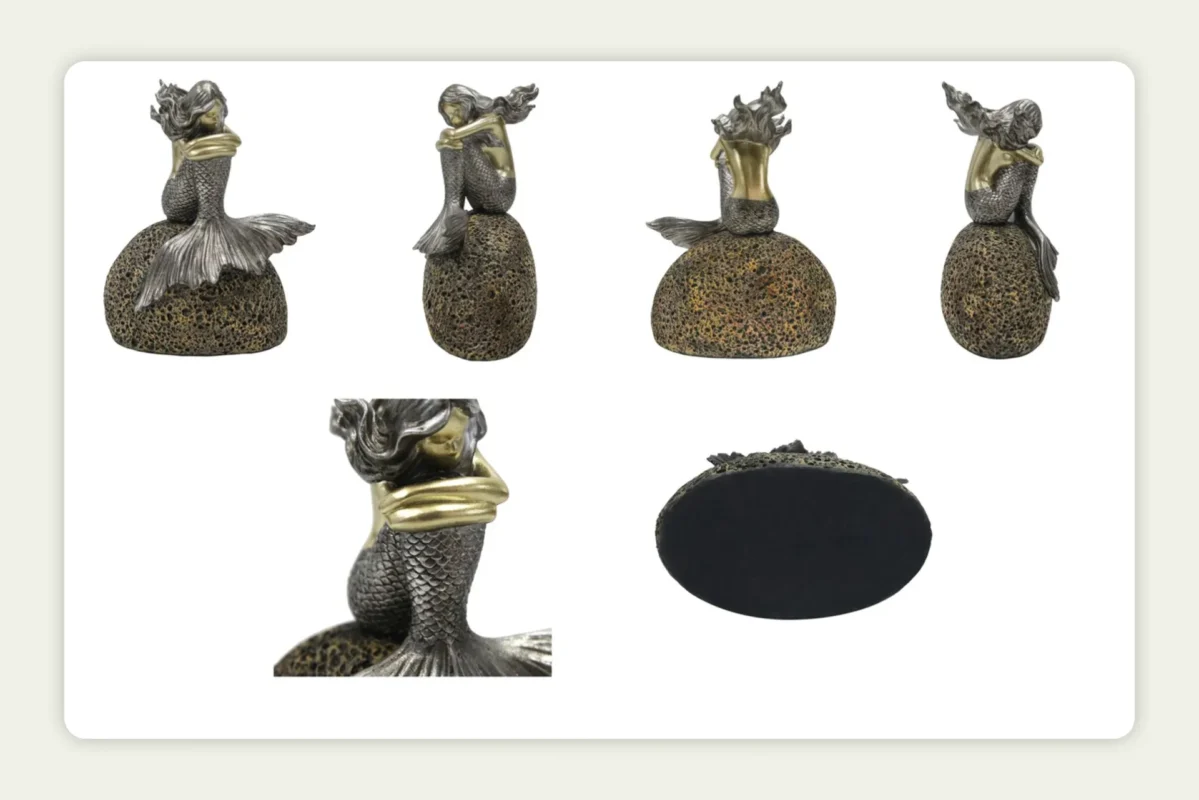
From a performance standpoint, multiple angles also reduce return rates caused by unmet expectations. They help answer silent questions such as how thick the product is, how it looks from behind, or how components connect.
7. Use close-ups to prove quality, not just claim it
Detail shots are where trust is built. Close-ups allow buyers to evaluate texture, material quality, finishes, stitching, buttons, ports, labels, or craftsmanship that may not be visible in wider frames. These images are especially important for products where quality perception directly influences price justification, such as electronics, fashion, beauty, tools, or home goods.
For instance, here is a close-up shot of a blanket that gives a better idea of the quality and the material used:
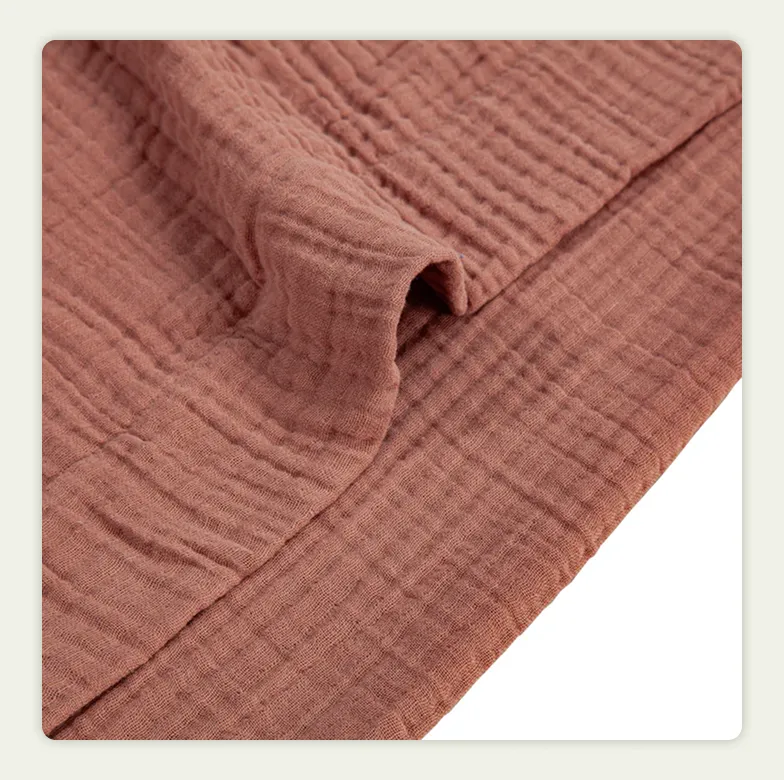
High-quality close-ups also reduce reliance on long descriptions. Instead of telling buyers about premium materials or precise engineering, you show it. When executed well, detail shots help buyers move from interest to intent by reassuring them that the product matches the claims made on the page.
8. Use lifestyle context to help shoppers imagine ownership
Lifestyle imagery bridges the gap between product and ownership. When you show the product in a realistic retail or usage context, you help buyers visualize how it will be merchandised or used by their end customers. This emotional connection is often what separates browsing from buying, especially for lifestyle, home decor, wellness, and fashion categories.
For instance, here is a product captured in a lifestyle setting:
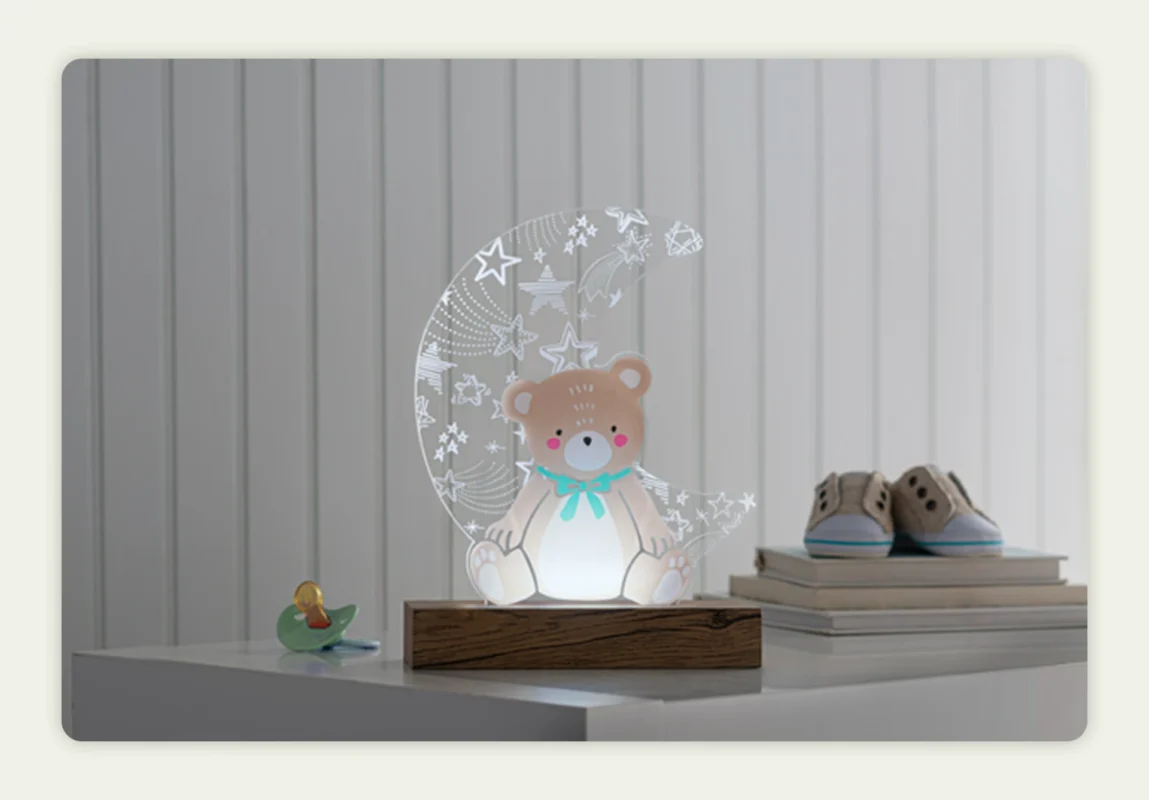
Beyond inspiration, lifestyle shots also provide functional clarity. They demonstrate real-world scale without relying on explanation. Whether the environment is physically staged or digitally generated, lifestyle context adds meaning to the product and supports storytelling.
9. Include visual cues for size and scale
One of the most common reasons for ecommerce returns is incorrect size perception. Including scale indicators helps eliminate this risk. Scale can be communicated by placing the product next to familiar objects, showing it in use, or including hands, models, or environmental references that buyers instinctively understand.
Here is an example where the product is placed alongside a complementary item, providing a clear visual reference for size:

This approach is especially critical for small items, compact electronics, decor, accessories, and tools. Scale indicators reduce hesitation, improve buyer confidence, and set accurate expectations. From a business perspective, this leads to fewer size-related complaints, lower returns, and higher customer satisfaction.
10. Capture in RAW to protect image quality and flexibility
Shooting in RAW format preserves the maximum amount of image data. This gives you far greater control during post-processing. Unlike compressed formats, RAW files retain details in highlights and shadows. This helps with precise color correction and exposure adjustments,
Capturing in RAW format also ensures that your images remain adaptable to different platforms, background changes, cropping requirements, and future updates without degradation in quality.
Essential post-shoot tips (Editing & optimization)
Post-production is where your raw captures are transformed into visual assets. Remember – editing is not about transforming the product. It’s about presenting it clearly and accurately. These post-shoot practices help you achieve that:
11. Retouch without misleading
Here’s a simple thumb rule – Retouching should enhance clarity, not alter reality. It must remove distractions such as dust, minor blemishes, creases, background inconsistencies, etc., all the while preserving the product’s true appearance. Over-editing that changes color, texture, size, or finish can lead to broken expectations and higher return rates.
When your customers receive the product that looks exactly like what they saw online, it is going to reinforce your brand’s credibility. So, subtle and honest edits are the way to go rather than aggressive manipulation.
12. Use consistent editing presets
When you use standardized editing presets (uniform exposure, color balance, contrast, and shadow depth) across all images, your catalog will look more professional and well-curated. This is true even when your products vary in shape or material.
From a scalability perspective, presets also streamline workflows. For instance, they speed up editing and make it easier to onboard new products without compromising visual quality.
13. Optimize image sizes for faster loading
Large, uncompressed files slow down pages. This negatively impacts user experience and hurts SEO and conversion rates. One study by Google found that people leaving your site increases 32% when a page’s load time extends from one second to just three seconds.
So, the key is to optimize them. Now, this doesn’t mean you compromise on their quality. Optimizing here simply means enabling fast load times without sacrificing visual clarity. By resizing images appropriately and using modern formats where applicable, you strike the right balance between quality and speed.
This optimization is especially important for mobile shoppers, where performance directly influences engagement and bounce rates.
You can resize images using online optimization tools such as Squoosh or TinyPNG. When compressing images, ensure quality is preserved by exporting them in efficient formats like JPG, PNG, or Google’s WebP.
14. Name and organize files properly
Clear file naming and structured organization are often overlooked but incredibly valuable. Descriptive filenames make assets easier to locate and manage. It also makes it easy to reuse across teams and platforms.
Right naming practices also support SEO by making your images more discoverable in search, as search engines use descriptive filenames to better understand and index visual content. Greg Bernhardt, senior SEO strategist, Shopify, rightly says –
“The clearer you can be about what an image depicts, it’s all the better for a search engine, and a file name is one of the clearest, easiest signals you can provide,”
Proper organization becomes even more critical when you are scaling content production or collaborating across different teams. Well-structured assets save time and keep your visual library future-ready.
Here are some examples of poor file naming and proper file naming practices:
| Poor file naming | Proper file naming |
| IMG_1023.jpg | GreenSoul_OfficeChair_Black_Front_Hero.jpg |
| product_final_v2.png | GreenSoul_OfficeChair_Black_Side_Angle.jpg |
| edited_1.jpg | GreenSoul_OfficeChair_Black_CloseUp_Material.jpg |
| blue-chair-new.jpg | GreenSoul_OfficeChair_Black_Lifestyle_Retail.jpg |
| final_image.jpg | GreenSoul_OfficeChair_Packaging_Box.jpg |
15. Test images on different devices
Images that look perfect on a desktop may not perform the same on mobile or tablet screens. When you test across different devices, you make sure that your visuals retain clarity and have the same impact regardless of screen size or resolution.
When you test, you can also identify cropping issues and issues related to text legibility in annotated images. These are important for user experience. Similarly, it shows any loading performance under real-world conditions. By validating images across devices, you ensure a reliable experience for every buyer, no matter how they browse.

One tip that beats all others: Leverage an AI photography platform
There was a time when AI photography platforms could only do basic editing. Today, they streamline the entire ecommerce photography workflow. From background removal to lifestyle scene generation, they handle all.
If you are a brand with a large catalog and working with a strict deadline, AI image generators are a manna from heaven. They eliminate the need for repeated reshoots. You don’t have to rebuild a shoot every time you need a new background or angle. Put simply, you can generate on-brand visuals digitally in a fraction of the time.
The impact on cost is equally significant. AI tools cut down expenses associated with studios, logistics, and post-production. This allows you to move without friction from product readiness to go-live.
Finally, these AI product photo generators also emphasize brand consistency as they let you standardize visual rules, presets, and styles across the entire catalog.
In an environment where speed and efficiency directly influence revenue, AI photography platforms have become a key part of how ecommerce and wholesale brands create and scale visual content.
WizStudio: The best ecommerce photography platform powered by AI

WizStudio is one such AI-powered product photography platform built specifically to help ecommerce and wholesale brands create high-quality visuals without the time and operational overhead associated with traditional ecommerce photography. WizStudio takes your existing product photos and transforms them into polished, ready-to-upload visuals using intelligent AI. No more studios, props, complex setups, or juggling multiple editing tools.
At its core, WizStudio was designed for speed and scale. You can not only turn simple product shots into immersive lifestyle visuals but also enhance photos with AI-powered editing that mirrors professional retouching.
And, if you want additional assistance, WizStudio also offers a hybrid done-for-you service that combines AI efficiency with expert human oversight. The result is a more flexible way to produce professional product imagery that stays consistent across your catalog.
Want to explore WizStudio and its capabilities in more detail? Sign up for a free trial to experience the platform firsthand.
Frequently asked questions
What are the best practices for ecommerce product photography that make photos more appealing to customers?
Always use consistent lighting and clean backgrounds for your product images. For most use cases, products in front of a white background, supported by the best possible light work. Capture multiple angles, depth of field, and macros(for a closer look) to highlight specific features and build buyer confidence. Image optimization (reduce file size) is also important for fast loading of the product page in both desktop and mobile devices. Finally, use lifestyle shots to help potential customers of your online store visualize real-world usage.
How do I create a professional look for my ecommerce product photos?
Quality product photography is all about controlled lighting. If you are not sure about what type of light to adopt, simply use window light that meets your specific needs. Consistent framing also helps your product listings. Apart from this, use a tripod to avoid blur and keep color accuracy and white balance true to the product. Editing is another crucial aspect of commercial photography. It should enhance clarity and contrast without overprocessing or misrepresenting the product.
What are some tips to improve the quality of images on my ecommerce site?
Shoot in high resolution and use proper artificial lights instead of relying on filters. Compress images without sacrificing clarity and choose the right formats like JPEG or WebP. Finally, ensure consistent sizing. All these will help improve the quality of your images and, at the same time, help with search engine optimization. Regularly audit your visuals to remove outdated or low-quality images.
Are there platforms that deliver product photography services for ecommerce businesses?
Ecommerce brands can use traditional photography services or modern AI-powered photography platforms like WizStudio. AI solutions can generate studio-quality and lifestyle images at scale and create variations quickly. This reduces costs, turnaround time, and the need for repeated photoshoots.
How can I set up an ecommerce website specifically for selling my photography?
To set up an ecommerce website specifically for selling your photography, choose a platform that supports high-quality image galleries, add a clean theme, organize your work into collections, and connect secure payment and delivery (downloads or prints). Focus on clear pricing, simple licensing terms, and SEO-friendly titles and descriptions for each photo.
What online communities or forums can help me with ecommerce photography advice?
For ecommerce photography advice, look for communities where both photographers and online sellers hang out—Subreddits like r/photography and r/photobusiness, Facebook groups for photography business owners, and niche forums like PhotographyTalk or Digital Photography Review. These spaces let you ask practical questions about pricing, marketing, ecommerce setups, and gear.
How do I choose between different ecommerce platforms for selling my photography online?
When choosing between different ecommerce platforms for selling your photography online, compare how they handle image presentation, digital downloads, print-on-demand integrations, fees, and ease of setup. Also weigh customization options, built-in marketing tools (SEO, email, coupons), and whether the platform fits your current volume and future growth.
Which website builders make it easy to add ecommerce features to my photography website?
Website builders like Squarespace, Wix, and Shopify make it easy to add ecommerce features to a photography website because they offer templates designed for portfolios plus built-in stores, payment gateways, and digital download options. Many also integrate with print labs, so you can automate selling prints without heavy technical work.
What features should I look for in an ecommerce website builder for photography portfolios?
In an ecommerce website builder for photography portfolios, look for beautiful gallery layouts, fast image loading, watermarking or right-click protection, digital download delivery, print-on-demand support, and flexible pricing options. Strong SEO tools, mobile-friendly design, and easy checkout are also key to turning portfolio visitors into paying customers.
What features should I look for in an ecommerce website builder for photography portfolios?
In an ecommerce website builder for photography portfolios, look for beautiful gallery layouts, fast image loading, watermarking or right-click protection, digital download delivery, print-on-demand support, and flexible pricing options. Strong SEO tools, mobile-friendly design, and easy checkout are key. If you also sell prints or licenses to business clients, it helps if your setup can connect to a B2B platform like WizCommerce to handle custom pricing and larger repeat orders smoothly.
Which ecommerce platforms are the best for photographers to showcase and sell their images online?
The best ecommerce platforms for photographers to showcase and sell images online balance portfolio-quality presentation with robust selling tools. Options like Squarespace, Shopify, SmugMug, and Zenfolio are popular for this. If your photography business also works with galleries, retailers, or other trade buyers, pairing your front-end portfolio with a B2B-focused platform such as WizCommerce can make it much easier to manage bulk orders, client-specific price lists, and ongoing wholesale relationships.