Skip to content




If you’ve ever tried managing customer orders, scheduling jobs, and handling accounting all in separate apps, you know how chaotic it gets. One minute you’re updating a spreadsheet, the next you’re chasing invoices or cross-checking figures in QuickBooks. It’s slow, error-prone, and honestly, exhausting.
It’s no surprise that the work order management software industry is rapidly expanding, projected to reach $1.22 billion by 2029 with a CAGR of 7.99%. This is because work order software benefits nearly every industry by organizing all task-related information in one place, streamlining everything from job tracking to accounting.
That’s where work order software integrations with QuickBooks come in. They don’t just simplify accounting; they bring your entire business management process into one connected flow from scheduling and dispatching to payment processing and reporting.
With the right field service management software, you can eliminate manual entry, reduce errors, and keep your team members, customers, and accountants on the same page.
In this post, we’ll walk through what makes work order software compatible with QuickBooks so effective, explore top tools for 2024, and help you find the best setup for your business.
What is work order software?
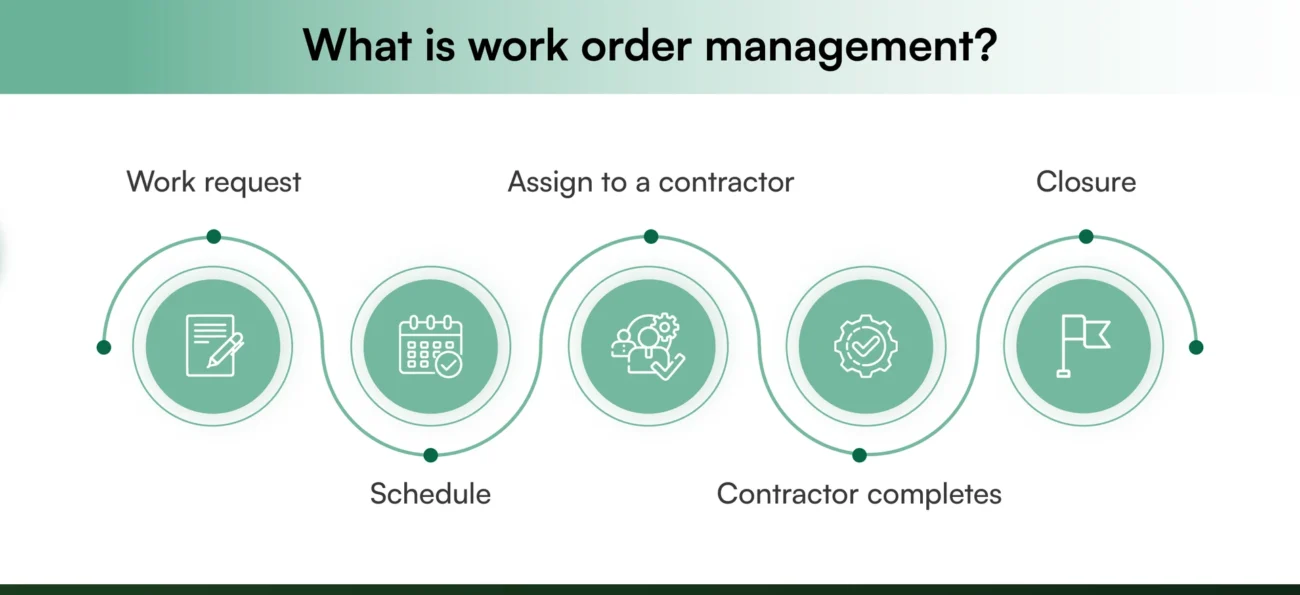
Think of it as your operations control room. Work order management software helps you organize everything about a job, including assigned technicians, materials, progress updates, costs, and completion reports. Whether you run a field service business, a manufacturing plant, or handle B2B distribution, this tool ensures smooth job management and visibility into every task., This software helps you:
- Create and track work orders from start to finish.
- Assign tasks to specific team members or departments.
- Monitor work order status.
- Generate invoices automatically after completed work orders.
- Keep detailed records for reporting and customer service follow-ups.
Now, link this system directly with QuickBooks, your accounting, inventory management, and customer records all sync automatically. That’s the magic of work order software integrations with QuickBooks.
Why integrate work order software with QuickBooks?
QuickBooks handles accounting brilliantly, but managing business operations, service requests, and job tracking requires more. When both systems connect, you get a single service management platform that keeps financial and operational data consistent.
Create a new work order, and QuickBooks automatically reflects it for billing and customer information. Mark it complete, and an invoice is generated instantly. No duplicate entry, no risk of missing a payment, no confusion.
Also read: QuickBooks Sales Order Integration
What happens when work orders and QuickBooks operate separately?
Running work orders separately from your accounting system is like driving a business with half its engine disconnected. Things move, but never smoothly. Every day, small inefficiencies stack up, a job gets completed but is not recorded, invoices wait to be sent, and financial reports become a guessing game. These gaps don’t just waste time; they directly affect cash flow, team productivity, and customer trust.
That’s where work order software integrations with QuickBooks come in. But to understand the value of connecting both systems, you first need to see what happens when you don’t.
| Challenge | What actually happens | Business impact |
| Missed or delayed invoices | Completed jobs don’t automatically sync with QuickBooks, leaving invoices pending or forgotten. | Slower cash flow, revenue recognition lags, and financial reporting become inaccurate. |
| Duplicate data entry | Teams manually input the same data into both the work order app and QuickBooks. | Increases human error, wastes admin hours, and causes frustration across departments. |
| Disjointed communication | Field technicians update one system, while the finance team works from another. | Creates confusion, delays approvals, and leads to incomplete or mismatched data. |
| Inconsistent reporting | Separate databases mean totals, expenses, and margins rarely match up. | Decision-makers lose visibility into business growth, profitability and performance. |
| Slow job-to-invoice cycle | Without automation, invoices depend on manual updates from field teams. | Delays billing, slows payments, and impacts customer satisfaction. |
| Compliance risks | Manual transfers increase the risk of errors in tax, payroll, or expense reporting. | Potential audit issues, inaccurate filings, and regulatory risks. |
| Scattered data storage | Work order records and financial data live in different tools or folders. | Makes it harder to track job costs and asset management. |
Each small delay, mismatch, or manual task seems harmless at first until you realize how much time and money it costs your business every month. When you integrate work order management software with QuickBooks, all this friction disappears. That’s why more businesses, especially service-based and field operations teams, are turning to work order software integrations with QuickBooks. Once connected, data flows seamlessly from job creation to invoicing, and from customer payments to financial reports. No more manual syncs. No more mismatched numbers. Just a unified system that works as hard as your team does.
How to choose the best work order software integration?
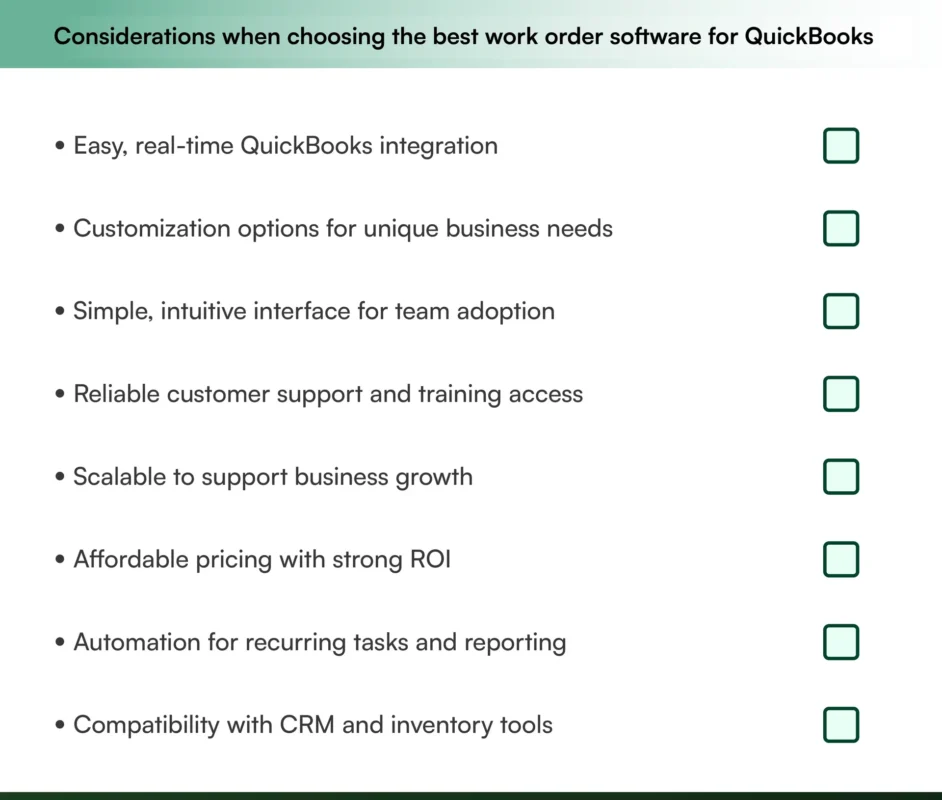
The best work order software does more than manage maintenance requests; it keeps your entire operation in sync. By automating scheduling, invoicing, and reporting, it replaces manual spreadsheets with a smarter, connected workflow that saves hours every week.
And when it’s built to support work order software integrations with QuickBooks, you get an even bigger advantage, like financial visibility that links job management, payment processing, and reporting into a single automated flow.
Let’s explore the key features that make this integration a game-changer for modern service businesses.
1. Smart scheduling and dispatching
Scheduling is the backbone of operational efficiency. The best work order software lets you create, assign, and prioritize jobs in minutes, no more messy whiteboards or overlapping appointments.
With drag-and-drop scheduling, automated reminders, and live technician tracking, managers can see who’s working on what and make adjustments in real time. The dispatching dashboard also provides visibility into technician routes and workload, ideal for field service management teams. ensuring no job slips through the cracks.
2. Mobile access for field teams
Today’s service teams need flexibility. With mobile devices, technicians can update job status, upload images, or check customer information on the go.
Even without internet connectivity, offline mode keeps data accessible, syncing everything automatically once back online. This reduces delays, improves communication, and ensures everyone, from office staff to field workers, stays aligned.
3. Automated invoicing and payments
Invoicing shouldn’t slow down your cash flow. Integrated invoicing features automatically generate bills as soon as work orders are completed.
Paired with QuickBooks integration, these invoices sync instantly with your accounting system, which eliminates double data entry and delays in payment processing. You can even accept payments directly through the software using connected gateways, making it easier to track revenue, monitor unpaid invoices, and forecast earnings in real time.
4. Built-In CRM for better customer management
Every great service business thrives on relationships. That’s where the customer service built-in CRM comes in. It stores complete customer records, contact details, service history, preferences, and notes from every visit.
You can trigger automated email updates, send feedback surveys, or set reminders for follow-ups all from one platform. This level of personalization helps you strengthen trust and improve client retention without adding extra administrative work.
5. Reporting and analytics for smarter decisions
Numbers tell the story of your operations. Powerful reporting tools show real-time metrics on work order status, expenses, and business operations.
Dashboards turn raw data into easy-to-read charts and graphs, so decision-makers can spot inefficiencies and track KPIs at a glance. With QuickBooks connected, financial insights like profit margins and expense trends are automatically included, giving you a single source of truth for both operations and accounting.
6. Seamless QuickBooks integration
Of all features, work order software integrations with QuickBooks are the most impactful. This connection allows automatic data synchronization between your work management platform and your accounting system.
Invoices, payments, purchase orders, and expenses are updated in real time, eliminating manual input and reducing errors. The result? Accurate financial records, simplified tax preparation, and a clear view of your company’s profitability without switching between systems.
Together, these features turn a basic task manager into a full-scale operations and finance command center. Whether you’re managing ten jobs a week or a thousand, integrating your work order software with QuickBooks ensures that every completed task also contributes to smoother accounting and faster growth.

Importance of QuickBooks compatibility
QuickBooks Online remains the go-to accounting software for millions of small and medium-sized businesses. It simplifies bookkeeping, tracks expenses, and generates real-time financial insights, but when it runs separately from your operations system, the workflow feels fragmented.
Integrating your work order system with QuickBooks changes that. With work order software integrations with QuickBooks, your field operations, invoicing, and accounting all operate under one roof, giving your business a complete, synchronized view of every moving part.
Here’s why QuickBooks compatibility isn’t just “nice to have”, it’s essential for growing teams that want accuracy, speed, and control.
| Key benefit | What it means in practice | How it impacts your business |
| 1. Seamless integration | Automatically syncs data between work order software and QuickBooks with no duplicate entries or manual updates. | Saves hours of admin time, eliminates errors, and keeps financial data always up to date. |
| Example: | A wholesale electronics distributor creates a new purchase order in the work order system. QuickBooks instantly updates inventory and generates the invoice. | Manual data entry disappears, freeing staff for more valuable tasks. |
| 2. Simplified accounting | All financial information, from invoices to expenses, flows directly into QuickBooks in real-time. | Reduces reconciliation time, improves cash flow tracking, and simplifies month-end closing. |
| 3. Streamlined operations | Order fulfillment, invoicing, and reporting all connect automatically through QuickBooks integration. | Boosts efficiency, reduces delays, and gives managers a single source of truth for all financial and operational data. |
| 4. Route optimization & logistics | For businesses handling deliveries, QuickBooks integration provides real-time insight into orders and inventory. | Enables smarter route planning, reduces delivery times, and improves resource allocation. |
| Example: | A large-scale distributor integrates QuickBooks Online to monitor delivery schedules and inventory levels simultaneously. | Optimized delivery routes save fuel costs and improve on-time performance. |
| 5. Improved customer communication | Updated customer data and payment histories are instantly reflected in both systems. | Builds stronger client relationships through faster billing, accurate invoicing, and transparent order updates. |
Why it matters
When your work order software is compatible with QuickBooks, your business runs with precision, not patches. Teams stop chasing data across systems, customers get faster responses, and leadership gains full visibility into the financial health of operations.
The outcome?
- Fewer errors.
- Faster billing cycles.
- Smarter decisions.
- And a scalable setup that grows with your company.
QuickBooks compatibility isn’t just about convenience; it’s about creating a connected, efficient, and profitable workflow where every job, invoice, and payment moves in sync.

What makes a work order software integration with QuickBooks effective?
Not every tool plays nicely with QuickBooks. And compatibility isn’t just about connecting, it’s about how well both systems communicate. A truly integrated solution keeps your data consistent, your workflow uninterrupted, and your team free from double entry.
Here’s what to look for when choosing a QuickBooks-compatible work order software:
- Two-way sync: Updates in QuickBooks or your work order system should reflect instantly across both platforms, keeping records accurate and consistent.
- Custom field mapping: Your business isn’t one-size-fits-all. The software should allow mapping of custom fields like job numbers, part IDs, or department codes for clean data transfers.
- Batch updates: Look for support for bulk actions, so large volumes of transactions or orders sync quickly without slowing you down.
- Support for both QuickBooks Online and Desktop: Whether you’re on the cloud or still using Desktop, ensure your integration supports both environments.
- Error handling and alerts: The system should automatically flag mismatches, failed syncs, or missing data before they create accounting headaches.
These may sound like small technicalities, but they’re what determine whether your QuickBooks integration actually saves time or adds another layer of frustration.
Top work order software compatible with QuickBooks
| Software | Ideal for | QuickBooks integration | Key features | G2 rating | Best for |
| WizCommerce | B2B distribution & wholesale | Deep integration | Product orders, sales sync, automation. | 4.8 | A unified B2B workflow connecting QuickBooks, sales, and operations. |
| Jobber | Small businesses | Full two-way sync | Scheduling, invoices, and a mobile app | 4.6 | Simple onboarding for small service teams |
| Housecall Pro | Field service/home services | Online & Desktop support | Job scheduling, dispatch, and invoices | 4.3 | Home-service teams needing mobile, dispatch, and bookkeeping |
| Intuit Field Service Management | SMBs already using QuickBooks | Native integration (part of the QuickBooks ecosystem) | Job scheduling, dispatch, job costing | N/A | Businesses already on QuickBooks, wanting a tightly integrated field service extension |
| Workiz | Field service & home services | QuickBooks Online (Desktop no longer offered to new customers) | Scheduling, payments, job tracking, and invoice sync. | 4.6 | Service businesses needing mobile + payment + sync to QuickBooks Online |
| FieldEdge | Contractors & service companies | Full sync | Scheduling, inventory sync, live field service control | 4.1 | Contractor companies needing end-to-end field service, inventory and QuickBooks sync |
| mHelpDesk | Medium to large service teams | Direct API integration | Work order management, recurring tasks, and custom workflows | 4.0 | Growing service operations with complex workflows |
| FieldPulse | Small field teams | Instant sync | Client management, invoicing, lightweight system | 4.7 | Field teams looking for quick setup, minimal complexity |
| JobBOSS | Manufacturing | Batch sync with QuickBooks | Production tracking, costing tools | 3.8 | Manufacturers needing job plus and shop-level control, and accounting. |
| ServiceTitan | Enterprise field ops | Premium integration | Payroll, analytics, and dispatching for large teams. | 4.5 | Large enterprises with many techs and advanced requirements |

Why WizCommerce is the best work order software compatible with QuickBooks?
Most work order software integrations with QuickBooks solve only part of the challenge; they sync invoices and payments, but leave gaps in the rest of the workflow. You still end up switching between tools, re-entering data, and struggling to keep operations and accounting aligned.
Even when integrated, many work order systems offer limited connectivity, forcing teams to manually update records or cross-check data. The result? Missed details, delayed invoices, and no real-time visibility into order progress or inventory levels. WizCommerce, as an AI-first B2B platform, eliminates these disconnects.
1. Full-scale integration & data sync
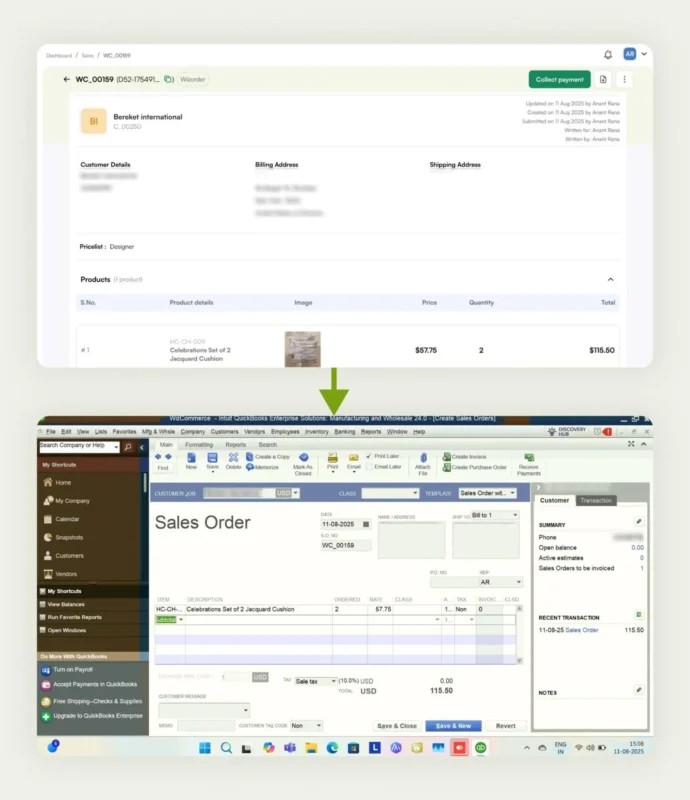
WizCommerce bridges the gap between QuickBooks and your work order software, connecting every part of the process from order creation to fulfillment and payment. WizCommerce syncs invoices, customer and product data, inventory, orders, and payments with QuickBooks in real time, reducing manual entry errors and freeing your team from tedious admin work.

2. Unified workflow
Instead of juggling between multiple tools, it creates a single connected system. You can monitor work orders, payments, and fulfillment all in one dashboard, giving you complete visibility from start to finish.
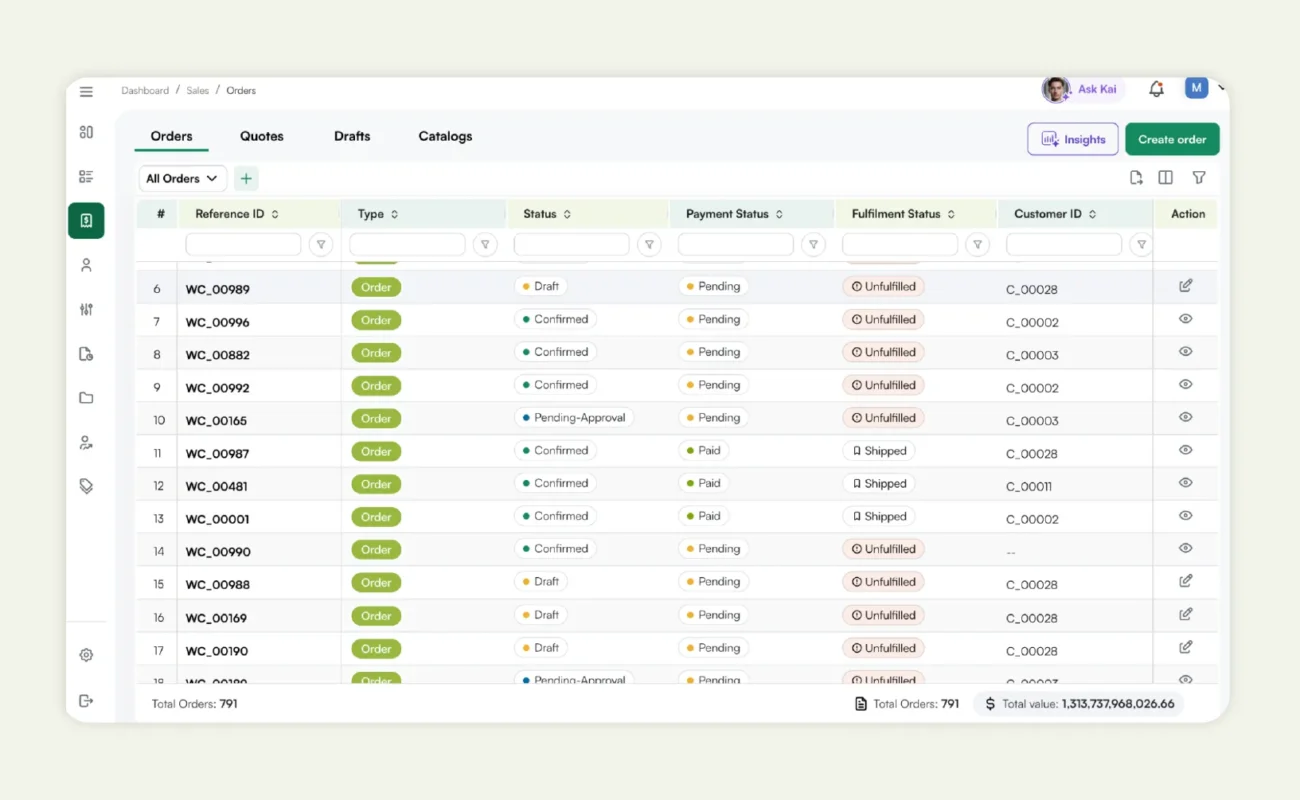
3. Real-time data consistency
Every update in your work order software is instantly reflected in QuickBooks. This ensures your reports, statements, and analytics are always accurate, with no mismatched numbers or missing entries.
4. Smarter order-to-cash cycle
WizCommerce doesn’t just sync data; it connects your entire order-to-cash process. Quotes, orders, invoices, and payments flow seamlessly, giving your team a faster turnaround and better control of cash flow.
5. Intelligent insights
WizCommerce combines operational and accounting data, enabling businesses to track profitability and performance in real-time, all within a single platform. Unlike most integrations that only cover financial syncing, WizCommerce provides a complete ecosystem for B2B businesses. It gives wholesalers, distributors, and manufacturers full control, visibility, and automation, improving both productivity and accuracy.
By integrating WizCommerce with QuickBooks and your work order software, you can:
- Eliminate manual data entry.
- Ensure data consistency across every tool.
- Automate recurring processes.
- Gain visibility into operations and finances.
- Make faster, data-driven decisions.
Stop managing disconnected tools. Power your business with WizCommerce, the all-in-one solution for seamless work order software integrations with QuickBooks.
Book a demo today and see how WizCommerce simplifies your workflow, eliminates manual effort, and helps your business scale faster.
Frequently asked questions
1. Does QuickBooks have a work order system?
QuickBooks, in its standard versions like Desktop and Online, doesn’t feature a dedicated, built-in work order system; rather, users typically adapt existing features like Sales Orders or Estimates to serve as work order placeholders.
2. How to use QuickBooks for work orders?
To use QuickBooks for work orders, you can utilize the Sales Order feature by renaming it and customizing the form to include specific work details, materials, and labor required for a job, essentially using it as a detailed instruction and tracking document.
3. Can QuickBooks be used for order management?
QuickBooks can be used for fundamental order management, specifically for tracking Sales Orders and invoices, but for comprehensive, advanced operational workflows, especially involving complex inventory or multi-channel sales, using a specialized solution like those offered by WizCommerce is often necessary.
4. What’s the difference between a sales order and a work order?
The difference between a sales order and a work order is that a sales order is a document confirming a customer’s purchase intent and detailing what they are buying, while a work order is an internal document authorizing and detailing the specific tasks, materials, and labor required to complete the job or produce the product.
5. How do I create a work order?
To create a work order, you can use a third-party application designed for this purpose, or, within QuickBooks, you can customize the Sales Order form to include fields for job instructions, required parts, estimated time, and labor to outline the task internally.
6. Can you create a work order in QuickBooks Desktop?
Yes, you can create a work order in QuickBooks Desktop by customizing one of the standard transaction forms, most commonly the Sales Order or Estimate, and relabeling it to reflect the purpose of a work order for internal job tracking.
7. Can QuickBooks integrate with other software?
Yes, QuickBooks integrates with hundreds of third-party applications, including CRM, inventory, and work order software. Integrations like WizCommerce extend QuickBooks’ functionality, connecting orders, sales, and accounting into one seamless system.
8. Can I automate work order creation?
Absolutely. With the right integration, such as connecting your task order software with QuickBooks via WizCommerce, you can automatically generate work orders based on triggers, like new customer orders or sales invoices, saving time and eliminating manual input.