Skip to content



Gold and silver prices are soaring, and buying jewelry has become a far more thoughtful decision for customers today. People no longer purchase a ring, necklace, or bracelet based on a glance. They want to zoom in, inspect every tiny detail, compare sparkle, study craftsmanship, and feel confident that what they see online truly matches the value they are paying for. In many cases, your product photos become the deciding factor between a sale and a missed opportunity. That is why jewelry photography is no longer just about taking beautiful pictures. It is about creating visuals convincing enough that customers can almost “feel” the piece through the screen. In this guide, we will show you how to photograph jewelry like a pro, how AI is transforming traditional workflows, and some handy jewelry photography hacks
What is jewelry photography?
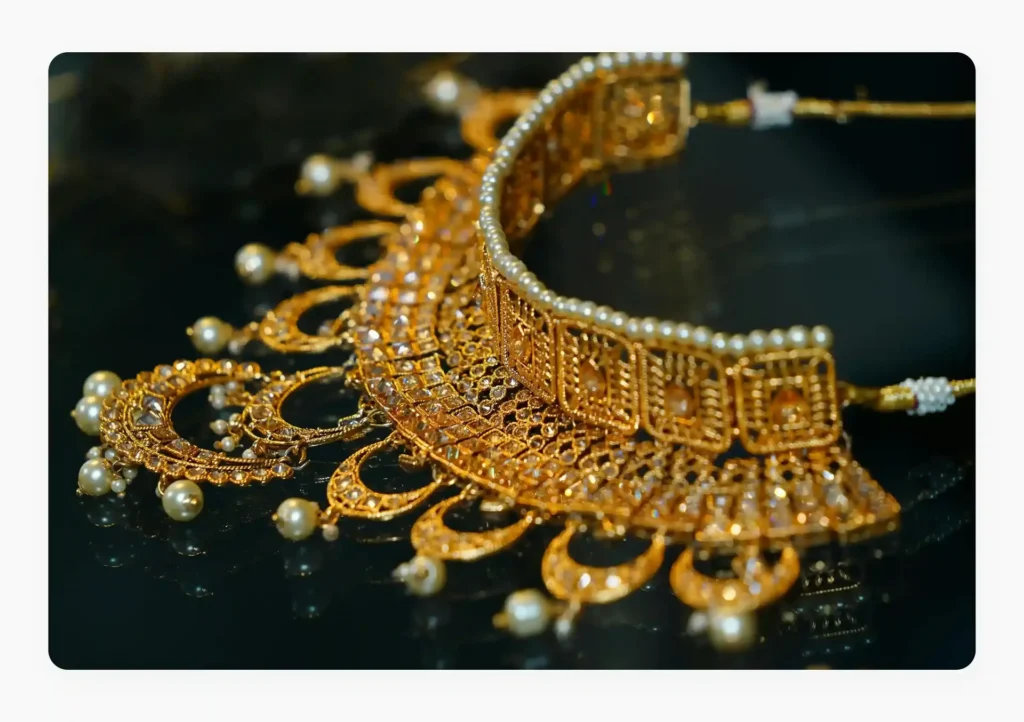
Jewelry photography is a specialized form of ecommerce product photography that focuses on capturing the beauty and fine details of jewelry pieces in the most accurate and visually appealing way possible. Unlike regular product photography, jewelry photography is far more challenging because even the smallest details matter.
Experienced jewelry photographers carefully manage reflections, shadows, texture, and lighting to ensure the jewelry looks luxurious and true to life. The goal of jewelry photography goes beyond showcasing a product, it is about helping customers confidently evaluate the value of a piece before committing to a purchase.
Benefits of high-quality jewelry photography
Since online buyers cannot physically examine jewelry before buying, your product images become the closest replacement for an in-store experience. Professional-looking visuals help create a strong first impression for your jewelry pieces and your brand at the same time. Here are some benefits of high-quality jewelry photography for your brand:
- Directly influences brand perception: Consistent and polished jewelry photography helps create a recognizable visual identity for your jewelry brand. Premium-looking images enhance the perceived value of your collections and position your brand as elegant and high-end.
- Highlights craftsmanship and premium quality: Jewelry often involves fine craftsmanship that deserves to be showcased properly. High-quality photography captures textures, engravings, stone settings, and metal finishes in a way that emphasizes attention to detail.
- Increases conversions and reduces returns: Professional product images help customers make informed purchasing decisions by presenting the jewelry accurately. This not only improves conversion rates but also reduces the chances of returns caused by mismatched expectations.
- Makes products stand out on marketplaces and social media: Whether customers are browsing Instagram feeds or scrolling through Pinterest boards, or shopping on Amazon and Etsy, visually striking jewelry images instantly grab attention and encourage engagement. Better visuals can give your products a competitive edge in crowded ecosystems. This is why the best jewelry ecommerce websites consistently invest in premium product photography as a core part of their brand strategy.

How is jewelry photographed traditionally?
To understand where jewelry photography fits in the broader world of product visuals, it helps to first learn about the different types of product photography used in ecommerce. Unlike regular product photography, capturing jewelry requires extreme precision because even the smallest flaw can make your expensive piece look dull. When taking the traditional route, brands usually take one of two approaches: setting up a DIY jewelry photoshoot or hiring a professional jewelry photographer. Let us understand the steps involved in both paths.
Option 1: DIY jewelry photography
Here are the key steps in this approach:
-
- Get the right equipment: This includes a high-resolution camera, a macro lens for close-up shots, a tripod for stability, and lighting accessories like softboxes, reflectors, or light tents.
- Clean and prepare the jewelry: Tiny fingerprints, dust particles, and scratches become extremely noticeable in high-resolution images. Use microfiber cloths, gloves, and air blowers to keep the jewelry spotless.
- Choose the right background: Use white or neutral backgrounds for ecommerce listings. Darker or textured backgrounds can create a more luxurious and editorial appearance for branding campaigns.
- Set up soft and even lighting: Use soft and diffused lighting because it highlights sparkle and texture without creating harsh shadows or distracting glare. Use light tents or diffusers to achieve balanced lighting.
- Adjust camera settings carefully: You need to adjust aperture, ISO, shutter speed, focus, and white balance to ensure gemstones and metal textures appear crisp and realistic.
- Capture multiple angles and close-ups: Customers want to inspect jewelry from every possible angle before buying. That is why you need to take multiple shots, including front views, side angles, clasp details, gemstone close-ups, etc.
- Edit and retouch the images: Once the photoshoot is complete, your images need to go through extensive editing. This includes removing dust spots, correcting reflections, adjusting colors, sharpening details, and enhancing sparkle.
Option 2: Hire a professional jewelry photographer
- Ship the jewelry or schedule an on-site shoot: After you select a product photography service provider, depending on the photographer’s workflow, you need to either ship your jewelry pieces to the studio or arrange for the photographer and their equipment to come to your showroom for the shoot.
- Conduct the photoshoot: The photographer captures multiple compositions, angles, and close-up shots based on the project requirements. They may also shoot lifestyle images or model photography, depending on your needs.
- Professional editing and retouching: After the shoot, the images go through professional post-production. This stage includes color correction, reflection cleanup, gemstone enhancement, background removal, and detailed retouching.
- Final review and delivery: Once editing is complete, the photographer shares the final images for your review. You can request revisions if needed before receiving the high-resolution files optimized for different channels.
Common challenges in photographing jewelry in the traditional way
Irrespective of the approach, traditional jewelry photography may appear straightforward at first glance, but in reality, it is one of the most technically demanding forms of product photography. Here are some common challenges encountered by businesses in both approaches:
1. Visuals inaccuracies
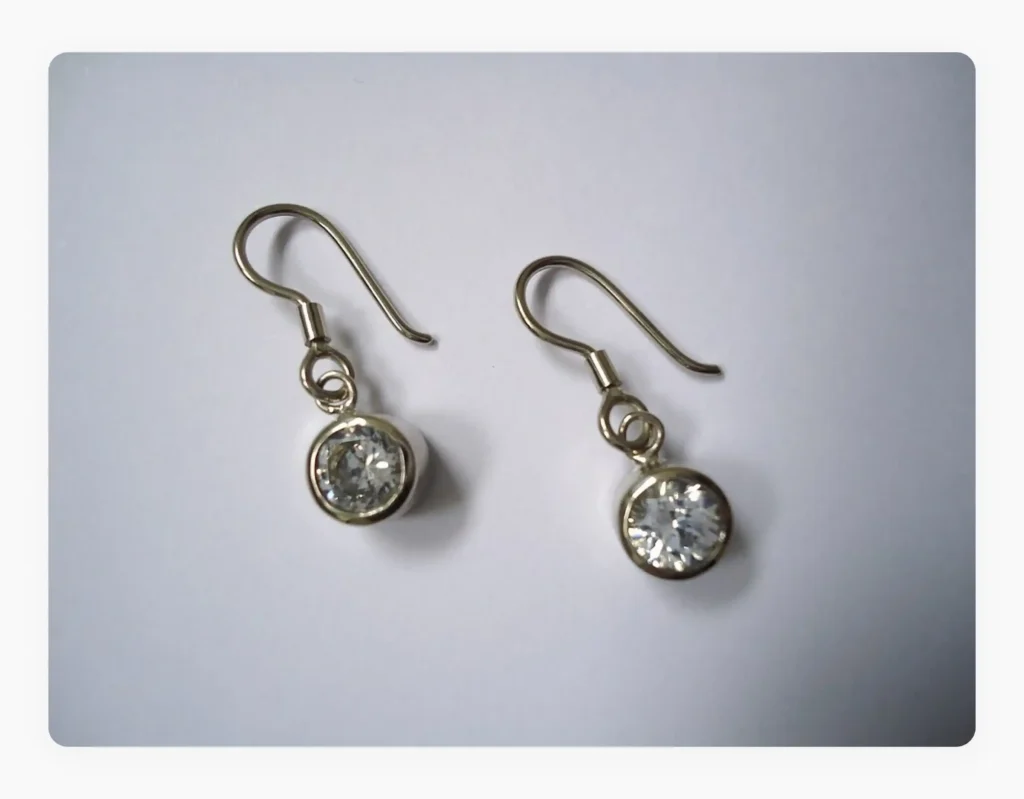
One of the biggest struggles in traditional product photography is controlling how the product appears on camera while preserving its natural beauty and fine details. Here are some technical areas you can easily go wrong, especially when you adopt DIY jewelry photography:
- Managing reflections on metals and gemstones: Gold, silver, diamonds, and gemstones easily reflect cameras, lighting equipment, backgrounds, and even photographers themselves. Removing these unwanted reflections often requires extensive retouching.
- Capturing sparkle without overexposure: Jewelry needs to shine, but adding too much light can quickly overexpose gemstones and erase important details. On the other hand, insufficient lighting makes products appear flat and lifeless. Achieving the perfect balance is extremely difficult.
- Blurry macro shots: Jewelry photography usually involves macro photography to capture intricate details. At this level of magnification, even tiny hand movements or focus errors can create blurry images.
- Maintaining accurate product colors: Lighting conditions can significantly alter how metals and gemstones appear in photos. Gold may look overly yellow. Silver may appear gray. Gemstones can lose their true color tones. Inaccurate colors can lead to customer dissatisfaction.
- Reducing unwanted shadows: Because jewelry pieces are small and dimensional, lighting can easily create harsh shadows that hide engravings and design details. Proper shadow control often requires multiple light sources and reflectors.
2. Consistency nightmare
Maintaining consistency across jewelry photoshoots is far more difficult than most brands expect. A necklace photographed in January may look noticeably different when photographed again in April due to changes in natural lighting. For ecommerce brands, even such subtle inconsistencies can create an unprofessional shopping experience where product images across catalogs fail to match visually. Maintaining the same lighting, angles, shadows, backgrounds, and color tones across thousands of SKUs becomes a constant nightmare.
3. Photoshoots are expensive
Traditional jewelry photography can become extremely expensive, irrespective of whether you do it yourself or get a professional photographer. The former largely involves the purchase of professional-grade cameras, macro lenses, diffused lighting setups, reflectors, and editing software, all of which require substantial investment. When you outsource, you need to pay an exorbitant fee for experienced photographers, stylists, models, and retouchers to achieve premium-quality results.
4. Logistics challenges
Managing jewelry photography workflows involves much more than simply taking pictures. Products often need to be shipped between warehouses, studios, photographers, and editing teams. Coordinating shoot schedules, handling delicate and expensive jewelry securely, tracking multiple product variations, and ensuring timely image delivery can quickly become operationally overwhelming and can even cause damage to your products.
5. Dependence on specialized skills
Jewelry photography requires a highly specialized skill set that goes beyond regular ecommerce product photography. Photographers must understand macro photography, reflective lighting techniques, gemstone highlighting, focus stacking, and advanced retouching. Without this expertise, even premium jewelry can appear poorly crafted in images. Finding and retaining professionals with these niche skills can also be difficult and expensive.
6. Difficulty in capturing lifestyle jewelry shots
Lifestyle jewelry photography introduces another layer of complexity. Photographing jewelry on models requires careful coordination between styling, makeup, lighting, poses, and camera angles. Since jewelry pieces are often small, it becomes difficult to keep them as the visual focus while still creating natural-looking lifestyle images. Movement, skin tones, reflections, and inconsistent lighting can make these shoots even harder to manage.
Because of these ongoing challenges, many jewelry brands are now switching to AI-powered photography solutions like WizStudio that simplify image creation without compromising on creative capabilities.
How does AI product photography solve the typical jewelry photography challenges?
One thing is clear – traditional jewelry photography is slow, expensive, resource-intensive, and highly dependent on technical expertise. Clicking a jewelry photo like this can quickly become overwhelming for most jewelry brands –
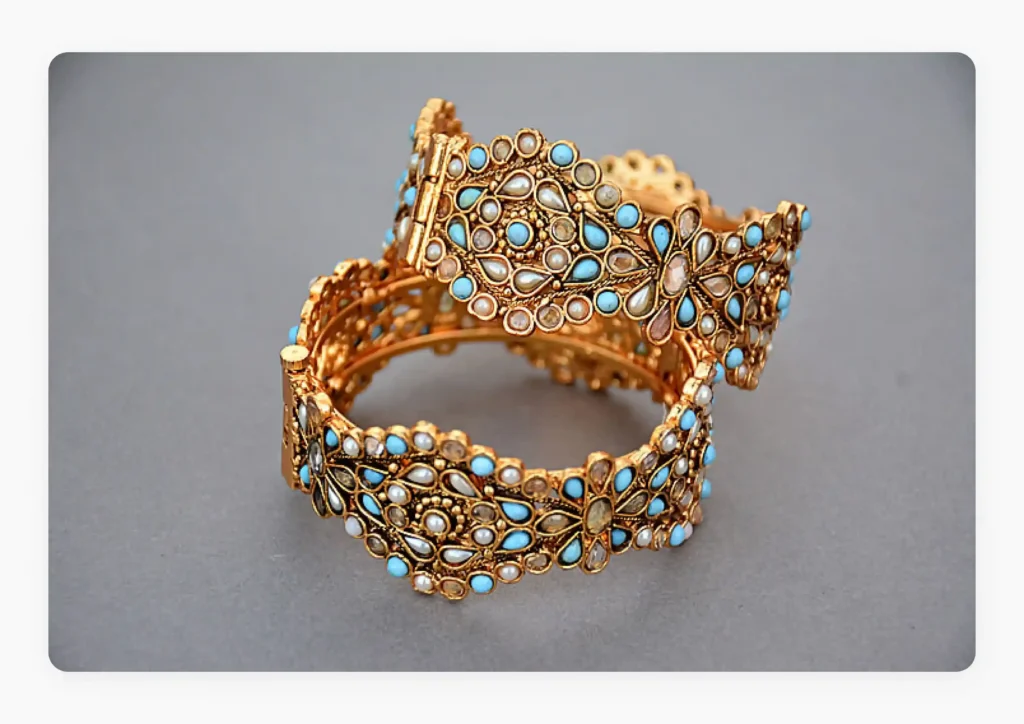
Thankfully, specialized AI image-generating tools like WizStudio are rewriting this equation by helping you automate some of the most time-consuming parts of jewelry image creation and editing. Here are the different ways in which platforms like WizStudio solve the typical challenges associated with traditional jewelry photography:
Replaces background instantly
An AI background remover can instantly strip existing backgrounds and place your jewelry into clean white ecommerce layouts, luxury-themed settings, festive scenes, lifestyle-inspired environments, etc. This allows you to create multiple visual styles from a single product image without repeating photoshoots. It also gives you far greater creative flexibility when compared to traditional jewelry photography.
In the image below, we used the AI product image generator software to instantly transform the background of the earlier image, giving the jewelry piece a far more luxurious and premium look –
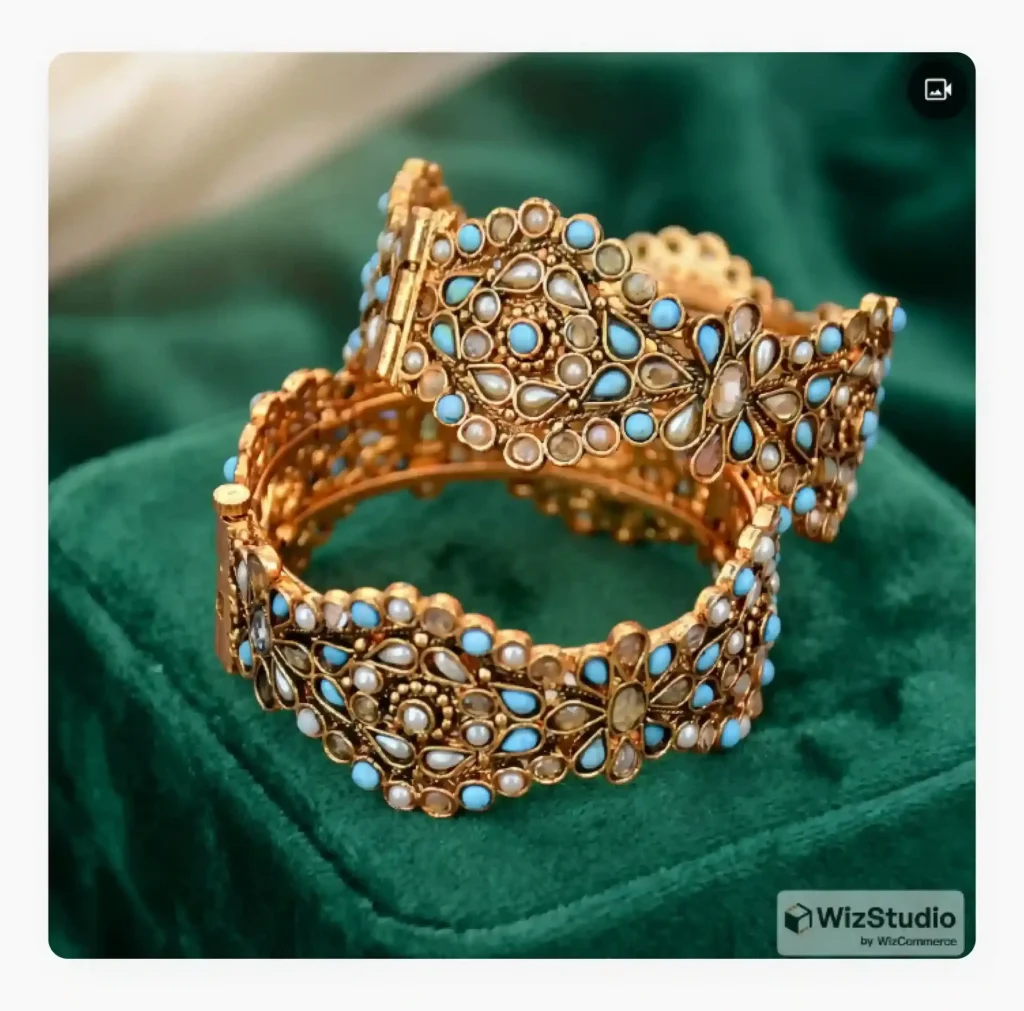
Automatically corrects lighting, reflections, and shadows
AI platforms can significantly improve the overall quality of your jewelry images by automatically enhancing lighting, cleaning reflections, and correcting shadows in just a few clicks. They can intelligently adjust brightness, contrast, highlights, sharpness, and clarity to make gemstones appear more brilliant, metals more polished, and intricate craftsmanship more visible without making the product look unnatural.
Similarly, they can detect and reduce unwanted reflections caused by cameras, lighting equipment, fingerprints, or surrounding surfaces while still preserving the natural shine of the jewelry itself.
Finally, they help soften and balance harsh shadows to create cleaner and more visually appealing product images with consistent lighting and depth across your catalog.
For instance, the image below was enhanced using WizStudio. The platform automatically corrected the colors, improved the lighting, and softened the shadows to create a cleaner and professional-looking jewelry image –
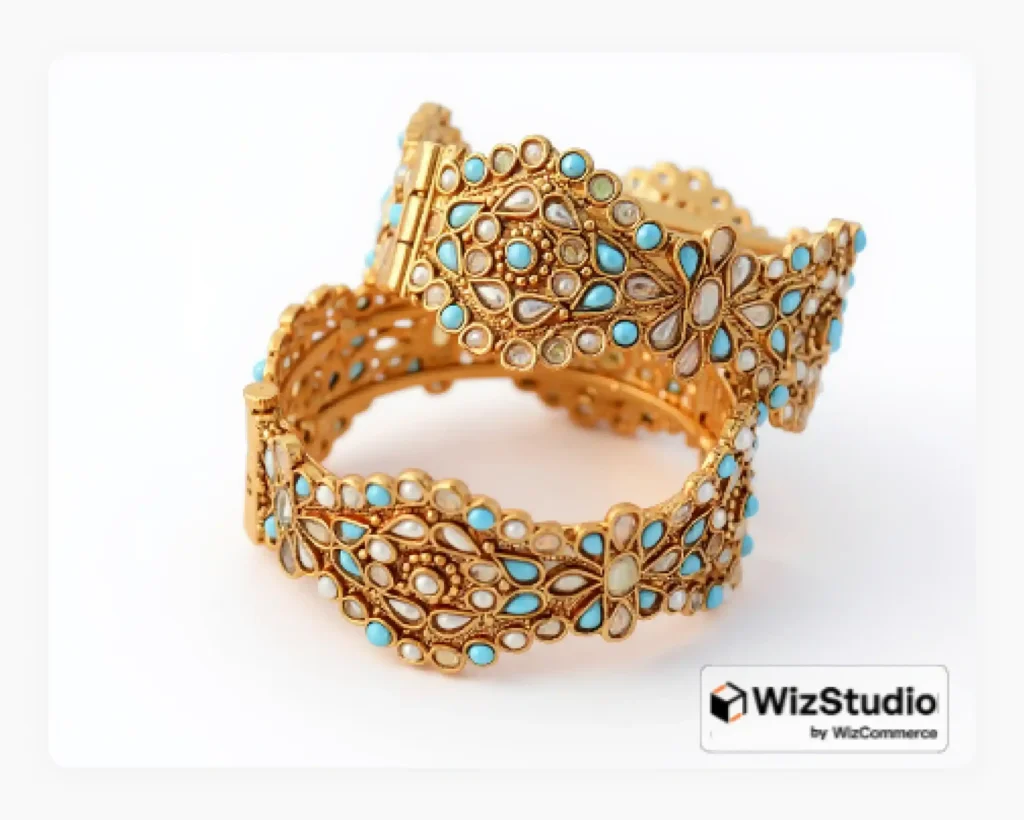
AI lifestyle scene generation
AI platforms enable you to generate realistic lifestyle scenes digitally without managing complex workflows. Jewelry pieces can be placed onto virtual models or styled into premium-looking fashion environments using AI-generated scenes. This helps you quickly create marketing visuals for advertisements, social media campaigns, seasonal promotions, and ecommerce banners without investing heavily in traditional photoshoots. It also allows you to experiment with different creative styles much faster.
The lifestyle jewelry image below was created entirely using WizStudio and our original image, without the need for models, studio setups, or physical props –
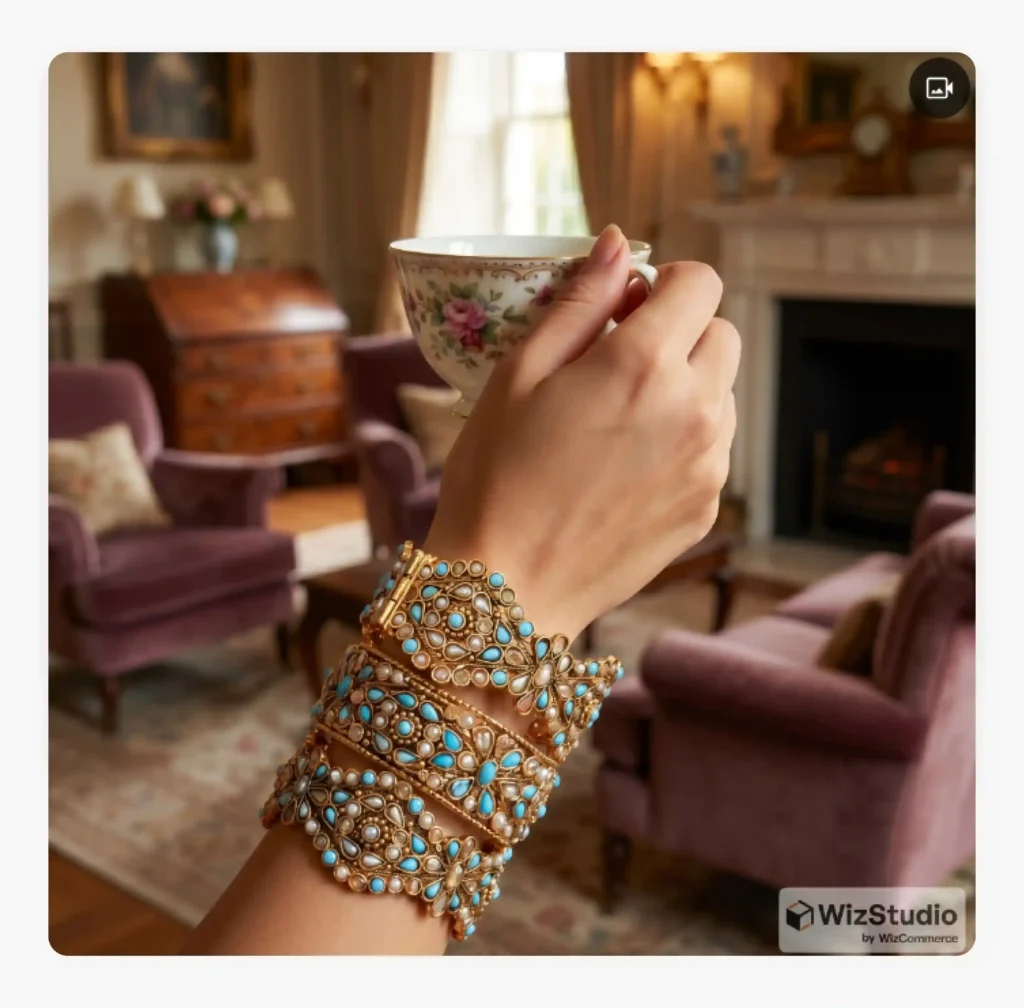
Image upscaling and retouching
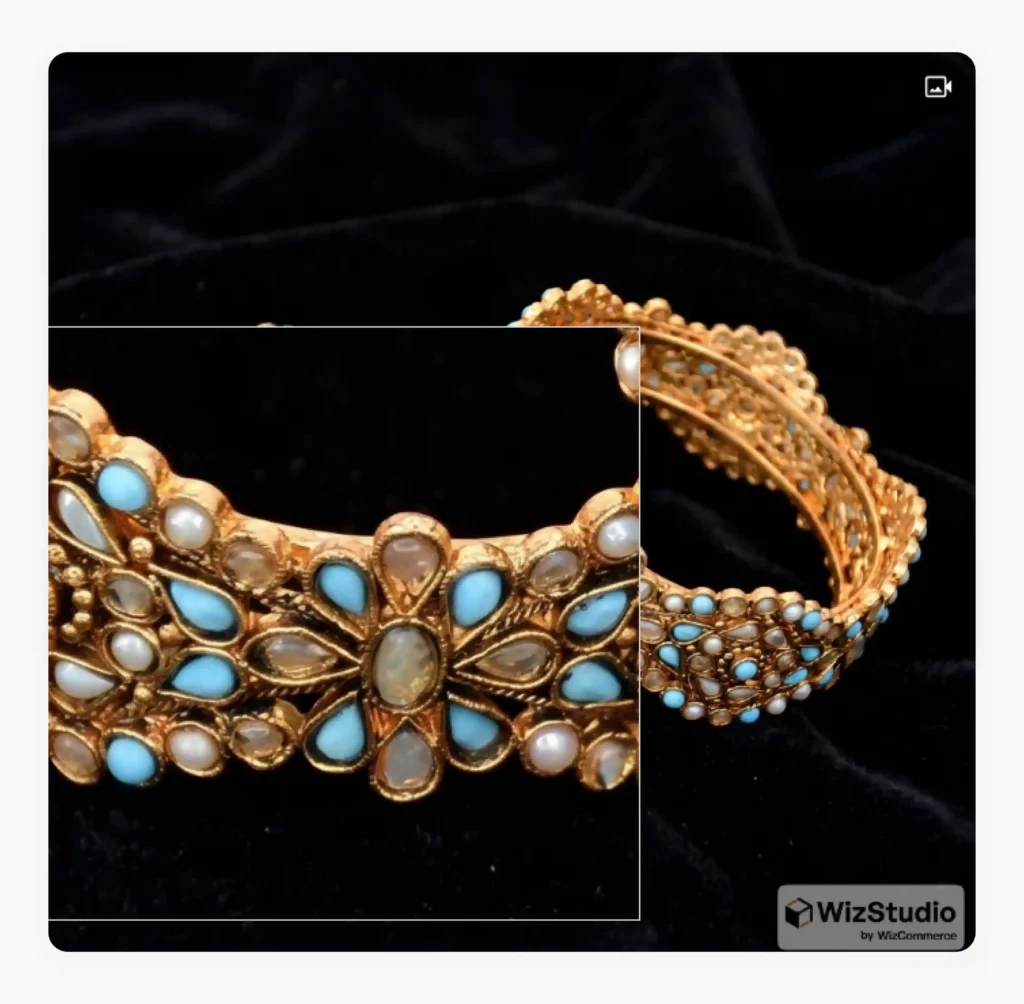
Jewelry buyers often zoom into product images to inspect gemstones, engravings, textures, and craftsmanship before making a purchase. Low-quality or blurry images can reduce customer trust instantly. AI platforms help improve image sharpness, clarity, and resolution without requiring expensive photography equipment or reshoots. They can automatically sharpen details, improve overall image quality, perform AI photo cleanup to remove scratches or dust, and retouch imperfections while preserving the original appearance of the jewelry.
For instance, in the image below, WizStudio was used to enhance the sharpness of the original image, which is clearly visible in the zoomed-in view of the product –
Preserves product
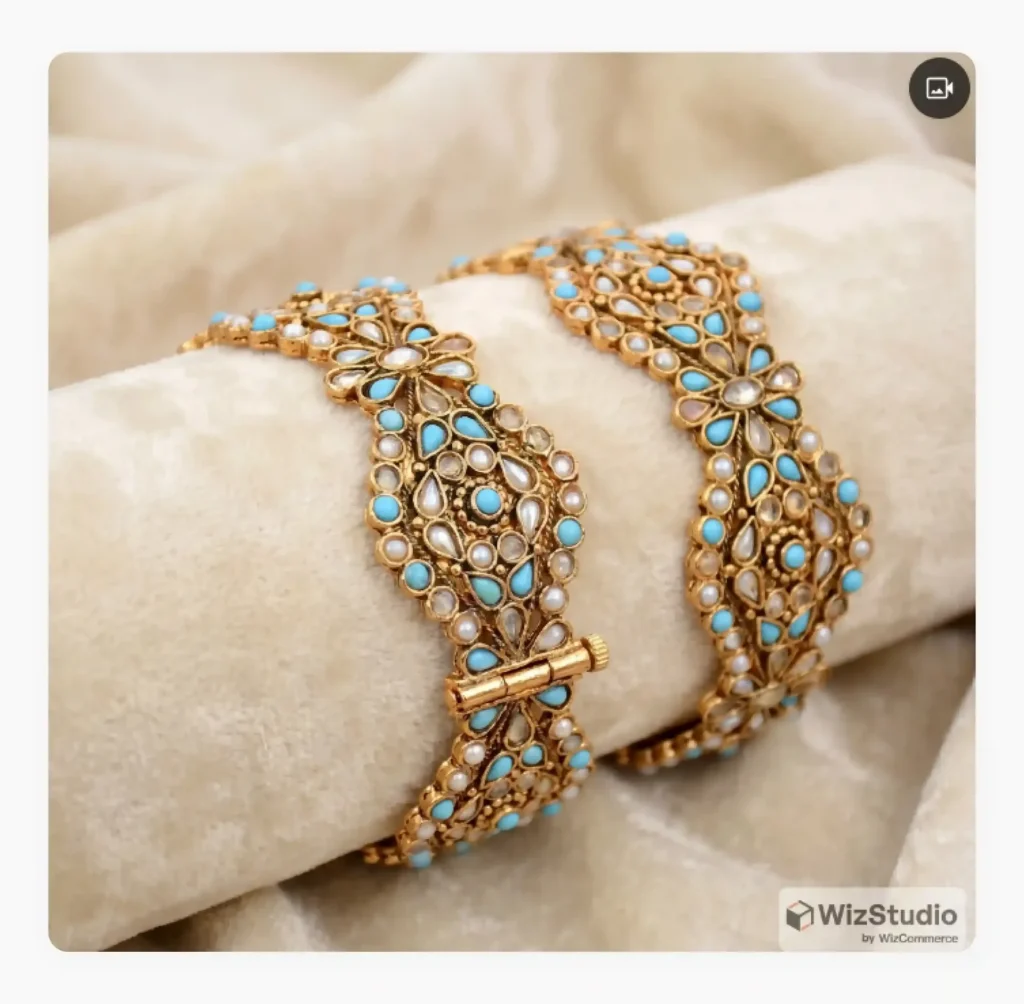
Modern AI photography platforms are increasingly designed around product preservation, meaning they enhance images without changing the core appearance of the product itself. Instead of altering the shape, gemstone structure, or actual color tones, AI focuses on improving presentation while maintaining realism. This is extremely important for jewelry ecommerce because customers expect the delivered product to match the images they saw online.
In the image below, generated using WizStudio, the jewelry has been placed in a different setting while preserving its original texture, color, and design details –
No more consistency nightmares
AI solutions like WizStudio help solve the classic consistency issue of traditional jewelry photography by applying standardized lighting, shadows, color correction, backgrounds, and editing styles across all product images automatically.
Whether you are photographing 20 products or 20,000 SKUs, such platforms help ensure that every image follows the same visual quality and branding guidelines. This creates a cleaner and more premium shopping experience while also reducing the need for repeated reshoots and manual corrections.
How to take jewelry photos with AI: (Step-by-step process)
Creating professional-quality jewelry photos with AI is much faster and simpler. than traditional photography workflows. Instead of spending hours setting up studio lights and manually retouching images, AI-powered tools like WizStudio help you generate ready-to-use visuals in just a few steps. Here is a practical walkthrough of how the process typically unfolds in WizStudio:
Step 1: Prepare your original product image
The first step is starting with a clean and reasonably well-lit product image. While WizStudio can dramatically improve image quality, the output still depends on the quality of the original input.
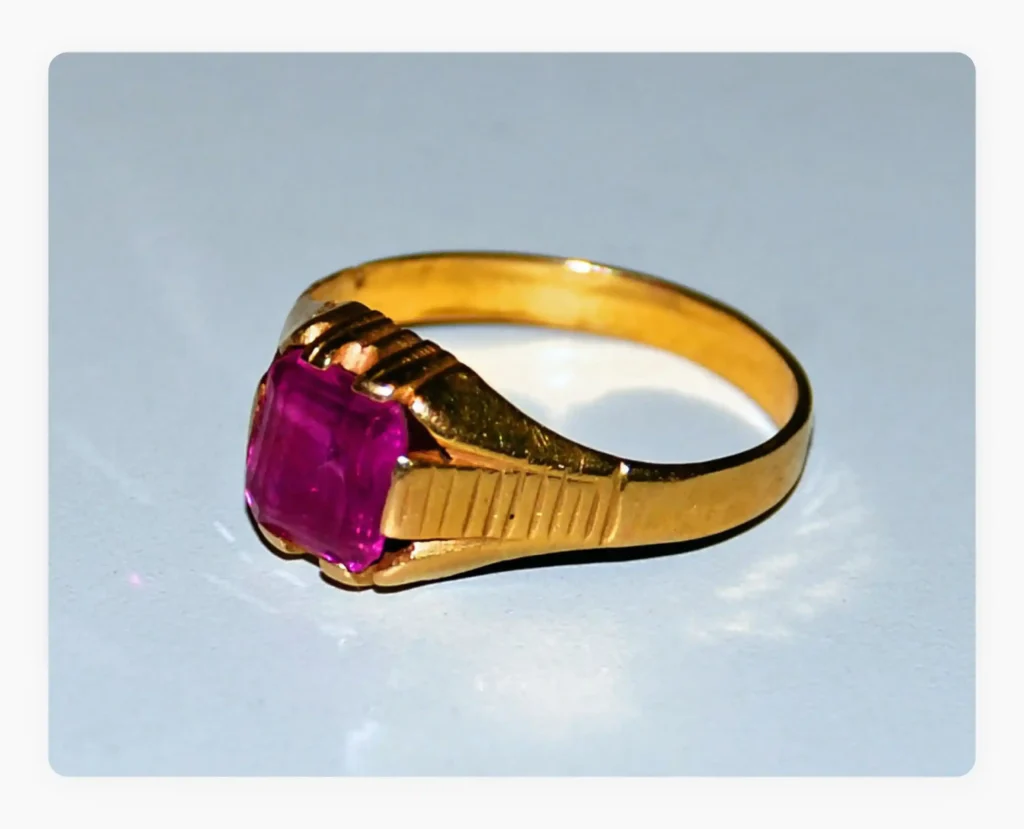
Try to photograph your jewelry piece against a simple background with decent lighting and minimal blur. Make sure the product is clearly visible and free from distracting objects, fingerprints, or excessive shadows. Even a smartphone image can work well for WizStudio as long as the details of the jewelry are sharp enough.
Here is a sample image which we will use throughout this section:
Step 2: Use visual prompts to describe your scene
Once you upload the original image to WizStudio, you can enter a visual prompt to describe the exact scene you want to generate. This gives you a lot of room for creativity because you can control the overall mood, background style, lighting aesthetic, colors, textures, and environment of the final image using simple text instructions.
Alternatively, you can also use one of the many pre-designed scene suggestions provided by WizStudio to quickly generate professional-looking visuals that align with your brand style. This makes it easy for jewelry brands to experiment with different creative directions, especially when they run short of ideas.
In the below screengrab of the WizStudio interface, you can see the platform offering highly creative prompt suggestions.

Step 3: Select an image from the different variants generated
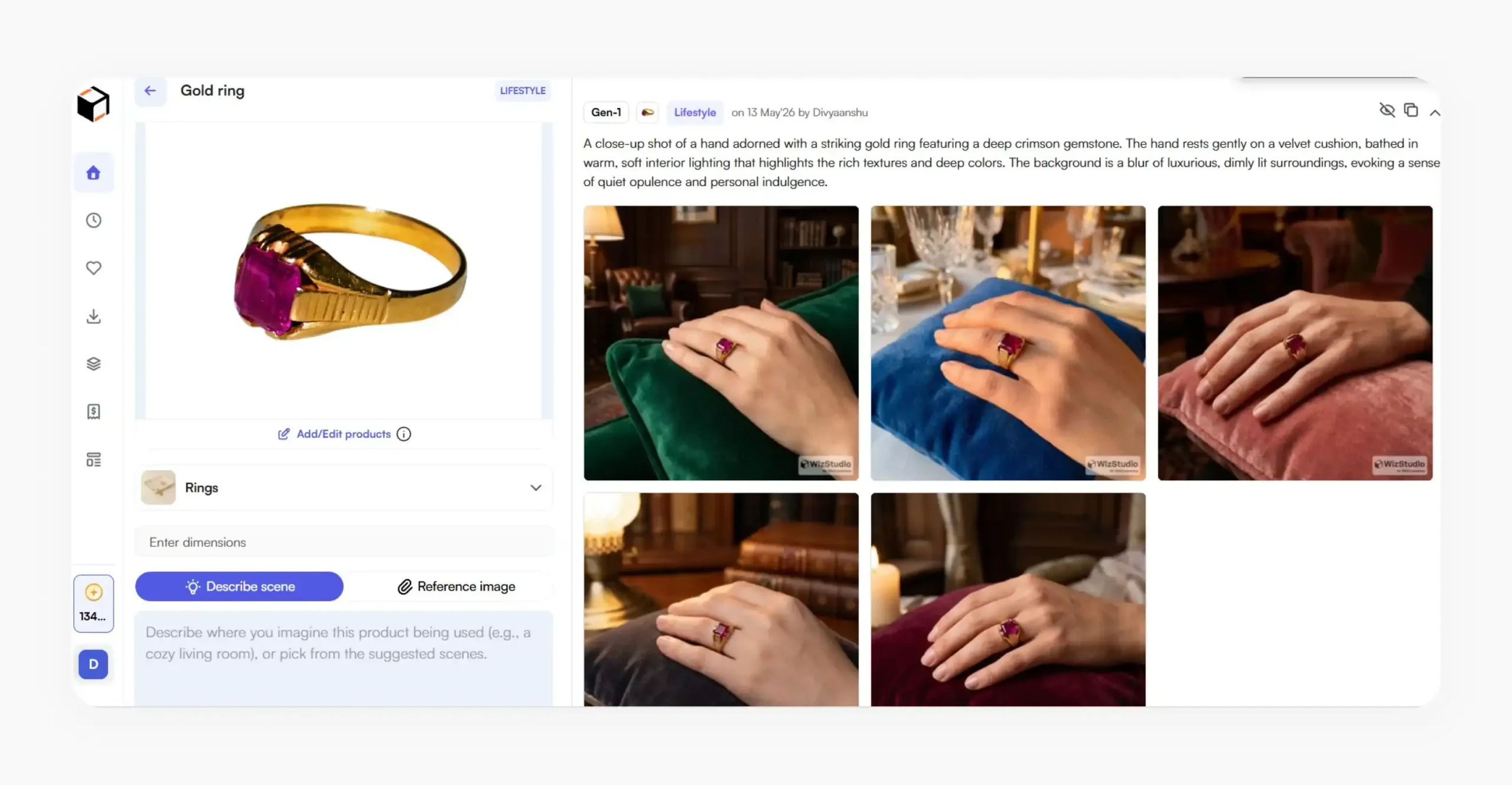
After processing your prompt, WizStudio will generate image variations based on your selected scene and composition. You can compare different creative directions and choose the version that best highlights your jewelry’s overall appeal.
If you are not satisfied with the results, you can easily generate additional batches of images or tweak your prompts to refine the background, lighting, mood, colors, or overall styling. This gives you the flexibility to experiment freely till you get the desired output.
Here are the different variation images generated based on our original image and the entered prompt:
Step 4: Adjust lighting and shadows
One of the most valuable parts of AI product photography is automatic lighting enhancement. Instead of manually adjusting exposure, brightness, highlights, and shadows in complicated editing software, tools like WizStudio can intelligently balance lighting, soften harsh shadows, improve gemstone brilliance, and enhance metallic shine automatically.
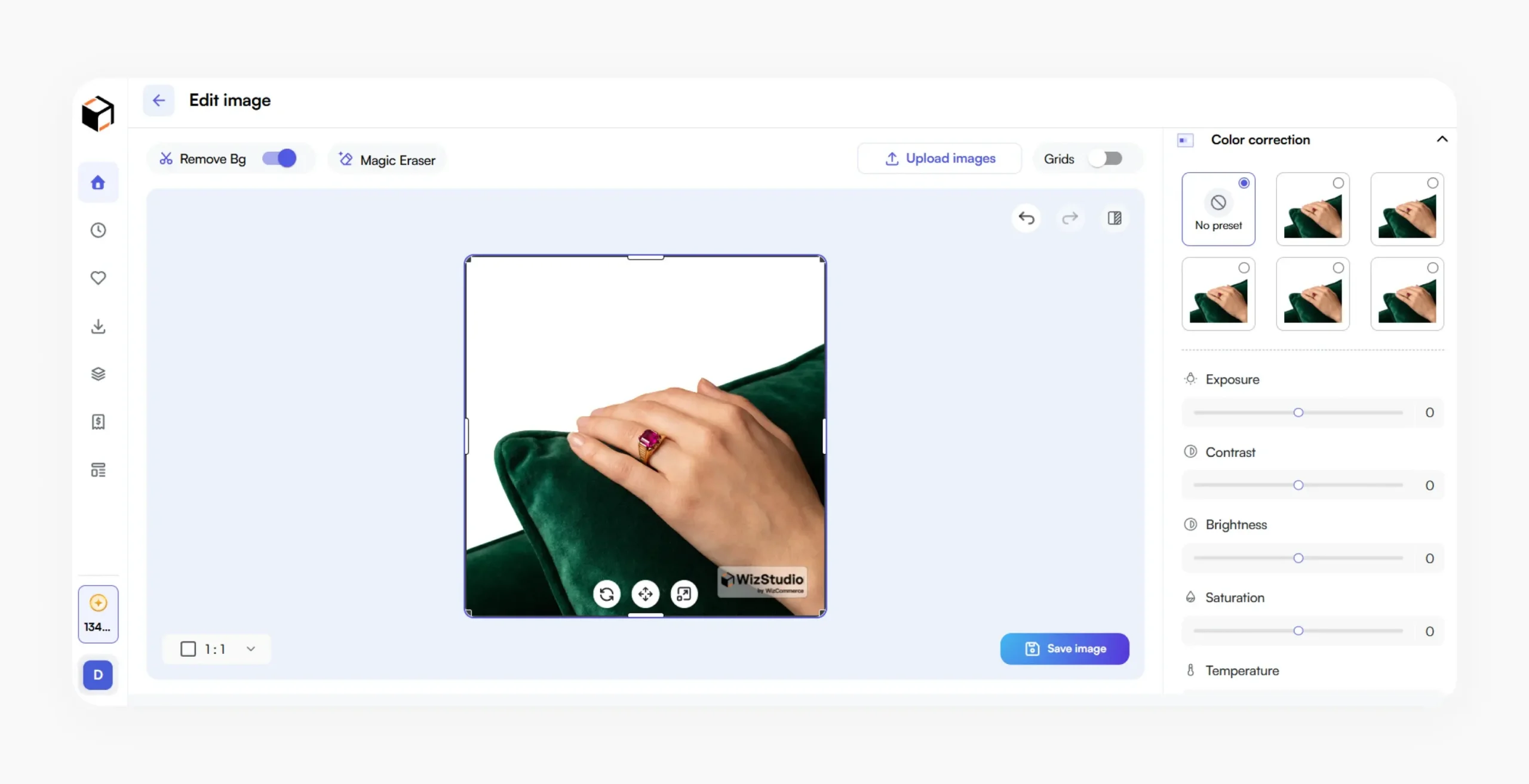
But you can also manually fine-tune the final output because WizStudio gives you the flexibility to adjust a variety of parameters based on your preferred aesthetic. For example, you can control shadow intensity, brightness levels, contrast, color tones, and overall scene mood to match your brand style perfectly. This combination of AI automation and manual customization allows you to create perfect visuals without spending hours on traditional photo editing workflows.
In the screenshot below, you can see the manual editing interface of WizStudio, designed to give users greater control over jewelry image enhancements and refinements –
Step 5: Export high-resolution outputs
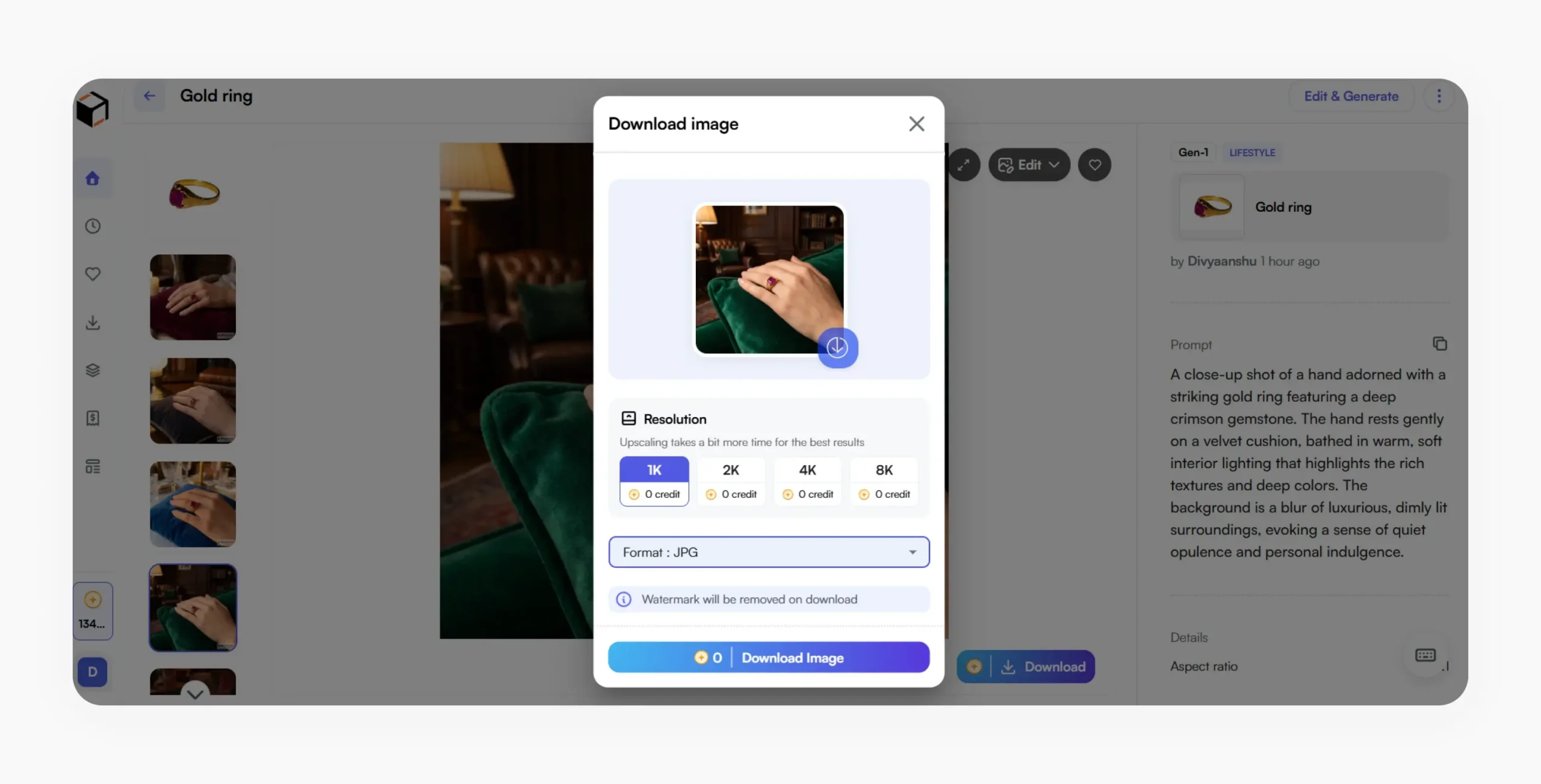
Once your final image is ready, WizStudio lets you export it in any resolution (1 K, 2K, 4K, or 8K) you want based on your desired use cases, like ecommerce websites, marketplaces, social media campaigns, advertisements, or print catalogs. WizStudio also supports multiple output formats like JPG, PNG, and WEBP.
This makes it easier to maintain consistency across channels. Instead of spending days editing and resizing images manually, you can produce large volumes of professional-quality jewelry visuals in a fraction of the time using WizStudio.
It’s also worth understanding how specialized AI image generation tools compare to generic ones because for jewelry, the difference in output quality is significant.
Additional jewelry photography tips to stand out from the crowd
AI can dramatically simplify jewelry photography, but creating realistic and premium-looking results still requires the right approach. Here are some practical tips for taking pictures of jewelry where the final visuals look realistic and ecommerce-ready while still preserving the luxurious appearance of your products.
- Always start with the highest-quality original product image possible to give the AI product photography tools you are using better details to work with.
- Choose AI-generated backgrounds that match your brand aesthetic and jewelry style.
- Keep lighting realistic instead of overly dramatic to maintain a premium and authentic appearance.
- Pay close attention to reflections on gemstones and metals on the generated images to ensure they look natural.
- Do not over-edit sparkle or shine, as excessive enhancement can make jewelry appear fake.
- Use consistent backgrounds, shadows, and editing styles across your catalog for a professional storefront.
- Zoom into generated images to inspect tiny details like prongs, engravings, gemstone edges, and textures before publishing.

Generate realistic jewelry photography images with WizStudio
WizStudio is helping product brands across categories including jewelry, apparel, home décor, and gifting transform the way they create catalog-ready visuals by simplifying complex photography workflows into just a few easy steps. Instead of investing heavily in studio setups, multiple photoshoots, advanced editing software, and time-consuming retouching, you can use the platform to generate professional-quality jewelry images quickly and consistently. From background generation and lighting enhancement to reflection cleanup, shadow correction, and lifestyle scene creation, WizStudio can handle all. Whether you are a growing ecommerce brand or managing a large jewelry catalog, WizStudio helps you create premium-quality product photography faster and at a fraction of the traditional cost. Sign up for a free trial today and start generating stunning jewelry visuals in minutes.
FAQs on How to photograph jewelry for e-commerce catalogue
1. What’s the best way to photograph jewelry?
The best way to photograph jewelry is by using soft, diffused lighting, a stable camera setup, and clean backgrounds that highlight the product without distractions. Focus on capturing sharp details, accurate colors, and realistic sparkle while minimizing reflections and shadows. Many brands now use AI tools like WizStudio to transform their basic product shots into professional-quality visuals
2. Which app is best for jewellery photography?
The best jewelry photography apps are the ones that combine image enhancement, background generation, lighting correction, and retouching in a simple workflow. AI-powered platforms like WizStudio are becoming popular because they help brands create ecommerce-ready jewelry visuals quickly without requiring advanced photography or editing skills.
3. How to take jewelry photography at home with a phone?
You can photograph jewelry at home using a smartphone by placing the product near soft natural light, using a plain background, and keeping the camera stable with a tripod or stand. Clean the jewelry carefully before shooting and avoid harsh direct lighting. Tools like WizStudio can then help improve reflections, lighting, and overall image quality professionally.
4. How to take jewelry product photos without reflections?
To reduce reflections in jewelry photography, use diffused lighting, softboxes, or white sheets to soften light sources around the product. Avoid placing reflective objects nearby and carefully adjust camera angles to minimize glare. Alternatively, AI-powered tools like WizStudio can automatically clean unwanted reflections while preserving your jewelry’s natural shine.
5. How to make jewelry sparkle in photos?
Jewelry sparkle is created through controlled lighting and proper angles that allow gemstones and metals to reflect light naturally. Using soft but directional lighting helps enhance brilliance without overexposing the product. AI-powered tools like WizStudio can further improve gemstone clarity, highlights, and metallic shine while maintaining a realistic and premium appearance.
6. Which phone is best for jewellery photography?
Any phone with strong macro photography capabilities, advanced camera sensors, and good low-light performance works best for jewelry photography. However, to achieve professional results,pairing your smartphone with an AI-powered platform like WizStudio can dramatically enhance image quality and help your products stand out.
7. What are the common mistakes in jewellery photos?
Common jewelry photography mistakes include harsh reflections, blurry macro shots, inaccurate colors, excessive editing, hard light, distracting backgrounds, and inconsistent shadows. Overprocessing sparkle can also make jewelry appear unrealistic and prevent you from achieving the desired results. Maintaining clean, sharp, and balanced visuals is essential because customers closely inspect jewelry details before making a purchase online.
8. What is the best color to photograph jewelry on?
A pure white background is usually the preferred choice for ecommerce jewelry photography because it creates a clean and distraction-free appearance. However, black, gray, beige, marble, or velvet-inspired backgrounds can also work well depending on the jewelry style and brand aesthetic. The goal is to choose backgrounds that enhance the jewelry without overpowering it visually.
9. How to take pictures of jewelry to sell?
If you’re wondering how to photograph jewelry to sell online, it’s simple. Focus on creating sharp, well-lit images that clearly showcase the product’s details, texture, and sparkle. Use clean backgrounds, multiple angles, and close-up shots to build buyer confidence.
10. What are some professional jewelry photography tips?
Some useful tips for photographing jewelry include using soft, diffused lighting to reduce reflections, keeping the camera stable with a tripod, using a macro lens for detailed close-up shots, and choosing clean, minimal backgrounds that keep the focus on the jewelry. When it comes to post-processing, some jewelry photo editing tips include correcting colors for accurate tones, enhancing sharpness, softening harsh shadows, removing dust or blemishes, and refining backgrounds for a more polished look.